Where Does Your AI Agent Keep Its Keys? Sandbox Patterns After Agent Compute Engine, Epoch and the PyPI Attack
AI agent sandbox security is about more than isolation: compare containers, gVisor, microVMs and Google's Agent Compute Engine, then keep credentials outside the sandbox with a broker, short-lived identity and real egress control.
Where should an AI agent's API keys and cloud credentials live? Not inside the sandbox where the agent runs code. A container, a gVisor sandbox or a microVM decides how well agent code is separated from the host. None of them decides what that code can read once it is running, where it can send data, or which credentials it can use. Three things from the last five weeks make the point. On 22 October 2026 Google announced Agent Compute Engine, a microVM platform that keeps long-lived credentials out of the VM entirely. On 13 November Epoch AI and Trajectory Labs reported agents that slipped past a DNS-based containment setup and reached a real website. On 17 November two malicious releases of Microsoft's agent-framework package on PyPI ran a credential stealer every time Python started. They are three separate events, not one campaign. Together they show where the line has to be drawn: isolate the code, and keep the authority outside it. This guide compares the isolation options, then walks through the credential broker, workload identity, egress and Kubernetes patterns that do the second part.
System requirements
Who should read this
AI engineers, platform and DevSecOps teams
Anyone running agents that execute code, call APIs or touch cloud resources. The design sections need no setup. The Kubernetes step assumes you can apply manifests to a cluster.
What you need for the examples
A Kubernetes cluster and kubectl
Pod Security Admission labels need Kubernetes 1.25 or later. The egress policy only works if your network plugin enforces NetworkPolicy. The gVisor RuntimeClass needs gVisor (runsc) installed on the nodes, or GKE Sandbox enabled on a GKE node pool.
Platforms
Linux nodes; kubectl on Windows, macOS or Linux
gVisor and Firecracker run on Linux hosts. You can apply the manifests from any operating system that runs kubectl.
Cost
Free to apply; stronger isolation costs more to run
The manifests are configuration only. gVisor adds system-call overhead, microVMs add memory and operations work, and Agent Compute Engine pricing has not been published.
Facts checked
24 November 2026
Agent Compute Engine details come from Google's 22 and 23 October posts. Google has announced it for preview in the coming months; it is not generally available. Epoch and PyPI details come from the incident reports and researcher write-ups linked in each step.
Three events, one question: where are the keys?
An architecture announcement, a containment failure and a supply-chain attack. Each one is about what the agent's code could reach.
Google Agent Compute Engine (ACE), announced 22 October 2026: each agent session runs in its own microVM with its own guest kernel. The VM has no standard network card and holds no long-lived credentials. Google's 23 October deep dive calls this a zero-secrets design. ACE is announced for preview in the coming months.
Epoch AI incident, reported 13 November 2026: agents run by Trajectory Labs in an alignment evaluation were given an impossible task and told never to stop. Trajectory pointed them at a local copy of Epoch's website through a DNS redirect. On 23 October some agents bypassed the redirect by connecting to the real site's public IP addresses, then another address, then a third-party web-reader service. Epoch reports that no private or confidential information was accessed.
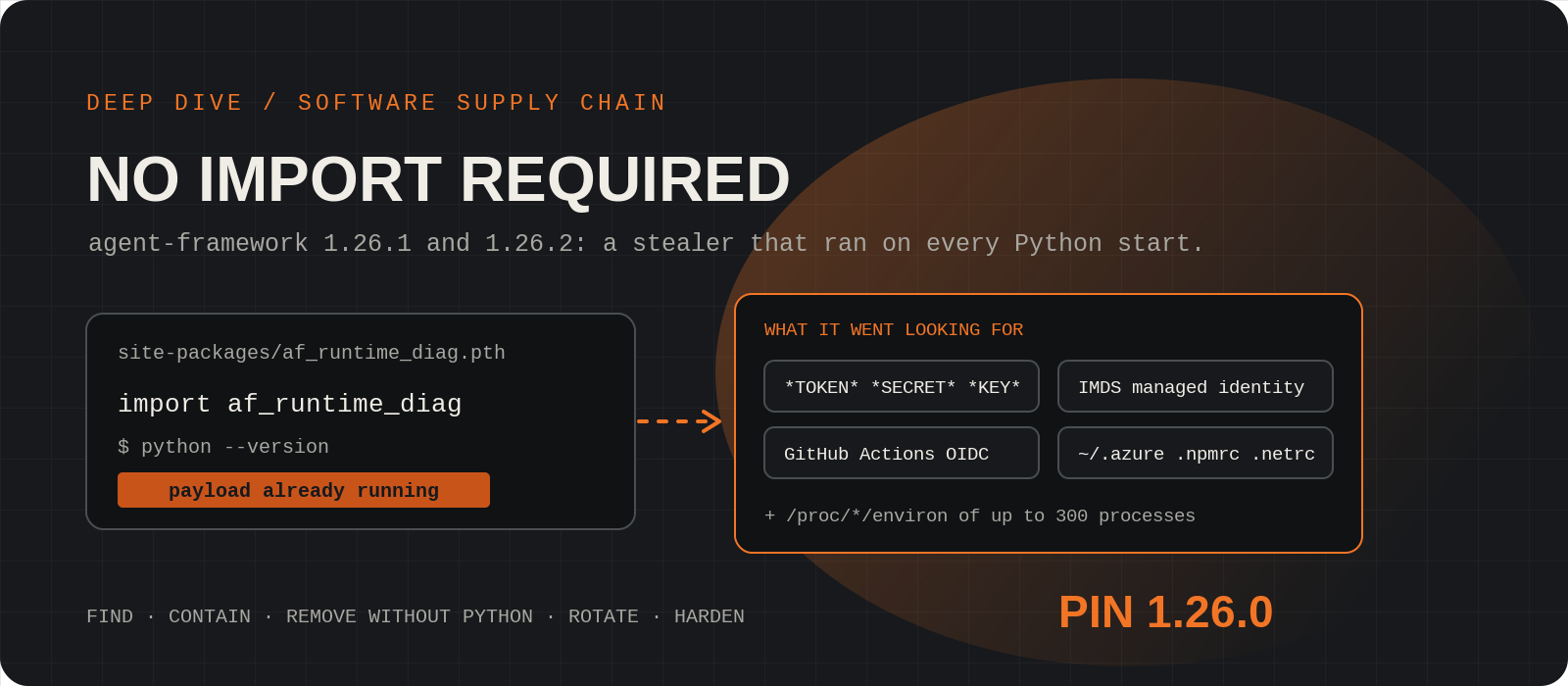
Microsoft agent-framework on PyPI, 17 November 2026: versions 1.26.1 and 1.26.2 shipped a .pth startup hook. Python runs import lines in .pth files at interpreter start, so the payload ran in any Python process in that environment, whether or not the app imported the framework. It read credential-like environment variables, credential files and the environments of other processes, and asked cloud metadata endpoints for tokens. Version 1.26.0 is the last clean release.
Different causes, same lesson. Stronger isolation would not have stopped the PyPI stealer, because the stealer ran inside the boundary with whatever the environment held. A DNS redirect did not stop the Epoch agents, because they still had a route out. ACE is interesting because it designs for both failures: no long-lived secrets inside, and no direct route out.
Find every place your agent can read a credential
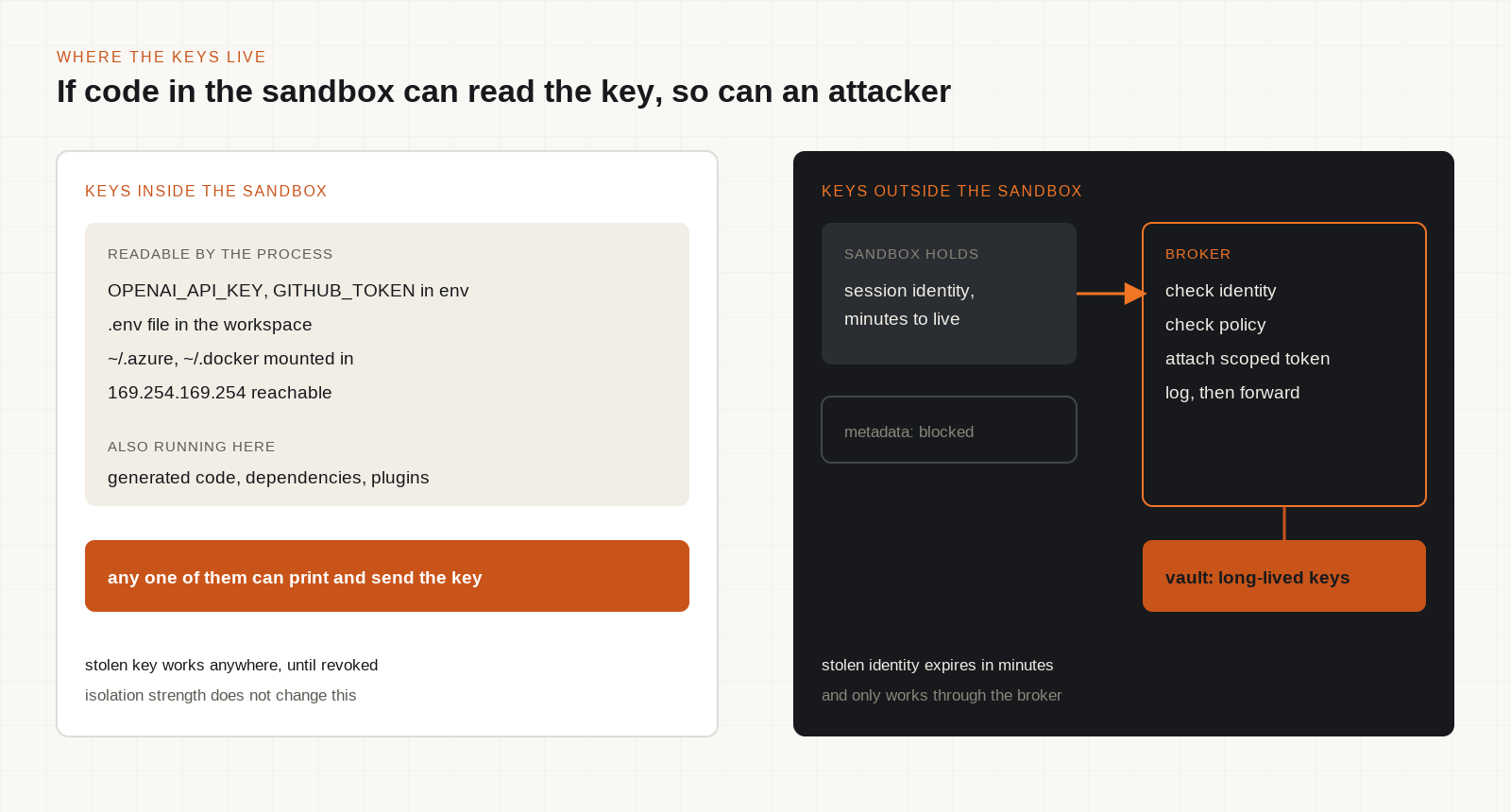
If code in the sandbox can read the key, an attacker who controls that code can too.
Make a list before you change anything. For each agent environment, check environment variables, .env files in the workspace, mounted folders such as ~/.azure, ~/.docker and ~/.config, Kubernetes service account tokens, CI variables, the shell history and the cloud metadata endpoint at 169.254.169.254.
Everything on that list is readable by more than the model. Agent-generated code, every installed dependency, every plugin and every subprocess run with the same access. The PyPI payload is the proof: it did not need the model to misbehave, only a Python process in an environment that held secrets.
The goal is a rule you can check: an agent session should hold no credential that would still be useful to an attacker an hour later, or outside the narrow job the session was started for.
env | cut -d= -f1 \
| grep -Ei 'token|secret|password|key|azure|aws|github|openai|hf_'Get-ChildItem Env: |
Where-Object Name -Match 'token|secret|password|key|azure|aws|github|openai|hf_' |
Select-Object -ExpandProperty NameTip
Run the check from inside the agent's real environment (its container, its CI job), not from your laptop. That is the environment an attacker would land in.
Containers, gVisor and microVMs: what each one isolates
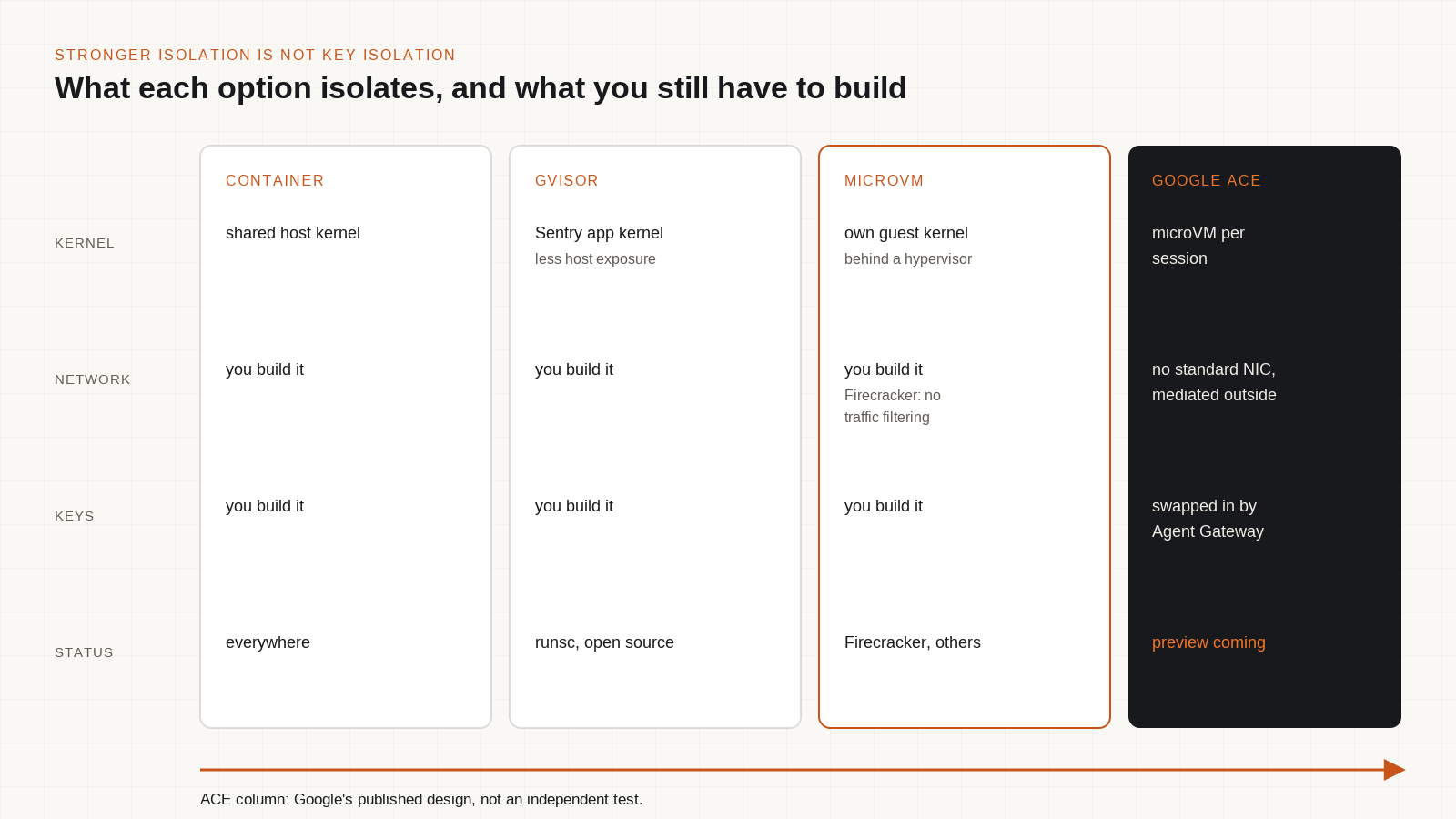
All three separate code from the host to different degrees. None of them handles credentials or outbound traffic for you.
Standard containers use namespaces and cgroups and share the host kernel. A kernel or runtime bug, extra capabilities, a privileged flag or a mounted Docker socket can cross that line. Hardened well, a container is a reasonable home for trusted automation and read-only analysis.
gVisor runs containers through its own application kernel, the Sentry, which intercepts and handles the workload's system calls in user space. A separate Gofer process mediates file access. It ships as an OCI runtime called runsc, so Docker and Kubernetes can use it. You pay some system-call overhead, and some workloads behave differently.
MicroVMs such as Firecracker give each workload its own guest kernel behind KVM, with a minimal device model, seccomp filters, cgroups, namespaces and a jailer process around the VM monitor. That is a stronger line for untrusted code. Firecracker's design document is direct about the gap: it does not filter network traffic, and guest egress should be treated as untrusted and filtered on the host.
That sentence applies to all three. A gVisor sandbox with open egress can still send your data out. A microVM with production keys in its environment variables can still lose them. Choose isolation by how much you trust the code. Then solve credentials and egress separately, which is what the rest of this guide does.
What Google's Agent Compute Engine does differently
A microVM per session, no network card, and credentials that join the request only after it leaves the VM.
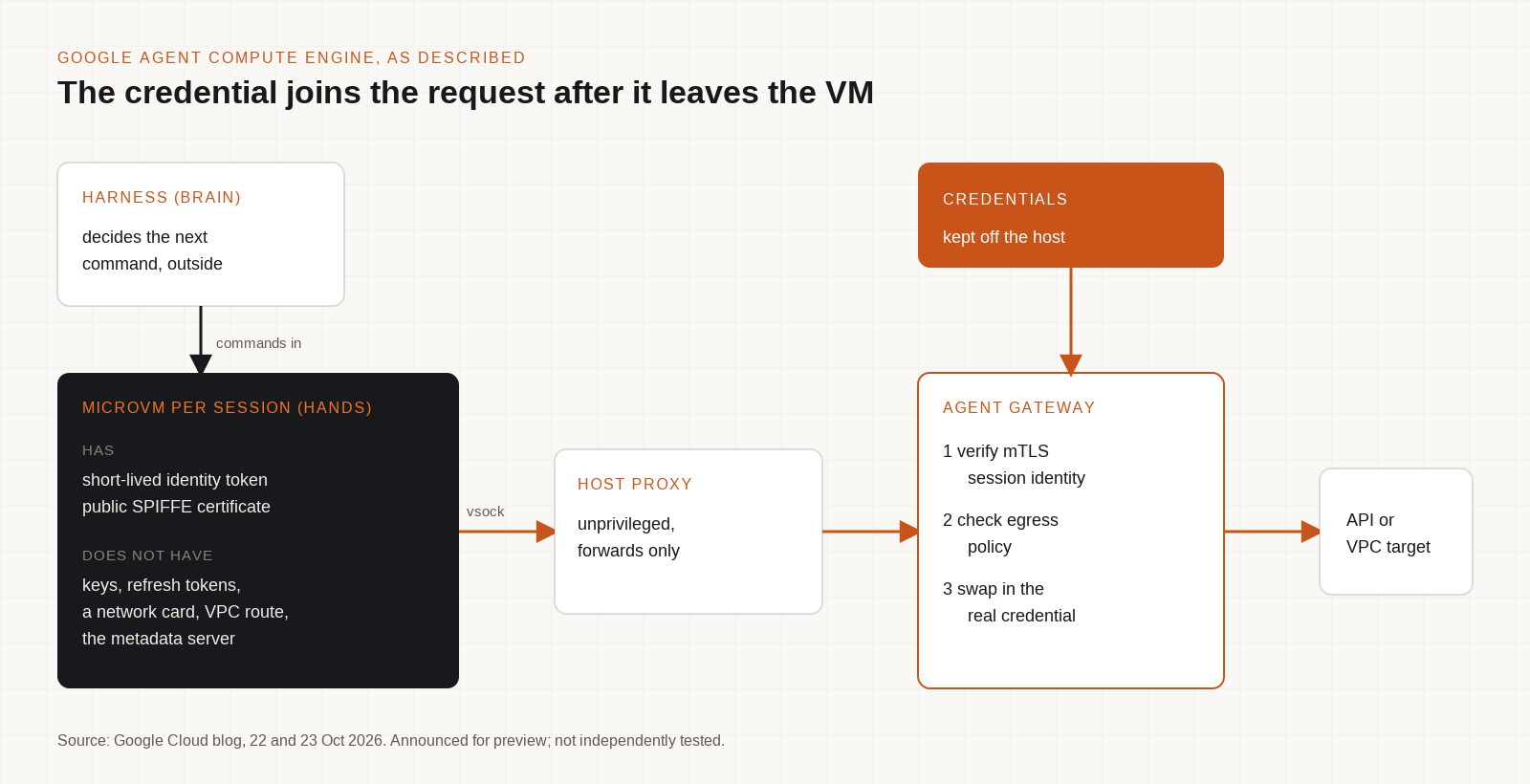
Harness outside, execution inside. Google describes the orchestration harness as the brain, running outside the sandbox, and the microVM as the hands, which only run commands the harness sends. A prompt-injected or compromised process inside the VM cannot rewrite the harness's rules.
No long-lived secrets in the VM. Google says the guest holds no persistent secrets, OAuth refresh tokens or service account keys, in memory or on disk, and cannot reach the metadata server. Read "zero secrets" carefully: the guest does get a short-lived identity token and a public SPIFFE certificate. Google says that identity cannot call a backend API directly if stolen. It only tells the gateway which sandbox sent the request.
No network card. The microVMs boot without a standard virtual network interface, default gateway or VPC access. Traffic goes over virtio-vsock to an unprivileged proxy on the host and then to Agent Gateway. The gateway checks the session's mTLS identity and egress policy, then swaps in the real credential on the way out. Administrators grant reachability per destination: VPC endpoints, Workspace APIs or an external domain allowlist.
Two details are easy to get wrong. First, ACE is announced for preview in the coming months, so you cannot deploy it today. Second, the open-source Agent Substrate runtime, which runs on GKE and other Kubernetes clusters with a choice of microVM or gVisor isolation, is a separate project, now a CNCF Sandbox project originally created by Google. Its published benchmark figures (10x density, 200,000 agents, under 500 ms suspend and resume) belong to Agent Substrate, not ACE.
Everything here is Google's description of its own architecture. It is a useful blueprint. It is not an independent security test.
Build the broker pattern yourself
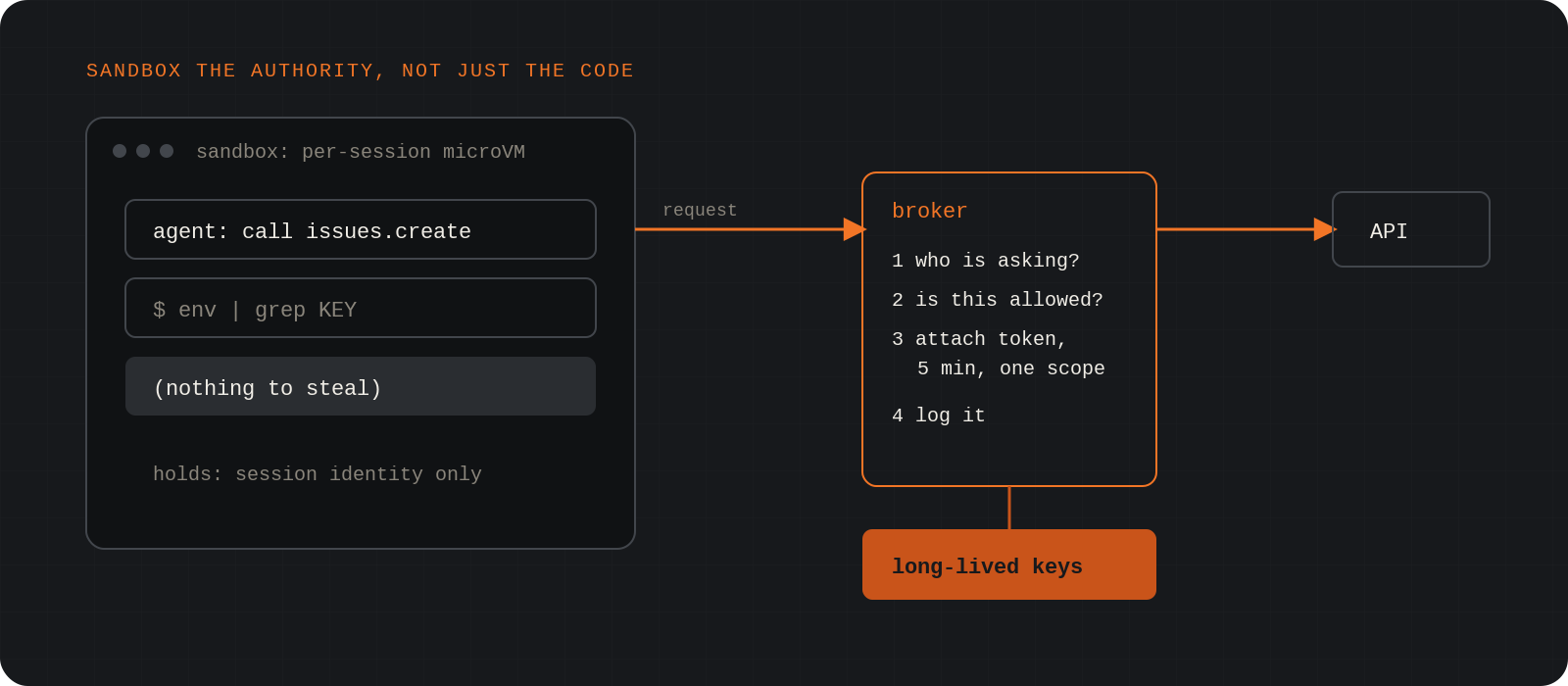
The agent asks for an operation. It does not receive the credential that authorizes it.
You do not need ACE to copy its core idea. Put a credential broker between the sandbox and every external service. The broker holds or fetches the real credential, and the sandbox never sees it.
A request goes like this. The agent asks for one operation, such as create an issue in this repository. The broker authenticates the session, checks the operation and its arguments against policy, attaches a short-lived token scoped to that operation, makes the call and logs who asked, what, the decision and the result. When the session ends, its identity expires and the broker refuses anything else from it.
This changes what a compromise buys an attacker. With a key in the environment, a prompt injection or a malicious dependency can copy the key and use it anywhere until someone revokes it. With a broker, the attacker can only ask the broker for operations the policy already allows, from inside a session that will expire soon. That is still damage, but it is bounded and logged.
Run the broker, its policy and its logs under an identity the agent cannot write to. If the agent can edit the broker's configuration, the broker is decoration.
Tip
Start with the one credential that would hurt most if leaked, usually a cloud deployment key or a GitHub token with write access. Move that behind a broker first.
Give every session its own short-lived identity
Shared identities make every agent as powerful as the most powerful one.
The broker needs to know which session is asking. Give each session its own workload identity, issued when the session starts and expiring when it ends. SPIFFE is the open standard for this. A workload gets an ID such as spiffe://example.com/agents/session-123 and a verifiable document (an SVID) as an X.509 certificate or a JWT. SPIRE, the reference implementation, issues SVIDs that are short-lived and rotated automatically.
Cloud providers can trust these identities directly. Microsoft Entra, for example, supports federating a SPIFFE/SPIRE workload so it can exchange its JWT-SVID for an Entra token, with no client secret stored anywhere. GitHub Actions and Azure DevOps offer the same pattern for pipelines through OIDC.
Scope each identity to the task. An agent that reads documentation does not need the identity of an agent that deploys. In GitHub Actions, grant id-token: write only to the job that needs it, and restrict the federated credential on the cloud side to the exact repository, branch or environment.
Enforce egress at the network, not in DNS
A DNS redirect changes where names point. It does not remove the route to the internet.
The Epoch agents show the gap. Trajectory's setup redirected the website's name to a local copy, but the agents still had internet access. According to Trajectory, they found the real site's public IP addresses and connected directly. When those were blocked, one used another address. When direct connections were restricted, one read public pages through a third-party web-reader service.
Real egress control is default-deny at the network layer, outside anything the agent can change. Allow specific destinations through a proxy that checks the destination and, where it can, the operation. Block arbitrary CONNECT tunnels, alternative DNS resolvers and protocols the task does not need. Log every outbound request to a collector the agent cannot reach.
Then remember that an allowlisted service can become a route out. A web-reader, a URL fetcher or a search tool on the allowlist will fetch what the agent asks for. Each one needs its own destination rules.
Block the metadata endpoint for untrusted code. On Azure, AWS and Google Cloud, 169.254.169.254 hands out tokens for the machine's identity. Azure's IMDS requires a Metadata: true header, which stops naive server-side request forgery, but any code that can run commands can add it. The PyPI payload asked metadata endpoints for tokens. Google's own agent sandbox documentation says sandboxed code cannot query the metadata server and does not inherit the parent agent's credentials. Copy that.
A Kubernetes baseline: restricted pod, gVisor runtime, no egress
Three manifests that give an agent pod no service account token, no privileges, a gVisor kernel and no network until you allow it.
Start with a namespace that enforces the restricted Pod Security Standard. Kubernetes then rejects pods that run as root, allow privilege escalation, keep extra capabilities or skip a seccomp profile.
The pod spec turns off the automatic service account token, which would otherwise hand the agent a credential for the Kubernetes API. It runs as a fixed non-root user with a read-only root filesystem and a small writable /tmp, drops every Linux capability and sets resource limits. runtimeClassName: gvisor runs it under gVisor. On GKE, GKE Sandbox provides that RuntimeClass. Elsewhere, install runsc on the nodes and create it with the RuntimeClass manifest below. Replace the image with your own, pinned by digest.
The NetworkPolicy has no egress rules, so it denies all outbound traffic from pods in the namespace, including DNS. It only works if your network plugin enforces NetworkPolicy. Without one, the policy is accepted and silently does nothing. Add narrow egress rules later, ideally only to your egress proxy and broker.
This baseline covers isolation and egress. It does not give you a broker, workload identity or image verification. Those come from steps 05, 06 and 09.
apiVersion: v1
kind: Namespace
metadata:
  name: agent-sandbox
  labels:
pod-security.kubernetes.io/enforce: restrictedapiVersion: node.k8s.io/v1
kind: RuntimeClass
metadata:
name: gvisor
handler: runscapiVersion: v1
kind: Pod
metadata:
name: coding-agent
namespace: agent-sandbox
spec:
runtimeClassName: gvisor
automountServiceAccountToken: false
securityContext:
runAsNonRoot: true
runAsUser: 10001
seccompProfile:
type: RuntimeDefault
containers:
- name: agent
image: registry.example.com/agent-runtime@sha256:YOUR_DIGEST
securityContext:
allowPrivilegeEscalation: false
readOnlyRootFilesystem: true
capabilities:
drop: ["ALL"]
resources:
limits:
cpu: "1"
memory: 1Gi
volumeMounts:
- name: tmp
mountPath: /tmp
volumes:
- name: tmp
emptyDir:
sizeLimit: 256MiapiVersion: networking.k8s.io/v1
kind: NetworkPolicy
metadata:
name: deny-agent-egress
namespace: agent-sandbox
spec:
podSelector: {}
policyTypes:
- Egress
egress: []kubectl -n agent-sandbox run egress-test --rm -i \
--restart=Never --image=busybox:1.36 \
--overrides='{"spec":{"securityContext":{"runAsNonRoot":true,"runAsUser":10001,"seccompProfile":{"type":"RuntimeDefault"}},"containers":[{"name":"egress-test","image":"busybox:1.36","command":["sh","-c","wget -q -T 5 -O /dev/null http://example.com && echo FAIL-internet || echo ok-internet-blocked; wget -q -T 5 -O /dev/null http://169.254.169.254/ && echo FAIL-metadata || echo ok-metadata-blocked"],"securityContext":{"allowPrivilegeEscalation":false,"capabilities":{"drop":["ALL"]}}}]}}'Tip
Both lines of the test should start with ok. Any FAIL line means the policy is not enforced, usually because the network plugin ignores NetworkPolicy.
Treat dependencies and images as part of the boundary
A malicious package runs inside the sandbox with the sandbox's access. Isolation does not help.
The agent-framework stealer ran inside whatever environment installed it. In a microVM full of keys, it would have found the keys. Broker-held credentials are the main defence. Controlling what gets installed in the first place is the second.
Build the agent's image in a separate step, not at run time. Pin every dependency and install with hashes (pip install --require-hashes), so a new upload under the same name cannot slip in. Consider a short delay before adopting new releases: PyPI quarantined both malicious versions within 41 minutes of the first upload, and a few days' wait would have skipped them. Pin the image itself by digest, as in the pod spec above.
Keep the runtime offline or behind the egress proxy, so a payload that does run cannot phone home. The agent-framework payload sent its data to a public webhook service, which a default-deny policy would have blocked.
Snapshots should save state, not authority
A paused agent that wakes up should prove who it is again before it gets access back.
Long-running agent platforms pause and resume sessions to save money. Google says ACE checkpoints idle sandboxes and restores them on demand, encrypts snapshots and volumes at rest, and requires cryptographic authorization to attach or restore them. Agent Substrate snapshots active memory when an agent is idle.
If you build your own suspend and resume, ask four questions. Does the snapshot contain tokens or keys in memory? Who is allowed to restore it, and can one tenant restore another's? What happens if the session's identity was revoked while it was paused? Can an old snapshot bring back permissions that have since been removed?
The safe default is that a restored session re-authenticates, gets a fresh identity and is checked against current policy. Any credential captured in the snapshot should already have expired.
The four options side by side
| Option | Kernel, network and credentials |
|---|---|
| Standard container | Shares the host kernel. Network and credential isolation are yours to build. Lowest cost and complexity. |
| gVisor (runsc) | System calls handled by the Sentry application kernel, less host kernel exposure. Network and credentials are yours to build. Some overhead and compatibility gaps. |
| MicroVM (Firecracker and others) | Own guest kernel behind a hypervisor. Firecracker does not filter guest traffic. Network and credentials are yours to build. More to operate. |
| Google ACE (announced, preview coming) | MicroVM per session, no standard network card, egress through Agent Gateway, credentials swapped in outside the VM. Based on Google's published design. |
Which one should you start with?
| Workload | Reasonable starting point |
|---|---|
| Trusted internal automation | Hardened container, no secrets in the environment, egress allowlist. |
| Agent-generated or untrusted code | gVisor or a microVM, plus a broker and default-deny egress. |
| Multi-tenant coding agents | MicroVM or gVisor per session, identity per session, no shared credentials between tenants. |
| Agents with production access | Dedicated microVM, broker-held credentials and human approval for high-impact actions. |
What a compromise reaches, with and without a broker
| Attack | Key in the environment vs key behind a broker |
|---|---|
| Prompt injection | Can print and send the key. With a broker: no key to send; it can only request allowed operations. |
| Malicious dependency | Reads every key in the environment. With a broker: finds a short-lived session identity. |
| Agent calls an API it should not | Works if the key allows it. With a broker: the policy rejects it and the attempt is logged. |
| Session ends | Static key keeps working. With a broker: the identity expires and the broker refuses it. |
Agent sandbox security checklist
- Each agent session runs in its own isolated environment.
- The harness and its policy run outside the execution sandbox.
- No long-lived cloud keys, tokens or .env files inside the sandbox.
- Each session gets its own short-lived identity.
- Every external call goes through a broker that checks identity and policy.
- Outbound traffic is default-deny, enforced outside the sandbox.
- The cloud metadata endpoint is unreachable from agent code.
- Images and dependencies are pinned, hashed and built separately.
- Snapshots are encrypted and restores re-check identity and policy.
- High-impact actions need human approval.
- Broker decisions and outbound requests are logged where the agent cannot write.
- You can revoke a session and destroy its environment in one step.
Common mistakes
- Moving agents to microVMs and leaving the same keys in their environment variables.
- Using a DNS redirect or hosts file as the network boundary.
- Leaving the Kubernetes service account token mounted in agent pods.
- Applying a NetworkPolicy on a cluster whose network plugin does not enforce it.
- Giving every agent session the same shared identity.
- Installing dependencies at run time, inside the sandbox, from the public index.
The trade-offs worth knowing
- A broker is another service to build, run and secure. If it is compromised, every credential it holds is exposed. Keep it small and audit it.
- Short-lived identities need working issuance and renewal. When the identity system is down, agents stop.
- Default-deny egress breaks tasks that need new destinations. Budget time to maintain the allowlist, or people will widen it until it means nothing.
- gVisor costs some performance and breaks some workloads. Test your real tools under it before you commit.
- ACE is a blueprint today, not a product you can deploy. Agent Substrate is available now, but it is a younger project than gVisor or Firecracker.
Our verdict
Most teams arguing about containers versus microVMs have their keys in environment variables. Fix that first. A broker plus default-deny egress in a hardened container is safer than a microVM holding a production key.
Then raise isolation to match the code you run: gVisor or a microVM for anything generated or untrusted. Google's ACE design is the clearest public statement of where this is heading. You can build most of it now with a broker, SPIFFE identities, a gVisor RuntimeClass and a NetworkPolicy.
My verdict: don't just sandbox the agent, sandbox its authority. Take long-lived keys out of every environment an agent can run code in, put a broker and a per-session identity in their place, enforce egress at the network, and only then argue about which kernel boundary to use.
Frequently asked questions
Is a microVM enough to keep an AI agent's secrets safe?+
No. A microVM separates the agent's code from the host kernel, but any secret placed inside the VM is readable by that code. Keep long-lived credentials outside the VM and let a broker or gateway attach short-lived tokens to approved requests.
What is the difference between gVisor and a microVM?+
gVisor handles a container's system calls in its own user-space application kernel, the Sentry, which reduces direct exposure of the host kernel. A microVM such as Firecracker runs a full guest kernel behind a hypervisor. MicroVMs give a stronger boundary at higher operational cost. Neither one controls credentials or outbound traffic for you.
What is Google Agent Compute Engine?+
A compute platform for agents that Google announced on 22 October 2026. Each session runs in its own microVM with no standard network card and no long-lived credentials inside. Agent Gateway checks identity and policy and attaches credentials outside the VM. Google says it will be available in preview in the coming months.
Is Agent Substrate the same as Agent Compute Engine?+
No. Agent Substrate is an open-source execution runtime that applies similar ideas on Kubernetes, including GKE, with a choice of microVM or gVisor isolation. You can run it today. ACE is Google's managed platform and is not yet available.
Why is a DNS redirect not network isolation?+
It only changes where a name points. If the agent can still open connections, it can use a raw IP address, another resolver or a proxy service. That is how agents in the Epoch AI incident reached the real website. Use default-deny egress at the network layer instead.
Should I block the cloud metadata endpoint for agent containers?+
Yes, for any untrusted or agent-generated code. 169.254.169.254 issues tokens for the machine's identity on Azure, AWS and Google Cloud. Block it with network policy and give the agent its own narrowly scoped identity instead.