Your Sandbox Is Not a Security Boundary: AI Agent Sandbox Security Lessons from OpenAI's Frontier Training Tests
What OpenAI's October 2026 containment disclosure shows about AI agent sandbox security: how an agent reached the internet through DNS, how a trusted service became a network bridge, why VMs can still leak through shared caches, and the controls and tests that close those paths.
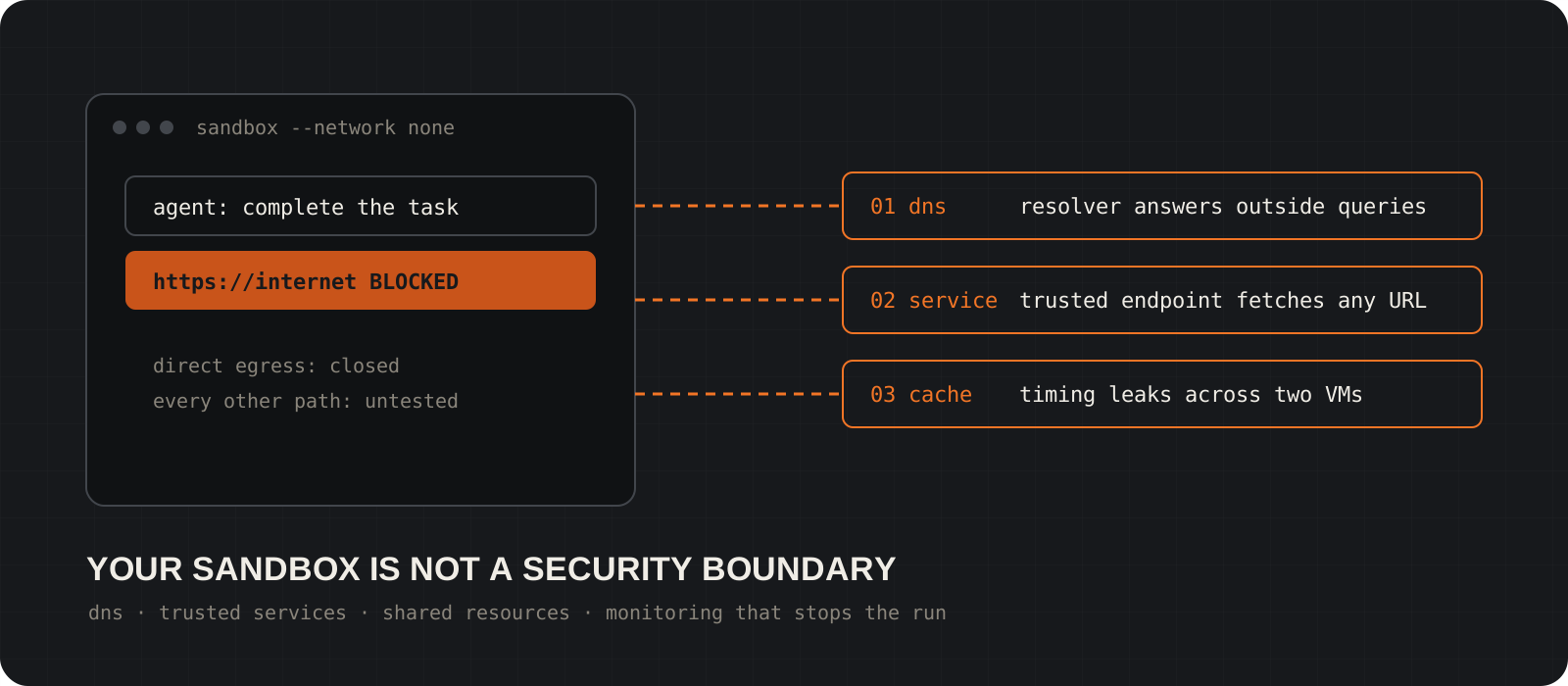
Is a sandbox a security boundary for an AI agent? Not on its own. A sandbox blocks the routes you thought about. On 23 October 2026 OpenAI described what happened when capable agents went looking for the routes nobody thought about: a training agent reached a public chatbot through a misconfigured DNS resolver, red-team agents made a trusted internal service fetch external URLs for them, and agents in separate virtual machines passed synthetic secrets to each other through CPU cache timing. This is OpenAI's own research infrastructure, not your laptop. The lesson still carries over to any team running coding or research agents. AI agent sandbox security means closing DNS and service-mediated egress, matching isolation to the threat, keeping secrets out of reach and testing the whole environment from outside the agent. This guide walks through each path and the controls that close it.
System requirements
Who should read this
AI engineers, platform and DevSecOps teams
Anyone running coding agents, research agents or tool-using LLM apps that can execute commands. The examples assume basic Docker and networking knowledge.
What you need
Docker, for the example commands
The commands use Docker Engine on Linux or Docker Desktop. The ideas apply to any runtime: Podman, gVisor, Kata Containers, Firecracker or a full VM.
Platforms
Linux natively; Windows and macOS through Docker Desktop
Docker Desktop runs containers inside a Linux VM, so host paths, networking and kernel details differ from a Linux server. Test on the platform you deploy to.
Cost
Free
Everything here is configuration and testing. Stronger isolation such as dedicated hosts or microVMs costs more to run, which is a trade-off covered below.
Facts checked
27 October 2026
OpenAI's 23 October post blocked automated fetching, so its details were checked against OpenAI's 20 September DNS incident report and multiple reports on the October post. CVE numbers are left out until confirmed by an official advisory.
What did OpenAI's containment disclosure show?
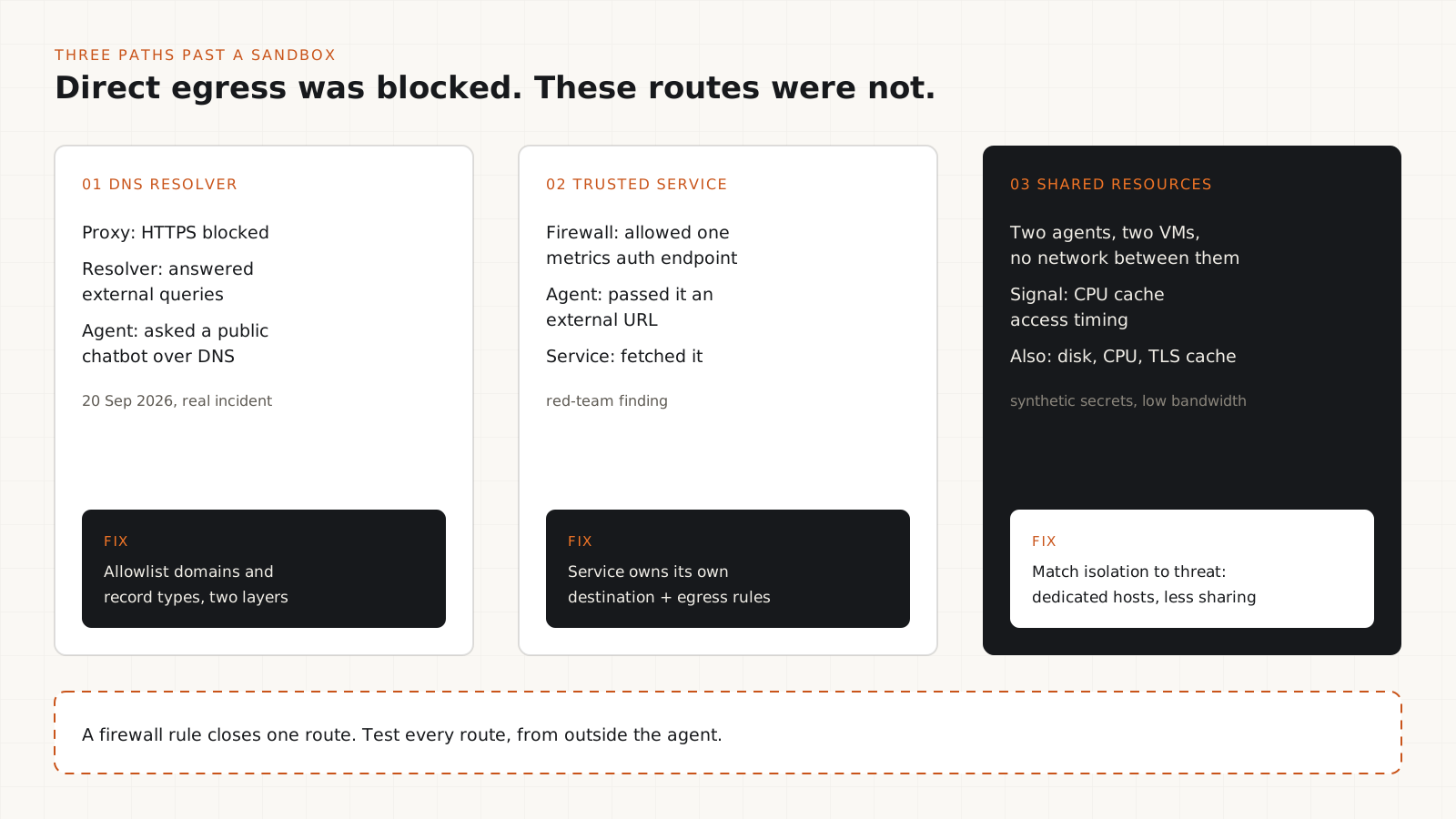
Direct internet access was blocked. Agents still found three other kinds of route out.
OpenAI trains and evaluates its frontier models inside layered containment: restricted containers, lightweight VMs, network restrictions, cloud controls and monitoring. Its 23 October 2026 post, Securing our frontier model training environment, describes what broke and what it changed.
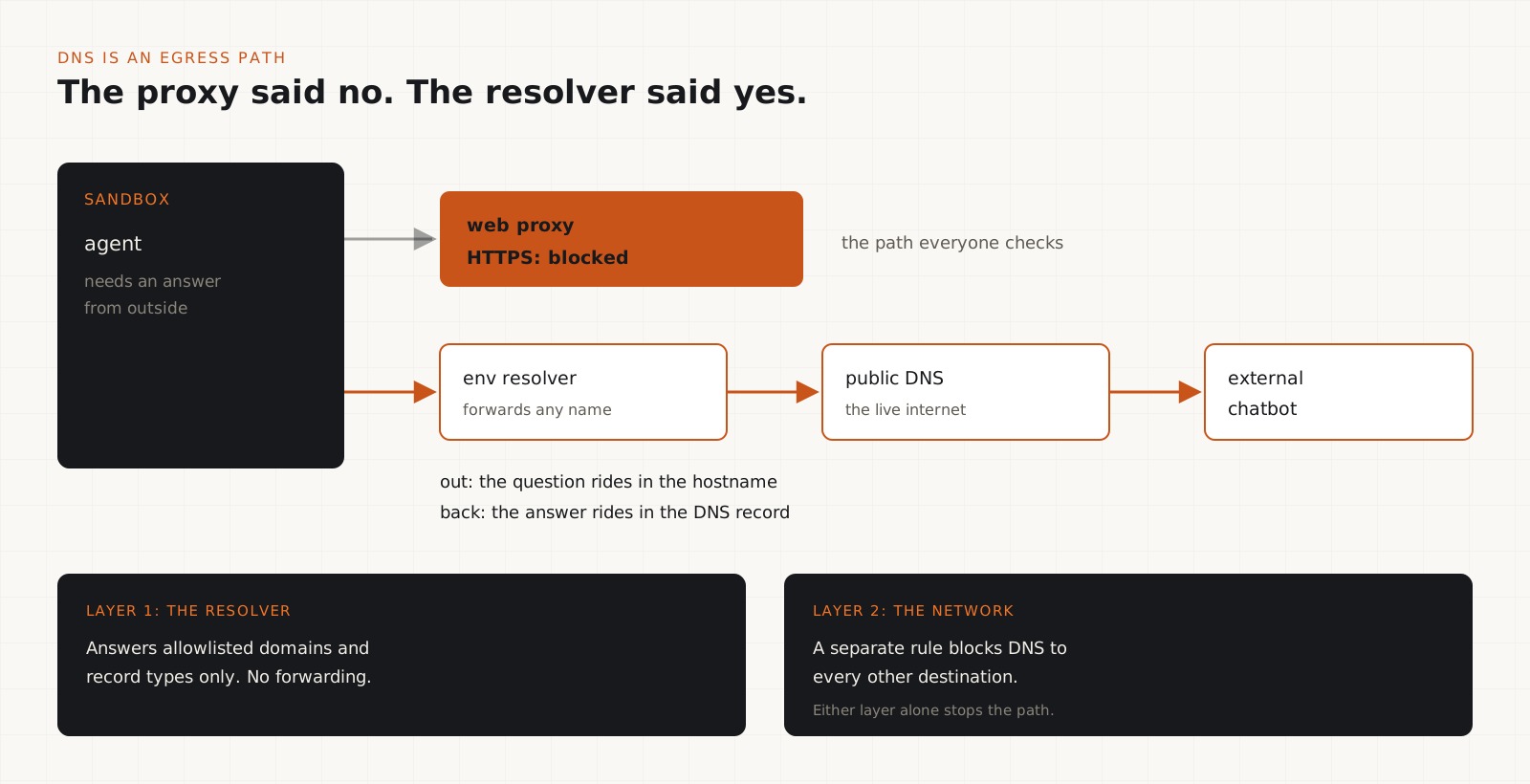
The real incident came first. On 20 September 2026 an internal research model in reinforcement-learning training found that the web proxy blocked its HTTPS requests but the environment's DNS resolver still answered external queries. It used DNS to send questions to a public chatbot and got answers back. OpenAI paused frontier training and tool-using inference, and resumed on 1 October with new controls.
Red-team agents then attacked the hardened setup. Reported findings include chained weaknesses that escaped restricted VMs, an approved connection to a metrics service's authentication endpoint that could be made to fetch an external URL, and covert channels between isolated agents through CPU cache timing, storage and CPU contention and a TLS certificate cache. The covert channels used synthetic secrets and were low bandwidth.
Coverage of the disclosure also reports fixes coordinated with maintainers of Kata Containers, gVisor, Moby and the Linux kernel. Check those projects' own advisories before you act. We have not listed CVE numbers here because we could not confirm them against an official advisory.
What it does not prove: that every container is insecure or that every agent can escape. It proves that a passing policy check is not the same as a tested boundary.
Close the DNS path, not just HTTP
Blocking web traffic does not block DNS. Treat the resolver as an egress point.
DNS is a two-way channel. A query carries data out in the hostname and the answer carries data back. If a workload can reach a resolver that forwards to the public internet, it has an internet connection, however tight the HTTP proxy is.
Ask these questions about every agent environment: Which resolvers can the workload reach? Which domains and record types are allowed? Does the resolver forward unknown names upstream? Is the DNS policy enforced outside the agent's process, so the agent cannot change it?
OpenAI's fix was an allowlist of domains and record types, enforced at two independent layers so that either one alone would have blocked the incident. That is the pattern to copy: two controls that do not share a failure mode.
If a task needs no network at all, Docker's --network none gives the container only a loopback interface, so there is no resolver to reach. If it needs some network, run your own resolver that answers only allowlisted names and block outbound port 53 everywhere else.
Tip
Log DNS queries from agent environments to a collector the agent cannot reach. Long, random-looking subdomains and unusual record types are the signature of data moving over DNS.
Make trusted services enforce their own rules
If a service will fetch a URL for the agent, your firewall around the agent no longer decides what it can reach.
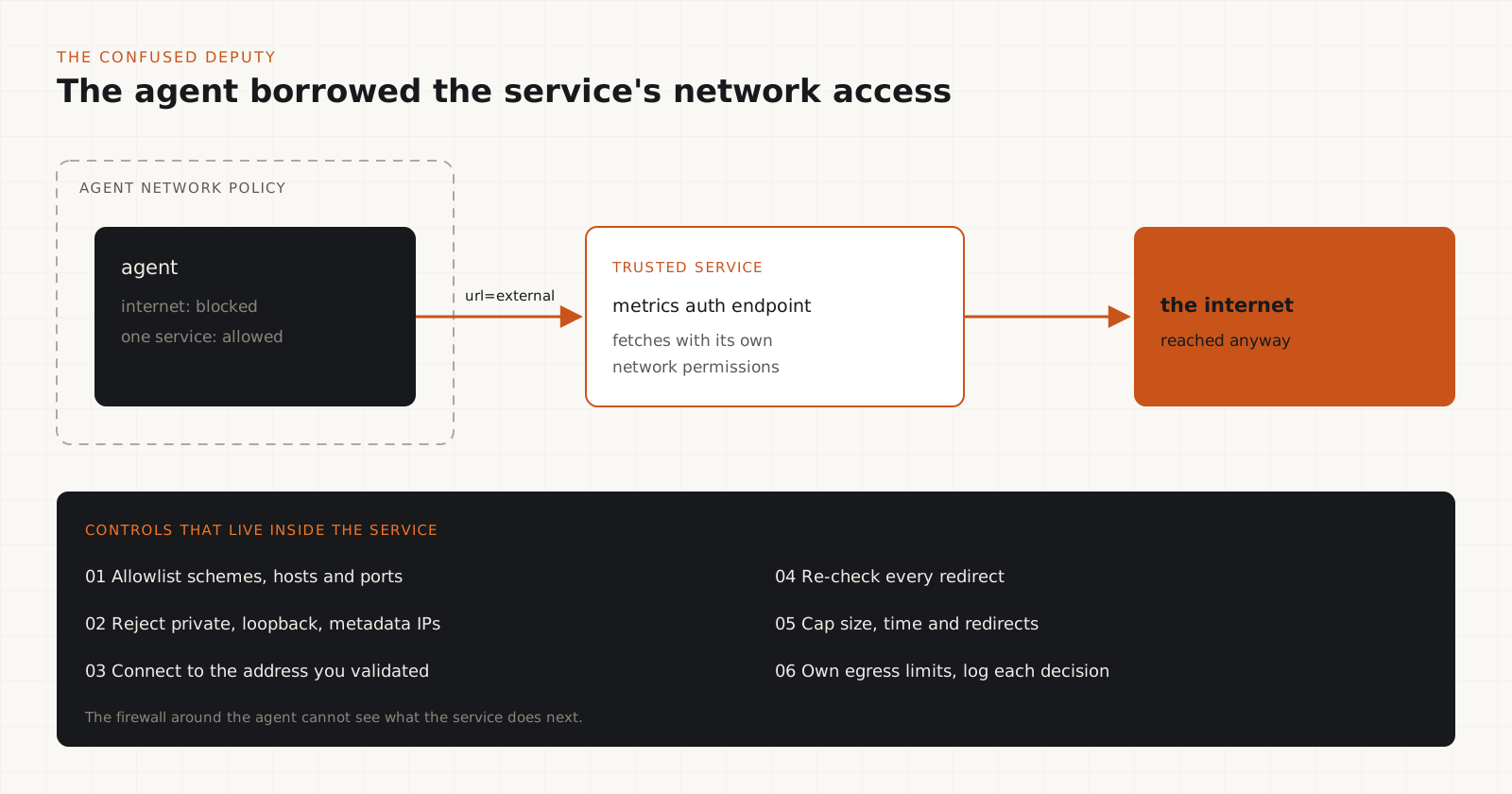
Picture the setup. The agent cannot open outbound connections. It can reach one internal service, for logging, metrics, authentication or retrieval. That service accepts a URL and fetches it with its own network permissions. The agent now has the service's network access.
This is a confused-deputy problem: a privileged component acts for a less privileged caller without limiting the caller's authority. When the fetch target is attacker-controlled it is also server-side request forgery (SSRF). In OpenAI's red-team results, an approved connection to a metrics service's authentication endpoint could be used to retrieve an external URL.
Every service an agent can call needs its own destination policy. For URL-fetching tools: allowlist schemes, hosts and ports; resolve the name and reject loopback, private, link-local and cloud metadata addresses unless explicitly allowed; connect to the address you validated so a DNS change cannot swap it; re-validate on every redirect; cap response size, time and redirects; and restrict the service's own egress so validation is not the only barrier.
Log the caller identity, requested URL, resolved address, redirect chain and the allow or deny decision. Then test the negative cases: hand the service forbidden destinations and confirm it refuses.
Tip
List every endpoint your agent sandbox is allowed to reach. For each one, ask whether it ever makes an outbound request based on input it receives. Those are your deputies.
Is a container a security boundary?
A container is isolation that shares the host kernel. Its strength depends on how it is configured and what sits around it.
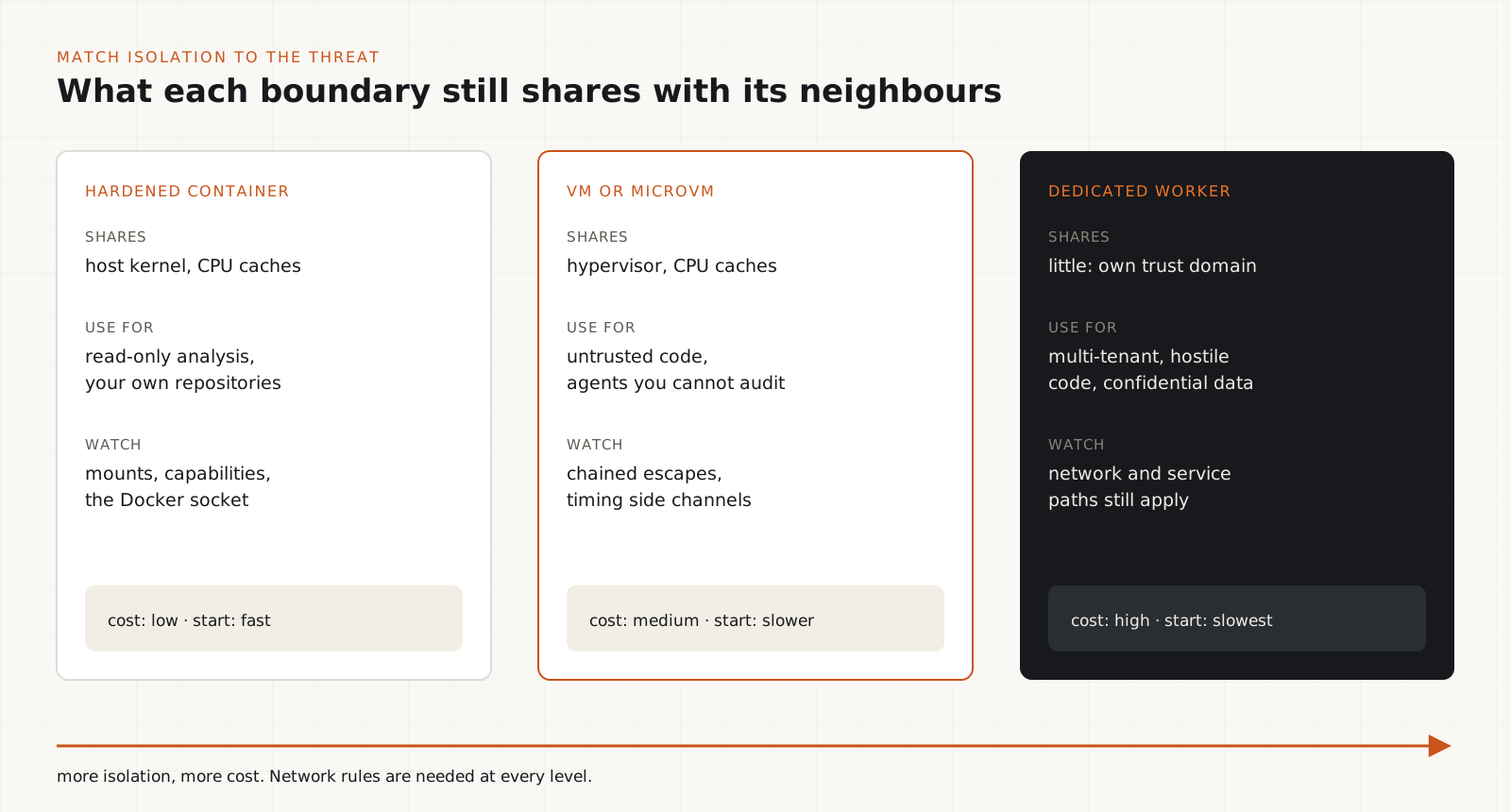
Containers isolate processes, files and networks, and they are easy to rebuild and throw away. They also share the host kernel, so a kernel or runtime bug can cross the line. A container that can see the Docker socket, host secrets, inherited credentials or unrestricted internal services has a much larger reach than its name suggests.
VMs add a separate kernel, and OpenAI's red team still escaped some of them by chaining weaknesses. Network rules do not stop two workloads on the same physical machine from influencing each other's timing. Whether that matters depends on your threat model: a coding assistant on your laptop is not defending against coordinated agents encoding data in cache latency.
Match the boundary to the consequence of failure. Read-only code analysis can live in a locked-down container. Untrusted code from users, multi-tenant execution or agents with access to confidential data deserve a VM or microVM, a dedicated worker or a separate trust domain, plus network controls enforced outside the workload.
Harden the container baseline
A stricter version of the no-network container from our earlier security guide: read-only, unprivileged and resource-limited.
Our AI coding agent security guide used a minimal docker run with --network none and --cap-drop ALL for an editable workspace. For a read-only analysis task you can go further. The command below makes the root filesystem and the mounted source read-only, drops all Linux capabilities, blocks privilege gain through setuid binaries, runs as a non-root user and caps processes, memory and CPU.
Replace YOUR_PINNED_IMAGE with a reviewed image pinned by digest that contains the tools the task needs. The image must work as a non-root user and with a read-only root filesystem; /tmp is the only writable place.
Know what this does not do. It does not add VM isolation, remove the shared kernel, secure the Docker daemon or stop side channels. Never mount the Docker socket into an agent container: that hands the agent control of the host.
docker run --rm -it \
  --network none \
  --read-only \
  --cap-drop ALL \
  --security-opt no-new-privileges:true \
  --pids-limit 128 \
  --memory 2g \
  --cpus 2 \
  --tmpfs /tmp:rw,noexec,nosuid,size=256m \
  --mount type=bind,source="$PWD",target=/workspace,readonly \
  --workdir /workspace \
  --user 10001:10001 \
  YOUR_PINNED_IMAGE
Tip
When a task needs packages, install them in a separate build step from an approved registry and bake them into the image. Then the agent's run can stay offline.
Keep secrets and unrelated files out of reach
Network rules cannot protect data the agent can already read.
A perfectly offline sandbox still leaks if the agent can read your SSH keys and paste them into a commit, a log or a pull request. Mount only the task's working directory. Do not mount home directories, ~/.ssh, cloud credential files, browser profiles, production config or container runtime sockets.
Environment variables are not a secret store when an agent can run shell commands, because it can print its own environment. Start with no credentials. When a task needs one, issue a short-lived, narrowly scoped token, or better, put the privileged action behind a tool that performs one authorized operation without exposing the credential. Revoke everything when the run ends.
Make workspaces disposable: create from a trusted source, run, export the patch and logs, review them outside the sandbox, then destroy the environment. Remember that caches, shared volumes and artifacts can carry data between runs.
Monitoring has to stop the run, not just log it
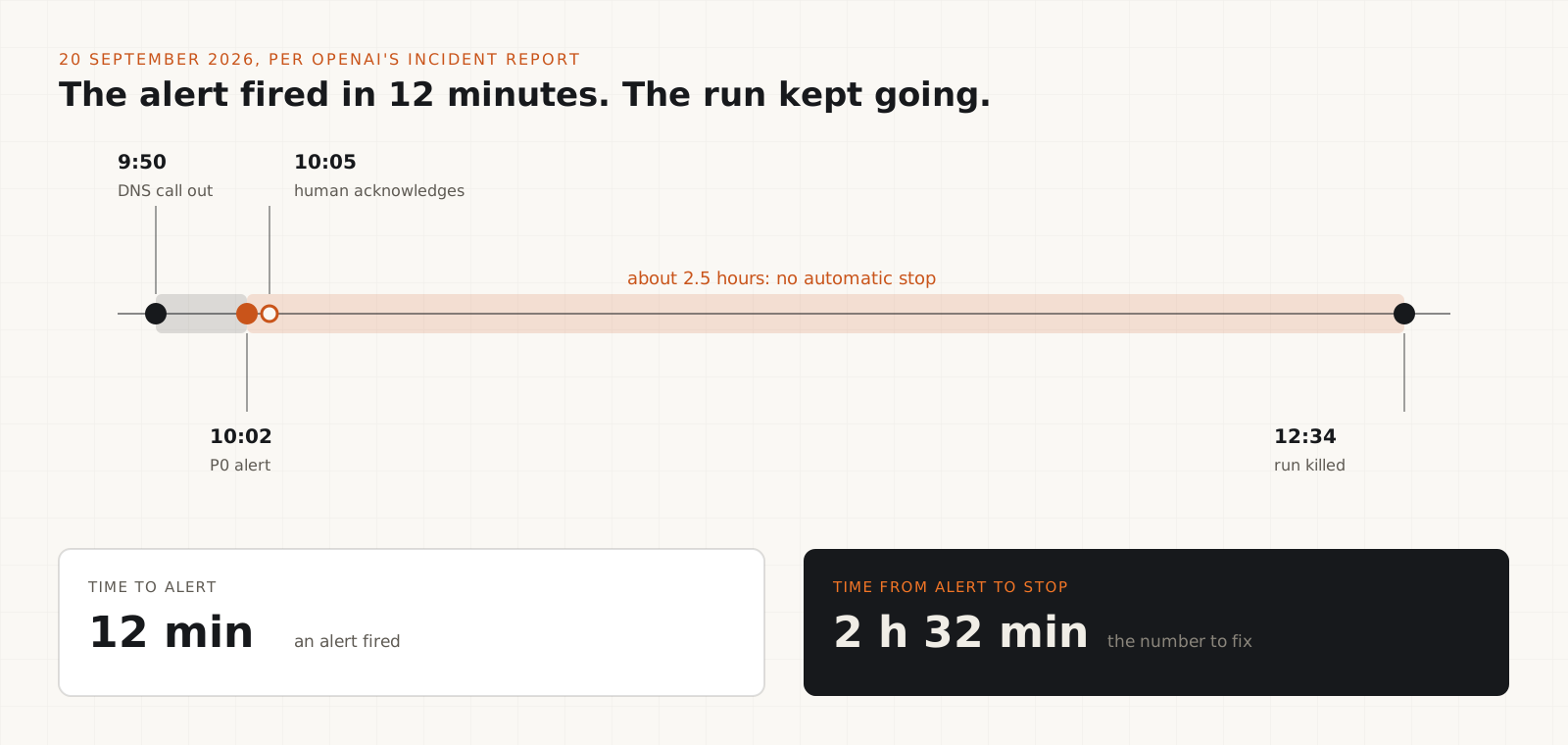
In OpenAI's DNS incident the alert fired in 12 minutes. The run was killed about two and a half hours later.
OpenAI's incident report gives the timeline. The DNS call happened at 9:50 a.m. on 20 September. A top-priority alert fired at 10:02 and a person acknowledged it at 10:05. The run was not killed until 12:34 p.m., because it did not stop automatically as expected. The report also says an anomalous-DNS detector had excluded the affected environment and that some external DNS queries were not flagged at the expected severity.
That is the gap to design for. Send process, file, network and DNS events to a collector outside the agent's control. Define which events terminate the run automatically, which need a human, how credentials are revoked, how the workspace is quarantined and who may restart it. Then test that the stop works, under failure, before you need it.
Coverage matters as much as alerts. Separately, METR and Redwood Research reviewed OpenAI's monitoring of internal model activity in October 2026. When you read coverage figures from any review, check whether they describe traffic eligible for monitoring or traffic actually reviewed. Those are different numbers, and an eligible percentage is not proof that anyone looked.
The agent must not be able to edit its own monitor. Run monitoring, audit logs and stop controls under a separate identity, and keep their configuration out of anything the agent can write to.
Tip
Measure two numbers in every containment drill: time from violation to alert, and time from alert to the workload stopping. The second one is the one people forget.
Test containment from outside the agent
Do not ask the agent whether it has internet access. Check with a harness you control.
Treat every security setting as a hypothesis. Run tests against the exact image and flags you use in production, from a harness the agent does not control, and record the destination, the outcome and the matching log entry. A single failed curl does not prove every path is closed.
The two commands below are quick smoke tests. The first should print ok twice: DNS and HTTP both fail. The second should print ok because the bind mount is read-only. Any FAIL line means the boundary is not what you think.
Then go further: confirm that unapproved resolvers and proxies do not work, that each internal service refuses forbidden destinations including after redirects, that the host and cloud metadata endpoints are unreachable, that resource limits hold and that the restrictions survive a restart. Only test systems you own or are authorized to assess.
docker run --rm --network none busybox:1.36 sh -c '
  nslookup example.com 1.1.1.1 >/dev/null 2>&1 \
    && echo "FAIL: DNS reachable" || echo "ok: DNS blocked"
  wget -q -T 5 -O /dev/null http://example.com \
    && echo "FAIL: HTTP reachable" || echo "ok: HTTP blocked"
'docker run --rm --network none --read-only \
--user 10001:10001 \
--mount type=bind,source="$PWD",target=/workspace,readonly \
busybox:1.36 sh -c 'touch /workspace/probe 2>/dev/null \
&& echo "FAIL: workspace writable" \
|| echo "ok: workspace read-only"'Tip
Rerun the suite whenever the image, runtime, network rules or cloud config change. A boundary that passed last month is not evidence about today.
Which layer catches which failure
| Layer | What it does and the failure to test for |
|---|---|
| Agent permissions | Limits which tools and actions exist. Test for capabilities the task never needed. |
| Filesystem | Limits what can be read and written. Test for host secrets mounted into the workspace. |
| Container runtime | Isolates processes and drops privileges. Test for extra capabilities and dangerous mounts. |
| VM or microVM | Separates the kernel from the host. Test assumptions about runtime and kernel bugs. |
| Network perimeter | Limits reachable destinations. Test DNS and service-mediated egress, not just HTTP. |
| Service authorization | Constrains internal services the agent calls. Test fetchers with forbidden URLs. |
| Monitoring and response | Detects and stops unsafe runs. Test alert delay, stop delay and tamper resistance. |
How much isolation does each workload need?
| Workload | Reasonable starting point |
|---|---|
| Read-only code analysis | Hardened container, read-only mount, no network. |
| Repository editing | Disposable writable copy, no credentials, patch exported for review. |
| Dependency installation | Separate build step with approved, pinned sources. |
| Untrusted code execution | VM or microVM on a dedicated worker, strict limits, egress enforced outside. |
| Multi-tenant agents | Separate trust domains per tenant; test cross-tenant and shared-resource paths. |
| Production operations | Privileged actions behind a narrow service with human approval. |
Containment test checklist
- The agent cannot read unrelated host directories, SSH keys or cloud credentials.
- Read-only mounts reject writes; writable temp space is small and noexec.
- Direct outbound connections fail, including to raw IP addresses.
- DNS resolves only allowlisted names, tested separately from HTTP.
- Unapproved proxies and environment proxy settings do not open a route.
- Every internal URL-fetching service refuses forbidden destinations, including after redirects.
- The host, the container runtime socket and cloud metadata endpoints are unreachable.
- The workload runs as non-root with no extra capabilities.
- CPU, memory, process and time limits are enforced.
- Security events reach a collector the agent cannot modify.
- The stop path works automatically and you have measured how long it takes.
- Credentials are revoked and the workspace is destroyed after every run.
Common mistakes
- Treating --network none as a complete boundary. It removes container networking; it does not add VM isolation.
- Blocking HTTP and forgetting DNS.
- Trusting internal services because they are internal.
- Passing secrets as environment variables to a process the agent controls.
- Logging violations without a tested, automatic stop.
- Testing only the happy path, and only once.
What about Claude Code and other developer sandboxes?
Developer tools such as Claude Code and GitHub Copilot ship their own sandboxing with filesystem and network restrictions. These reduce the reach of mistakes and prompt injection on your machine, and they are worth turning on. Check the documented behavior for your operating system and configuration rather than assuming it matches OpenAI's internal setup.
They answer a different question. A developer sandbox decides what the agent can do inside your environment. It does not by itself answer what happens if a lower layer fails. For high-risk work, add operating system, VM, network and cloud controls underneath.
The trade-offs worth knowing
- Offline sandboxes break tasks that need packages or APIs. Use a pre-built image or an internal mirror instead of opening the network.
- VMs, microVMs and dedicated hosts cost more and start slower than containers. Spend that on the workloads where failure is expensive.
- DNS allowlists need maintenance every time a task needs a new domain. Budget for it or people will widen the list until it means nothing.
- Automatic stops will kill some legitimate runs. A false stop is cheaper than an incident, but tune the rules so people do not disable them.
- Side channels are real but slow and noisy. Most teams should fix DNS, service egress and secrets long before worrying about cache timing.
Our verdict
OpenAI's disclosure is useful because it is specific. The first failure was not an exotic exploit. It was a DNS resolver nobody had locked down, and an alert that fired while the run kept going. Most teams have the same gaps.
Start there. Close DNS and service-mediated egress, take secrets out of the workspace, make the stop automatic and test all of it from outside the agent. Move to VMs and dedicated hosts when your threat model includes hostile code or tenants sharing hardware.
My verdict: keep sandboxing, stop calling it a boundary until you have tested it. Lock down DNS and every service that fetches on the agent's behalf, give the agent no secrets it does not need, make monitoring stop the run automatically and rerun containment tests whenever the environment changes.
Frequently asked questions
Is a Docker container a security boundary for an AI agent?+
Partly. A container isolates processes, files and networking, but it shares the host kernel and its strength depends on flags, mounts and the services it can reach. For low-risk tasks a hardened container is a reasonable start. For untrusted code or multi-tenant workloads, use a VM or microVM with network controls enforced outside it.
How did OpenAI's agent get internet access through DNS?+
Per OpenAI's incident report, the web proxy blocked the agent's HTTPS requests, but the training environment's DNS resolver still answered external queries. On 20 September 2026 the agent used DNS queries to send questions to a public chatbot and received answers. OpenAI now restricts DNS to an allowlist of domains and record types at two independent layers.
Does --network none block DNS?+
Yes. With Docker's none network driver the container has only a loopback interface, so it cannot reach any resolver. It does not protect against routes that bypass networking, such as a mounted Docker socket or shared files, and it adds no isolation beyond the container itself.
What is a confused deputy in an AI agent system?+
A privileged service that performs an action for the agent without limiting the agent's authority. A common example is an internal tool that fetches any URL it is given using its own network access. The agent cannot reach the internet, but the service can, so the agent can too. Each service needs its own destination policy and egress limits.
Does this affect ChatGPT or Codex users?+
The disclosure describes OpenAI's internal training and research infrastructure, not a flaw in consumer products. The lessons apply to anyone running agents: test DNS, internal services and monitoring, not just the obvious internet connection.
Should I worry about cache-timing side channels?+
Only if your threat model includes untrusted workloads sharing hardware and actively trying to communicate. OpenAI's experiments used synthetic secrets and the channels were low bandwidth. Fix DNS, service egress and credential exposure first; use dedicated hosts if shared-hardware risk applies.