AI Coding Agent Security in 2026: Sandboxing, Push Protection and Workflow Lockfiles
Sandboxing is one layer, not a guarantee. What GitHub's new Anthropic key push protection, workflow lockfiles and Copilot sandbox defaults cover, what Plugin4Shell teaches about pinning and a checklist to secure your AI coding agent.
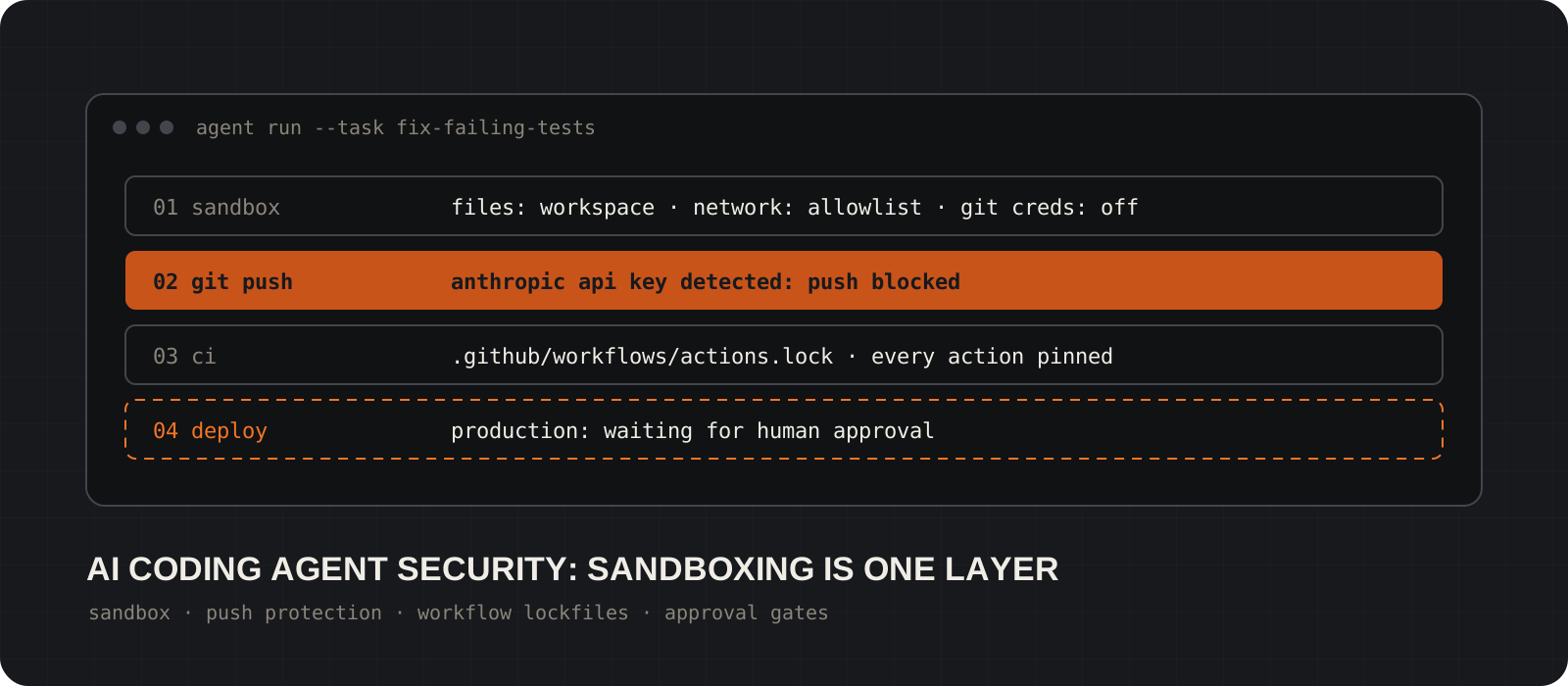
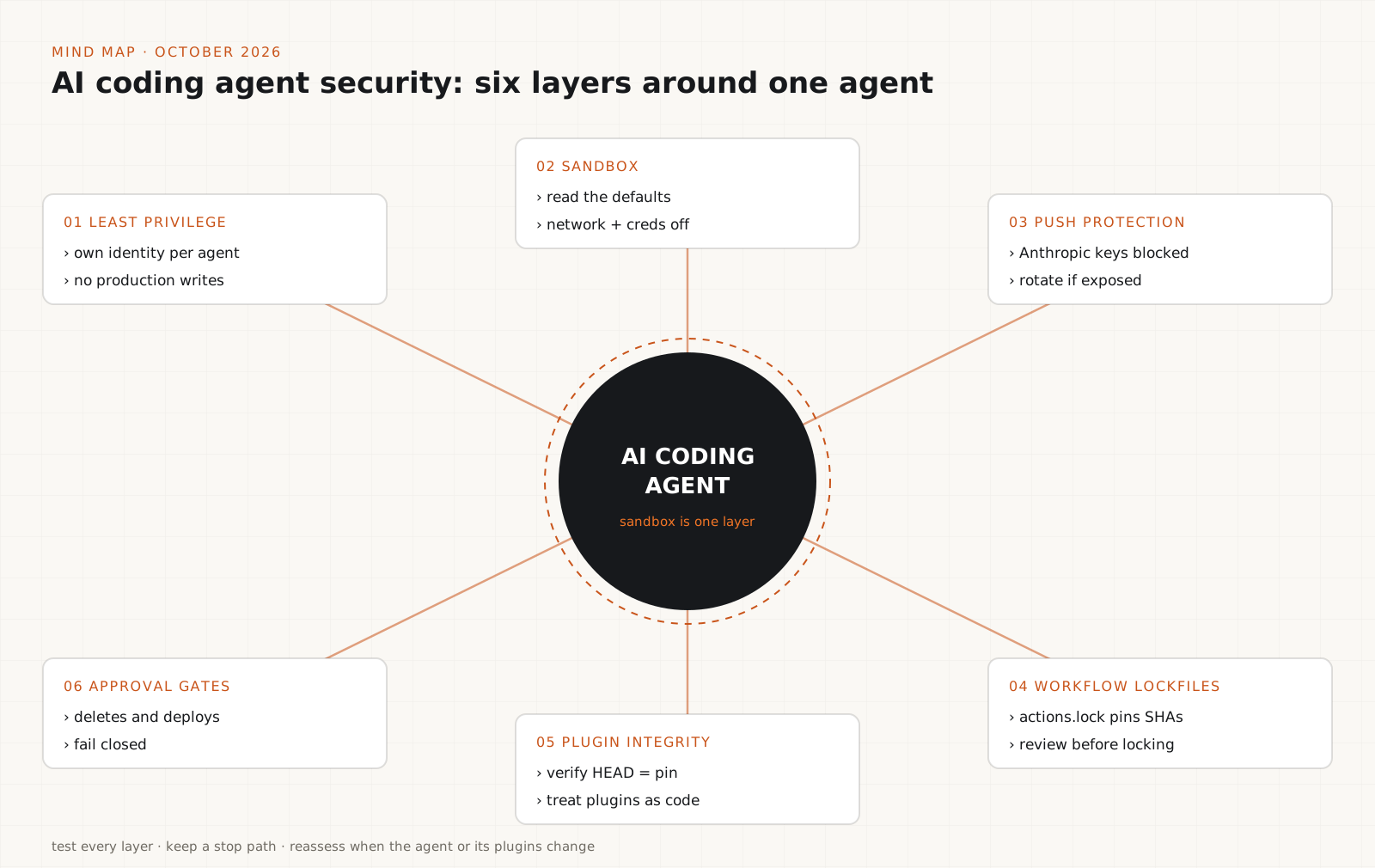
Is a sandbox enough to make an AI coding agent safe? No. Sandboxing is one layer of AI coding agent security, not a guarantee. An agent can still edit the wrong files inside its workspace, push a live API key, run a CI pipeline that pulls changed third-party code, or install a plugin that is not what it claims to be. This week GitHub shipped two new controls for exactly these gaps: push protection that blocks Anthropic API keys by default (13 October 2026) and workflow dependency lockfiles in public preview (14 October 2026). It also now documents local sandbox settings for Copilot. Add the Plugin4Shell disclosure from September and the picture is clear. Limit the agent's authority, isolate its execution, protect credentials, verify dependencies and put a human in front of high-impact actions. This guide covers what each control does, what it does not do and what to check.
System requirements
Who should read this
Developers and teams running AI coding agents
Claude Code, GitHub Copilot, Codex and similar tools that can read a repo, run commands, install packages and push changes. No security background needed.
What you need
A GitHub repository and the coding agent you already use
Push protection needs secret scanning enabled on the repository. Workflow lockfiles need the GitHub CLI and a plan in the public preview: Free, Team, or Enterprise Cloud.
Platforms
Windows, macOS and Linux
The GitHub CLI runs on all three. Copilot's local sandbox has platform requirements: a recent Windows 11 build with a specific update on Windows and Bubblewrap plus slirp4netns on Linux.
Cost
No extra cost for the controls covered here
Push protection for Anthropic keys applies in repositories with secret scanning enabled, including free public repositories. Workflow lockfiles are a public preview, so terms can change.
Facts checked
15 October 2026
Feature details were checked against GitHub Docs, the GitHub Changelog and AIR Security's Plugin4Shell disclosure. Confirm preview availability before you rely on it.
Why does AI coding agent security need more than one layer?
Every capability you give an agent is another boundary to protect. Start by limiting its authority.
A coding agent does not just suggest code. It reads files, runs shell commands, installs dependencies, runs tests and opens pull requests. Ask it to fix a failing test and it might make the right change. It might also edit unrelated files, run an unsafe script, or read a credential it finds in the environment. Instructions hidden in a README or a dependency can steer it further.
OWASP calls this excessive agency: a system given more functionality, permissions, or autonomy than its task needs. The fix is not a better model. It is a smaller blast radius. Give the agent access to the repositories and directories the task needs, use separate identities for development and production, restrict network and credential access and log what it does.
No single control covers all of that. The rest of this guide takes the controls one boundary at a time: execution (sandbox), secrets (push protection), CI (workflow lockfiles), extensions (plugin pinning) and high-impact actions (approval gates).
Tip
Write one sentence per agent: the most damaging thing it can do right now without a human approving it. That sentence tells you which layer to fix first.
Sandboxing: check the defaults, not just the toggle
A sandbox limits what the agent's commands can reach. Its protection is only as good as its effective settings.
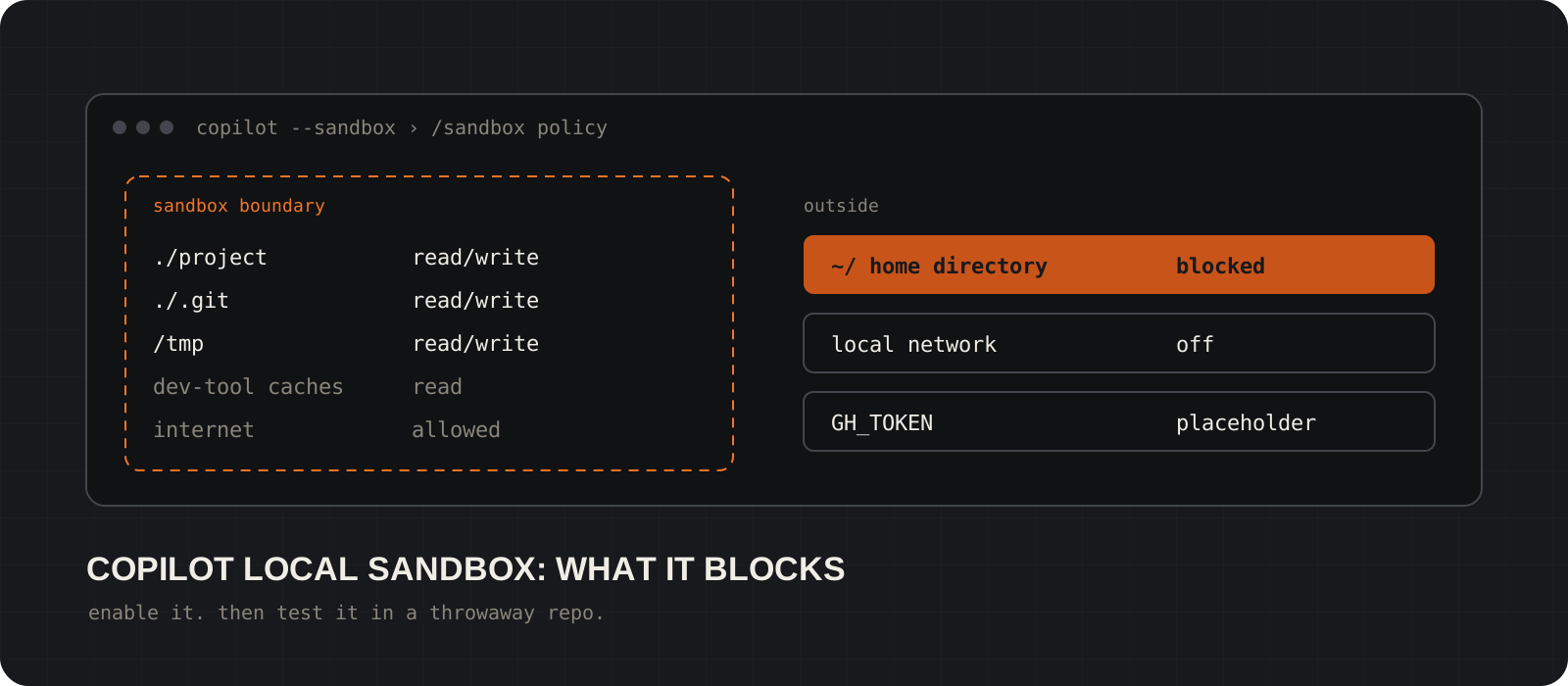
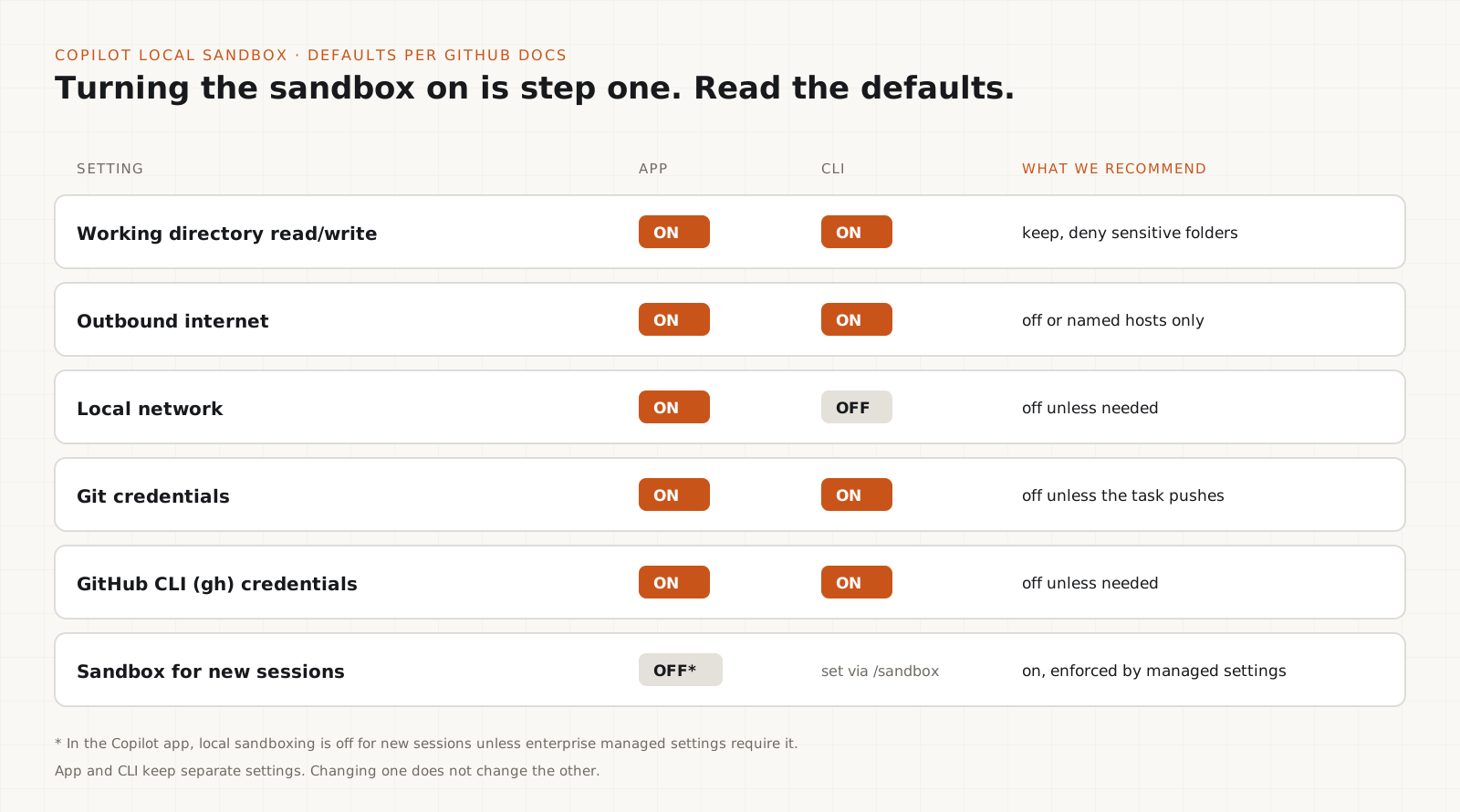
GitHub documents local sandbox settings for the GitHub Copilot app and Copilot CLI. You can control filesystem access, outbound internet, local network access and whether Git and GitHub CLI credentials are available to sandboxed commands.
Read the defaults. Per GitHub's documentation, the sandbox allows read and write access to the working directory, leaves outbound internet on and keeps Git and GitHub CLI credentials available. The app allows local network access by default; the CLI does not. In the Copilot app, local sandboxing is off for new sessions unless enterprise managed settings require it.
The app and the CLI keep separate settings. Changing one does not change the other and the CLI does not read repository-level sandbox settings. A policy you set in one place will not follow a developer into the other tool.
GitHub says that when the host cannot enforce the requested policy, the sandboxed shell fails with an error instead of running unsandboxed. Test that on the machines your team uses rather than assuming it.
What to check: workspace-only file access with sensitive folders denied, outbound network off or limited to named hosts, Git and gh credentials off unless the task pushes, managed settings that override local ones and a deliberate test that a blocked action is really blocked.
/sandboxdocker run --rm -it \
--network none \
--cap-drop ALL \
-v "$PWD:/work" \
-w /work \
agent-sandbox:latestPush protection: stop API keys before they reach the repository
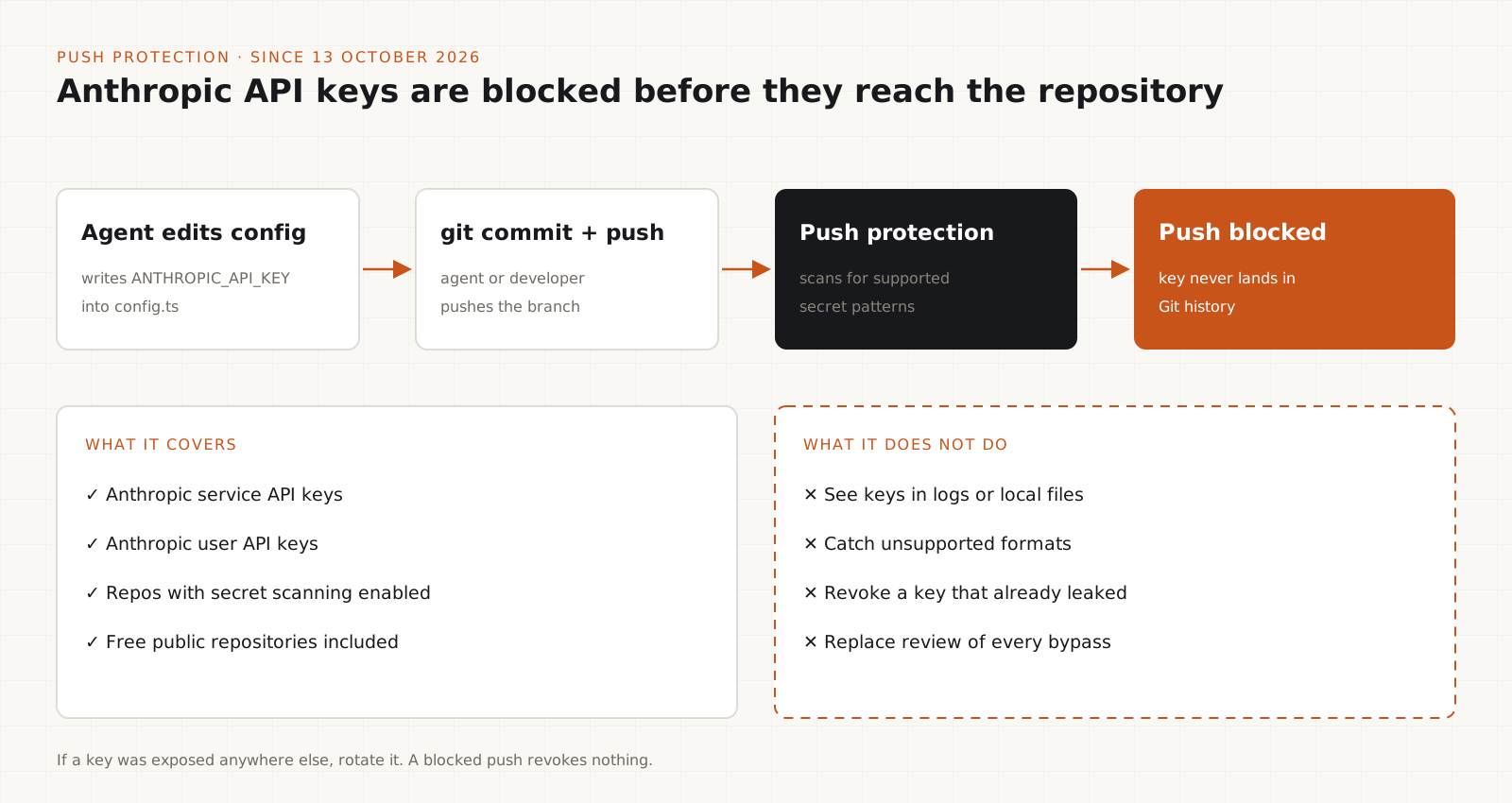
Since 13 October 2026, GitHub blocks Anthropic API keys at push by default in repositories with secret scanning enabled.
Coding agents write config files, examples and debugging code. Any of those can carry a live API key into a commit. Once pushed, the key stays in Git history even after the visible file is fixed.
GitHub added secret scanning detectors for Anthropic service API keys and Anthropic user API keys and turned on push protection for both by default in repositories with secret scanning enabled, including free public repositories. Push protection checks a push for supported patterns and blocks it before the secret lands. That is prevention, not an alert you read afterwards.
Know the limits. It only matches supported patterns in the pushes it covers. It does not see keys in local files, logs, chat transcripts, CI output, or unsupported formats. A blocked push also revokes nothing. If the key was exposed anywhere else, rotate it.
What to check: secret scanning and push protection are on for every repository an agent can push to; live keys come from a secret store or injected environment, never from committed .env files or test fixtures; and every bypass is reviewed by a person.
Tip
Give agents a scoped key with a spending limit, never your personal key. If push protection fires on it, rotate first and investigate second.
Workflow lockfiles: protect the CI/CD supply chain
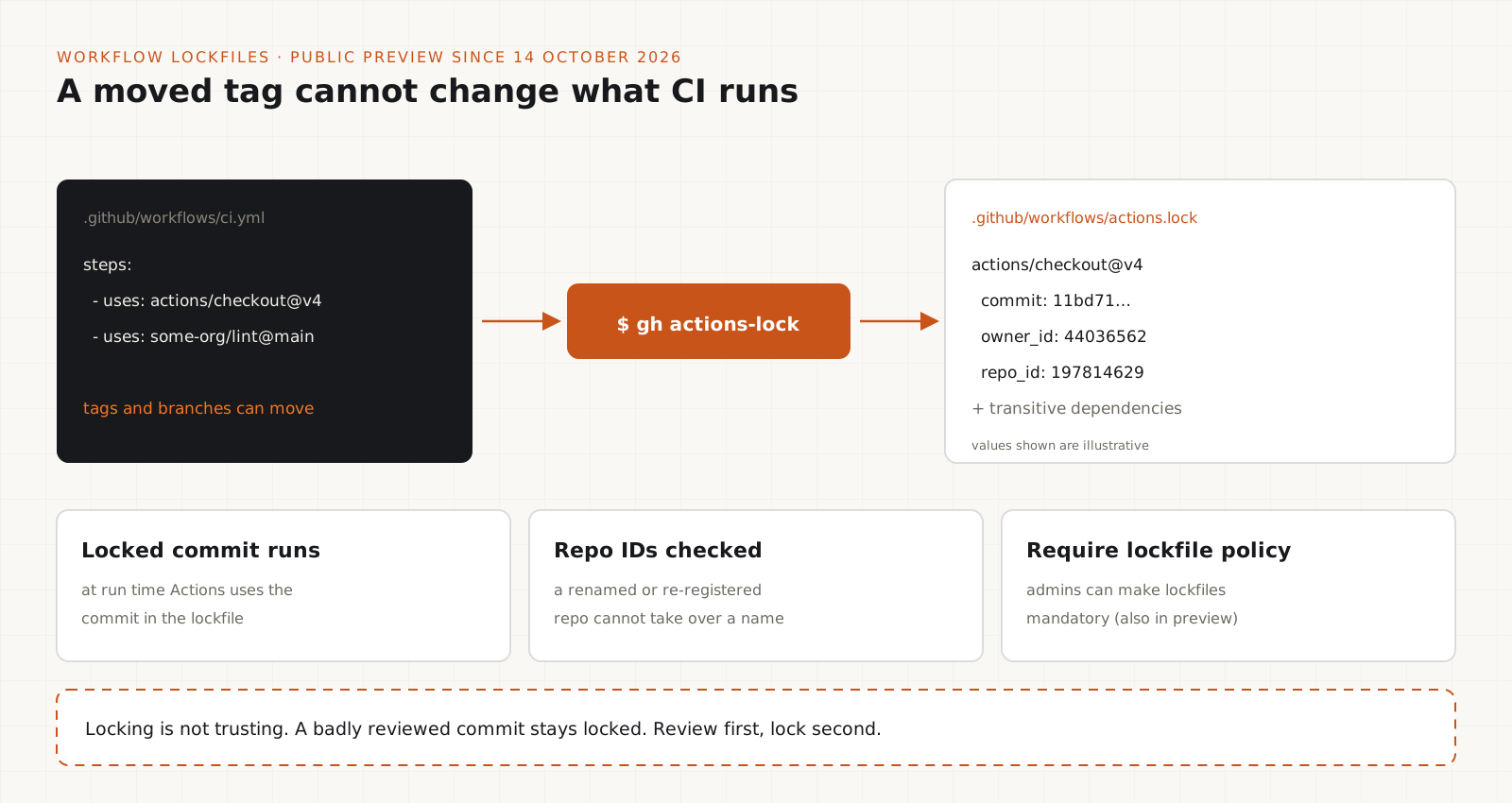
Public preview since 14 October 2026. A lockfile records the exact commit each GitHub Action resolves to, so a moved tag cannot change what runs.
An agent's change is tested and shipped by your workflows. Those workflows usually reference actions by tag or branch, such as v4 or main. Tags and branches move. A run next week can execute different code from what someone reviewed today.
GitHub's workflow dependency lockfiles are in public preview for Free, Team and Enterprise Cloud plans. The gh actions-lock CLI extension writes .github/workflows/actions.lock, which maps each action reference to a commit SHA and to the source repository's numeric owner and repo IDs. At run time Actions uses the locked commit and checks the IDs, so a renamed or re-registered repository cannot take over a name. Transitive dependencies of your actions are covered too. A Require lockfile policy, also in preview, lets administrators make lockfiles mandatory.
A lockfile makes resolution consistent. It does not make a dependency trustworthy. If a malicious commit is approved and locked, the lockfile will run it every time. Review first, lock second and route lockfile changes through code-owner or security review.
Roll it out gradually: generate the lockfile, read the diff, onboard workflows that use third-party actions first, then turn on the require policy. Do not edit the file by hand; rerun the extension. Reusable workflows are locked by the repository that defines them.
gh extension install github/gh-actions-lockgh actions-lockWhy pinning alone is not enough: the Plugin4Shell lesson
A pinned reference only helps if something verifies that the code you got is the code you pinned.
On 17 September 2026 AIR Security published Plugin4Shell, a plugin SHA-pinning bypass in several AI coding agents. The agents checked out the pinned commit but never confirmed the checkout produced that commit. An attacker who controlled a plugin repository could create a branch named after the pinned 40-character SHA and Git resolved the checkout to the branch. Background auto-update meant the swap needed no click.
Per AIR's disclosure, Anthropic fixed Claude Code in version 2.1.179 and OpenAI fixed Codex in version 0.146.0. AIR reported that GitHub Copilot had no fix at publication and that Google had deprecated Gemini CLI rather than patch it. Vendor status changes, so check current advisories before acting on these details.
Do not assume workflow lockfiles fix Plugin4Shell. Lockfiles protect GitHub Actions resolution in CI. Plugin4Shell was about how agents install plugins on a developer machine. Different boundary, different control.
What to check: install plugins only from sources you can assess, review the permissions each requests, turn off auto-update where the risk is not acceptable, keep agent software updated and treat every extension as executable code.
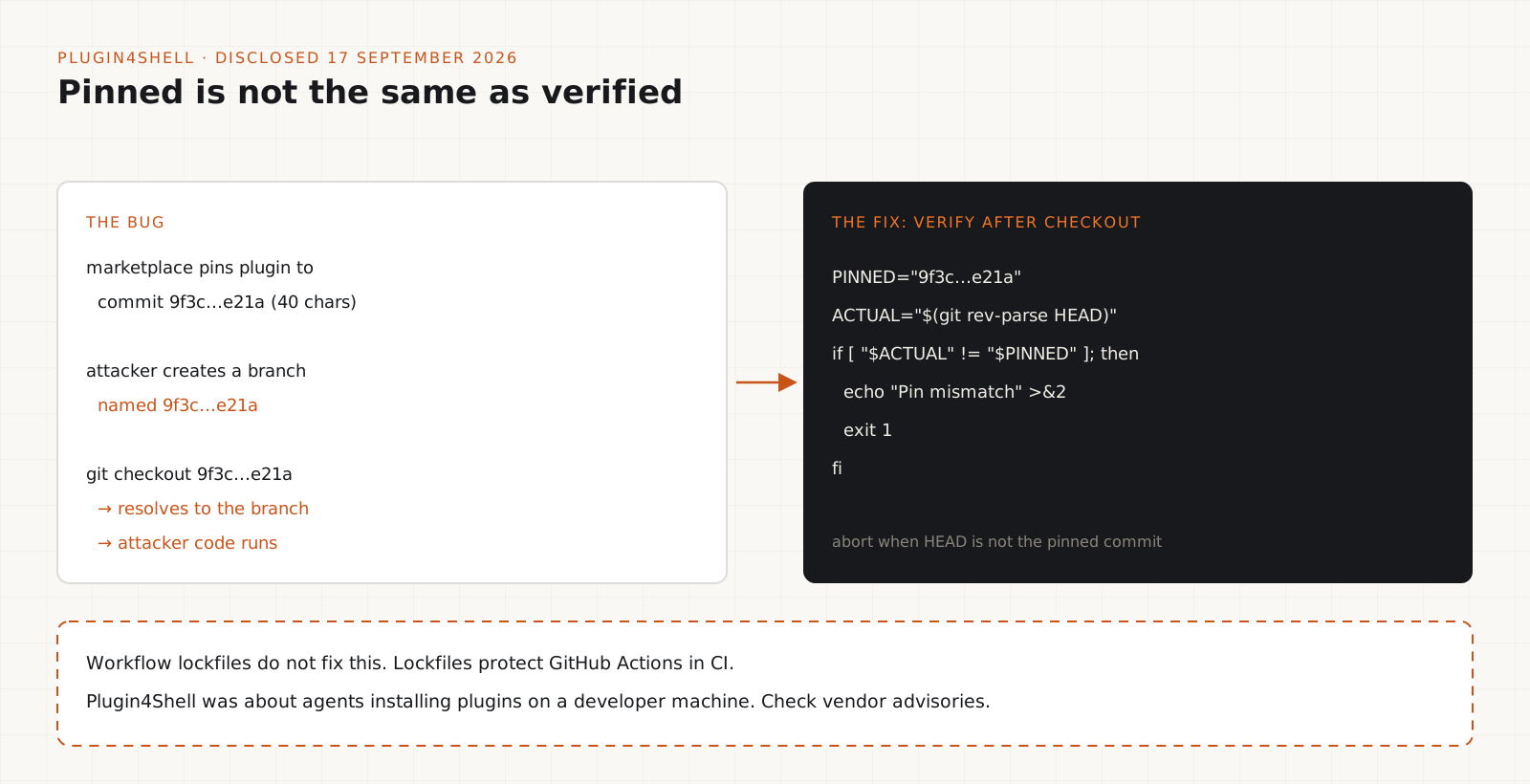
PINNED="<40-character-sha>"
ACTUAL="$(git -C path/to/plugin rev-parse HEAD)"
if [ "$ACTUAL" != "$PINNED" ]; then
  echo "Pin mismatch: $ACTUAL" >&2
  exit 1
fiHuman approval gates for high-impact actions
Let routine work flow inside the sandbox. Put a person in front of anything destructive or external.
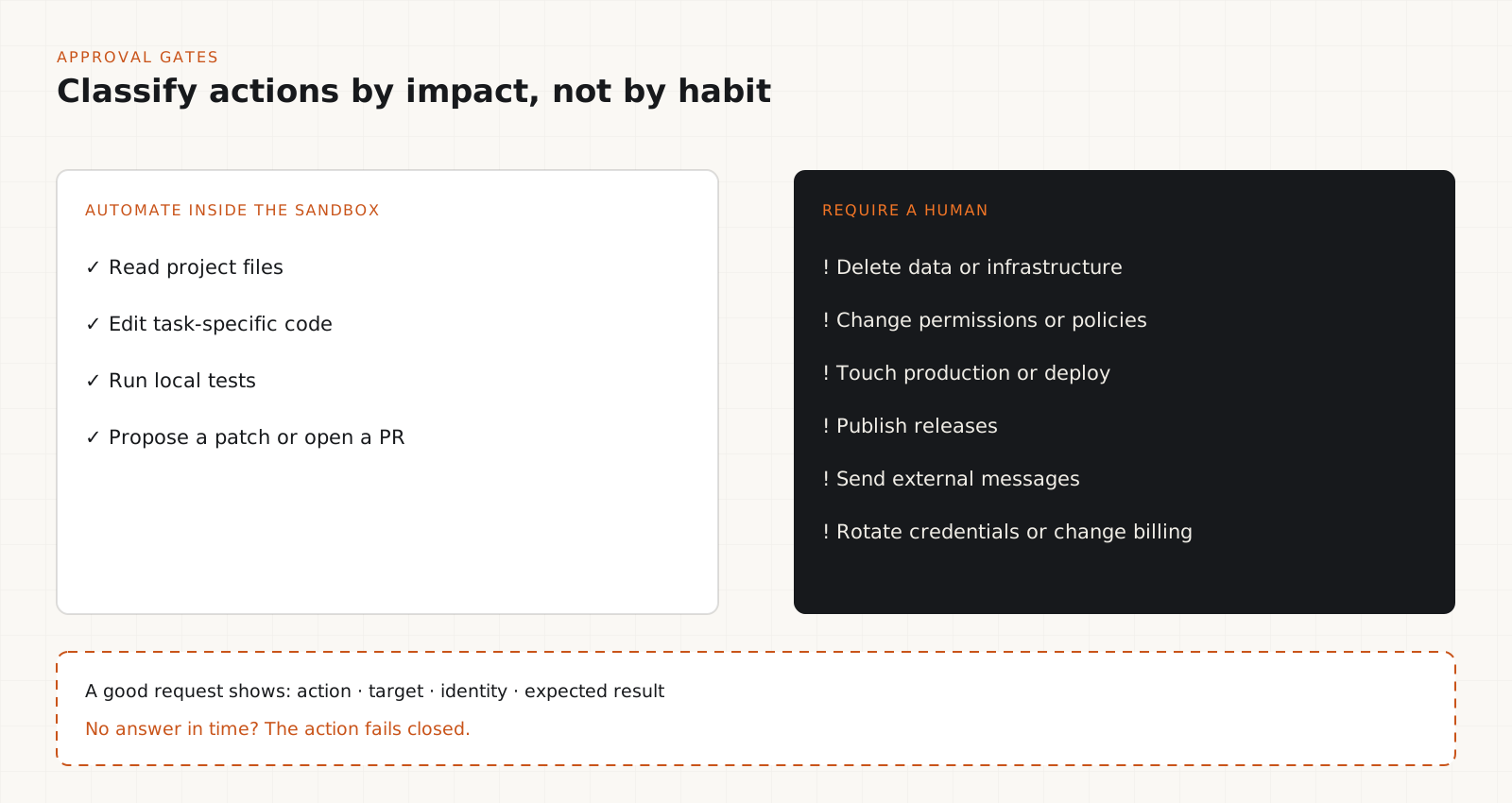
Approving every file edit makes an agent useless. Approving nothing makes it dangerous. Classify actions by impact instead.
Usually fine to automate inside a sandbox: reading project files, editing task-specific code, running local tests and proposing a patch. Needs explicit review: deleting data or infrastructure, changing permissions or security policies, touching production, publishing releases, sending external messages and rotating credentials or changing billing.
An approval request should show the action, the target, the identity in use and the expected result. If reviewers approve without reading, the gate is too wide. When approval is required but nobody answers, the action fails closed.
A sandbox limits where the agent runs. A gate controls specific actions. You need both.
{
  "permissions": {
    "allow": ["Bash(pnpm test*)", "Bash(git diff*)"],
    "ask": ["Bash(git push*)", "Bash(terraform apply*)"],
    "deny": ["Bash(rm -rf*)", "Bash(terraform destroy*)"]
  }
}
Tip
Pattern rules catch the obvious cases. They do not replace identity limits, because an agent can reach the same outcome through a script or SDK the pattern does not match.
Test the controls and keep a stop path
A demo proves the agent can do the task. A test proves it cannot exceed it.
Run the agent with the exact settings you plan to use and try to make it misbehave. Ask it to add a real API key to a config file and push. Ask it to fetch something from a host outside your allowlist. Give it a README with instructions to delete files. Each attempt should hit the sandbox, push protection, or an approval prompt. Record which control stopped it.
Keep a stop procedure: disable the agent, revoke its session and tokens, rotate credentials and quarantine the workspace without waiting for its current plan to finish.
Log commands, file changes, tool calls, approvals and deployments. Rerun the tests whenever the agent, its plugins, or its environment changes.
Which control covers which risk
| Control | What it covers and what it does not |
|---|---|
| Least-privilege identity | Limits what any mistake can reach. Does not stop a mistake inside the allowed scope. |
| Local sandbox (Copilot app and CLI) | Limits files, network and credentials for agent commands. Defaults still allow workspace writes, internet and Git credentials. |
| Push protection for Anthropic keys | Blocks supported key patterns before they reach GitHub. Does not cover logs or local files and does not revoke an exposed key. |
| Workflow lockfiles (public preview) | Keeps Actions on reviewed commits. Does not make a locked commit safe and does not cover agent plugins. |
| Plugin pin verification | Confirms the installed code is the pinned commit. Does not tell you whether that commit is trustworthy. |
| Human approval gate | Stops high-impact actions until a person decides. Only works with real context and a fail-closed default. |
AI coding agent security checklist
- Define which repositories, files, tools and plugins the agent may use.
- Use least-privilege identities and keep production credentials separate.
- Configure and test filesystem, network and credential restrictions.
- Enable secret scanning and push protection on every repo the agent can push to.
- Keep API keys and tokens out of source code, fixtures and committed .env files.
- Review third-party actions, plugins, skills and dependencies before trusting them.
- Lock workflow dependencies where the preview is available and verify plugin pins.
- Require human approval for destructive and production-impacting actions.
- Log commands, file changes, tool calls, approvals and deployments.
- Test unsafe scenarios and confirm each control blocks or contains them.
- Keep a stop procedure for disabling the agent, revoking access and rotating credentials.
- Reassess whenever the agent, its integrations, or the environment changes.
The trade-offs worth knowing
- Tighter sandboxes break tasks that need packages or APIs. Use a named allowlist or an internal mirror instead of opening the network.
- Push protection has false positives and the bypass is one click away. Decide who may approve a bypass before the first one happens.
- Lockfiles add a file to review on every dependency update and the feature is still in preview. Expect tooling to change.
- Approval gates cost time and attention. Keep the gated list short so reviewers read what they approve.
- None of these controls is on for every organization just because it was announced. Check what is enabled in your own repos and machines.
Our verdict
The October 2026 controls are worth turning on. Push protection and lockfiles are cheap and reading your sandbox defaults takes ten minutes. But each one covers a single boundary and Plugin4Shell is the reminder that every control rests on an assumption somebody has to verify.
Do not trust an agent more because it writes better code. Make sure that when it gets something wrong, the permissions, the sandbox and the review process stop the mistake from becoming an incident.
My verdict: treat the sandbox as one layer. Give every coding agent least-privilege access, read and tighten the sandbox defaults, turn on push protection everywhere an agent can push, lock and review your CI actions, treat plugins as code and keep a human in front of deletes, deploys and anything touching production.
Frequently asked questions
Does sandboxing make an AI coding agent safe?+
No. A sandbox limits what the agent's commands can reach, which reduces the damage from a mistake. It does not stop the agent from editing the wrong files in the workspace, leaking a key it can read, or using credentials the sandbox leaves available. Combine it with least-privilege access, secret protection and approval gates.
Does GitHub block Anthropic API keys now?+
Yes. Since 13 October 2026, push protection blocks Anthropic service and user API keys by default in repositories with secret scanning enabled, including free public repositories. It only catches supported patterns in pushes it covers. If a key was exposed anywhere else, rotate it.
Who can use GitHub Actions workflow lockfiles?+
According to GitHub's 14 October 2026 changelog, workflow lockfiles are in public preview for GitHub Free, Team and Enterprise Cloud plans, including Enterprise Cloud with data residency. Preview terms can change, so confirm in the docs before enforcing the Require lockfile policy.
Do workflow lockfiles fix Plugin4Shell?+
No. Lockfiles control which commits GitHub Actions run in CI. Plugin4Shell affected how coding agents install and update plugins on a developer machine. Update your agent software, check vendor advisories and verify plugin pins separately.
What are the Copilot local sandbox defaults?+
Per GitHub Docs: read and write access to the working directory, outbound internet on and Git and GitHub CLI credentials available. Local network is on in the Copilot app and off in the CLI. App and CLI settings are separate.
Which actions should always need human approval?+
Deleting data or infrastructure, changing permissions or security policies, touching production, publishing releases, sending external messages and rotating credentials or changing billing. If nobody approves, the action should fail closed.