GitHub Copilot's Local Sandbox: What It Blocks and What Developers Should Check
Learn how GitHub Copilot's local sandbox restricts filesystem, network, and credential access for agent-run commands, and how to test those limits yourself before you trust them.
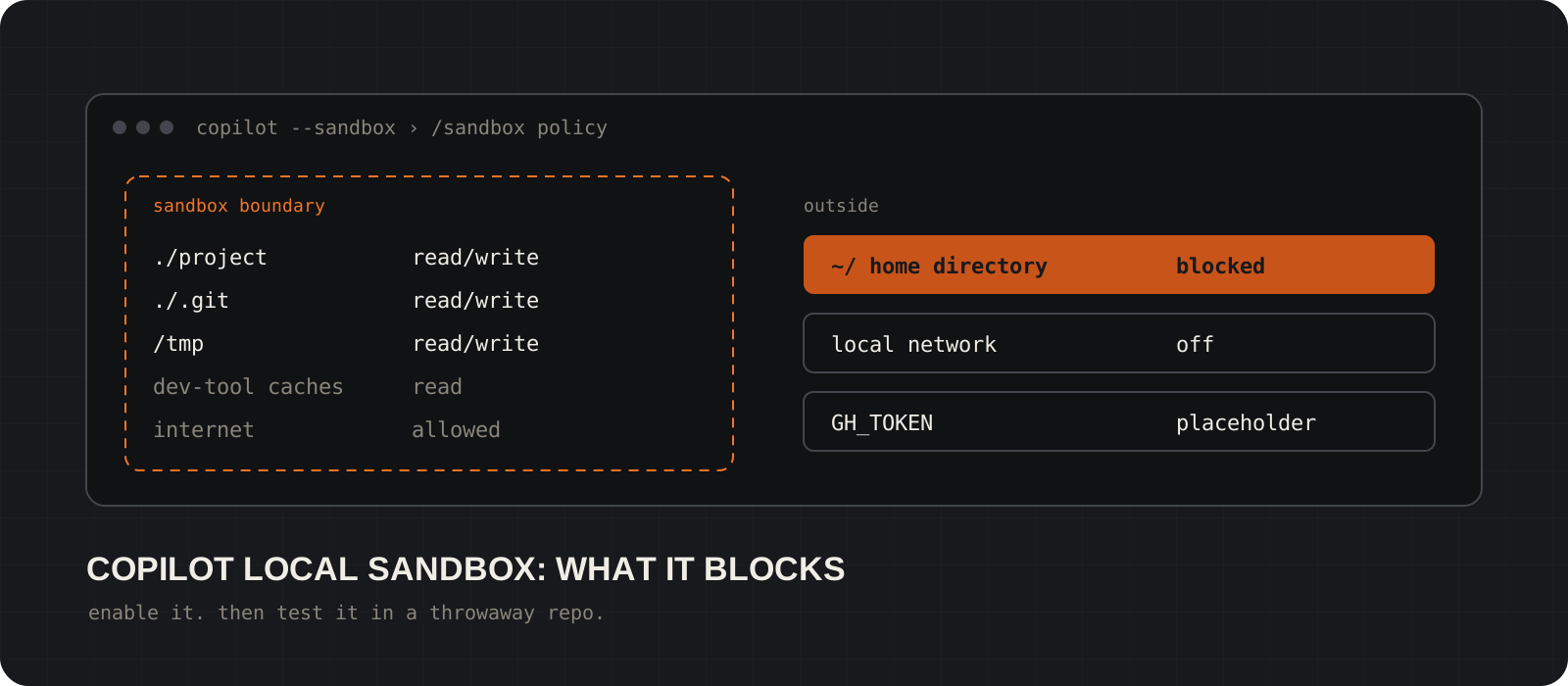
GitHub Copilot's local sandbox limits what agent-run commands can touch on your machine. With it on, a command Copilot runs can write to your project folder but not your home directory, cannot reach your local network by default, and sees placeholder Git and GitHub CLI tokens instead of the real ones. That cuts the damage a bad command can do. It does not make every agent action safe, and the limits depend on your operating system and your settings. This guide covers what the sandbox restricts, how to turn it on in Copilot CLI, and four tests to run in a throwaway project before you rely on it.
System requirements
Copilot access
A GitHub Copilot plan, signed in to Copilot CLI or the app
The sandbox is a local feature of the client. Check GitHub's docs for current plan and policy requirements; enterprise owners can require or restrict it.
Copilot surface
Copilot CLI or the GitHub Copilot app
Both support local sandboxing. VS Code has its own sandbox settings, documented separately by VS Code. The app cannot sandbox cloud sessions or sessions on a remote host.
Windows
Windows 11 25H2 (KB5124010+) or 26H1 (KB5124006+)
The OS must support the BaseContainer tier of the ProcessContainer backend. Some features, such as denied paths and localhost access, need a supported version or the command fails.
Linux
Bubblewrap (bwrap) 0.5.0+ and slirp4netns
Both must be on your PATH. Install them from your distribution's package manager.
macOS
No extra packages listed
GitHub does not list prerequisites for macOS. Keychain access is off by default inside the sandbox.
Test project
A disposable folder with dummy credentials
Our recommendation, not a GitHub rule. Run every test below away from real repositories and real secrets.
What does GitHub Copilot's local sandbox do?
It puts a boundary around the commands and tools Copilot runs: files, network, and credentials.
AI coding agents write code, run terminal commands, edit files, and call external services. That is useful right up until the agent runs a command you did not intend, or reads something it had no reason to read. The local sandbox restricts the resources those agent-run operations can reach.
It works in four areas. Filesystem: which folders a command can read or write. Network: whether a command can reach the internet, your local network, or specific hosts. Credentials: Git and GitHub CLI tokens, plus any environment variables you choose to mask. Permission requests: what happens when a command needs more access than the policy allows.
The defaults below come from GitHub's documentation for Copilot CLI. Your effective policy can differ by operating system, enterprise policy, and your own settings, so check it with /sandbox policy rather than trusting the defaults table further down.
Tip
Most commands and tools Copilot invokes run inside the sandbox, including local MCP servers and language servers by default. Remote MCP servers are a different story; see the limitations section.
How do you turn on the sandbox in Copilot CLI?
Install the OS prerequisites, then enable it with /sandbox enable or the --sandbox flag.
On Linux, install Bubblewrap and slirp4netns first. Windows and macOS need no extra packages, but Windows must be on a supported build (see the requirements above).
Inside Copilot CLI, run /sandbox enable. The choice is saved as sandbox.enabled in ~/.copilot/settings.json, and the status line shows sandbox enabled. To try it for one session without saving anything, start Copilot with --sandbox. Already-open sessions need a restart (copilot --continue) or their own /sandbox enable.
Sandbox settings live in your personal settings file only. GitHub does not support them in repository-level settings files, so a repo cannot quietly loosen your sandbox. In the Copilot app, the switch is the Sandbox new sessions toggle under Settings > Projects > your project > Sandbox. App and CLI settings are separate.
sudo apt install bubblewrap slirp4netns
bwrap --versionsudo dnf install bubblewrap slirp4netns
bwrap --versioncopilot --sandbox/sandbox enable
/sandbox status
/sandbox policy
/sandbox configTest 1: does the filesystem restriction hold?
Put a harmless file outside the workspace, ask Copilot to read and change it, and confirm it is untouched.
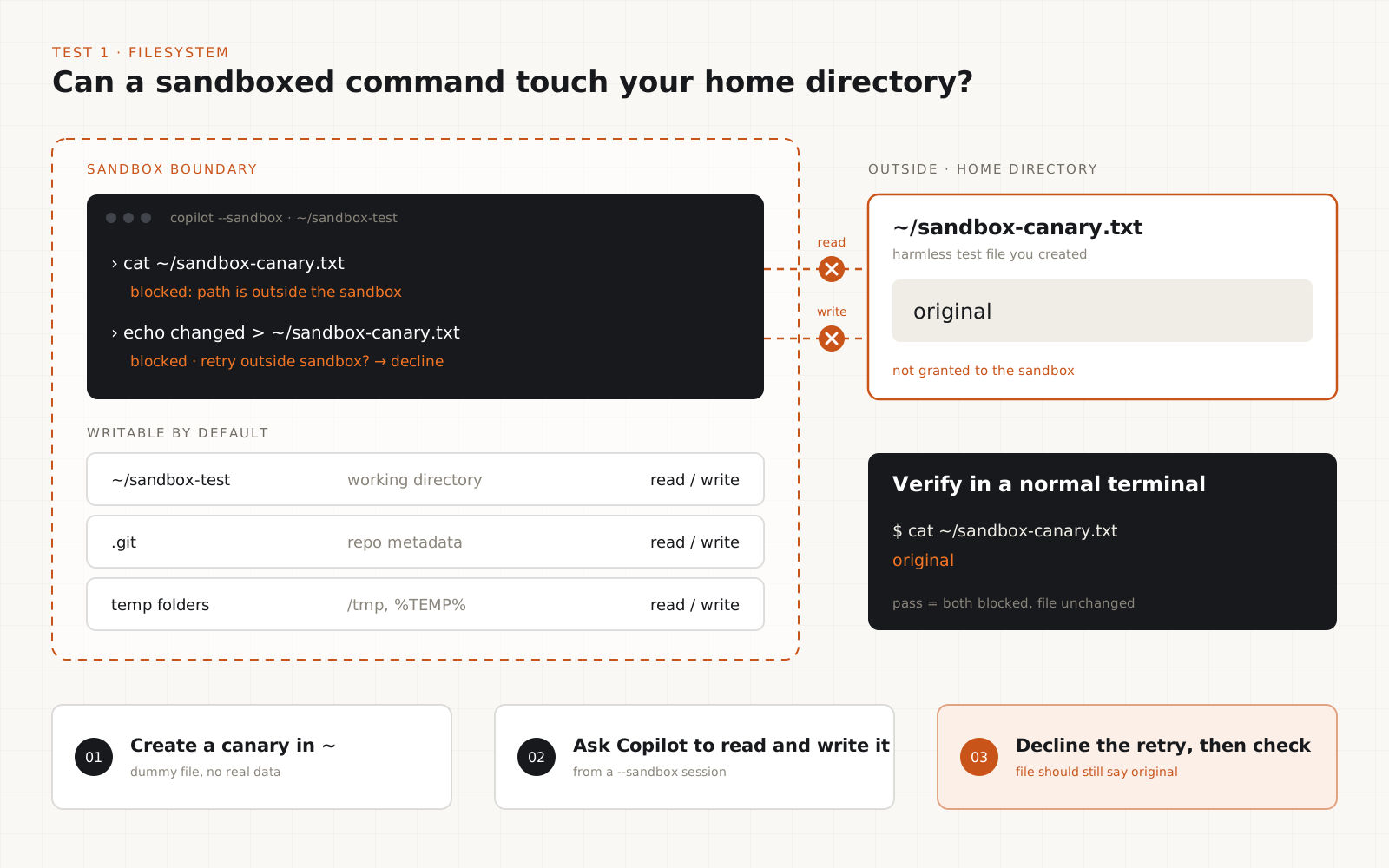
By default a sandboxed command can write to the current working directory and temp folders. In a Git repository it can also write .git, while the rest of the repo above the working directory is read-only. Your home directory is not granted. Note that /add-dir adds a folder to Copilot's context but does not grant sandbox access to it.
Create a test project and a canary file in your home directory. Start Copilot with --sandbox from inside the test project, then ask it to run: cat ~/sandbox-canary.txt, and then: echo changed > ~/sandbox-canary.txt (on Windows, Get-Content and Set-Content on the same path).
Expected result: both are blocked. Copilot may offer to retry outside the sandbox. Decline for this test. Then, in a normal terminal outside Copilot, check that the file still says original.
mkdir ~/sandbox-test && cd ~/sandbox-test && git init
echo "original" > ~/sandbox-canary.txtNew-Item -ItemType Directory $HOME\sandbox-test; Set-Location $HOME\sandbox-test; git init
Set-Content $HOME\sandbox-canary.txt "original"cat ~/sandbox-canary.txtGet-Content $HOME\sandbox-canary.txtTip
Allow dev tool access is on by default. It gives read access to package-manager and developer-tool configs, which can include stored tokens. If your test needs a strict filesystem, turn it off on the Filesystem tab and see what breaks.
Test 2: does the network policy match what you configured?
Test outbound internet and local network separately, against endpoints you control.
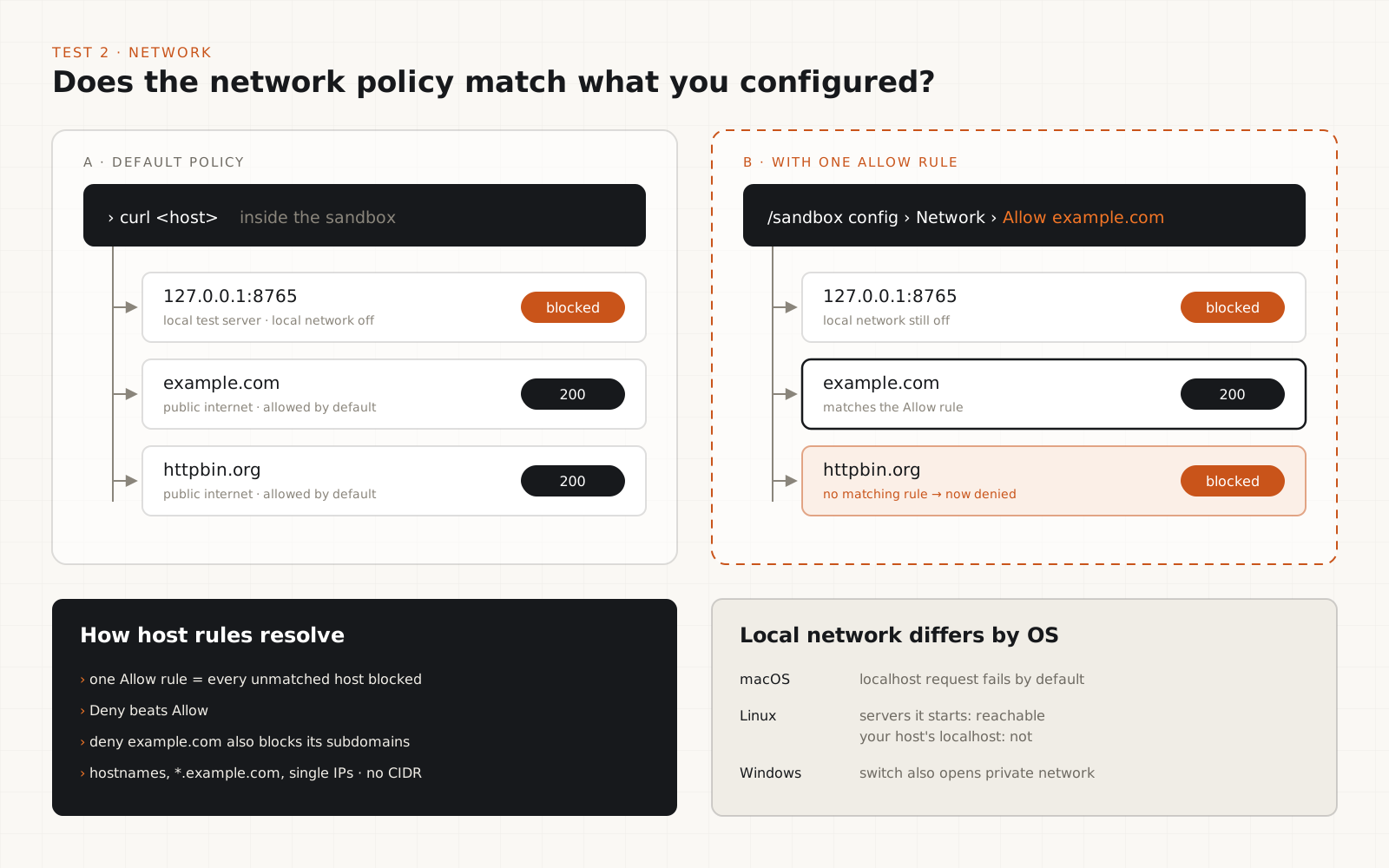
In Copilot CLI, outbound internet is allowed by default and local network access is off. Test them as two separate questions.
For local network, start a small web server in a normal terminal, then ask the sandboxed Copilot session to curl it. With the default settings on macOS, the request should fail. Behaviour differs by OS: on Linux, commands can reach servers they start themselves but not your host's localhost, and on Windows the local-network switch also opens private-network access.
For outbound internet, add a host rule on the Network tab of /sandbox config. Once any Allow rule exists, every unmatched host is blocked. Deny beats Allow, and denying example.com also blocks its subdomains. Add an Allow rule for one host, then curl that host and a second one. Only the first should succeed.
python3 -m http.server 8765py -m http.server 8765curl -s -o /dev/null -w "%{http_code}\n" http://127.0.0.1:8765
curl -s -o /dev/null -w "%{http_code}\n" https://example.comcurl.exe -s -o NUL -w "%{http_code}\n" http://127.0.0.1:8765
curl.exe -s -o NUL -w "%{http_code}\n" https://example.comTip
Host rules accept hostnames, *.example.com wildcards, and single IP addresses. CIDR ranges are not supported, and *.example.com does not match example.com itself.
Test 3: are credentials masked the way you expect?
Use a dummy token and watch where the real value is, and is not, delivered.
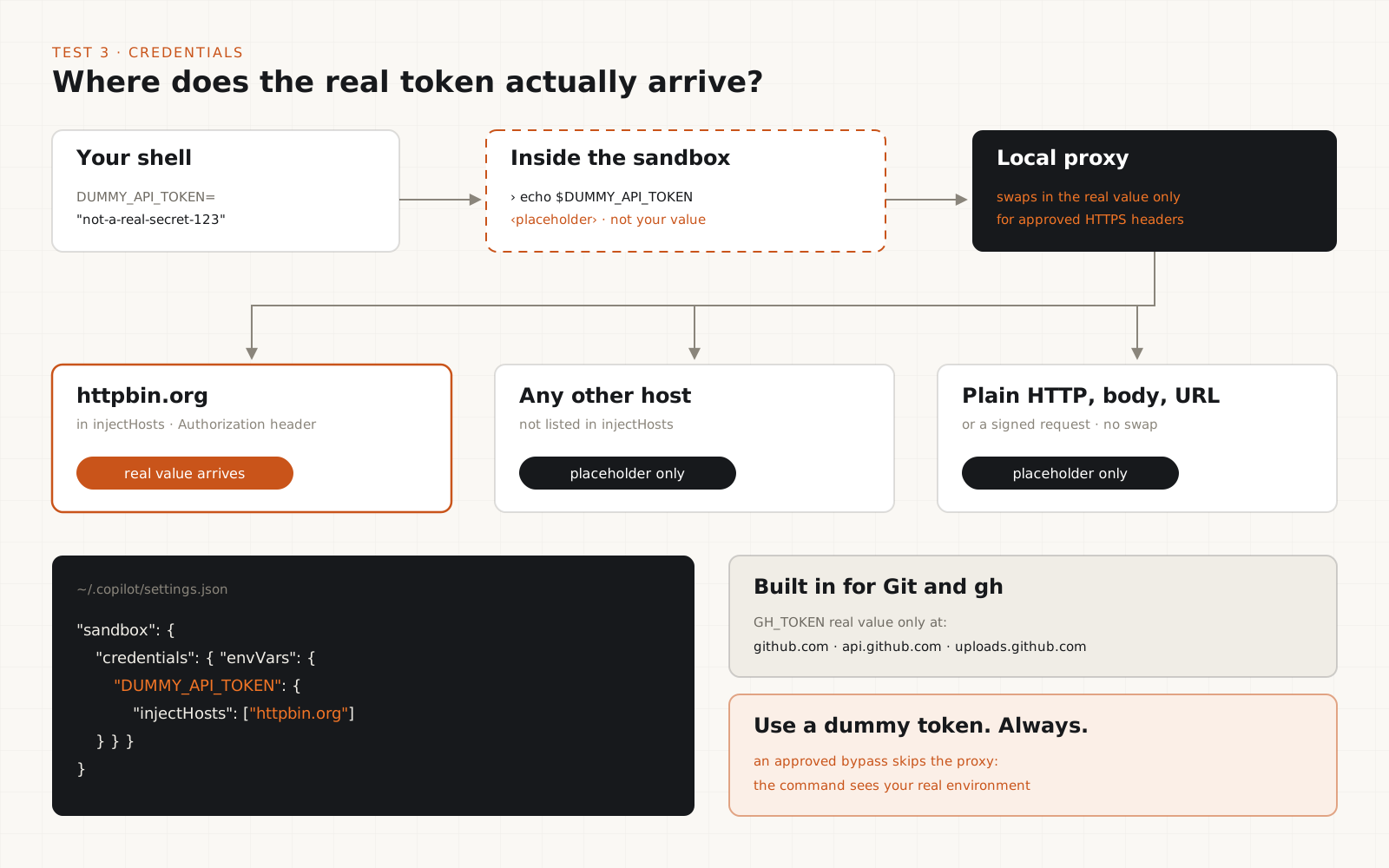
Git and gh authentication are on by default. Commands get placeholder credentials, and a local proxy swaps in the real ones only for approved HTTPS destinations. The gh token is delivered only to github.com, api.github.com, and uploads.github.com. Git credentials keep their original host, port, and repository path.
You can mask other variables too. Set a dummy variable before you start Copilot, add it to the sandbox credentials config with the one host allowed to receive it, and restart the session. Inside the sandbox, ask Copilot to echo the variable: it should print a placeholder, not your value.
Then send it in an Authorization header to a header-echo service. The real value should arrive only at the host you listed. Masking works only for HTTPS headers such as Authorization or X-Api-Key, or an HTTP Basic password. Plain HTTP, request bodies, URLs, and signed requests never get the real value.
{
  "sandbox": {
    "enabled": true,
    "credentials": {
      "envVars": {
        "DUMMY_API_TOKEN": {
          "injectHosts": ["httpbin.org"]
        }
      }
    }
  }
}export DUMMY_API_TOKEN="not-a-real-secret-123"
copilot --sandbox$env:DUMMY_API_TOKEN = "not-a-real-secret-123"
copilot --sandboxTip
Never use a production secret for this test. On Windows, masking needs Allow local network turned on, which also permits private-network access. If curl fails with a certificate error on macOS or Windows, look at /sandbox ca trust.
Test 4: what happens when a command asks to bypass the sandbox?
Trigger a block on purpose, read the prompt, and understand what approving it gives away.
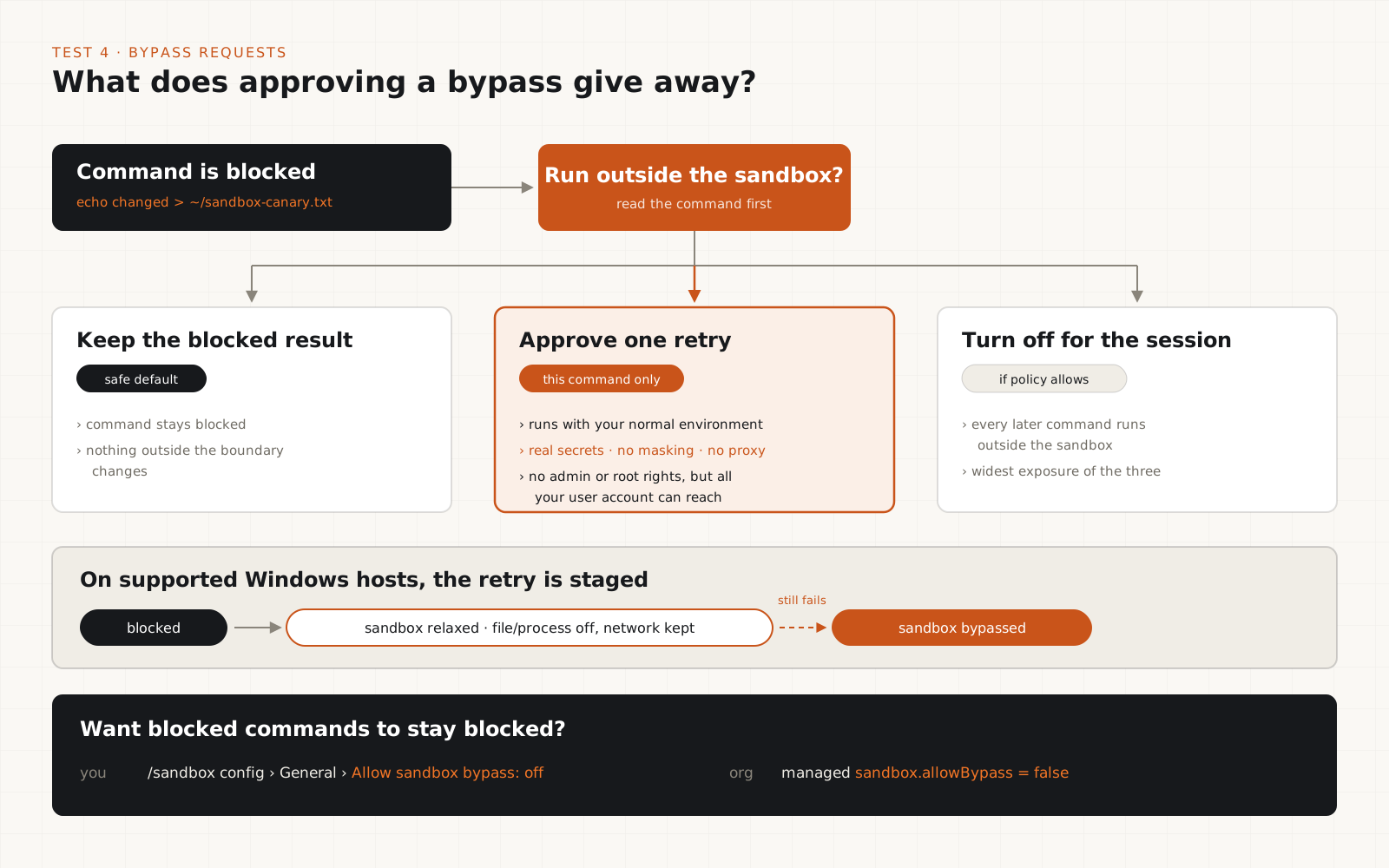
When a command fails and the failure looks like the sandbox's doing, Copilot can offer to retry it with broader access. You can approve one retry, keep the blocked result, or turn the sandbox off for the rest of the session if policy allows. In the Copilot app, the prompt reads Run outside the sandbox?
Rerun the canary write from Test 1 and look closely at the prompt before answering. The important detail: an approved bypass skips credential masking and the proxy. The command runs with your normal environment, real secrets included. It does not gain admin or root rights, but it gets everything your user account can reach.
On supported Windows hosts the retry is staged. It first relaxes file and process limits while keeping network limits (sandbox relaxed), and only offers a full bypass (sandbox bypassed) if that still fails.
If you would rather blocked commands stay blocked, turn off Allow sandbox bypass on the General tab. Organizations can enforce this with managed sandbox.allowBypass set to false.
Tip
Write down the configuration, commands, logs, and outcome of each test. Make claims about what the sandbox blocks only from what you observed.
What does the sandbox allow by default?
| Resource | Default in Copilot CLI |
|---|---|
| Current working directory and temp folders | Read / write |
| Rest of the Git repo above the working directory | Read only (.git is read / write) |
| Home directory and other paths | Blocked |
| Dev-tool configs and package caches | Read (caches read / write), on by default |
| Outbound internet | Allowed |
| Local network | Off |
| Git and gh credentials | Placeholders, real token only at approved hosts |
| Sandbox bypass requests | On, each one needs your approval |
These are Copilot CLI defaults from GitHub's documentation, checked on 12 October 2026. Run /sandbox policy to see your effective policy, which also folds in automatic grants and any managed enterprise settings.
What are the limitations?
Sandboxing reduces risk. It does not remove it.
- Configuration matters. Broad filesystem rules or unrestricted outbound network access weaken the protection, and outbound internet is on by default.
- Approved operations can still do damage. A command can delete or rewrite anything inside the permissions it has, including your project folder, even when the sandbox works exactly as designed.
- Not every tool has the same boundary. Shell commands, built-in file operations, local MCP servers, and remote MCP servers run under different models. Remote MCP authentication is not protected by credential masking.
- Bypass changes everything about one command. An approved bypass runs with your real environment and real secrets. Read what the command is before you approve it.
- Some tools will not work through the proxy. Tools that ignore the supplied certificate bundle, need HTTP/2, pin certificates, use client certificates, or sign requests may fail.
- Platform behaviour differs. Local network access, denied paths, and masking all behave differently on Windows, macOS, and Linux.
A quick security checklist
- Confirm sandboxing is enabled and supported: /sandbox status, and the status line shows sandbox enabled.
- Review the effective filesystem permissions with /sandbox policy.
- Restrict network access to what the task needs, using Allow host rules.
- Minimize credential exposure: mask API tokens and set injectHosts to the one host that needs each.
- Read every bypass request before approving, or turn bypass off.
- Check which tools and MCP servers are covered. Remote MCP servers are not masked.
- Run your tests in an isolated project before pointing Copilot at a sensitive repository.
Turn the local sandbox on, run the four tests above once on your own machine, and treat it as one layer of defense next to code review, dependency scanning, secret detection, and least-privilege access. We would also restrict outbound hosts and read every bypass prompt, because those are where the defaults leave the most room.
Frequently asked questions
Is GitHub Copilot's local sandbox on by default?+
No. In Copilot CLI you turn it on with /sandbox enable or the --sandbox flag. In the Copilot app, the Sandbox new sessions toggle is off by default unless enterprise settings require it.
Does the sandbox block internet access?+
Not by default. Copilot CLI allows outbound connections and blocks local network access. To limit the internet, add Allow host rules on the Network tab of /sandbox config. Once one Allow rule exists, unmatched hosts are blocked.
Can a sandboxed command read my GitHub token?+
It sees a placeholder GH_TOKEN. A local proxy substitutes the real token only for requests to github.com, api.github.com, and uploads.github.com. An approved sandbox bypass skips this and runs with your real environment.
Does the sandbox cover MCP servers?+
Local MCP servers run in the sandbox by default (the Sandbox MCP servers setting is on) and receive masked variables as placeholders. Remote MCP authentication is not protected by masking.
Can a repository change my sandbox settings?+
No. GitHub does not support sandbox settings in repository-level settings files. They live in your personal Copilot settings, and enterprise managed policy can only narrow them.
Which operating systems are supported?+
Windows 11 25H2 with KB5124010 or later, or 26H1 with KB5124006 or later. Linux with Bubblewrap 0.5.0+ and slirp4netns on your PATH. macOS is supported with no extra packages listed.