Career-Ops Tutorial: Run the Free AI Job Search Agent with Claude Code or ChatGPT Codex
Install career-ops, connect it to Claude Code, Codex, or a free AI tool, and score jobs, tailor your CV, and track applications, with a clear guide to free and paid plans.
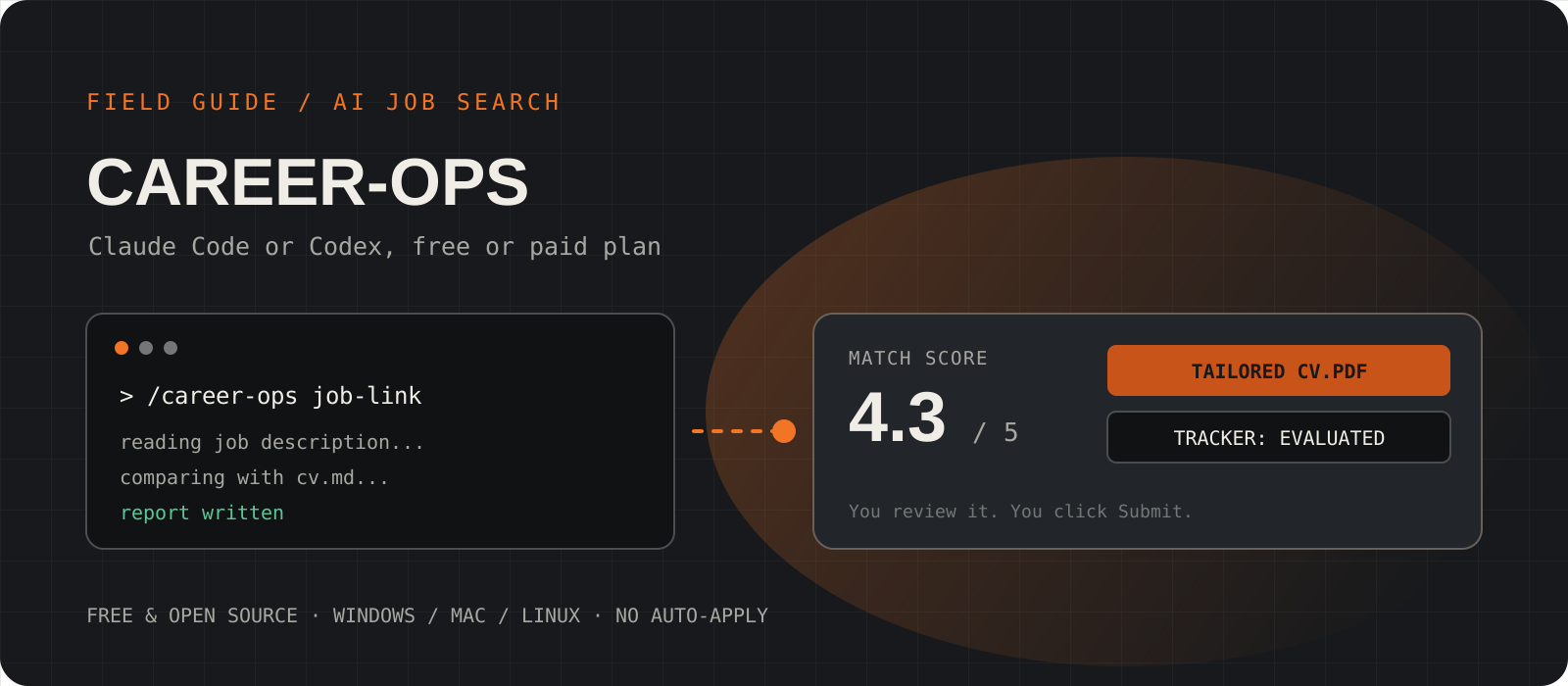
Career-ops is a free, open-source AI job search agent. It runs on your computer inside an AI coding tool such as Claude Code or Codex. You give it your CV and a job link. It scores the job from 1 to 5, writes a report, makes a tailored CV as a PDF, and adds the job to your tracker. It never submits an application for you. This guide sets it up step by step and explains which Claude or ChatGPT plan you need, including the free options.
System requirements
Software
Node.js 22.13 or newer, and Git
The career-ops installer stops if Node.js or Git is missing. Playwright's Chromium browser is also needed to make PDFs. The setup installs it with one command.
AI tool
Claude Code, Codex, or a free CLI
Claude Code needs a Claude Pro, Max, Team, or Enterprise plan, or an API key. Codex is included in every ChatGPT plan, including Free. Google's Antigravity CLI has a free tier with no card.
Cost
career-ops is free (MIT license)
You pay only for the AI tool. A subscription you already have usually covers it. With a pay-per-token API key, the project estimates a full evaluation cycle at about $0.05 to $0.15 on top models.
Your data
Local files, sent only to your AI provider
Your CV, reports, and tracker stay as files on your computer. The project says it has no telemetry. The text you process still goes to the AI provider you choose.
Install Node.js and Git
Career-ops runs on Node.js. Check the version first, because it needs 22.13 or newer.
On Windows, close and open PowerShell again after the install. Then run the check command. If node --version prints a number below 22.13, update Node.js before you continue.
winget install --id OpenJS.NodeJS.LTS -e
winget install --id Git.Git -ebrew install node gitsudo apt update && sudo apt install -y git curl
curl -o- https://raw.githubusercontent.com/nvm-sh/nvm/v0.40.1/install.sh | bash
source ~/.bashrc
nvm install --ltsnode --version
git --versionInstall one AI tool: Claude Code, Codex, or a free option
Pick the tool that matches the plan you already pay for. You need only one.
Claude Code: use it if you have Claude Pro, Max, Team, or Enterprise. The free Claude plan does not include Claude Code. Run claude once and sign in through the browser.
Codex: use it if you have any ChatGPT plan, including Free. Run codex once and choose Sign in with ChatGPT. Free and Go have lower usage limits than Plus and Pro.
Antigravity CLI: use it if you want to pay nothing and have no paid plan. Run agy once and sign in with your Google account.
irm https://claude.ai/install.ps1 | iexcurl -fsSL https://claude.ai/install.sh | bashnpm install -g @openai/codexirm https://antigravity.google/cli/install.ps1 | iexcurl -fsSL https://antigravity.google/cli/install.sh | bashCreate your career-ops workspace
One command downloads career-ops into a new career-ops folder and installs its parts.
Open a terminal in the folder where you keep your documents, then run the commands. The second command installs the Chromium browser that career-ops uses to make PDFs. Without it, you get reports but no PDF, and no error message.
npx @santifer/career-ops init
cd career-ops
npx playwright install chromium
Tip
Have your CV ready as plain text before the next step. A copy from Word or Google Docs is fine.
Start your AI tool and finish the setup chat
On the first start, career-ops asks you questions in the chat and fills in its own files.
Start the tool from inside the career-ops folder. The agent asks for your CV, your name, the roles you want, and your salary range. It also sets up the job scanner. You do not have to edit any file yourself. It saves your CV as cv.md and your details in config/profile.yml.
Check cv.md when the chat ends. Every later CV starts from this file, so a mistake here appears in every application.
claudecodexagyEvaluate your first job
Give the agent a job link or paste the job description. It returns a score, a report, a tailored PDF, and a tracker entry.
In Claude Code, use the /career-ops command followed by the link. Codex does not always support slash commands, so describe the task in plain words instead. The agent writes the report to the reports folder, the PDF to the output folder, and the tracker entry to data/applications.md.
/career-ops https://company.com/jobs/123Evaluate this JD with career-ops auto-pipeline: https://company.com/jobs/123Read the report and the CV before you apply
The agent drafts. You decide and you click Submit.
The project advises against applying when the score is below 4.0 out of 5. A low score saves you time on a poor match. For a good match, read the whole tailored CV. Career-ops checks numbers in the CV against your source CV, but it does not yet check job titles or rewording. AI can still invent details, so remove anything that is not true.
For help on the application form, use the apply mode. It reads the form and drafts answers, but it never submits the form.
/career-ops applyRun the career-ops apply mode for the latest evaluated role. Draft only.Scan job boards and keep the tracker current
The scanner checks company career pages for new roles. The tracker shows the status of every application.
The scanner checks more than 100 preset companies on Ashby, Greenhouse, Lever, and Wellfound. The npm run scan command uses no AI tokens, so it costs nothing on any plan. New matches go to data/pipeline.md, and the pipeline mode evaluates them.
npm run scan/career-ops pipeline
/career-ops trackerRun the career-ops pipeline mode for data/pipeline.md.
Run the career-ops tracker mode and summarize the current statuses.Write a cover letter and prepare for the interview
The same workspace drafts cover letters, outreach messages, and company-specific interview prep.
Each mode uses the job report it already wrote, so run these after an evaluation. The contact mode drafts a LinkedIn message but does not send it. Over time, career-ops also collects STAR stories from your evaluations, which you can reuse in interviews.
/career-ops cover
/career-ops contacto
/career-ops interview-prepRun the career-ops cover mode for the latest evaluated role.
Run the career-ops interview-prep mode for the latest evaluated role.Which plan do I need: Claude or ChatGPT, free or paid?
| Your plan | How to run career-ops |
|---|---|
| ChatGPT Free ($0) | Use Codex. Good for a few evaluations to try it. OpenAI describes Free as suited to quick tasks. |
| ChatGPT Go ($8 a month) | Use Codex. Fine for light weekly use. |
| ChatGPT Plus ($20 a month) or Pro | Use Codex. Enough for regular scans and evaluations. |
| Claude Free | Claude Code is not included. Use Codex or the Antigravity free tier, or upgrade. |
| Claude Pro, Max, Team, or Enterprise | Use Claude Code with the /career-ops slash commands. |
| No paid plan and no ChatGPT account | Use the Antigravity CLI free tier with a Google account, or free models through OpenRouter. |
| API key only | Pay per token. Career-ops estimates $0.05 to $0.15 per full cycle on top models, and much less on budget models. |
Career-ops itself is free. The plan question is only about the AI tool that runs it. Use this table to pick a starting point.
Can I use career-ops in the ChatGPT or Claude website?
No. Career-ops needs to read and write files on your computer and run small scripts, and a chat website cannot do that. Your ChatGPT plan still helps, because it includes Codex, which runs on your computer. Your Claude plan includes Claude Code.
If you prefer an app to a terminal, the project also documents Claude Cowork in the Claude desktop app. Cowork needs a paid Claude plan. You run the install once in a terminal, then add the career-ops folder in Cowork and ask in plain words. PDF generation still needs the terminal.
Claude Code and Codex: the same task, two ways
| Claude Code | Codex |
|---|---|
| /career-ops <job link> | Evaluate this JD with career-ops auto-pipeline: <job link> |
| /career-ops scan | Run the career-ops scan mode and summarize new matches. |
| /career-ops pdf | Run the career-ops pdf mode for the latest evaluated role. |
| /career-ops tracker | Run the career-ops tracker mode and summarize the current statuses. |
Claude Code supports the /career-ops slash command. In Codex, write the same request as a sentence.
Why am I billed per token when I pay for Claude Pro?
echo $ANTHROPIC_API_KEYIf the ANTHROPIC_API_KEY variable is set on your computer, Claude Code can use the API key instead of your plan. API use is billed per token. Run /status inside Claude Code to see which login it uses. To use your plan, remove the key from your shell profile or .env file, open a new terminal, and run /login.
Points to consider
- AI can invent experience. Read every CV and cover letter before you send it. You are responsible for what you submit.
- Do not mass-apply. The project warns against spamming employers, and many job portals ban automated applications in their terms of service.
- Each evaluation loads about 26,000 tokens of instructions. On Free and Go plans, you can reach the usage limit after a few jobs.
- Start a new session after about 10 evaluations. The project saw quality drop in long sessions.
- Your CV goes to the AI provider you pick. Read that provider's data policy if your CV holds sensitive details.
- On Windows, the batch features need Git Bash. If bash points to WSL, career-ops cannot find Node.js. The project's Windows guide shows the fix.
I would use career-ops for the boring half of a job search: scoring postings, keeping the tracker, and making a first draft of a tailored CV. I would start on whatever plan I already have, and try ChatGPT Free with Codex if I have none. I would never let it write a CV I have not read line by line, and I would apply only to roles that score 4.0 or higher.
Frequently asked questions
Is career-ops free?+
Yes. Career-ops is free and open source under the MIT license. Your only cost is the AI tool. A ChatGPT Free account with Codex, or the Antigravity CLI free tier, can run it at no cost within their limits.
Does career-ops apply to jobs automatically?+
No. It scores jobs, drafts documents, and fills in drafts for forms, but it never submits an application or sends an email. You click Submit.
Can I use career-ops with the free Claude plan?+
Not with Claude Code, because the free Claude plan does not include it. Use Codex with a free ChatGPT account, the Antigravity CLI free tier, or upgrade to Claude Pro.
Do I need to know how to code?+
No. You copy a few commands into a terminal during setup. After that, you talk to the agent in plain words, and it edits the files for you.
Why did I get a report but no PDF?+
The Chromium browser is probably missing. Run npx playwright install chromium in the career-ops folder, then ask the agent to make the PDF again.
Which job boards does the scanner support?+
The scanner checks company boards on Ashby, Greenhouse, Lever, and Wellfound, with more than 100 preset companies. You can add your own companies in portals.yml. You can also paste any job link or description for a single evaluation.