Your Agent's "Don't Ask Again" Button Is a Secret Store: How Claude Code Settings Exposed 1,379 Secrets on Public GitHub
Apiiro found 1,379 secrets in 1,122 public .claude/settings.local.json files. How a persistent permission approval turns into a stored credential, why Gitleaks and TruffleHog missed one file in five, and how to check and clean your own repositories.
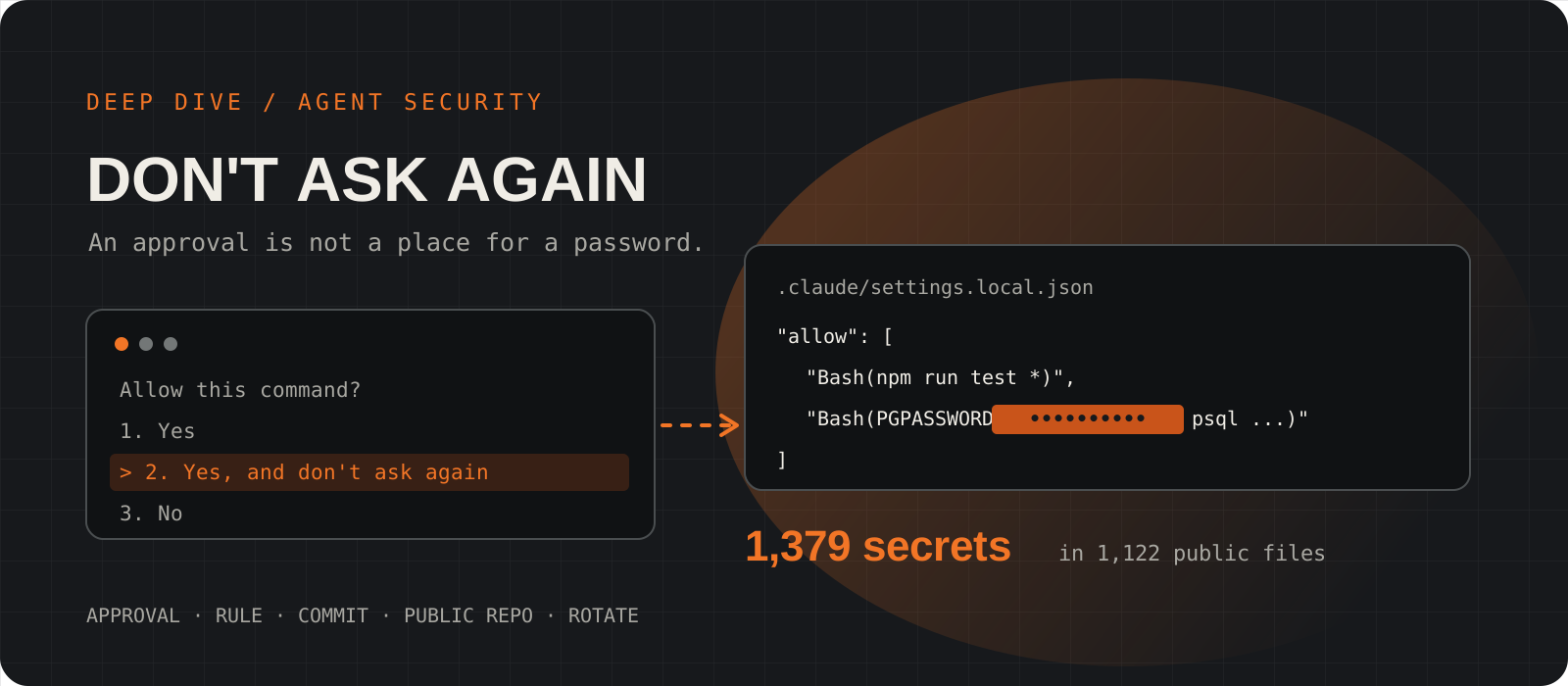
AI coding agents ask before they run a shell command, and the fastest way to stop being asked is to click "Yes, and don't ask again". In Claude Code that click saves a permission rule to .claude/settings.local.json. If the approved command had a password, token or connection string in it, the rule can carry that secret too, and a settings file that reaches a public repository takes the secret with it. On 5 November 2026 the application security company Apiiro published research showing how often that has already happened: 1,379 secrets in 1,122 public settings files on GitHub, including database passwords, Supabase service-role keys and SSH logins to public servers. This deep dive explains the mechanism, what the research does and does not show, why two popular secret scanners missed about one file in five, and how to check and clean your own repositories today. The short version: a permission rule should record what an agent may do, never the credential it used to do it.
System requirements
Who this is for
Developers using Claude Code or any agent with saved approvals
Also security and platform teams who run secret scanning across an organisation's repositories. The mechanism is described for Claude Code, but any agent that persists approved commands has the same risk.
Primary source
Apiiro, "Coding Agents Copy Your Secrets to a Hidden File. Thousands Are on GitHub"
By Shmulik Cohen and Matan Giladi, published 5 November 2026 and updated 8 November. Apiiro's page blocks automated readers, so we checked every figure here against two independent write-ups (iTnews and LATENT) and the Hacker News thread. None of them disagreed.
Behaviour checked against
Claude Code docs and changelog, as of 10 November 2026
Where approvals are saved and how the file is kept out of git come from Anthropic's settings and permissions pages. We read the changelog up to version 2.1.322 (10 November) for a fix.
Time to check one repo
About five minutes
Steps 07 and 08 are copy-paste commands. If you find a live credential, rotating it is the slow part, and it comes first.
What Apiiro found
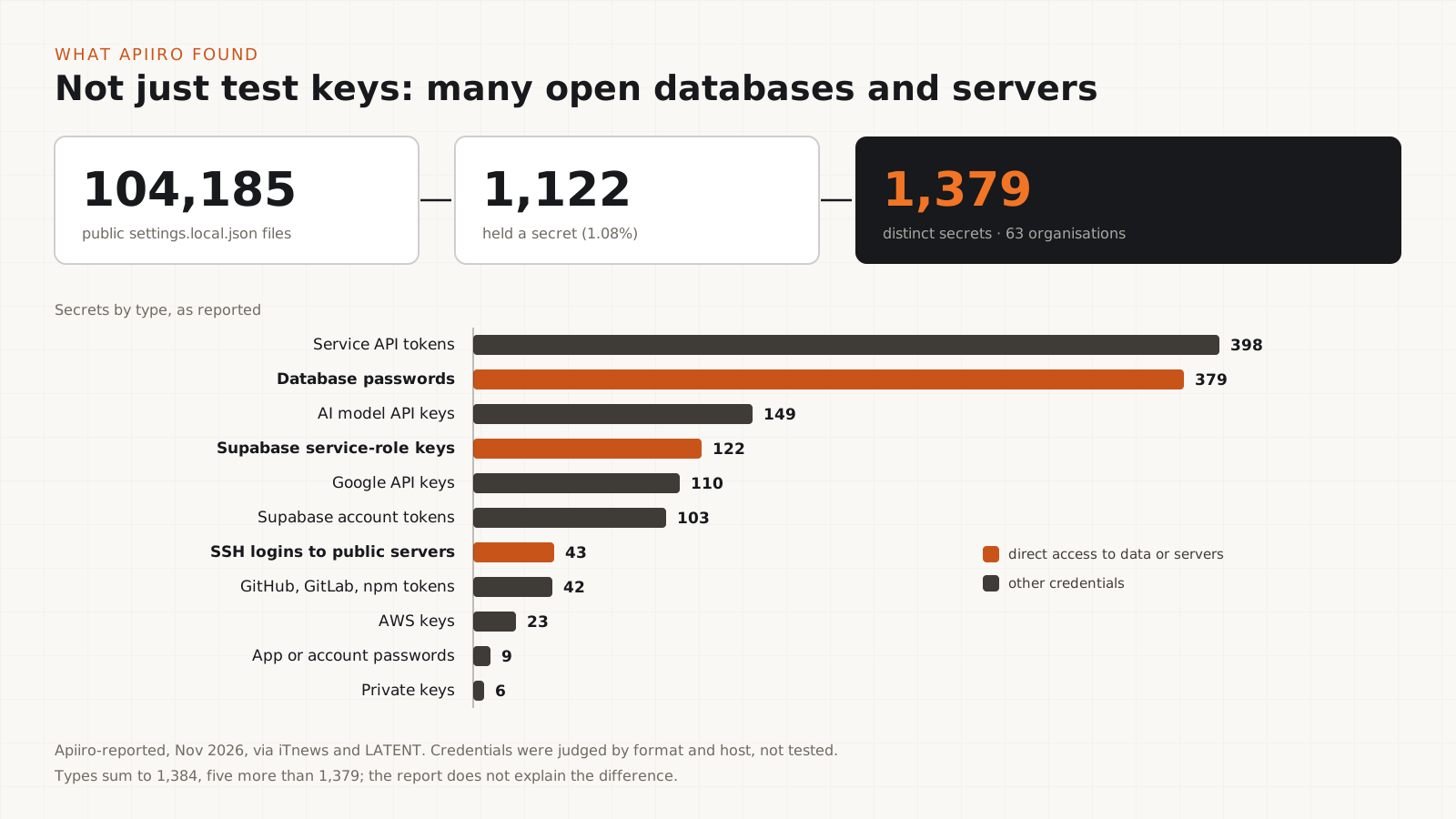
About 1 in 93 public Claude Code local settings files held at least one real-looking secret.
Between 1 and 3 November 2026 Apiiro collected 104,185 copies of .claude/settings.local.json from 103,617 public GitHub repositories. 1,122 of those files (1.08%) contained at least one secret, and together they held 1,379 distinct secrets. Apiiro counted 63 organisations with secrets in public allowlists, from student groups to established vendors.
These were not just test keys. The breakdown reported in the coverage includes 379 database passwords, 122 Supabase service-role keys (which bypass row-level security), 43 SSH logins to public servers (some of them root passwords passed to sshpass), 23 AWS keys and 42 GitHub, GitLab or npm tokens, alongside service API tokens, AI model API keys and Google API keys.
The wider investigation also looked at older versions of the file in git history, the shared .claude/settings.json file, saved agent chat transcripts and handoff notes. Across all of it the count reached 2,539 distinct secrets in 1,994 repositories. The headline figure of this article is the narrower 1,379, because it counts only the current local settings files.
One caveat matters before anything else. Apiiro did not log in with any of the credentials. It judged them real by their format, by whether they were paired with a public host, and by an extra review step. One organisation it notified confirmed that its key had been live. So treat 1,379 as "credentials that look real and usable", not "1,379 confirmed breaches".
How "don't ask again" writes a command to disk
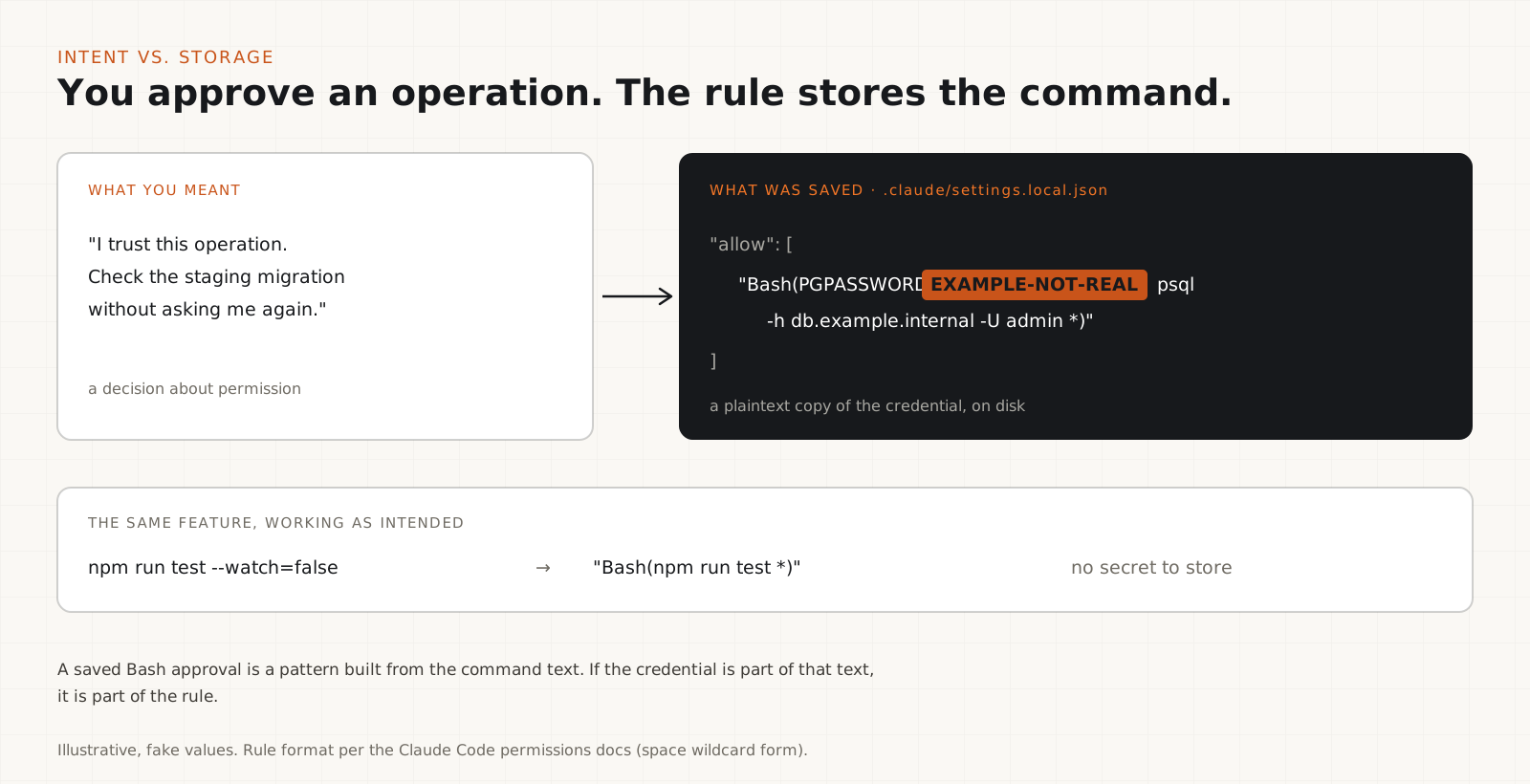
A saved Bash approval is a rule built from the command text, so whatever was inside the command can end up in the rule.
When Claude Code wants to run a Bash command it has not been allowed to run, it shows you the command and asks. Choosing "Yes, and don't ask again" saves an allow rule. Anthropic's permissions page says Bash approvals last "permanently per repository and command" and are written to .claude/settings.local.json at the root of the git repository. (On Windows, outside a git repository and in a few other cases, the file stays next to .claude/settings.json instead.)
The rule is a pattern made from the command, such as Bash(npm run test *). That is exactly what you want for npm run test. It is not what you want for a command that carries its own credential, because the credential is part of the text the rule is made from.
So the developer means "remember that I trust this operation". The tool records "remember this command". When the command contains PGPASSWORD=..., sshpass -p ..., a bearer token or a postgres://user:password@host URL, the approval quietly becomes a copy of the secret in a plain JSON file.
{
  "permissions": {
    "allow": [
      "Bash(npm run test *)",
      "Bash(git status)",
      "Bash(PGPASSWORD=EXAMPLE-NOT-A-REAL-PASSWORD psql -h db.example.internal -U admin -d app *)",
      "Bash(sshpass -p EXAMPLE-NOT-REAL ssh root@203.0.113.10 *)"
    ]
  }
}The chain from one click to a public secret
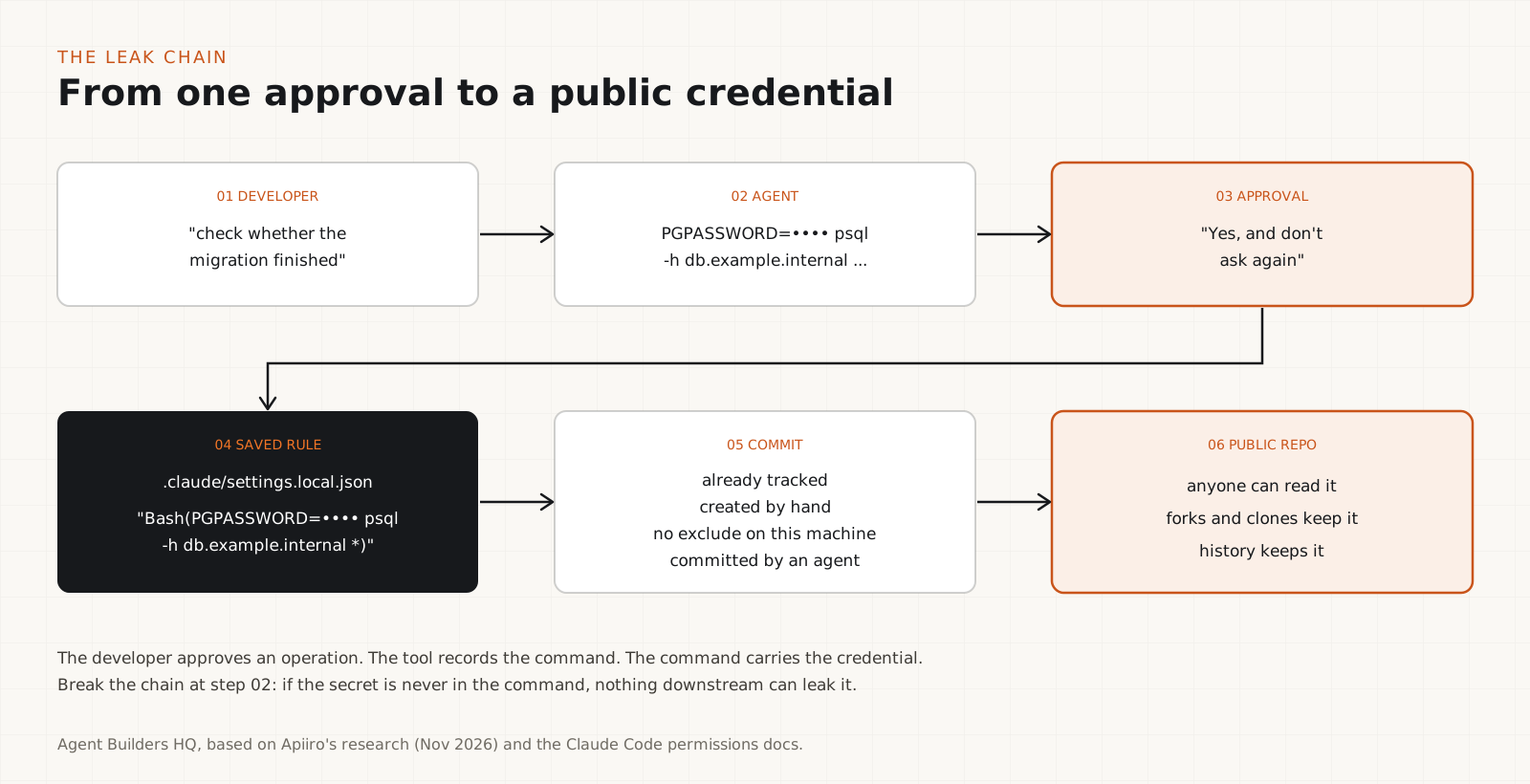
No single step is unusual. The leak is the whole chain.
You ask the agent for something ordinary: "connect to the staging database and check whether the migration finished". The agent builds a psql command with the password inline, because that is the quickest way to make it work. You approve it with "don't ask again" so you are not asked twenty more times this afternoon. The rule, password included, lands in settings.local.json.
From there the file only has to reach a commit. It can be tracked from before the ignore rule existed, created by hand, copied into a fresh repository on a machine with a different git setup, swept up by git add -A, or committed by an agent workflow. Once the repository is public, anyone who reads the file has the credential, and so does every fork and clone made since.
Apiiro noticed that last route in the history. Of the 1,105 repositories where it saw secrets tracked in git, 539 (48.8%) had a commit that changed the file and recorded Claude as a co-author.
Why the automatic git exclude is not enough
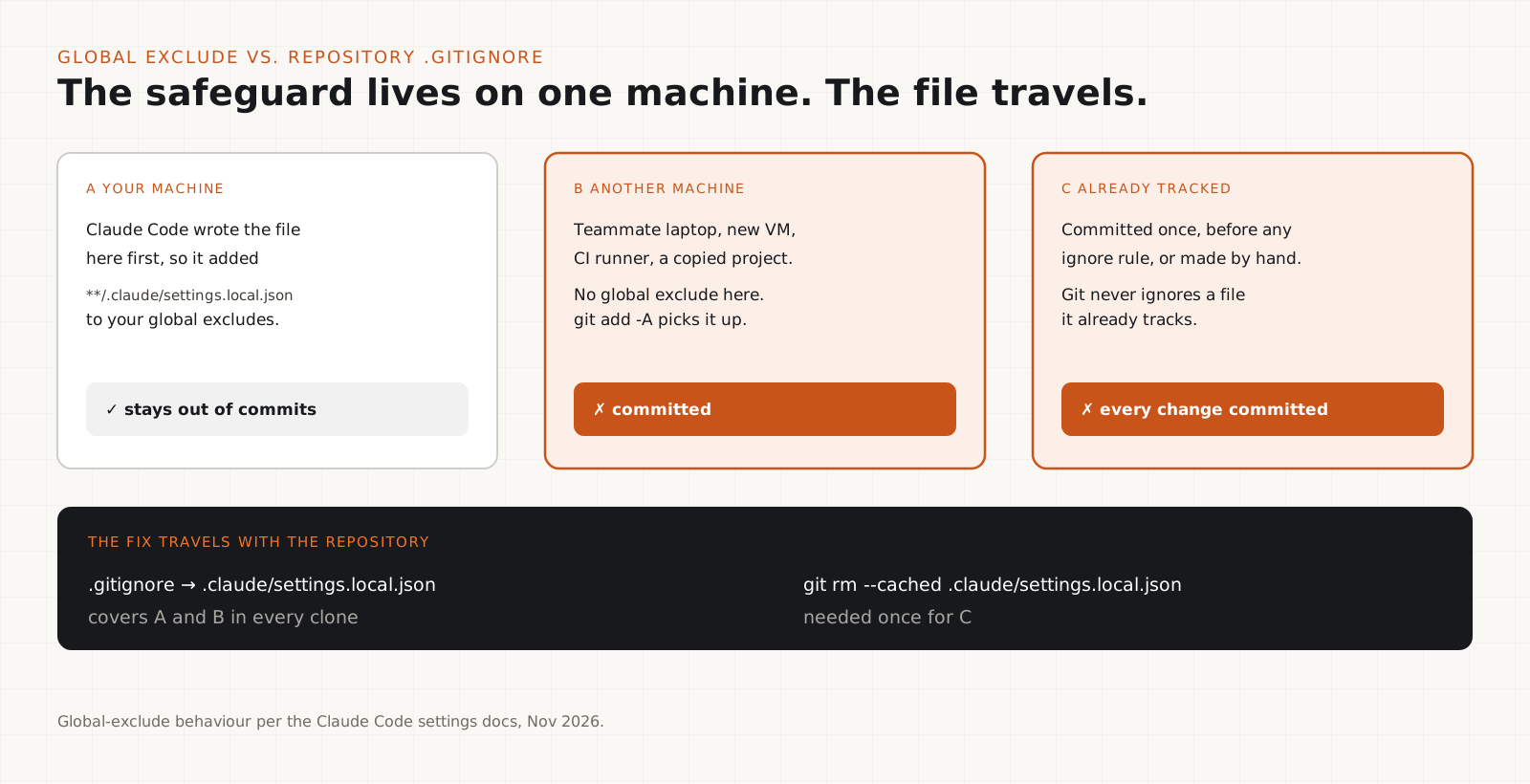
Claude Code keeps the file out of git on the machine where it first writes it. That protection does not travel with the repository.
Anthropic's settings page says that the first time Claude Code writes settings.local.json in a git repository that does not already ignore it, it adds **/.claude/settings.local.json to your global git excludes file. That is a real safeguard, and it is why most of the 104,185 files were never a problem.
But a global exclude lives in one user's git configuration on one machine. A teammate's laptop, a fresh CI runner or a new VM does not have it. Git also never applies ignore rules to a file that is already tracked: if settings.local.json was committed once, every later change to it is committed too. And if you create the file by hand before Claude Code has written to it, the docs say to add it to .gitignore yourself.
Anthropic's response leaned on this point. Boris Cherny, who leads Claude Code, wrote on Hacker News that Claude Code gitignores the file automatically when it creates it, "so in this case the files were manually created and checked in". That explains part of the data. It does not change the fix, which is to put the rule in the repository's own .gitignore, where it protects every clone.
# Claude Code personal settings and saved approvals
.claude/settings.local.json
**/.claude/settings.local.jsonWhy secret scanners missed one file in five
Scanners are good at recognising keys. A human-chosen password inside a command does not look like a key.
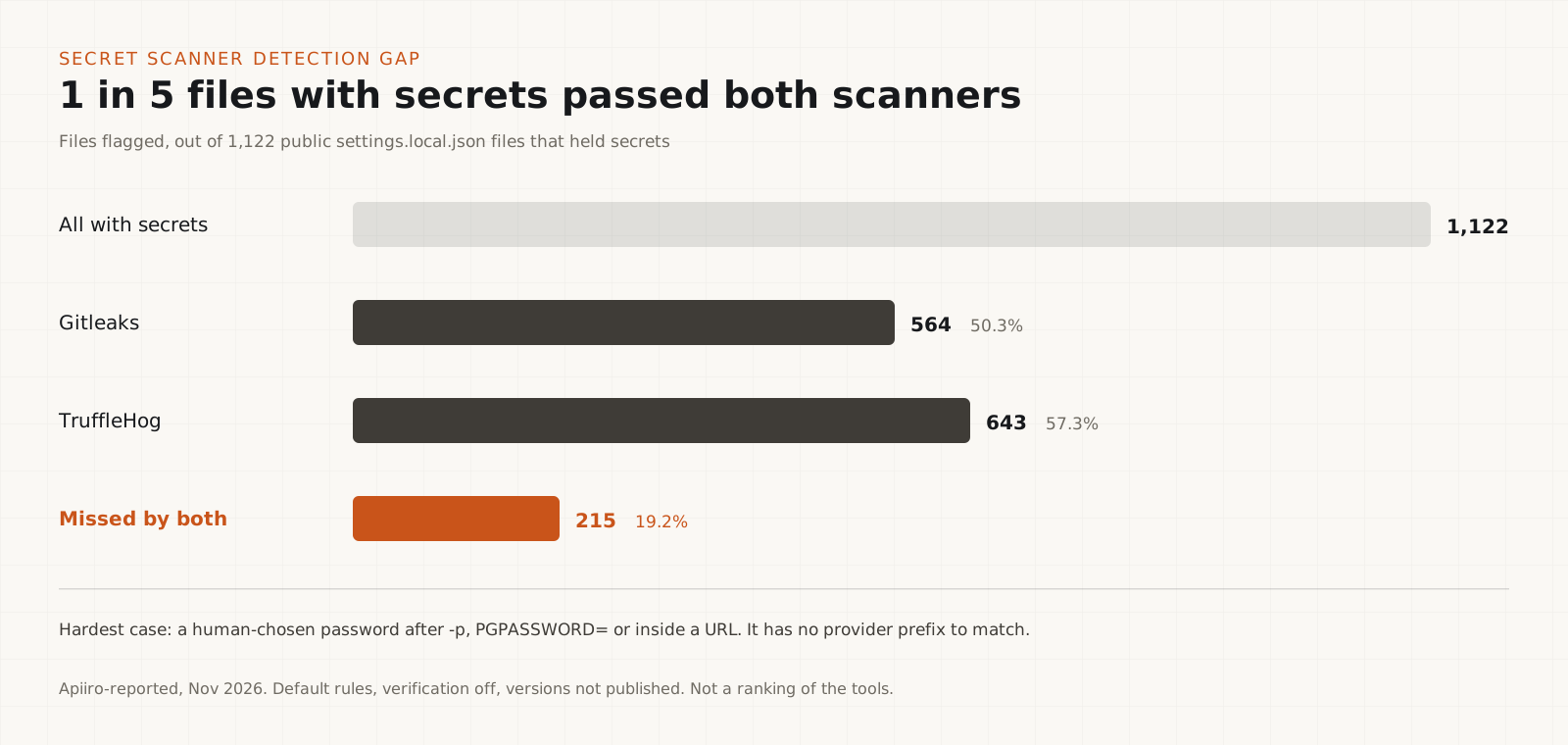
Apiiro ran two widely used open-source scanners over the 1,122 files with secrets. Gitleaks flagged 564. TruffleHog flagged 643. 215 files (19.2%) were flagged by neither. The scanners were run without their verification features, and their versions and settings were not published, so this is a measure of default pattern matching rather than a verdict on either tool.
The gap is easy to understand. Provider keys such as AKIA... for AWS or ghp_... for GitHub have recognisable prefixes and high entropy, and scanners catch them well. A database password like Spring2026! passed with -p or PGPASSWORD= is just a short string next to a flag. Nothing about its shape says "secret". Only its position in the command does.
So the lesson is not "scanners are useless". It is that detection has to understand how a credential is used (which flag, which environment variable, which part of a URL), not only what a credential looks like. Keep the scanners, and add a targeted check for the command patterns agents produce (step 07 has one).
PGPASSWORD="EXAMPLE-NOT-REAL" psql -h db.example.com -U admin
sshpass -p "EXAMPLE-NOT-REAL" ssh admin@server.example.com
mysql -u root -pEXAMPLE-NOT-REAL -h db.example.com
psql "postgres://admin:EXAMPLE-NOT-REAL@db.example.com:5432/app"
curl -H "Authorization: Bearer EXAMPLE-NOT-REAL" https://api.example.comIt is not only one file
Agents leave other artifacts behind, and some of them held secrets too.
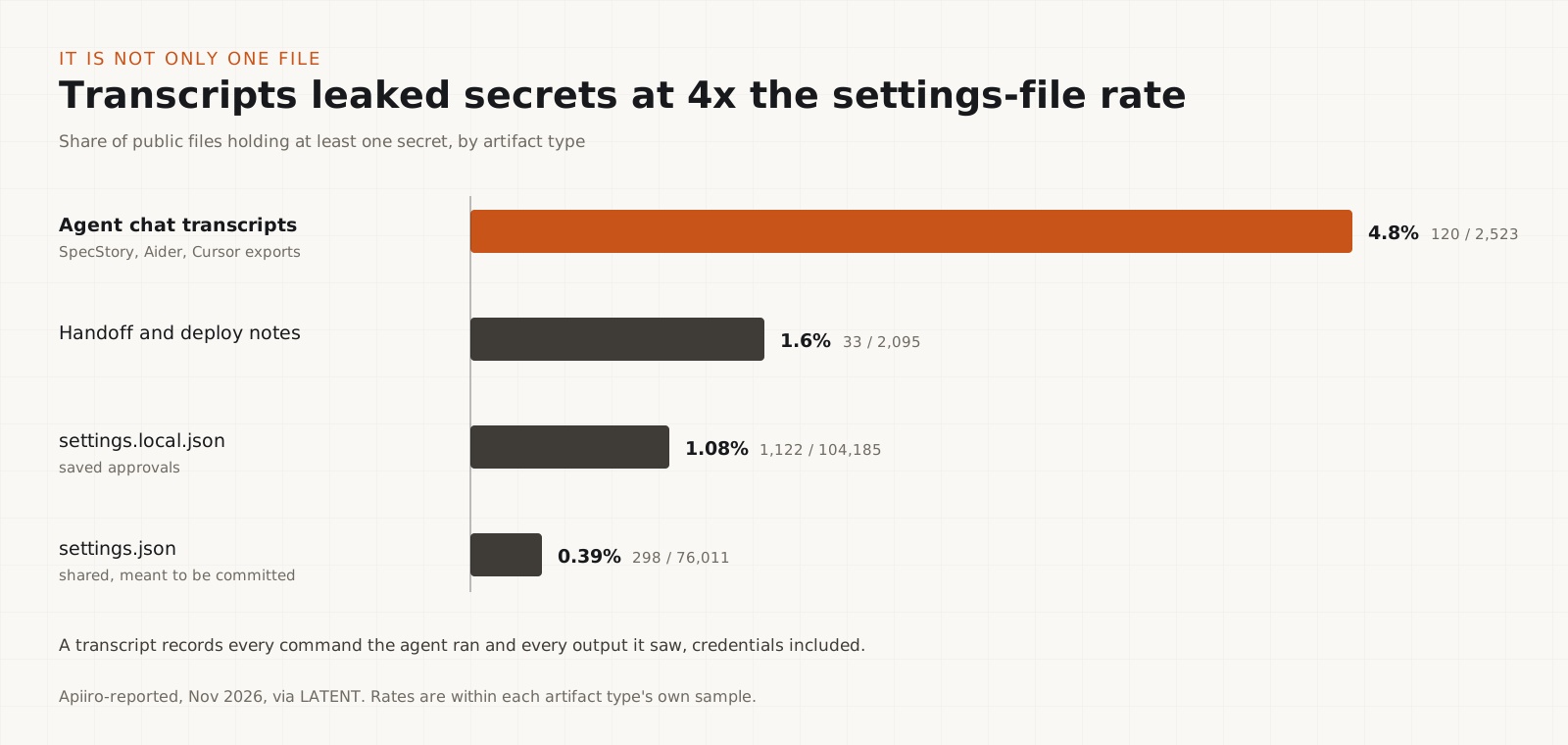
Apiiro also examined 76,011 shared .claude/settings.json files (298 with secrets, 0.39%), 2,523 exported agent chat transcripts from tools such as SpecStory, Aider and Cursor (120 with secrets, 4.8%), and 2,095 handoff and deploy notes (33 with secrets, 1.6%). In git history it found 734 secrets that existed only in past commits, in 509 repositories, and 211 forks carrying the same secrets from 74 original repositories.
Transcripts had the highest rate of the lot, which makes sense: a transcript records every command the agent ran and every output it saw. Memory files, handoff notes and generated scripts work the same way. Anything an agent writes down about its work can include the credentials it used for that work.
Treat every agent artifact as possibly sensitive: settings, transcripts, memory files, notes and scripts. Put them in scanning scope, and decide on purpose which of them belong in a repository at all.
Check your repositories now
Four commands tell you whether the file exists, whether git tracks it, and whether a secret was ever committed.
Run these at the root of each repository where you use Claude Code. Do not paste the file's contents into a chat, an issue or an online tool while you investigate; read it locally.
If git ls-files prints the local settings file, it is tracked and every change to it is being committed. If git check-ignore prints nothing, no ignore rule covers it in this clone. The last command searches every committed version of the file for the usual credential patterns, including in history you no longer see.
ls -la .claude/
cat .claude/settings.local.jsongit ls-files .claude/
git check-ignore -v .claude/settings.local.jsongit log --all -p -- ':(glob)**/.claude/settings*.json' \
| grep -nE 'PGPASSWORD=|MYSQL_PWD=|sshpass -p| -p[^ ]{6,}|Bearer [A-Za-z0-9._-]{12,}|://[^/: ]+:[^@ ]+@|AKIA[0-9A-Z]{16}|ghp_[A-Za-z0-9]{20,}|sk-[A-Za-z0-9_-]{20,}'Tip
In Claude Code, /permissions lists every saved rule and lets you delete one. Remove any rule with a credential in it, even if the file was never committed: it is still a plaintext copy of the secret on disk.
If a secret was exposed: rotate first, clean up second
Deleting the file does not revoke the credential. Anyone who copied it still has it.
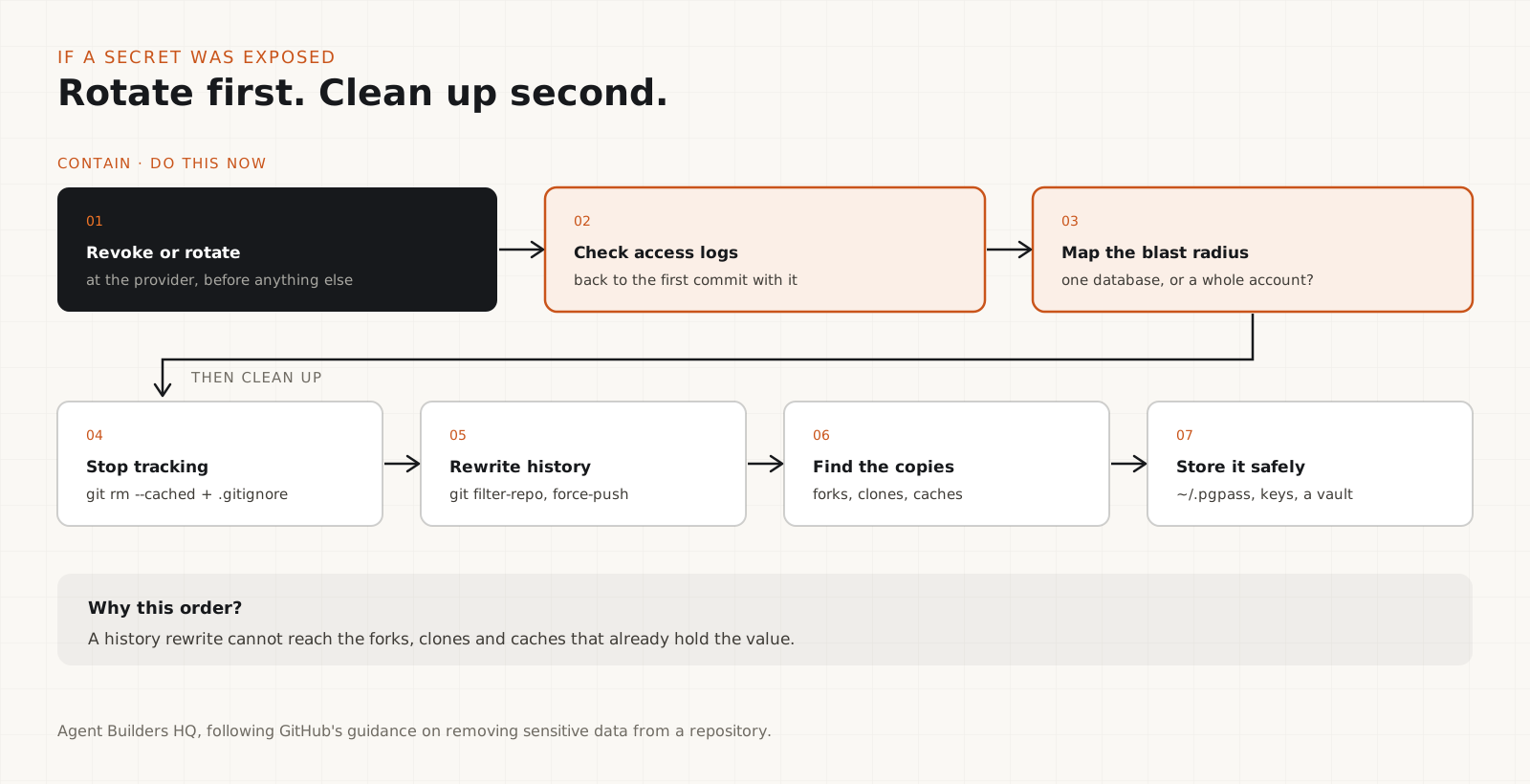
The order matters. A history rewrite cannot reach the forks, clones and caches that already hold the value, so the credential has to stop working before anything else.
1. Revoke or rotate the credential at its provider. 2. Check its access logs for use you do not recognise, back to the date of the first commit that contained it. 3. Work out what it could reach (one database, or a whole cloud account?) and widen the investigation to match. 4. Stop tracking the file and add the repository-level ignore rule. 5. Remove the value from history if the repository is still going to be public, then ask GitHub to clear cached views if needed. 6. Look for forks and other copies. 7. Store the replacement credential somewhere that is not a command line (step 09).
echo ".claude/settings.local.json" >> .gitignore
git rm --cached .claude/settings.local.json
git commit -m "Stop tracking Claude Code local settings"
git check-ignore -v .claude/settings.local.json# https://github.com/newren/git-filter-repo
git filter-repo --invert-paths --path .claude/settings.local.json
# then force-push every branch and tag, and have collaborators re-cloneKeep credentials out of the command line
If the secret is never in the command, no approval, transcript or shell history can capture it.
Most of the leaked patterns have a standard alternative that keeps the value out of the command text. psql reads ~/.pgpass, and MySQL reads ~/.my.cnf. SSH works with keys and an agent, which also retires sshpass. curl can read a header from a file with -H @file. Cloud CLIs use profiles, SSO or workload identity. A secret manager (1Password CLI, HashiCorp Vault, AWS Secrets Manager, Azure Key Vault, Google Cloud Secret Manager) can inject values into the process environment at run time.
Then tell the agent. A line in CLAUDE.md such as "never put passwords or tokens in a command; use ~/.pgpass, SSH keys or `op run`" stops it from building the inline version in the first place. Environment variables are better than arguments but not free of risk: they can still show up in process listings, crash dumps and logs, so prefer a credential file or an injected process environment over export PASSWORD=... in a shared shell.
Finally, put scanning where it cannot be skipped: GitHub secret scanning and push protection on every repository, and Gitleaks or TruffleHog in CI. Add the targeted pattern check from step 07 for agent files, because that is where format-based rules are weakest.
# Postgres: password lives in ~/.pgpass (chmod 600)
#   db.example.internal:5432:app:admin:<password>
psql -h db.example.internal -U admin -d app -f migration.sql

# SSH: key-based login instead of sshpass
ssh -i ~/.ssh/deploy_ed25519 deploy@server.example.com

# HTTP: header read from a file, not the argument list
curl -H @"$HOME/.config/example-api/auth-header" https://api.example.com

# Secret manager injects the value into the process only
op run --env-file=.env.tpl -- ./scripts/migrate.shWhat agent builders should change
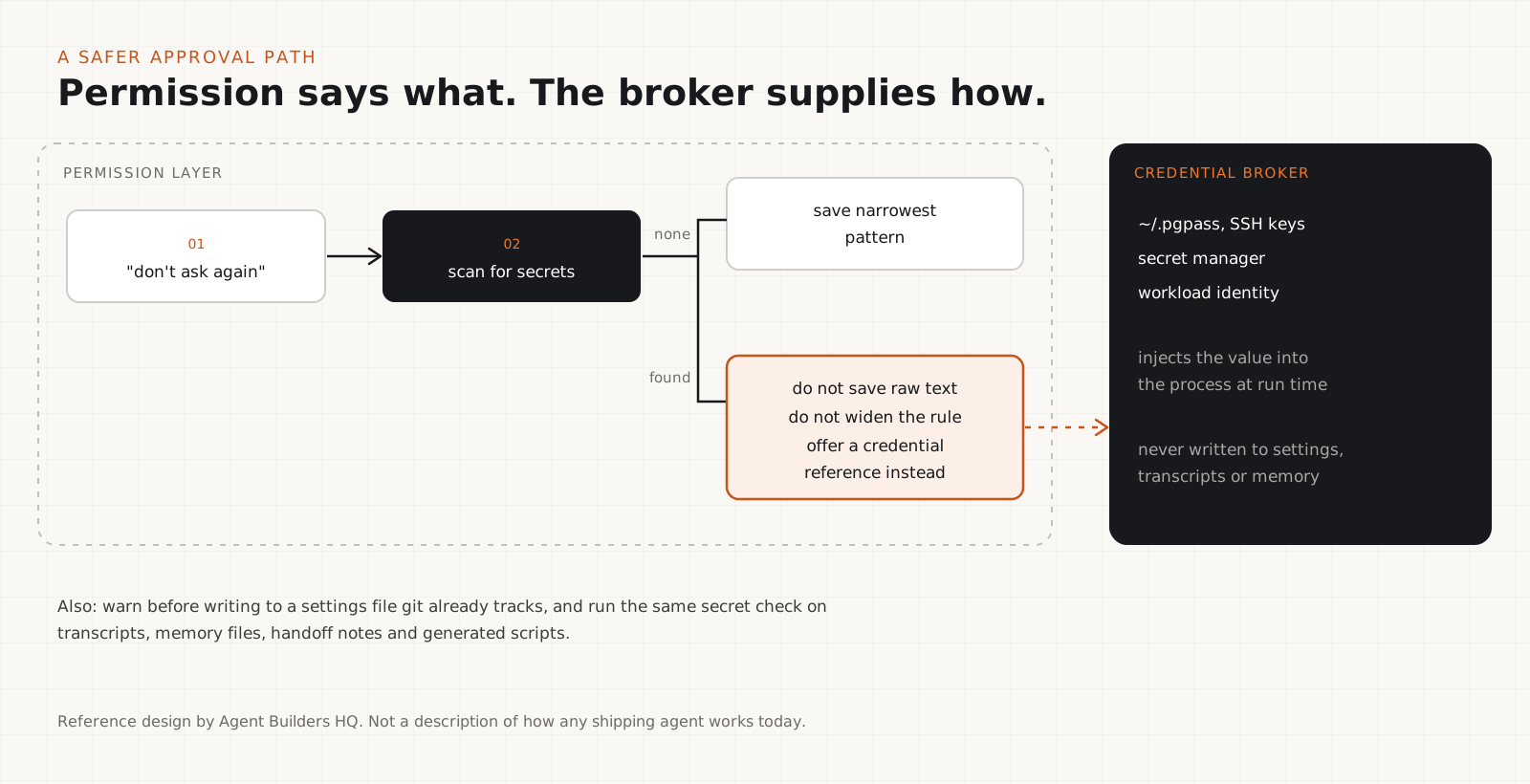
Separate the decision "may the agent do this?" from the material "how does it authenticate?". They should never share a string.
Security cannot rest on every developer remembering which files to ignore. If you build an agent with saved approvals, design the save path so that it cannot become a secret store.
Store the narrowest pattern that captures the intent, not the full command. Scan a command for credentials (known key formats and the usage patterns in step 05) before persisting it, and if one is found, refuse to save the raw text and offer a safer way to supply the credential. Do not quietly widen the rule to drop the secret: Bash(psql *) is a much bigger permission than the one the user approved. Warn loudly before writing to a settings file that git already tracks. And keep credentials in a broker that hands them to the process at run time, so the permission layer never sees them.
Apply the same check to every other artifact the agent writes: transcripts, memory, notes and generated scripts. The approval is just the most visible case of a general rule: an agent's own records are part of your software supply chain.
Anthropic's response, and what has shipped
In the Hacker News thread on the report, Boris Cherny, who leads Claude Code at Anthropic, wrote: "Historically Claude Code has not done secret scrubbing (there are many good tools for that), but we are looking into what we can do to prevent this." He made three further points: settings.local.json is meant to stay local and is gitignored automatically when Claude creates it; permission rules are "old hat" and people should use auto mode, which is on by default; and everyone should have secret scanning enabled whatever agent they use. When another commenter pointed out that approvals made through auto-mode flows could still be saved, he replied, as iTnews reported, "Yeah good catch. Thinking through what we can do to improve this (ideas welcome)."
That is an acknowledgement and an investigation, not a fix. We read the Claude Code changelog through version 2.1.322 (10 November 2026) and found no entry that redacts or refuses credentials in saved permission rules. Until one ships and you have upgraded to it, treat any credential in a settings file as exposed, and do not assume that switching permission modes cleans up rules that were already written.
What the research shows, and what it does not
- It shows a real, repeated pattern: credentials inside saved permission rules, in public repositories, across more than a thousand files and 63 organisations.
- It does not show that every secret was live. Apiiro did not authenticate with any of them. One notified organisation confirmed its key had been valid.
- It does not show how common this is in private repositories. The sample is public GitHub only, where the files are easiest to find, and also easiest for attackers to find.
- The category counts in the coverage add up to 1,384, five more than 1,379. The published material does not explain the difference; the headline figures (1,122 files, 1,379 secrets) are consistent across every source we read.
- The scanner comparison used default rules without verification, so 215 misses is a statement about default pattern matching on this file type, not a ranking of the tools.
- The 2,539 figure is the broader investigation (history, shared settings, transcripts and notes). Do not quote it as the number of secrets in settings.local.json.
Who should do what
| If you are | Do this first |
|---|---|
| A developer using Claude Code | Run step 07 in every repo, delete rules with credentials via /permissions, add the .gitignore line |
| Someone who found a committed secret | Rotate it now, check its access logs, then clean history (step 08) |
| A security or platform team | Turn on push protection org-wide and add a targeted check for agent settings and transcripts |
| A team lead | Add a CLAUDE.md rule against inline credentials and provide ~/.pgpass, SSH keys or a secret manager |
| Someone building an agent | Never persist raw approved commands; scan before saving and keep credentials in a separate broker |
This is not a sophisticated attack. It is a convenience feature doing exactly what it was built to do, on input nobody designed it for. If you use Claude Code, spend five minutes on step 07 in each repository, delete any saved rule that contains a credential, and add .claude/settings.local.json to the repository's own .gitignore. If anything was ever committed, rotate it before you do anything else. If you build agents, take the design lesson: an agent should remember what it is allowed to do, never the secret it used to do it.
Frequently asked questions
Is Claude Code leaking my secrets on its own?+
No. Claude Code saves approved commands to .claude/settings.local.json on your machine, and the secret leaks only if that file is committed to a repository other people can read. The risk is that the file can hold credentials you never meant to store, and that the automatic git exclude does not travel with the repository.
Is settings.local.json ignored by git automatically?+
Partly. The first time Claude Code writes the file in a git repository that does not already ignore it, it adds **/.claude/settings.local.json to your global git excludes file. That protects you on that machine only, and it does not help if the file was created by hand or was already tracked. Add the line to the repository's .gitignore as well.
I removed the file from my repository. Am I safe?+
Not until you rotate the credential. The value is still in git history, and in any fork, clone or cache made while it was public. Revoke or rotate it first, check its access logs, then clean history if the repository will stay public.
Would Gitleaks or TruffleHog have caught it?+
Often, but not always. In Apiiro's test Gitleaks flagged 564 of the 1,122 files and TruffleHog 643, and 215 files (19.2%) were missed by both. Passwords passed as command arguments are the hardest case, because they do not have the shape of a provider key. Keep the scanners and add a check for command patterns such as PGPASSWORD=, sshpass -p and credentials inside URLs.
Has Anthropic fixed this?+
Not as of 10 November 2026. Boris Cherny said on Hacker News that the team is looking into preventing it, and recommended auto mode and secret scanning. We found no changelog entry through version 2.1.322 that redacts credentials from saved permission rules. Check the changelog again before relying on a fix.
Does this affect other AI coding agents?+
Any agent that saves approved commands, transcripts or memory as text can capture credentials the same way, and Apiiro found secrets in exported Cursor, Aider and SpecStory transcripts too. The fix is the same everywhere: keep credentials out of commands, keep agent artifacts out of repositories unless you mean them to be there, and scan for both.