The ARTEX Attack on Barracuda: How a Forgotten Vendor Cloud Key Became a 44-Hour Intrusion
An AI vendor's cloud key that was never revoked gave an attacker using ARTEX-style tooling about 10 Barracuda cloud accounts in 44 hours. What happened, what is confirmed, and the credential controls that would have stopped it at step one.
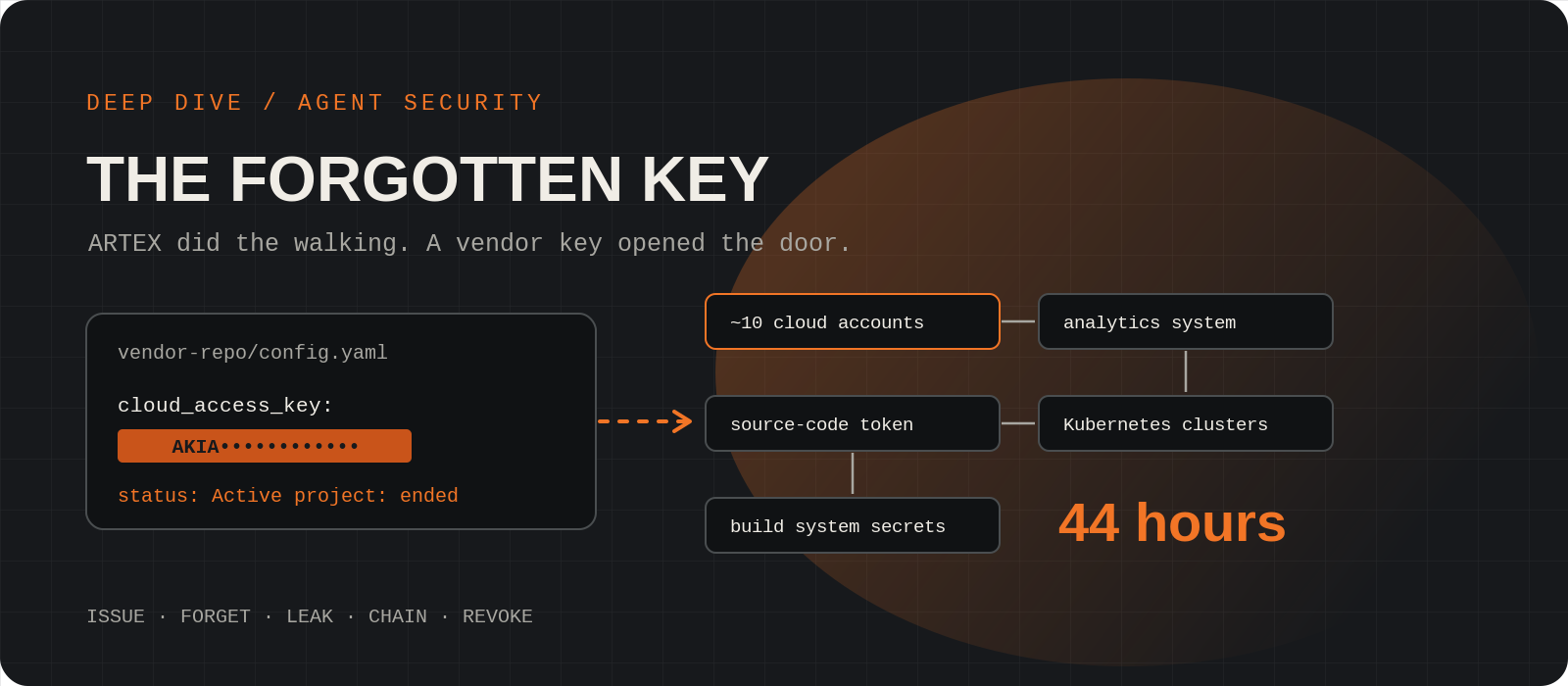
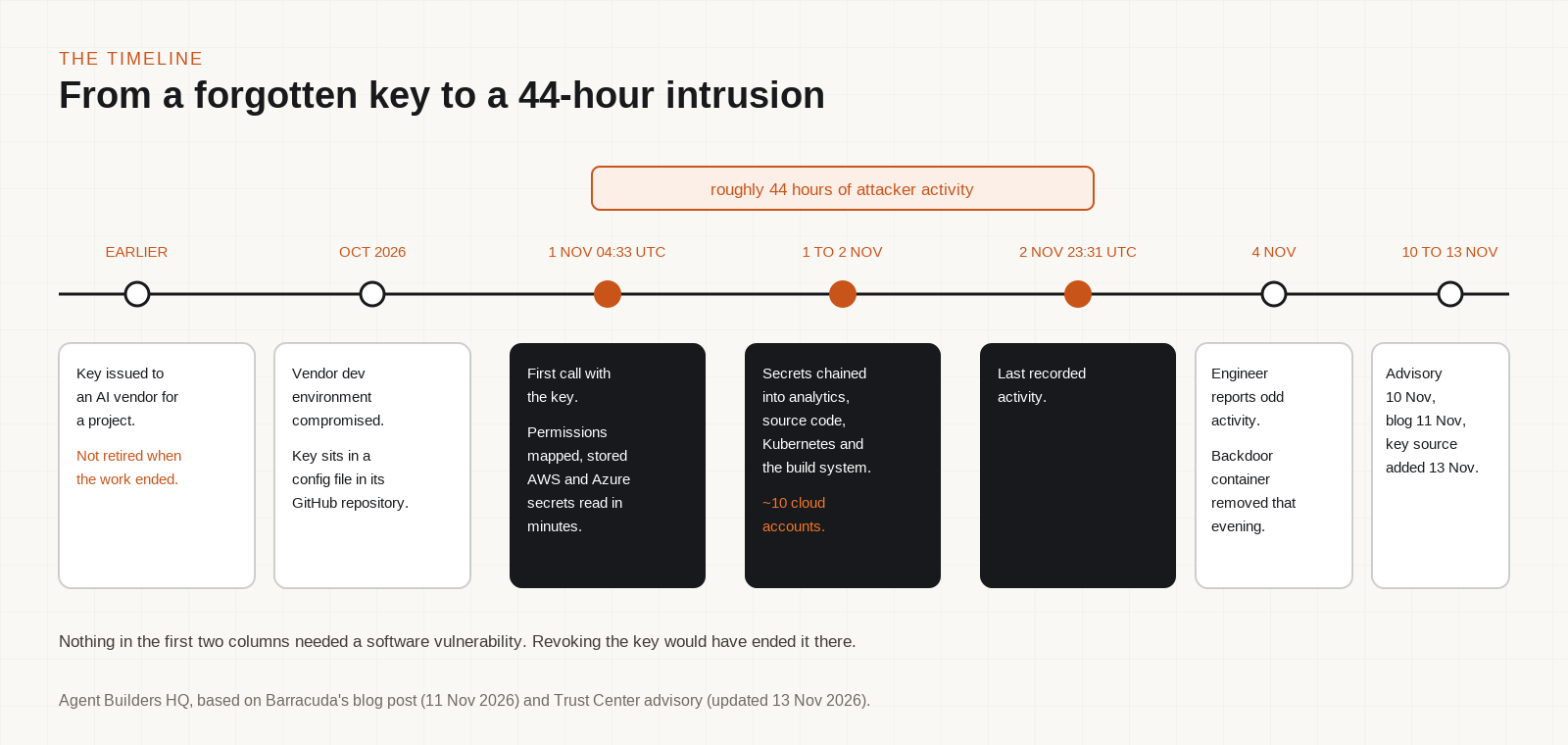
On 1 November 2026 an attacker logged in to Barracuda's cloud with a valid access key. Barracuda had given the key to a third-party AI vendor for an earlier project and never retired it. The vendor's development environment was breached in October, and the key was sitting in a configuration file in the vendor's GitHub repository. Over roughly 44 hours the attacker chained that one key into about 10 cloud accounts, a data analytics system, source code, Kubernetes clusters and the build system. Barracuda says the tooling and the order of operations match ARTEX, the open-source AI pentesting framework the FBI warned about on 13 November. The lesson for anyone building with AI agents is less about ARTEX than about the key. No software vulnerability was needed. An agentic tool turned one forgotten credential into a multi-platform intrusion faster than a human operator could have. This deep dive separates what Barracuda, the FBI and Cloudflare have confirmed from what they have not, then walks through the inventory, revocation, short-lived credential and agent identity controls you can put in place this week.
System requirements
Who this is for
Teams that hand cloud credentials to vendors, pipelines or AI agents
Platform, security and DevOps engineers, and anyone building agents that call cloud APIs. The commands cover AWS, Google Cloud and Azure.
Primary sources
Barracuda's incident write-up and advisory, the FBI FLASH, Cloudflare's research
Barracuda's "Forty-four hours" post (11 Nov 2026) and Trust Center advisory (10 Nov, updated 13 Nov), FBI FLASH-20261113-001 (13 Nov) and Cloudflare Cloudforce One (13 Nov). We read all four in full on 19 November 2026.
Tools for the hands-on steps
AWS CLI v2, gcloud, Azure CLI, Gitleaks
All four run on Windows, macOS and Linux. Commands are written as single lines so they paste into PowerShell, bash and zsh unless a block is labelled for one shell.
Time
About an hour for a first credential inventory
Steps 06 to 08 are the urgent part: find keys held by vendors and agents, and revoke the ones nobody owns. Moving workloads to short-lived credentials takes longer and is worth planning per service.
What happened at Barracuda
A key issued to a former AI vendor, never retired, leaked from the vendor's breached development environment and opened Barracuda's cloud.
Barracuda's own account is unusually direct. "The attacker did not break down our door. It gained access using a valid cloud access key." Barracuda had given the key to a third-party vendor, which it describes as a company working in AI, as part of a previous project. It did not retire the key when the work ended. In October the vendor's development environment was compromised. Barracuda's 13 November advisory update says the key was stored in a configuration file in the vendor's GitHub repository, which was exposed in that compromise. Other Barracuda credentials in the same file had already expired or have since been revoked.
The attacker made its first call with the key at 04:33 UTC on 1 November. Within minutes it had mapped what the key could reach and read stored secrets, including AWS access keys and Azure service principal secrets. Over the next day it used each new secret to open the next system. The last recorded activity was at 23:31 UTC on 2 November. Barracuda found out on 4 November, when an engineer noticed unusual activity on their own account and reported it.
Barracuda's summary: the attacker touched about 10 cloud accounts in roughly 44 hours and crossed five platforms in less than two days. (The first and last timestamps it publishes are just under 43 hours apart. We use Barracuda's own figure.)
What is ARTEX?
An open-source, LLM-driven multi-agent pentesting framework that the FBI says criminals have used since at least August 2026.
The FBI's FLASH of 13 November describes ARTEX as "an open-source, large language model (LLM)-driven agentic platform" that threat actors have weaponized to automate intrusions "from reconnaissance through data exfiltration". It is written in Go and turns goals written in natural language into commands run by specialised agents, with little human input after the objective is set. It has no model of its own. It plugs into external LLM providers, and the FBI says DeepSeek's Flash models dominate in attacker-controlled instances.
A developer using the handle Autumn-27 released it on GitHub in July 2026 for authorised testing. The FBI says malicious actors have used it since at least August 2026 against financial services, government, technology, defense, semiconductor, energy, healthcare, manufacturing, telecommunications and legal organisations, with some intrusions going "from initial targeting to privileged access in under three hours". The developer made the repository unavailable on 8 October, but forks, archived copies and a commercial version, ARTEX PRO, keep it in circulation. Researchers counted over 1,600 exposed ARTEX consoles in early November.
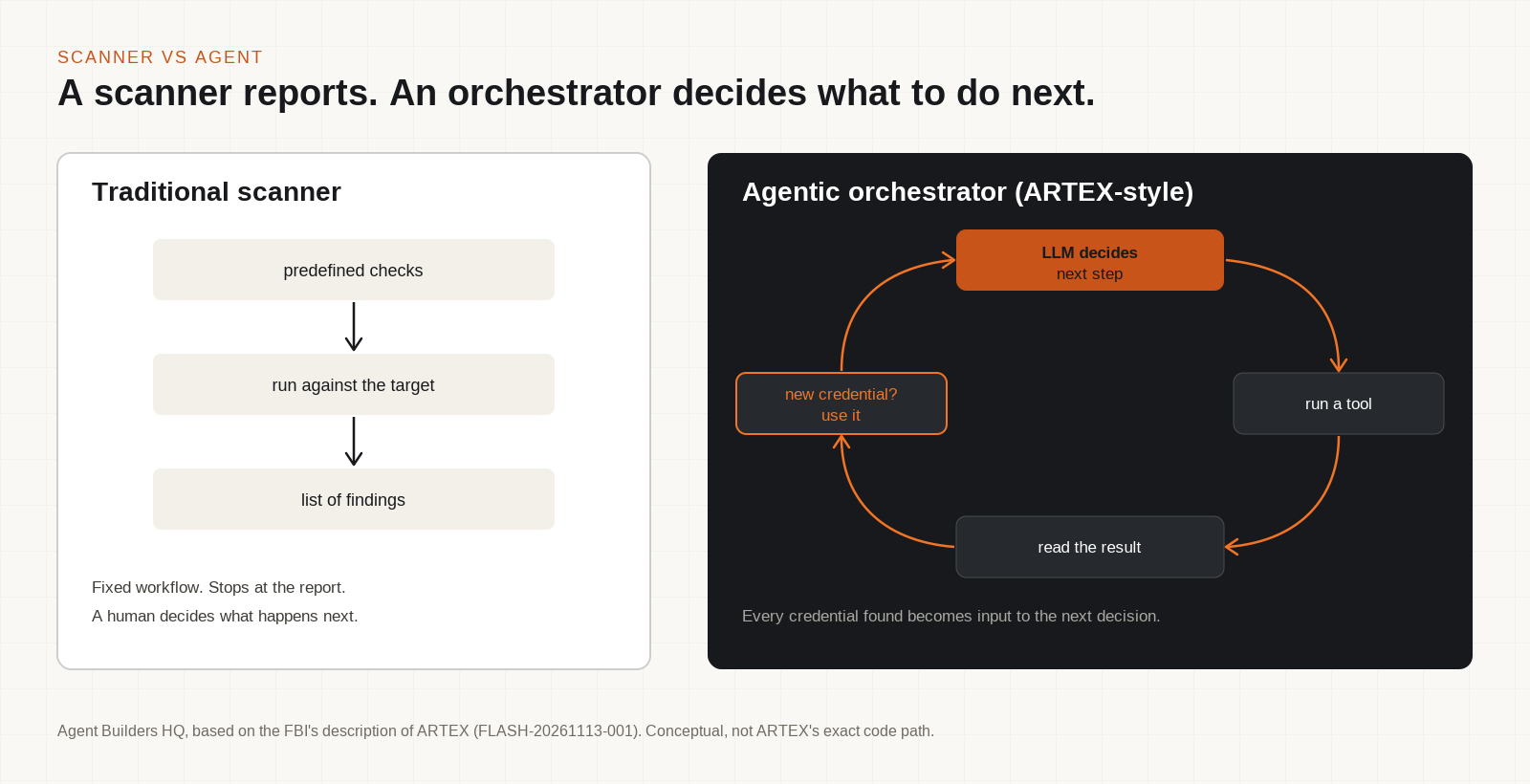
What makes an agentic framework different from a scanner is the loop. A scanner runs predefined checks and reports. An orchestrator reads the result of one step, decides the next, and calls the tool for it. That matters most after initial access: every credential it finds becomes the input to the next decision, with no human waiting to read the output.
Tip
The FBI lists Anthropic Claude and OpenAI GPT among the models ARTEX can integrate with, alongside DeepSeek, GLM, Grok and Kimi. Its network indicators include outbound calls to LLM APIs, to be investigated together with other suspicious activity. An unexpected LLM API call from a server that has no reason to make one is worth a look.
How one key became ten accounts: credential chaining
Every system the attacker reached held a credential for the next one.
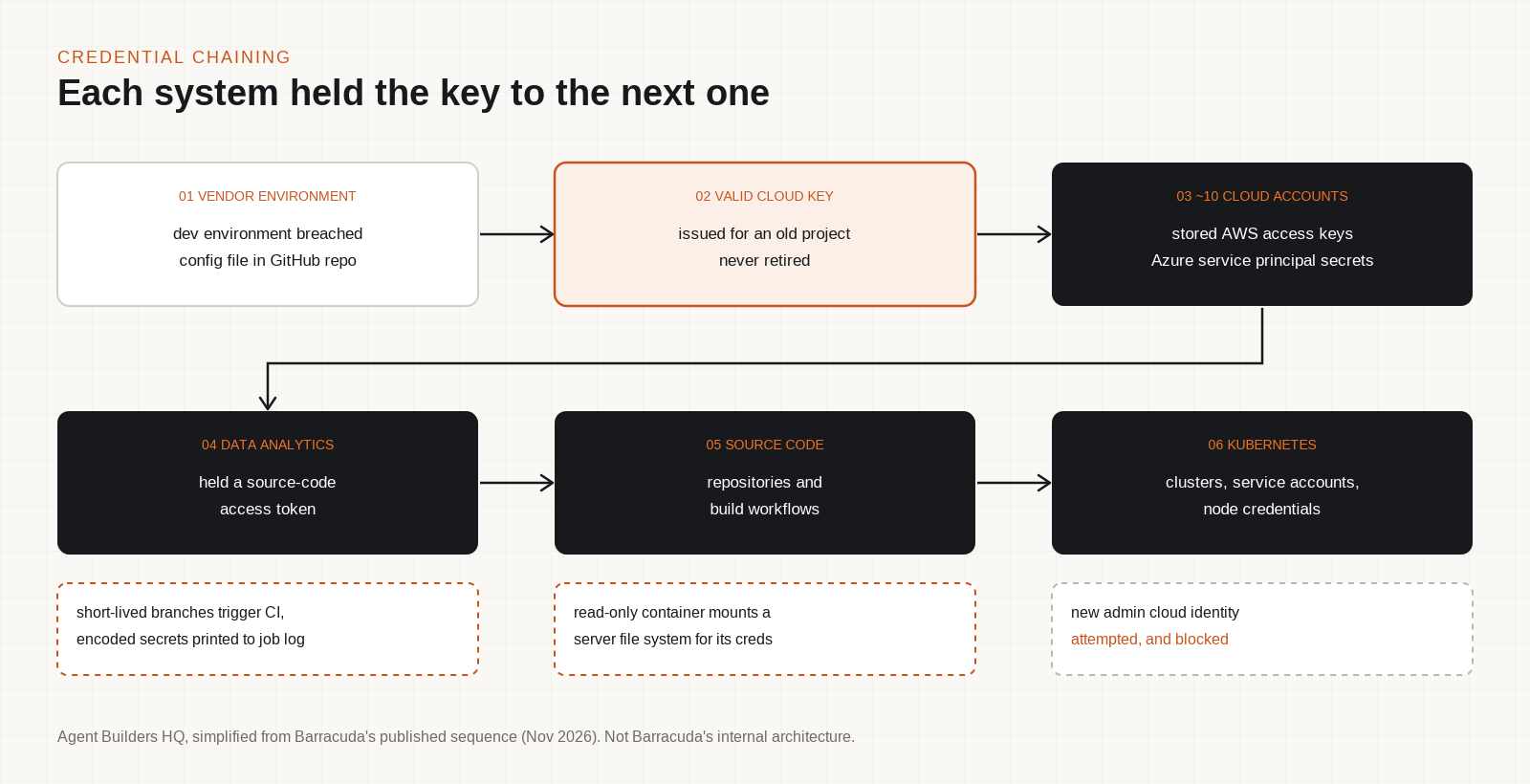
Barracuda describes the path in order. The vendor key opened cloud accounts that stored other secrets. Those led to a data analytics system, which held a source-code access token, which led to Kubernetes clusters. Along the way the attacker searched secret stores, infrastructure-as-code state files (which often contain credentials), server metadata services and Kubernetes service accounts.
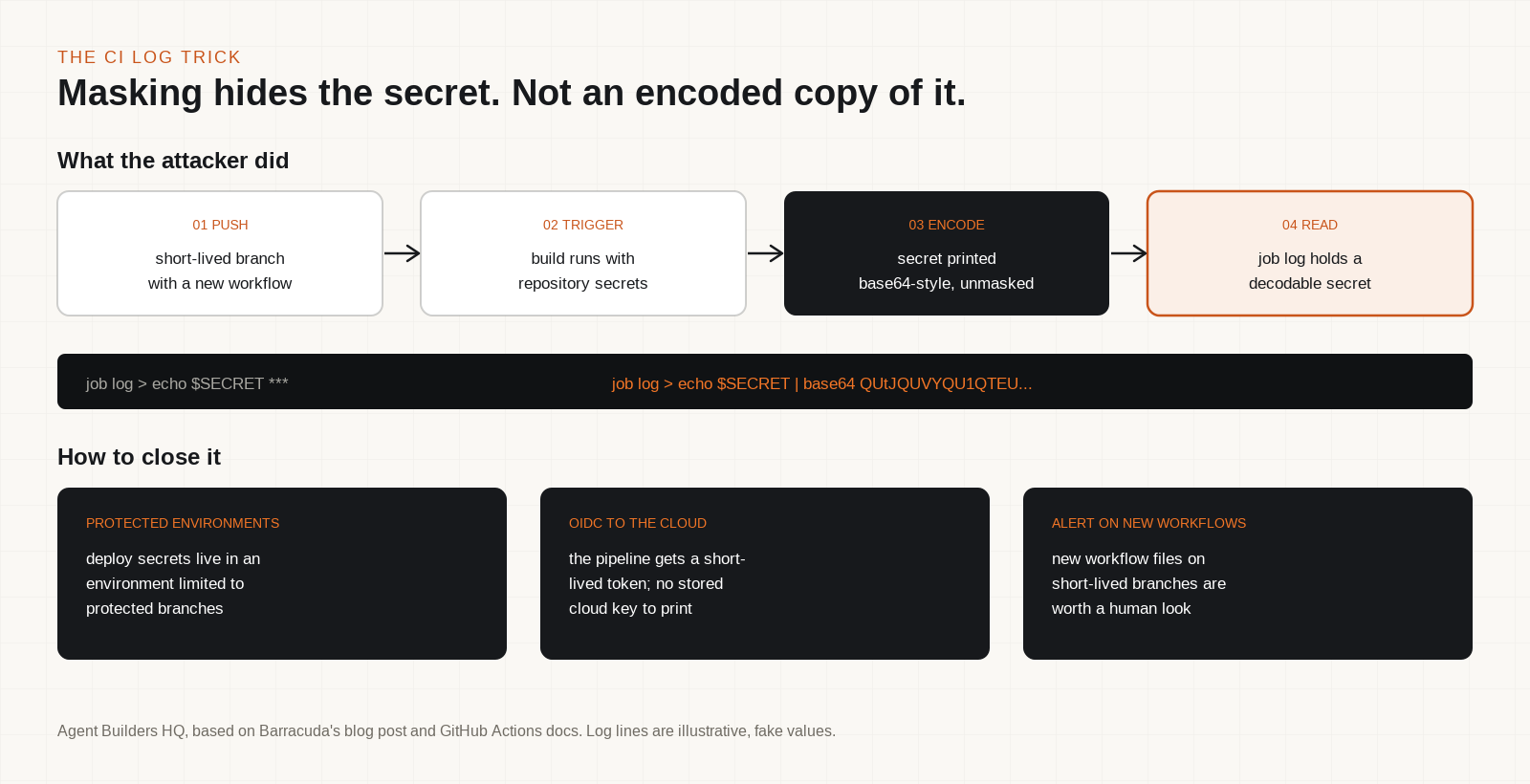
Two moves stand out. In just under four hours on 2 November, the attacker pushed short-lived branches to several repositories to trigger a build workflow that printed build-system secrets to the job log, encoded so the CI system's secret masking would not catch them. And from one Kubernetes cluster it deployed a container that mounted the underlying server's file system. The container was read-only, but that was enough to harvest the server's credentials. Its attempt to create a new administrative cloud identity for itself was blocked.
On servers where it got a shell, it searched for cryptocurrency wallet material: environment variables named WALLET, MNEMONIC, SEED or PRIV, Ethereum keystores and seed phrase files. Barracuda says no wallet material exists on those systems and describes the activity as consistent with a financially motivated attacker after crypto assets and reusable credentials.
This is credential chaining, and it is why a leaked key is never a single-system incident. The first key's permissions set the floor of the damage, not the ceiling. The ceiling is set by whatever secrets the first key can read.
What is confirmed, and what is not
Barracuda matched the activity to ARTEX but did not attribute it, and found no evidence customer credentials were taken.
Attribution: Barracuda's advisory says the indicators "are consistent with publicly reported characteristics of ARTEX". The blog says the probe names, the order of operations and the built-in routines for hunting credentials and wallets all match ARTEX, then adds: "Because many groups use ARTEX, the match tells us how the attacker operated, not who it was." So it is accurate to say the intrusion matched ARTEX tooling. It is not accurate to say a named group did it, or that ARTEX created the initial access. The key did that.
Customer impact: one system the attacker reached stores the credentials Barracuda XDR uses to collect data from customers' connected systems, and the attacker had access to it on 1 and 2 November. Barracuda found "no direct evidence" that the credentials were viewed or accessed, but says logging in that environment "was not detailed enough to rule it out". It notified customers with potentially affected credentials and told them to revoke and recreate those credentials and review connected system logs since 1 November. The advisory applies only to customers using an API integration for Barracuda Managed XDR Cloud or Monitored Endpoint; others need take no action.
Remediation so far, per the advisory: the attacker's known access and the compromised credentials are disabled, full audit logging is on in the affected environments with data-access logging being added where it was missing, long-lived and over-privileged keys are being removed, and vendor-held credentials now expire when the engagement ends.
Tip
If you are a Barracuda XDR customer and have not heard from Barracuda, its advisory says no action is needed. If you were notified, rotate the integration credentials first and investigate second.
Why long-lived cloud credentials are the real problem
A static key has no end date, no owner by default and no link to the project it was made for.
A long-lived credential is a secret that stays valid until someone revokes it: an AWS access key, an Azure service principal secret, a Google Cloud service account key file, a GitHub personal access token, a database password. Long-lived is not automatically insecure. The risk comes from the combination this incident had: a static key, held outside the company, with access to stored secrets, and nobody whose job it was to retire it.
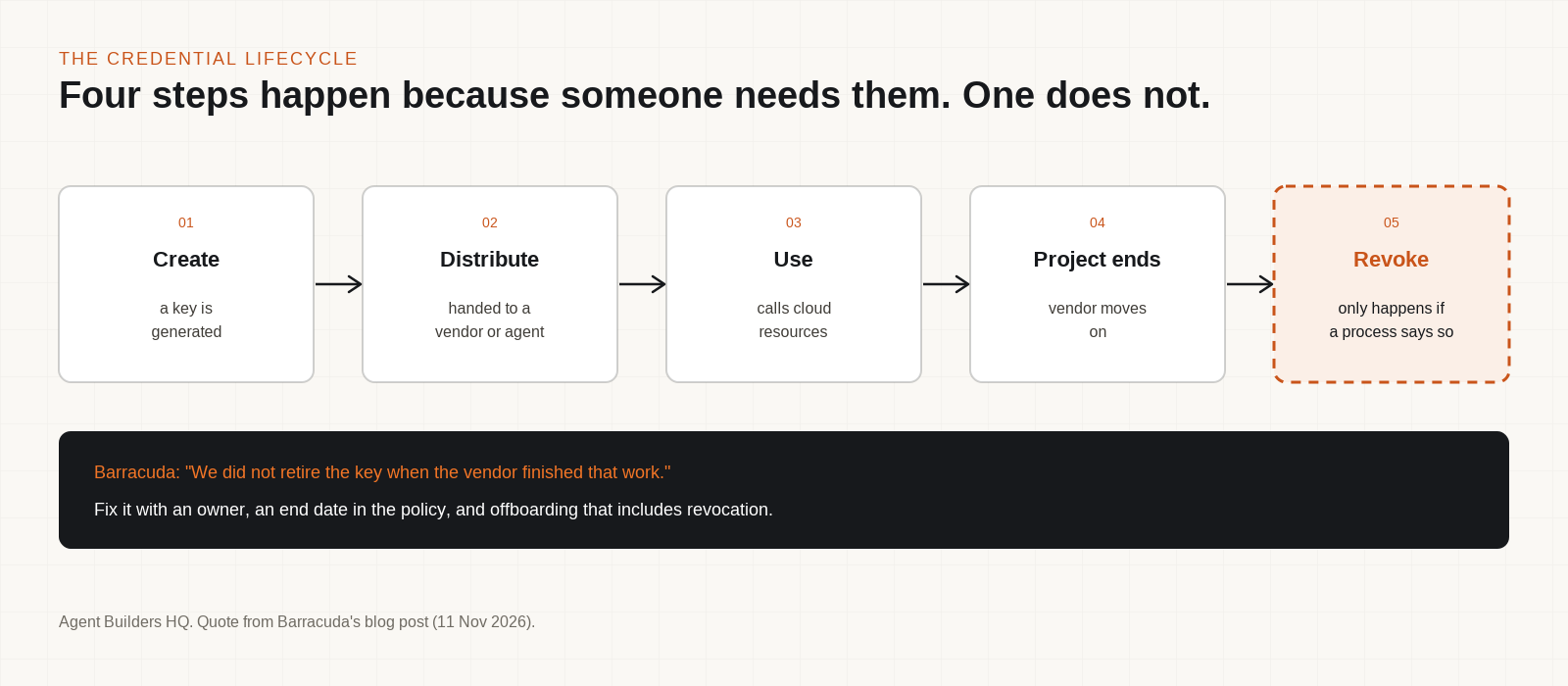
Look at the lifecycle. A key is created, handed to a vendor, used, and the project ends. Every step before the last one happens because someone needs it to. The last step, revocation, only happens if a process makes it happen. Barracuda's own lesson is blunt: short-lived, narrowly scoped credentials "would have stopped this intrusion at its first step".
Expiry is not the whole answer either. A credential that lives for 15 minutes can still be abused for 15 minutes, and an agentic tool can do a lot in that time. Short lifetimes shrink the window. Least privilege shrinks what can be done inside it. Separate identities stop one credential from reading the next one. You need all three.
import boto3

# A static key pasted into code or a config file is valid until someone
# revokes it, wherever the file ends up. Placeholder values shown.
session = boto3.Session(
    aws_access_key_id="AKIAEXAMPLEEXAMPLE",
    aws_secret_access_key="EXAMPLE-NOT-A-REAL-SECRET",
)
print(session.client("s3").list_buckets()["Buckets"])Inventory every credential held outside your team
List the keys that exist, who holds them and when they were last used, before you change anything.
Start with the question Barracuda could not answer in time: which keys exist that nobody is using? On AWS the IAM credential report lists every user with each access key's status, last rotation and last use. A key that is active but unused for 90 days, or used only from a vendor's network, is your first list.
Do the same on Google Cloud for user-managed service account keys and on Azure for app registration secrets and certificates, which carry an end date you can read. Record an owner and an end date for every credential held by a vendor, contractor, CI system or AI agent. A key with no owner is a key nobody will revoke.
aws iam generate-credential-report && aws iam get-credential-report --query Content --output text | base64 --decode > credential-report.csvaws iam generate-credential-report; [Text.Encoding]::UTF8.GetString([Convert]::FromBase64String((aws iam get-credential-report --query Content --output text))) | Out-File credential-report.csvaws iam get-access-key-last-used --access-key-id AKIAEXAMPLEEXAMPLEgcloud iam service-accounts keys list --iam-account=vendor-x@PROJECT_ID.iam.gserviceaccount.com --managed-by=useraz ad app credential list --id APP_ID --output tableTip
If the report generation call says the report is still being generated, wait a few seconds and run it again. In the CSV, read the access_key_1_active, access_key_1_last_used_date and access_key_1_last_rotated columns (and the access_key_2 equivalents).
Revoke vendor and agent credentials when the work ends, and check it worked
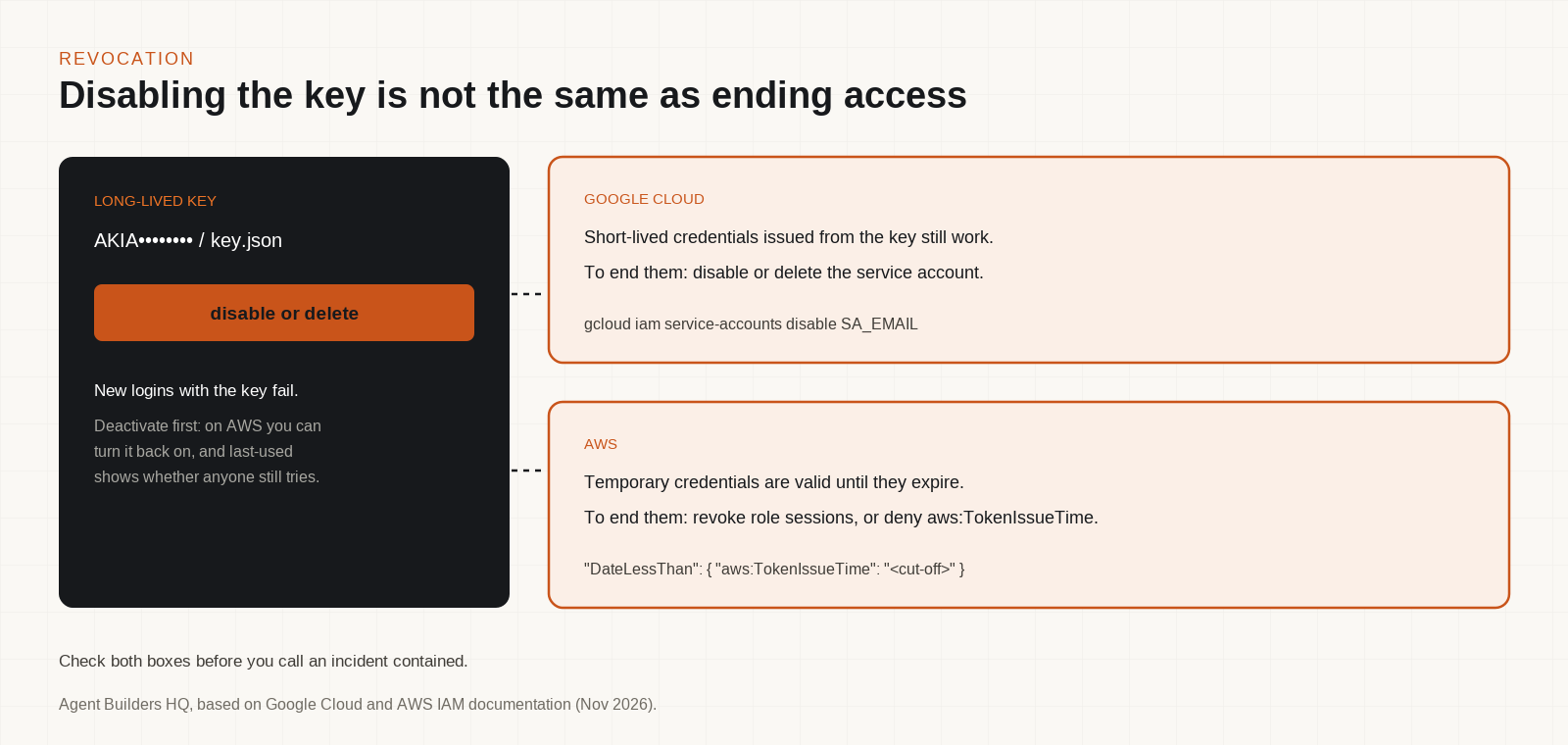
Deactivate first, watch for use, then delete. Disabling a key does not always end sessions already issued from it.
Make revocation part of offboarding, with the same weight as the final invoice. When a project, contract or agent deployment ends: disable the credentials issued for it, remove its role assignments and OAuth grants, search repositories and CI variables for copies, and confirm the old credential can no longer authenticate.
Deactivating before deleting is the safer order. A deactivated AWS key can be turned back on if something you forgot breaks, and its last-used date tells you whether anyone tried it after you switched it off.
Know what revocation does not do. Google Cloud's documentation states that disabling a service account key "does not revoke short-lived credentials that were issued based on the key"; to revoke those you must disable or delete the service account itself. On AWS, temporary credentials are valid until they expire, and the documented way to stop them is to change permissions: the console's "Revoke active sessions" action for roles, or an explicit deny on aws:TokenIssueTime. Do this before declaring containment complete.
{
  "Version": "2012-10-17",
  "Statement": [
    {
      "Effect": "Deny",
      "Action": "*",
      "Resource": "*",
      "Condition": {
        "DateLessThan": { "aws:TokenIssueTime": "2026-11-19T12:00:00Z" }
      }
    }
  ]
}aws iam update-access-key --user-name vendor-x --access-key-id AKIAEXAMPLEEXAMPLE --status Inactiveaws iam delete-access-key --user-name vendor-x --access-key-id AKIAEXAMPLEEXAMPLEgcloud iam service-accounts keys disable KEY_ID --iam-account=vendor-x@PROJECT_ID.iam.gserviceaccount.comgcloud iam service-accounts disable vendor-x@PROJECT_ID.iam.gserviceaccount.comaz ad app credential delete --id APP_ID --key-id KEY_IDGive vendors and agents roles with an end date, not keys
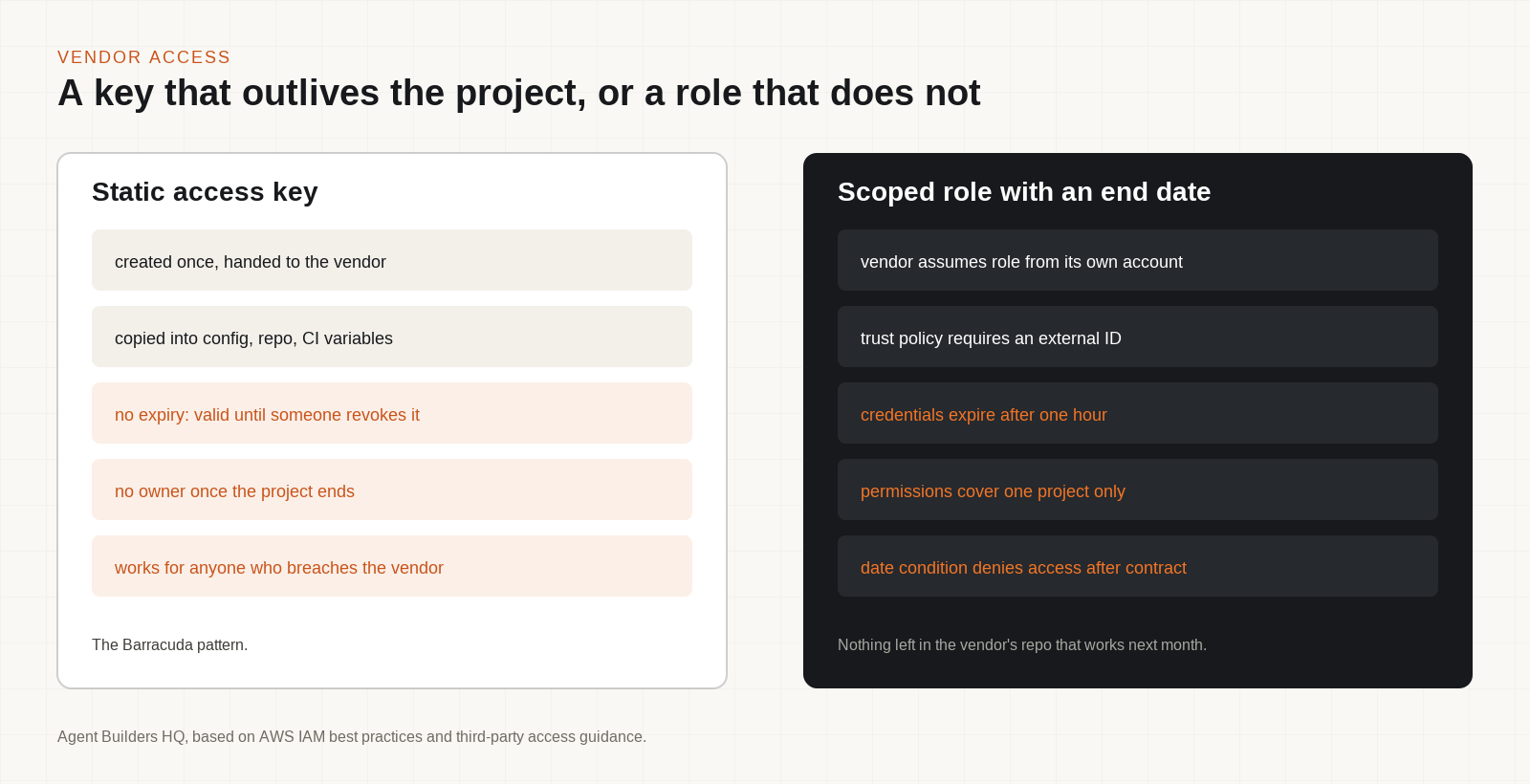
Let the vendor assume a role in your account for an hour at a time, and put the contract end date in the policy.
AWS's IAM best practices say workloads should use temporary credentials through IAM roles, and that "where possible" you should rely on temporary credentials instead of creating long-term access keys. For a third party, that means a cross-account role the vendor assumes from its own AWS account, with an external ID in the trust policy. AWS describes the external ID as protection against the confused deputy problem and notes it is not a secret. The vendor receives credentials that expire, and you never hand over a key that can sit in their repository.
Add the end of the engagement to the role's permissions policy as an explicit deny after a date. If offboarding is forgotten, the access still stops. Delete the role when the work ends, too.
On Google Cloud, Google's guidance is to avoid user-managed service account keys and authenticate with attached service accounts or Workload Identity Federation instead. If a key cannot be avoided, Google recommends rotating it at least every 90 days, and immediately if you think it has leaked. That interval is Google's recommendation for its keys, not a universal standard.
{
  "Version": "2012-10-17",
  "Statement": [
    {
      "Effect": "Allow",
      "Principal": { "AWS": "arn:aws:iam::111122223333:root" },
      "Action": "sts:AssumeRole",
      "Condition": {
        "StringEquals": { "sts:ExternalId": "vendor-x-project-7f3a" }
      }
    }
  ]
}aws sts assume-role --role-arn arn:aws:iam::444455556666:role/vendor-x-project --role-session-name vendor-x --external-id vendor-x-project-7f3a --duration-seconds 3600Tip
Put the date condition in the role's permissions policy as a Deny with aws:CurrentTime and DateGreaterThan. That is a standard identity-policy condition. Test it in a sandbox account before you rely on it.
Give each AI agent its own narrow identity, behind a policy gate
One agent, one identity, one purpose. The agent never decides its own permissions.
Barracuda's attacker was an agent working through stolen credentials. Your own agents hold credentials too, and the same chaining logic applies if one is compromised or prompt-injected. If every agent shares one powerful key, compromising any of them compromises all of them.
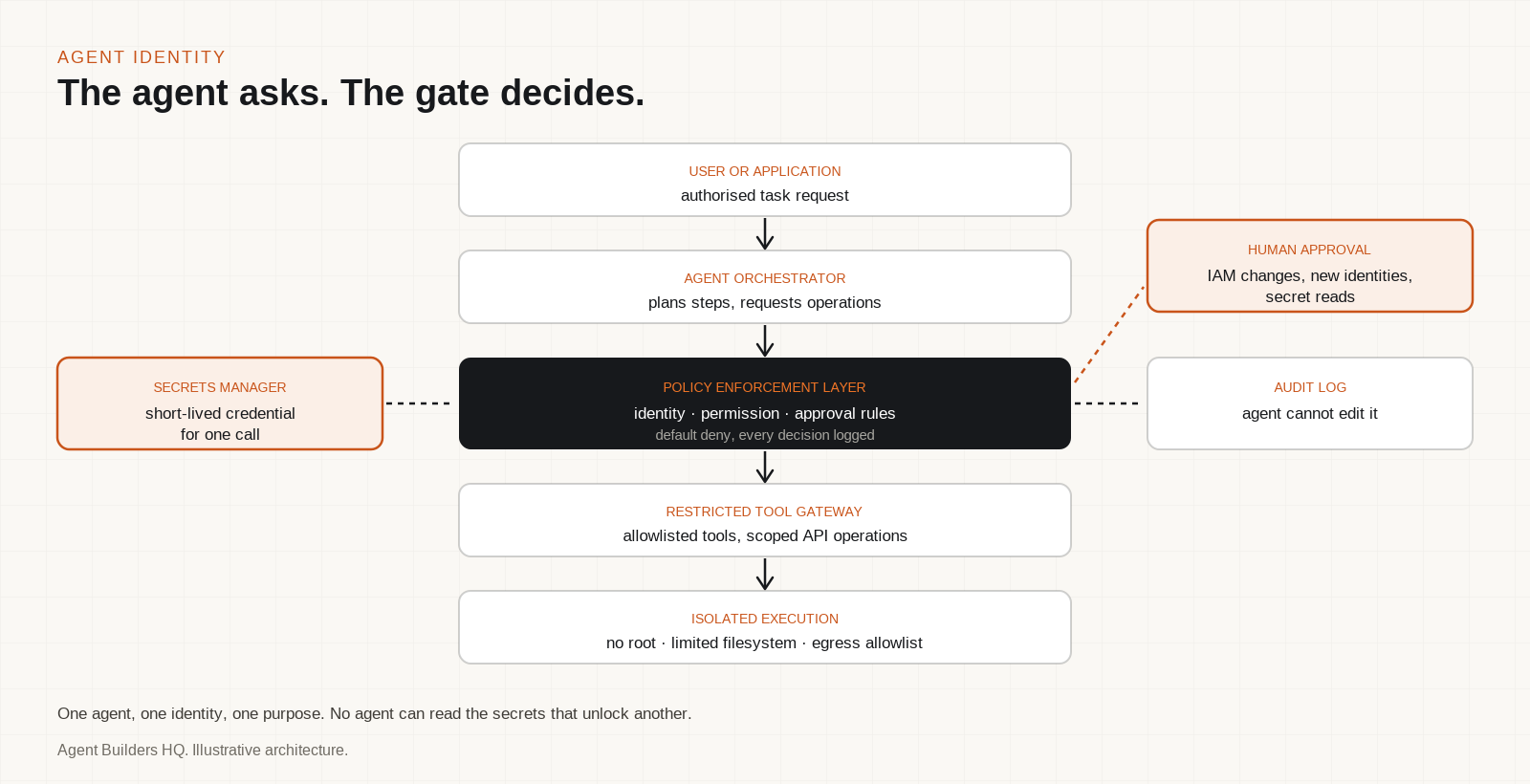
Give each agent a separate identity scoped to its task: a document agent that can read one bucket, a reporting agent that can read approved analytics tables, a deployment agent that can deploy to one environment. None of them should be able to read the secret store that holds the others' credentials. That is the step that let Barracuda's attacker move from one platform to the next.
Then put a policy layer between the agent and its tools. The agent asks for an operation; the gate checks the agent's identity, the requested action and the resource against an allowlist, logs the decision, and either fetches a short-lived credential for that one call or refuses. High-impact actions, such as creating identities, changing IAM or reading secrets, go to a human. Barracuda's blocked attempt to create an admin identity is the kind of call this layer exists to stop.
Run the agent somewhere that limits the damage if it misbehaves: a container or VM with no root, a restricted filesystem, resource limits and an egress allowlist. A container alone is not a security boundary. The host, runtime settings, network and identity controls around it matter as much.
from fnmatch import fnmatch

ALLOWED = {
    "report-agent": {("s3:GetObject", "arn:aws:s3:::sales-reports/*")},
}
NEEDS_HUMAN = {"iam:CreateUser", "iam:AttachUserPolicy", "secretsmanager:GetSecretValue"}

def authorize(agent_id: str, action: str, resource: str) -> str:
    if action in NEEDS_HUMAN:
        return "escalate"
    for allowed_action, pattern in ALLOWED.get(agent_id, set()):
        if action == allowed_action and fnmatch(resource, pattern):
            return "allow"
return "deny" # default deny, and log every decisionScan for secrets, and close the CI log trick
Catch keys before they are pushed, and stop arbitrary branches from running workflows that can see secrets.
The key in this incident was in a configuration file in a GitHub repository. Secret scanning on that repository could have flagged it; push protection blocks supported secret types before they reach the repository at all. GitHub notes that some generic patterns need to be turned on, and users with write access can bypass a block by giving a reason, which creates an alert. Add a local scanner such as Gitleaks in pre-commit and CI so the check does not depend on one platform.
Scanning is not revocation. Removing a secret from the latest commit leaves it in history, forks and clones. Revoke or rotate first, then clean up.
The build-system step deserves its own fix. Barracuda's attacker pushed short-lived branches to trigger a workflow that printed encoded secrets to the job log. Masking only catches the exact secret string, so an encoded copy gets through. Keep deployment secrets in GitHub Actions environments restricted to protected branches: environment secrets are only available to jobs that use the environment, after its protection rules pass. Better still, use OIDC from the pipeline to your cloud so there is no stored cloud key to print.
gitleaks git --redact -v .gitleaks dir --redact -v .Tip
Barracuda's advisory lists the workflow file names the attacker used (i19ghci.yml and i19ci2.yml) and resource names starting with "i" followed by digits. Alert on new workflow files appearing on short-lived branches, whatever they are called.
If a key leaks: a response playbook
Contain, investigate, hunt for the next credential, rotate, and fix the process that missed it.
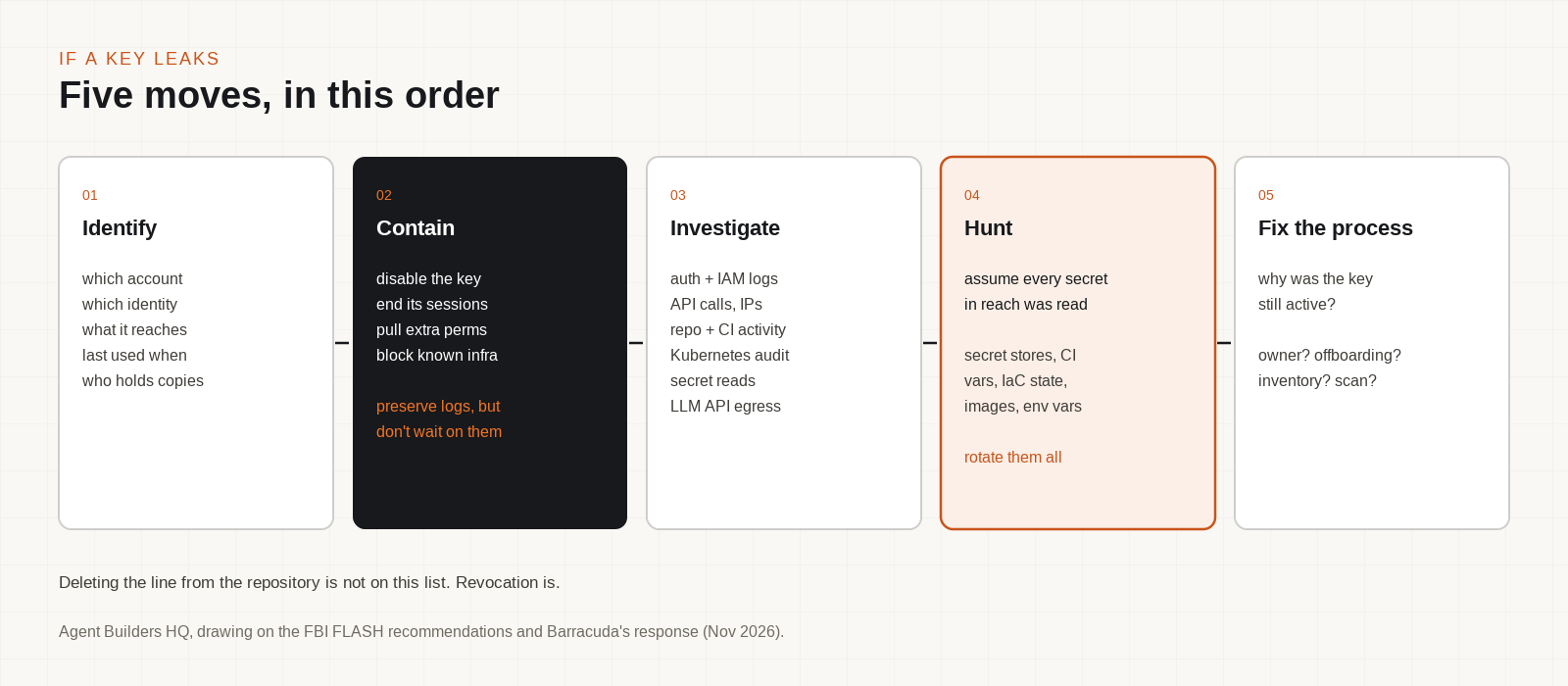
Identify: which account issued the credential, which identity owns it, what it can reach, when it was created, when it was last used, and who else holds a copy.
Contain: disable the credential, end sessions issued from it (step 07), remove unauthorised permissions and block confirmed malicious infrastructure. The FBI's advice is to preserve sign-in and audit records but "not delay urgent containment while waiting for exports".
Investigate: cloud authentication logs, IAM changes, unusual API calls and source addresses, repository and CI activity, Kubernetes audit logs, secret manager access and outbound data transfers. The FBI also asks for service principal sign-ins from unusual networks, credential additions to OAuth applications and outbound connections to LLM API endpoints or LLM proxies.
Hunt for the next credential: assume the attacker read every secret the key could reach, as Barracuda did. Check secret stores, CI variables, IaC state files, container images and environment variables, and rotate everything in range.
Fix the process: why was the key still active? Was there an owner, an offboarding step, an inventory, a scan? Barracuda's answer was a missing retirement step. Yours will be specific to you, and it is the only part of the response that stops the next incident.
What Cloudflare's numbers mean, and what they do not
Cloudflare's Cloudforce One team published its view of AI pentesting orchestrators on 13 November. In the three days before publication it saw over 50 framework families attempt to scan Cloudflare customers. Daily requests from AI pentesting and exploitation tools grew by 30x since 1 October, and by more than tenfold since the original ARTEX repository was removed on 8 October. As of 12 November, ARTEX and its forks made up over 60% of the AI pentesting orchestrators it knows about, and it counts over 12,000 repositories in the wider ecosystem, with several hundred unique forks descended from the original.
Cloudflare also describes the same pattern as Barracuda in other environments: "static, non-expiring tokens running inside CI/CD pipelines" being compromised and chained with LLM-based exploitation frameworks.
- These are Cloudflare's observations of traffic to Cloudflare customers, not a census of the internet.
- 30x is request volume, not successful intrusions.
- 60% is a share of orchestrators Cloudflare knows about, and the supporting chart measures attributed IPs, where one IP can run several tools.
- 12,000 repositories does not mean 12,000 active deployments. Cloudflare's fork tree shows 204 public repositories with their own code changes.
- Removing the original repository did not remove the copies. Defences have to focus on what these tools can reach, not on the tools.
Who should do what
| If you are | Do this first |
|---|---|
| A platform or cloud team | Run the credential inventory in step 06 and deactivate keys with no owner or no recent use |
| Someone who manages vendors | Add credential revocation to offboarding and give new vendors roles with an end date (step 08) |
| A team building AI agents | One identity per agent, no shared admin key, and a policy gate in front of sensitive tools (step 09) |
| Whoever owns CI/CD | Turn on push protection, move deploy secrets into protected environments, prefer OIDC (step 10) |
| A Barracuda XDR customer who was notified | Revoke and recreate the integration credentials and review connected system logs since 1 November |
Credential and agent security checklist
- Every cloud credential has an owner and an end date in a central inventory.
- Vendor and contractor credentials are revoked when the project or contract ends, and revocation is verified.
- Workloads, pipelines and vendors use temporary credentials through roles or workload identity, not static keys.
- Remaining static keys are rotated on a schedule and stored in a secrets manager, never in code or config.
- Secret scanning and push protection run on every repository, with a local scanner in CI.
- Deployment secrets are only available to protected branches or environments.
- Each AI agent has its own least-privilege identity and cannot read other identities' secrets.
- A policy layer sits between agents and sensitive tools, with default deny and human approval for identity and IAM changes.
- Agents run in isolated environments with egress restrictions.
- Cloud, Kubernetes and secret-manager audit logging is on, including data-access logs, and it is stored where an attacker with one key cannot change it.
- Unexpected outbound calls to LLM APIs from servers are investigated.
- There is a written procedure for revoking a leaked credential, including sessions already issued from it.
ARTEX is the headline, but the key is the story. An agentic framework made this intrusion fast and thorough. It did not make it possible: a credential with no end date, held by a vendor that no longer needed it, did that. If you do one thing this week, run the inventory in step 06 and deactivate every key held by a vendor, contractor or agent that has no current owner. Then stop issuing static keys to third parties at all and give them roles that expire. If you build agents, give each one its own narrow identity and make sure none of them can read the secrets that unlock the rest. Barracuda's own conclusion is the one to copy: short-lived, narrowly scoped credentials would have stopped this at the first step.
Frequently asked questions
Did ARTEX hack Barracuda?+
Not on its own. The initial access came from a valid cloud key Barracuda had issued to an AI vendor and never retired; it leaked when the vendor's development environment was breached. Barracuda says the attacker's tooling and sequence match ARTEX, but it has not attributed the intrusion to any group, because many groups use ARTEX.
Were Barracuda customers' credentials stolen?+
Barracuda found no direct evidence that customer XDR integration credentials were viewed or accessed, but its logging could not rule it out. It notified customers with potentially affected credentials and asked them to revoke and recreate them. Customers who were not contacted do not need to act, according to the advisory.
What is credential chaining?+
Using one stolen credential to find the next. In this case a vendor key opened cloud accounts that stored other secrets, which opened an analytics system, a source-code token, Kubernetes clusters and the build system. The first key's permissions are only the starting point; the real reach is every secret it can read.
Are long-lived API keys always insecure?+
No, but they need more care: an owner, narrow permissions, secure storage, rotation, monitoring and a revocation step. Where a short-lived alternative exists (IAM roles, workload identity, OIDC from CI), use it, because it removes the forgotten-key failure entirely.
Does deleting a leaked key from GitHub fix the problem?+
No. The key is still in git history, forks and clones, and it still works until you revoke it. Revoke or rotate it first, check where it was used, and end any sessions issued from it. Then clean the repository.
Does disabling a key end the attacker's access immediately?+
Not always. Google Cloud says disabling a service account key does not revoke short-lived credentials already issued from it; you must disable or delete the service account. On AWS, temporary credentials last until they expire unless you deny them with a policy or revoke role sessions. Check your provider's semantics before you call an incident contained.
How do I protect my own AI agents from being used like this?+
Give each agent its own least-privilege identity, keep long-lived secrets out of its environment, put a policy layer with default deny in front of sensitive tools, require human approval for identity and permission changes, run it in an isolated environment with restricted egress, and log every sensitive action somewhere the agent cannot edit.