Claude Opus 5.5 vs Sonnet 5.5 for Coding: Tokens, Time, and Cost on One Small Task
We ran the same Python coding task eight times in Claude Code, four per model, and explain the token counts, turns, time, and cost in beginner terms, with the exact prompt and command so you can repeat it.
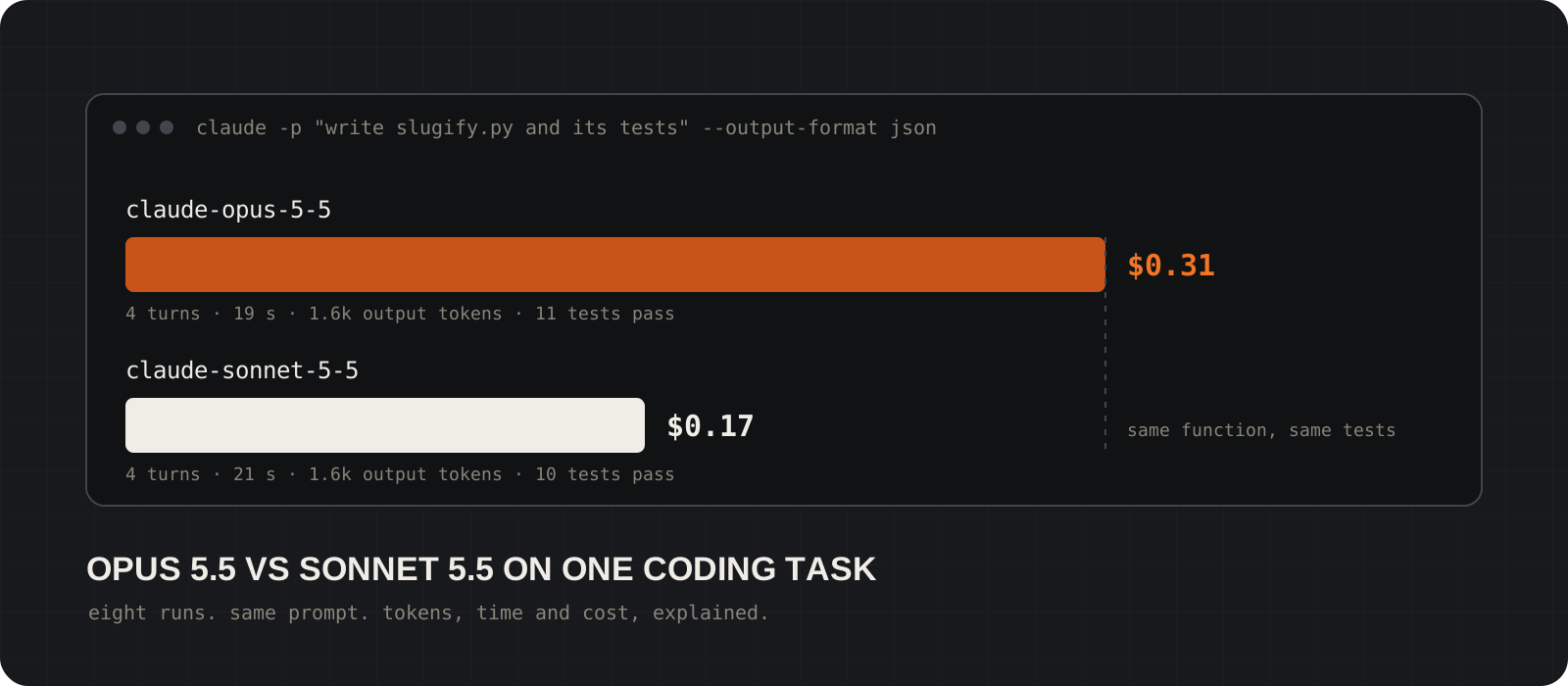
On a small, well-specified coding task, Claude Sonnet 5.5 and Claude Opus 5.5 wrote the same function, passed the same kind of tests, and finished in the same number of turns. Opus cost about 1.9 times as much. We ran the task eight times in Claude Code, four per model, and this guide walks through the token counts, the turn counts, the timing, and the dollar arithmetic so a beginner can read a usage report and make the same comparison on their own work.
System requirements
Claude Code
Version 2.1.292 or later
We used the CLI in non-interactive mode. Check your version with claude --version. The JSON result format and the flags below are documented in the headless guide linked at the bottom.
Account
A Claude subscription or an API key
Claude Code reports a dollar figure for every run. On an API key, that is close to what you pay. On a Pro, Max, or Team plan, usage draws from your plan allowance and the figure is the API list price equivalent.
Python
Python 3.10 or later
The task uses only the standard library and unittest. No pip packages are needed. We ran Python 3.14 on Windows 11.
Operating system
Windows, macOS, or Linux
The command is the same on all three. On Windows, Claude Code has both a Bash tool and a PowerShell tool, which matters for one finding below.
Budget
About $2 for eight runs
Our eight runs cost $1.96 in total at list price. Two runs, one per model, cost under $0.50.
What task did we give both models?
A small Python function with a test file. Specific enough to check, small enough to repeat.
The task asks for a slugify function. A slug is the lowercase, hyphen-separated text you see in a URL, such as creme-brulee. The function must lowercase the text, strip accents, replace runs of punctuation with one hyphen, and trim hyphens from both ends.
The prompt also asks for a unittest file with at least eight cases, and tells the model to run the tests and fix failures. That last line gives the model a way to check its own work, which is the habit Anthropic's own cost guide recommends.
We chose a task where both models should succeed. The point is not to find a task that breaks Sonnet. The point is to see what you pay when both models do the job.
Create a small Python project in this empty directory.

1. Write slugify.py with a function slugify(text: str) -> str. It must lowercase the text, convert accented characters to plain ASCII letters (so "Crème Brûlée" becomes "creme-brulee"), replace any run of spaces, underscores, or other non-alphanumeric characters with a single hyphen, and strip leading and trailing hyphens. Use only the Python standard library.
2. Write test_slugify.py using unittest with at least 8 test cases. Include an empty string, accented characters, repeated separators, and mixed punctuation.
3. Run the tests with "python -m unittest -v" and fix any failures.

Finish with a short summary of what you created and the final test result.How did we run both models the same way?
One command, one empty folder per run, only the model name changes.
Claude Code runs without the interactive screen when you pass -p. Add --output-format json and the final line is a JSON object with the result text, the token usage, the turn count, the duration, and a cost estimate.
Each run starts in a fresh empty directory so no model sees the other's files. The --allowedTools list lets the model write files and run Python without a permission prompt. The --max-turns flag is a safety stop.
We did not pass --effort, so both models ran at the Claude Code default. For Opus 5.5 and Sonnet 5.5 that default is medium. We also did not pass --bare, so each run loaded the same user-level setup an interactive session would, including MCP servers. Keep that in mind when you compare your numbers with ours.
mkdir run-opus && cd run-opus
claude -p "$(cat ../prompt.txt)" \
  --model claude-opus-5-5 \
  --output-format json \
  --permission-mode acceptEdits \
  --allowedTools "Read,Write,Edit,Glob,Grep,Bash(python:*),Bash(python3:*)" \
--max-turns 40 > ../result-opus.jsonNew-Item -ItemType Directory run-sonnet | Out-Null; Set-Location run-sonnet
claude -p (Get-Content ..\prompt.txt -Raw) `
--model claude-sonnet-5-5 `
--output-format json `
--permission-mode acceptEdits `
--allowedTools "Read,Write,Edit,Glob,Grep,Bash(python:*),PowerShell(python:*)" `
--max-turns 40 > ..\result-sonnet.jsonTip
Swap the model ID for the other one and repeat. Run each model at least twice. One run tells you very little, because the model can take a different route each time.
How do you read the JSON result?
Five fields tell the whole story. Everything else is detail.
total_cost_usd is the cost estimate at list price. Claude Code computes it on your machine from the token counts, so it is close to the bill but not the bill itself.
usage.output_tokens is what the model wrote: code, tool calls, and the final summary. Thinking tokens are included in this number and also reported separately under output_tokens_details.
usage.cache_creation_input_tokens is the text written into the prompt cache for the first time. In a fresh session that is mostly Claude Code's own system prompt and tool definitions. usage.cache_read_input_tokens is the text re-read from the cache on every later turn.
num_turns is how many times the model went back to the API. duration_ms is wall-clock time for the whole run. The short script below prints these fields for any result file.
import json, sys

for path in sys.argv[1:]:
    d = json.load(open(path, encoding="utf-8"))
    u = d["usage"]
    print(
        path,
        "model=" + ",".join(d["modelUsage"]),
        "turns=" + str(d["num_turns"]),
        "seconds=" + str(round(d["duration_ms"] / 1000, 1)),
        "cache_write=" + str(u["cache_creation_input_tokens"]),
        "cache_read=" + str(u["cache_read_input_tokens"]),
        "output=" + str(u["output_tokens"]),
        "cost=$" + str(round(d["total_cost_usd"], 3)),
    )
Tip
Run it as python summarize.py result-*.json. The same fields appear in the Session block of /usage inside an interactive session.
What did each model write?
The same four-line function. The test files differ only in the number of cases.
Every one of the eight runs produced the same approach: normalize the text with NFKD so accents become separate marks, drop everything that is not ASCII, lowercase, replace each run of non-alphanumerics with one hyphen, and strip the ends. The Opus and Sonnet versions differ in variable names and comments, not in logic.
Opus wrote 11 or 12 tests per run. Sonnet wrote 10 to 12. Both covered the four cases the prompt required. One Sonnet run added a test for non-Latin text being dropped, which the prompt did not ask for. One Opus run added a test for uppercase input.
We re-ran every test file ourselves after the models finished. All eight suites passed. No run needed a fix cycle; the models wrote the code, ran the tests once, and reported.
Both models also volunteered the same limitation in their summaries: letters without an accent decomposition, such as ß or ø, are dropped rather than converted. That is correct, and the prompt did not ask for a mapping table.
import re
import unicodedata


def slugify(text: str) -> str:
    """Convert text to a lowercase ASCII slug with single hyphens."""
    decomposed = unicodedata.normalize("NFKD", text)
    ascii_text = decomposed.encode("ascii", "ignore").decode("ascii")
return re.sub(r"[^a-z0-9]+", "-", ascii_text.lower()).strip("-")How do tokens turn into dollars?
Multiply each token type by its price. The cache write line dominates in a fresh session.
Opus 5.5 costs $4 per million input tokens and $20 per million output tokens. Sonnet 5.5 costs $2 and $10. Writing to the one-hour prompt cache costs twice the input price, so $8 and $4. Reading from the cache costs $0.20 per million on both models.
Take one clean Opus run: 32,763 cache-write tokens at $8 per million is $0.262. 101,402 cache-read tokens at $0.20 per million is $0.020. 1,579 output tokens at $20 per million is $0.032. Total: $0.314, which matches the reported figure.
The matching Sonnet run: 32,565 cache-write tokens at $4 per million is $0.130. 101,138 cache-read tokens at $0.20 is $0.020. 1,588 output tokens at $10 is $0.016. Total: $0.166.
Notice what those lines say. About 83 percent of the cost of each run went to writing Claude Code's roughly 33,000-token system prompt and tool list into the cache. The model's actual work, the output tokens, was $0.032 on Opus and $0.016 on Sonnet. The cache-read line was identical on both models.
                     Opus 5.5    Sonnet 5.5
input (uncached)     $4.00       $2.00
cache write, 1 hour  $8.00       $4.00
cache read           $0.20       $0.20
output               $20.00      $10.00
Tip
On an API key, Claude Code uses the five-minute cache by default, where a write costs 1.25 times the input price instead of 2 times. The fixed overhead per fresh session then drops to about $0.16 on Opus and $0.08 on Sonnet.
Results: eight runs, one task
| Claude Opus 5.5 | Claude Sonnet 5.5 |
|---|---|
| Cost per run: $0.314 and $0.313 | Cost per run: $0.166 and $0.167 |
| Turns: 4 and 4 | Turns: 4 and 4 |
| Wall time: 19.8 s and 18.3 s | Wall time: 21.7 s and 20.1 s |
| Output tokens: 1,579 and 1,592 | Output tokens: 1,588 and 1,613 |
| Thinking tokens reported: 41 and 0 | Thinking tokens reported: 0 and 0 |
| Cache write: 32,763 and 32,639 | Cache write: 32,565 and 32,559 |
| Cache read: 101,402 and 101,267 | Cache read: 101,138 and 101,128 |
| Tests written: 11 and 11, all pass | Tests written: 10 and 10, all pass |
The table shows the two clean runs per model, where both shell tools were allowed. Round one, discussed below, had a permission difference that cost Opus an extra turn. Times are wall clock from the start of the command to the final JSON line.
What do the numbers mean for a beginner?
- Output tokens were almost identical. The two models wrote the same amount of code and summary text. Neither one was more verbose on this task.
- Turn counts were identical. Each model wrote two files, ran the tests once, and finished. There was no exploration and no fix cycle, so the stronger model had nothing extra to do.
- Cache reads were identical because the context was identical: the same system prompt, the same prompt, the same two files, the same test output. Each turn re-reads the whole context, so four turns on a 33,000-token base produced about 100,000 cache-read tokens on both models.
- The whole price difference comes from the price list. Opus charges twice as much per token for writes and output, so the same work costs twice as much. The cache-read rate is the same on both models, which is why the total ratio is 1.9 and not 2.0.
- Opus was slightly faster on the clean runs, by one to three seconds. That is within normal variation for four API calls. Do not read a speed ranking into it.
The permission trap that cost Opus an extra turn
Our first two Opus runs took five turns, about 28 seconds, and $0.33. The first two Sonnet runs took four turns. The difference was not the model's reasoning. On Windows, Claude Code offers both a Bash tool and a PowerShell tool, and our first allow list only covered Bash. Opus reached for PowerShell to run the tests, was denied, and then used Bash. Sonnet picked Bash the first time.
That one denied call added a turn, which re-read the whole context once more and pushed cache reads from about 100,000 to about 150,000 tokens. Once we allowed both tools, Opus finished in four turns like Sonnet.
The lesson is practical. Before you compare models, make sure both have the same tools available, and check the permission_denials array in the JSON result. A denial is not a model failure, but it costs a turn, and every turn re-reads your whole context.
Which model should a beginner use for coding?
Start on Sonnet 5.5 for tasks like this one: a clear specification, a small change, and a way to verify the result. It did the same work for half the price, and Anthropic's own cost guide says Sonnet handles most coding tasks well.
Switch to Opus 5.5 when the task is open-ended, spans many files, or needs the model to decide what to build. Anthropic positions Opus 5.5 for long-running agentic coding, and it is the default model on most Claude Code plans for that reason. Our task did not exercise any of that, which is exactly why the two models tied on quality.
If you are on a subscription plan, the dollar figure is not a bill, but it still tells you how fast you use your allowance. The same 1.9 ratio applies.
The trade-offs worth knowing
- Eight runs of one small task is a field note, not a benchmark. It tells you what the token and cost structure looks like, not how the models rank on hard problems.
- The fixed overhead dominates short tasks. In an interactive session you pay the cache write once and then read it cheaply for an hour, so a ten-turn session is not ten times the price of a one-turn session.
- The cost figure is a client-side estimate at list price. Contracted rates, the five-minute cache on API keys, and regional inference multipliers all change the real bill.
- We ran at the Claude Code default effort of medium for both models. Raising effort to high or xhigh adds thinking tokens, which are billed as output. On a harder task, that is where Opus and Sonnet would separate, in both quality and cost.
- Both models answered on the Claude API, first-party. Numbers on Amazon Bedrock, Google Cloud, or Microsoft Foundry follow those providers' price lists.
For a small, well-specified coding task, use Sonnet 5.5 and keep the difference. Both models wrote the same function in the same four turns, and Opus cost 1.9 times as much for it. Reach for Opus 5.5 when the task is large or vague enough that a better plan saves turns, because turns, not model choice, are what multiply your cost.
Frequently asked questions
Is Opus 5.5 better at coding than Sonnet 5.5?+
On this small task, no. Both produced the same function and passing tests in four turns. Anthropic positions Opus 5.5 for long-running agentic coding and Sonnet 5.5 for everyday coding, so expect a gap on large, open-ended work rather than on a well-specified function.
Why is the cost not exactly double?+
Opus charges twice as much for input, cache writes, and output, but the cache-read price is $0.20 per million tokens on both models. Cache reads were about 6 percent of each run's cost, so the total ratio lands at about 1.9.
Why did a tiny task cost 30 cents?+
Most of the cost was writing Claude Code's system prompt and tool definitions, about 33,000 tokens, into the prompt cache. That happens once per fresh session. The model's own code and summary cost about 3 cents on Opus and 1.6 cents on Sonnet.
Does the dollar figure come off my credit card?+
Only if you authenticate with an API key. On Pro, Max, Team, and Enterprise plans, usage draws from your plan allowance and the figure is an equivalent at API list price. Either way it is a local estimate, not an invoice.
How do I see this inside a normal Claude Code session?+
Run /usage. The Session block shows total cost, API duration, and token counts by model, including cache reads and writes. It resets when you run /clear.
Can I make the comparison cheaper to repeat?+
Add --bare to skip loading hooks, plugins, MCP servers, and CLAUDE.md, which shrinks the system prompt. Bare mode needs an ANTHROPIC_API_KEY because it does not read your subscription login. Also keep the task small and the allow list complete, so neither model wastes a turn on a denied tool call.