GSD, Ralph Loop, and CodeRabbit Setup: A Vibe Coding Toolkit for Windows, macOS, and Linux
Install GSD, Ralph Loop, and CodeRabbit step by step, connect them to Claude Code, GitHub, or GitLab, and use them together on an existing repository.
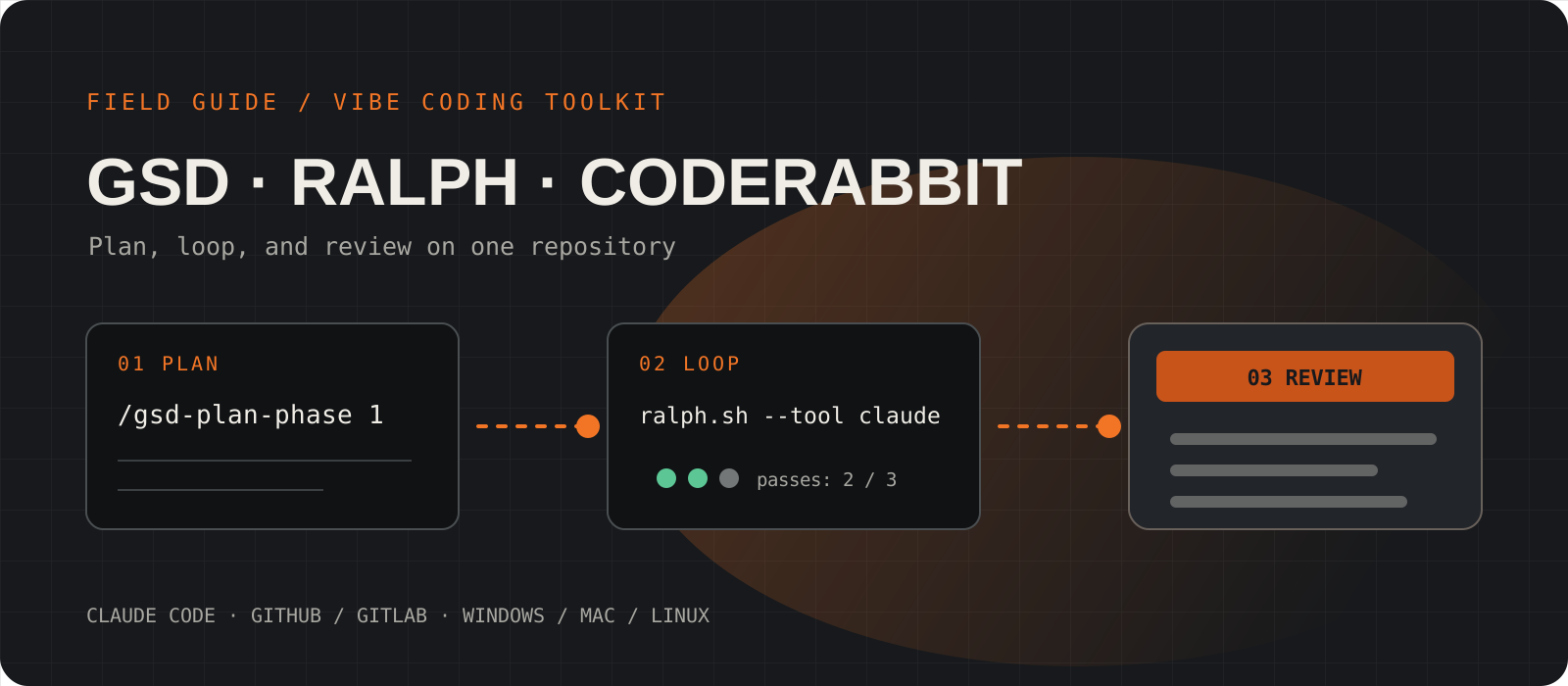
This vibe coding tools setup gives you three parts of one workflow. GSD plans and builds features inside Claude Code. Ralph Loop runs Claude Code again and again until a task list is done. CodeRabbit reviews each pull request on GitHub or GitLab. This guide installs all three on Windows, macOS, or Linux and connects them to an existing repository. Several commands in older setup guides no longer work, so every command here comes from the current official sources.
System requirements
Base tools
Git, Node.js LTS, GitHub CLI, and jq
GSD installs through npx, so it needs Node.js. Ralph Loop needs jq to read its task file. The GitHub CLI lets GSD open pull requests.
AI coding agent
Claude Code with a Claude plan or an API key
GSD also supports other agents such as Codex, Cursor, and OpenCode. Ralph Loop supports Claude Code and Amp. This guide uses Claude Code for both.
Shell
PowerShell, Terminal, or Git Bash
Ralph Loop is a bash script. On Windows, run it in Git Bash, which comes with Git for Windows. macOS and Linux can use their normal terminal.
Repository and cost
A GitHub or GitLab repository with admin access
GSD and Ralph Loop are free and open source. CodeRabbit is free for public repositories. Private repositories need a paid CodeRabbit plan after the 14-day trial. Claude Code usage is billed through your Claude plan or API account.
Install Git, Node.js, the GitHub CLI, and jq
All three tools depend on these base tools. Install them once per machine.
On Windows, close and open the terminal again after the install so it finds the new commands. On Linux, avoid the distribution's nodejs package, because it is often several versions old. Use nvm instead.
Check each tool before you continue. Every command in the check block must print a version number.
winget install --id Git.Git -e
winget install --id OpenJS.NodeJS.LTS -e
winget install --id GitHub.cli -e
winget install --id jqlang.jq -ebrew install git node gh jqsudo apt update
sudo apt install -y git jq curl gh
curl -o- https://raw.githubusercontent.com/nvm-sh/nvm/v0.40.1/install.sh | bash
source ~/.bashrc
nvm install --ltsgit --version
node -v
gh --version
jq --versionInstall Claude Code and sign in to GitHub
Claude Code runs GSD and Ralph Loop. The GitHub CLI login lets GSD push branches and open pull requests.
Run the installer for your platform, then run claude once to sign in. Type /exit when the sign-in finishes. Next, run gh auth login and follow the browser prompts.
GitLab users can skip the GitHub CLI login. GSD opens pull requests on GitHub only, so on GitLab you push the branch and open the merge request yourself.
irm https://claude.ai/install.ps1 | iexcurl -fsSL https://claude.ai/install.sh | bashclaude --version
claude
gh auth loginInstall GSD in your project
GSD is not a separate terminal program. Its installer adds slash commands to Claude Code.
Open a terminal in your project folder. VS Code users can open the folder and use Terminal > New Terminal. Run the installer. It asks for your runtime, so select Claude Code. Then it asks for a location. Local installs GSD for this project only, and Global installs it for every project.
Start Claude Code and run /gsd-help. If you see the GSD command list, the install worked.
npx @opengsd/gsd-core@latestclaude/gsd-helpTip
The original get-shit-done repository is archived. If a guide tells you to run npm install -g get-shit-done-cli or gsd init, use the GSD Core installer above instead.
Point GSD at an existing codebase or a new project
GSD needs a roadmap before it can plan any work. Choose the start command that matches your project.
For an existing repository, run /gsd-onboard. GSD reads the code and builds a roadmap from what it finds. If you only want an analysis of the code structure, run /gsd-map-codebase. Add --fast to use one agent instead of several.
For an empty folder, run /gsd-new-project. GSD asks what you want to build and writes the roadmap from your answers.
/gsd-onboard
/gsd-map-codebase
/gsd-new-projectRun one GSD phase from discussion to pull request
GSD splits the roadmap into phases. Each phase goes through the same five commands.
Discuss asks you questions about the phase. Plan researches and writes the plans. Execute writes the code and makes one commit per plan. Verify helps you test the result. Ship opens a GitHub pull request with a generated description. Add --draft if you want a draft pull request.
Run /gsd-progress at any time. It shows where you are and what to run next. When phase 1 ships, repeat the five commands with 2.
/gsd-discuss-phase 1
/gsd-plan-phase 1
/gsd-execute-phase 1
/gsd-verify-work 1
/gsd-ship 1Copy Ralph Loop into your project
Ralph Loop is one bash script plus a prompt file. You copy both into a scripts/ralph folder.
On Windows, do this step and the next two in Git Bash, not PowerShell. In Git Bash, the D: drive is /d/, so a project at D:\Projects\my-app is /d/Projects/my-app.
The prompt file for Claude Code is CLAUDE.md. The prompt.md file in the same repository is for Amp.
git clone https://github.com/snarktank/ralph.git ~/ralph
mkdir -p scripts/ralph
cp ~/ralph/ralph.sh scripts/ralph/
cp ~/ralph/CLAUDE.md scripts/ralph/CLAUDE.md
chmod +x scripts/ralph/ralph.shWrite the Ralph task list as prd.json
Ralph works through user stories in prd.json. Each loop picks one story whose passes value is false.
Install the Ralph skills in Claude Code first. Then ask Claude Code to write a PRD (product requirements document) for your feature. Read the PRD and correct it. Next, ask Claude Code to convert it to prd.json.
The script reads prd.json from its own folder only. Make sure the file ends up at scripts/ralph/prd.json. Keep each story small enough to finish in one session, and give it acceptance criteria that a test or a type check can confirm.
/plugin marketplace add snarktank/ralph
/plugin install ralph-skills@ralph-marketplaceLoad the prd skill and create a PRD for [your feature]
Load the ralph skill and convert tasks/prd-[feature-name].md to scripts/ralph/prd.json{
"project": "MyApp",
"branchName": "ralph/task-priority",
"description": "Add priority levels to tasks",
"userStories": [
{
"id": "US-001",
"title": "Add priority field to database",
"acceptanceCriteria": ["Migration runs", "Typecheck passes"],
"priority": 1,
"passes": false,
"notes": ""
}
]
}Run Ralph Loop safely and watch its progress
The loop starts Claude Code once per iteration and stops when every story passes.
Read this before you start. The script runs Claude Code with --dangerously-skip-permissions, so the agent can run any command without asking. Commit your work first. Do not run the loop in a folder that holds secrets or production credentials. A virtual machine or a container is the safest place.
Pass --tool claude, because the script uses Amp when you leave the flag out. The last number is the maximum number of iterations, and the default is 10. Watch progress from a second terminal. Press Ctrl+C to stop early. When the loop ends, push the branch named in branchName and open a pull request.
./scripts/ralph/ralph.sh --tool claude 10jq '.userStories[] | {id, title, passes}' scripts/ralph/prd.json
cat scripts/ralph/progress.txt
git log --oneline -10git push -u origin ralph/task-priority
gh pr create --fillConnect CodeRabbit to GitHub or GitLab
CodeRabbit runs in the browser, so the steps are the same on every operating system.
Open coderabbit.ai and select Get Started. Sign in with GitHub or GitLab. Azure DevOps and Bitbucket also work. Authorize the CodeRabbit app. On GitHub, choose Only select repositories and pick the repositories you want reviewed. You need admin access to the repository or the organization.
Check the repository list in the CodeRabbit app settings and add any repository that is missing. Then open a small pull request or merge request. CodeRabbit posts a summary and line comments within a few minutes.
Add .coderabbit.yaml and control reviews from the pull request
A config file in the repository root sets review tone, skipped paths, and file-specific rules.
Name the file .coderabbit.yaml, with a leading dot, and put it in the repository root. The chill profile gives fewer comments and assertive gives more. A path_filters entry that starts with ! is skipped. A path_instructions entry adds review rules for matching files. Commit and push the file.
To check which settings CodeRabbit uses, comment @coderabbitai configuration on a pull request. Other comment commands: @coderabbitai review reviews new changes, @coderabbitai full review starts over, @coderabbitai pause and @coderabbitai resume control automatic reviews, and @coderabbitai help lists the rest.
language: "en-US"
reviews:
  profile: "chill"
  auto_review:
    enabled: true
    drafts: false
  path_filters:
    - "!dist/**"
    - "!**/*.lock"
  path_instructions:
    - path: "src/**/*.ts"
      instructions: "Check for missing error handling and unsafe types."
How do GSD, Ralph Loop, and CodeRabbit work together?
Use GSD to plan. Its discuss and plan commands turn a vague goal into phases and plans you can read. Build with /gsd-execute-phase when you want to watch each step. Switch to Ralph Loop when you already have a list of small, testable stories and want the agent to work through them alone.
Both paths end in a pull request. CodeRabbit reviews it automatically. Ask Claude Code to fix the comments, push the fixes, comment @coderabbitai review, and merge when the review is clean.
Which old setup commands no longer work?
| Older instruction | Current instruction |
|---|---|
| npm install -g get-shit-done-cli | npx @opengsd/gsd-core@latest |
| gsd --version and gsd init | /gsd-help, then /gsd-onboard or /gsd-new-project inside Claude Code |
| gsd create-roadmap, gsd plan-phase, gsd execute-plan | /gsd-plan-phase N and /gsd-execute-phase N |
| Set GITHUB_TOKEN and run gsd connect-github | gh auth login, then /gsd-ship N |
| sudo apt install nodejs npm | nvm install --lts, because apt often installs an old Node.js |
| ./scripts/ralph/ralph.sh | ./scripts/ralph/ralph.sh --tool claude 10, plus jq and CLAUDE.md in scripts/ralph |
| Tasks in a PRD document or any JSON list | scripts/ralph/prd.json with a userStories array |
| coderabbit.yaml | .coderabbit.yaml, with a leading dot |
Some older guides, including a PDF that circulated in our community, use commands that do not exist in the current tools. Use the right column instead.
Points to consider before you use these tools
- Ralph Loop skips every Claude Code permission prompt. Treat it like giving a stranger a shell on your machine, and isolate it.
- Autonomous loops burn tokens quickly. Set a low iteration count for your first run and check your Claude usage afterwards.
- GSD adds planning files and commits to your repository. Read the plans before you execute them, because a wrong plan produces wrong code fast.
- CodeRabbit comments are suggestions. It can miss bugs and flag correct code, so a human still approves the merge.
- Private repositories on CodeRabbit cost money after the trial. Check the pricing page before you add a team.
- None of these tools works offline. Claude Code and CodeRabbit both send your code to hosted models.
I would start with GSD alone on a real repository and run one phase end to end. That shows you whether its planning style fits your work. I would add CodeRabbit next, because it costs nothing on public repositories and catches problems before merge. I would use Ralph Loop last, inside a container, and only for small stories with clear tests.
Frequently asked questions
Is GSD a command-line tool?+
No. GSD installs slash commands into an AI coding agent such as Claude Code. There is no gsd command in your terminal. You run commands like /gsd-onboard and /gsd-plan-phase inside the agent.
Can I run Ralph Loop on Windows?+
Yes. Install Git for Windows and jq, then run the script in Git Bash. PowerShell cannot run the bash script directly.
Does GSD work with GitLab?+
The planning and execution commands work on any Git repository. The /gsd-ship command opens pull requests through the GitHub CLI, so on GitLab you push the branch and open the merge request yourself.
Is CodeRabbit free?+
CodeRabbit reviews public repositories for free. Private repositories get a 14-day trial, then need a paid plan. Check the pricing page for current prices.
Why does Ralph say it cannot find prd.json?+
The script looks for prd.json in its own folder, scripts/ralph. Move the file there, or ask Claude Code to write it there when you convert the PRD.
Do I need all three tools?+
No. Each tool works alone. GSD is the best first step for planning, CodeRabbit is the easiest to add to an existing team, and Ralph Loop is optional for long, well-defined task lists.