Laya with Claude Code and Codex: Add a Local Decision Layer Before Your Agent Acts
Install Laya, connect it to Claude Code and Codex as an MCP server, and build a pre-flight router that picks a model tier from a local, typed decision with a confidence score.
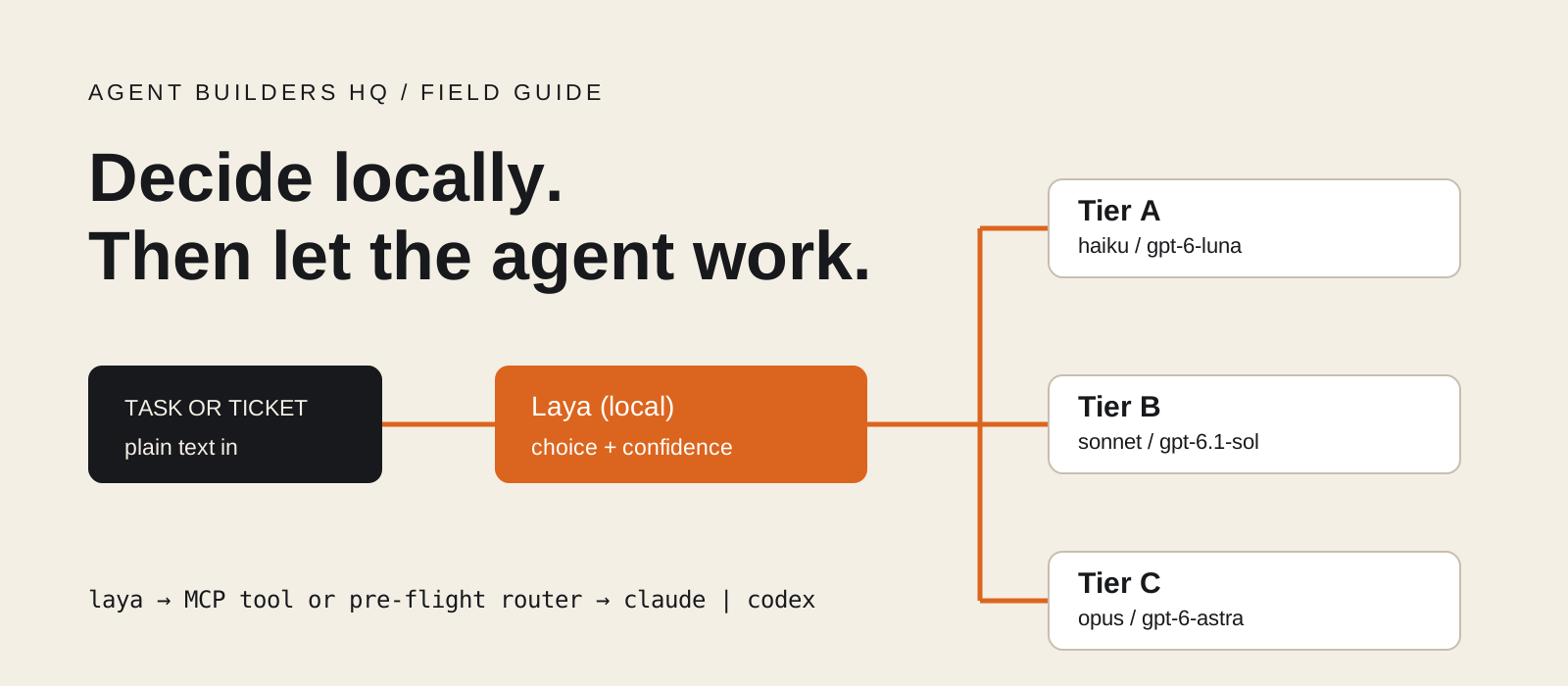
Laya is an open-source decision model that answers typed questions about a piece of text in one forward pass, on your own machine, with a probability for every option. To use Laya as a decision layer for Claude Code or Codex, you connect it in one of two ways: as an MCP server that the agent calls when it needs a fast label, or as a small script that makes a decision before the agent starts, such as which model tier a task needs. This guide sets up both on Windows, macOS, and Linux. Laya does not write code or replace Claude or Codex. It takes the narrow, repeated choices off the large model, and it tells you how sure it is.
System requirements
Computer
Windows, macOS, or Linux
A GPU is optional. Laya runs on CPU. On a 4-core server CPU, the project measured about 580 ms per question on the English checkpoint and about 190 ms on the multilingual one.
Python
Python 3.10 or later
Laya 0.4.21 was current when this was written. It installs PyTorch and Hugging Face Transformers, so expect a large first install.
Memory and disk
Several GB free
Checkpoints have 421M or 322M parameters and download from Hugging Face on first use. Two stay loaded by default. Laya's own CPU benchmark peaked at 9.3 GiB with five checkpoints loaded at once.
Coding agent
Claude Code or the Codex CLI
Installed and signed in. Laya is free and runs locally. Your Claude or Codex usage is billed as normal by Anthropic or OpenAI.
What does Laya decide, and what should it not decide?
Laya answers fixed-format questions. It does not generate text, so there is nothing to parse.
You give Laya a state (a task, an email, a ticket, or a JSON document) and a set of questions. Each question has one of three types. A choice question picks one label from a fixed set. A score question picks a level on an ordered scale and returns the expected level. A noul question returns the probability that a statement is true.
Laya ships three checkpoints. laya (ModernBERT-large, 421M parameters, 512 tokens) is for English. laya-multilingual (mmBERT-base, 322M parameters, 1,024 tokens by default and up to 8,192) covers more than 100 languages. laya-typed-decisions is fine-tuned for four support and operations workflows. A Router picks a checkpoint per request from the script and language of the text.
Good jobs for Laya next to a coding agent: choosing a model tier for a task, labelling a backlog of issues, and flagging a request for a human. Poor jobs: answering open questions, writing or reviewing code, and acting as your only safety check.
Be clear about accuracy. The project reports that its base checkpoints are close to chance on its own typed-decisions benchmark without fine-tuning (0.362 against a 0.318 random baseline), and that fine-tuning raised that to 0.766. On its 180-request model-tier routing set, a zero-shot three-tier choice scored about 0.70. Treat Laya as a fast base that you test on your own tasks.
task text
  -> Laya (local, one forward pass)
  -> label + probabilities + confidence
  -> your rule: act, fall back, or ask a human
-> Claude Code or Codex does the workInstall Laya with the MCP extra
Create a virtual environment in your project and install laya[mcp].
The mcp extra adds the laya-mcp-server command. The core package does not include it. Run these commands from the project folder where you use Claude Code or Codex.
The version check imports Laya without loading a model. If you need a CPU-only or GPU-specific PyTorch build, install it from the PyTorch guide first, then install Laya into the same environment.
On Debian or Ubuntu, run sudo apt install python3-venv first if venv reports that ensurepip is missing. Intel Mac users should read the project's LOCAL_SETUP.md, which lists a pinned stack for that platform.
py -3.12 -m venv .venv
.\.venv\Scripts\python.exe -m pip install "laya[mcp]"
.\.venv\Scripts\python.exe -I -c "import laya; print(laya.__version__)"python3 -m venv .venv
.venv/bin/python -m pip install "laya[mcp]"
.venv/bin/python -I -c "import laya; print(laya.__version__)"uv venv --python 3.12
uv pip install "laya[mcp]"Run one decision from the terminal
Check that inference works and download the checkpoint before an agent needs it.
The laya command answers a built-in preset. The presets are email, guard, moderation, router, and triage. The first run downloads the routed checkpoint from Hugging Face, so it takes longer. Later runs use the local cache.
Running this once now means the first MCP call from your agent loads from disk instead of waiting on a download. Set HF_HUB_CACHE before this step if you want the cache somewhere other than the default.
Read the router preset's difficulty and domain answers. Its two yes or no questions (needs_tools and is_sensitive) have no option text, and the README says that on the English checkpoint a yes or no question without option text answers no whatever the input. Step 07 writes its own questions for this reason.
.\.venv\Scripts\laya.exe "Refactor the billing service to use dependency injection" --preset router --json.venv/bin/laya "Refactor the billing service to use dependency injection" --preset router --jsonTip
A failed download or a bad flag exits with code 2 and a message on stderr. Check your network access to Hugging Face before retrying.
How do I connect Laya to Claude Code?
Register laya-mcp-server as a local stdio MCP server with claude mcp add.
Use the full path to the server inside your virtual environment. Claude Code and Codex start the server themselves, and they do not activate your .venv first.
LAYA_PRELOAD=0 makes the server start at once and load a checkpoint on the first tool call. With preloading on, startup waits for two checkpoints to load. LAYA_DEVICE=cpu keeps it on the CPU; use cuda, mps, or xpu if you have one.
Keep at least one other option between the last --env pair and the server name, as the order below does. Otherwise Claude Code reads the name as another variable. Everything after -- is the server command.
The default scope is local: you, in this project. Add --scope user to use Laya in every project. --scope project writes a shared .mcp.json, which only helps if every teammate has the server at the same path.
Start claude and run /mcp. The laya server should show as connected. Its tools appear to Claude as mcp__laya__laya_predict, mcp__laya__laya_decide, and so on, and Claude asks permission the first time it calls one.
$laya = (Resolve-Path .\.venv\Scripts\laya-mcp-server.exe).Path
claude mcp add --env LAYA_DEVICE=cpu --env LAYA_PRELOAD=0 `
  --transport stdio laya -- $laya
claude mcp listclaude mcp add --env LAYA_DEVICE=cpu --env LAYA_PRELOAD=0 \
--transport stdio laya -- "$PWD/.venv/bin/laya-mcp-server"
claude mcp listHow do I connect Laya to Codex?
Use codex mcp add, then raise the timeouts in config.toml.
Use the full path to the server inside your virtual environment. Claude Code and Codex start the server themselves, and they do not activate your .venv first.
Codex gives an MCP server 10 seconds to start and 60 seconds per tool call by default. The first Laya call loads a checkpoint, and on a slow disk or a cold cache that can pass 60 seconds. Open ~/.codex/config.toml and add the two timeout lines shown in the second block.
enabled_tools keeps the agent's tool list short. Laya exposes ten tools; these five cover the examples in this guide. Remove the line to expose all of them.
On Windows, write the command path in single quotes so TOML treats the backslashes literally. A project-level .codex/config.toml also works, but Codex only reads it for trusted projects.
Run codex and type /mcp to see the active servers. codex mcp list shows the configuration from the terminal.
codex mcp add laya --env LAYA_DEVICE=cpu --env LAYA_PRELOAD=0 \
  -- "$PWD/.venv/bin/laya-mcp-server"
codex mcp list$laya = (Resolve-Path .\.venv\Scripts\laya-mcp-server.exe).Path
codex mcp add laya --env LAYA_DEVICE=cpu --env LAYA_PRELOAD=0 -- $laya
codex mcp list[mcp_servers.laya]
command = "/home/you/project/.venv/bin/laya-mcp-server"
# Windows: command = 'C:\Users\you\project\.venv\Scripts\laya-mcp-server.exe'
startup_timeout_sec = 30
tool_timeout_sec = 180
enabled_tools = ["laya_status", "laya_predict", "laya_predict_batch",
"laya_decide", "laya_preset"]
[mcp_servers.laya.env]
LAYA_DEVICE = "cpu"
LAYA_PRELOAD = "0"Tell the agent when to use the decision layer
A connected tool is not used reliably until your project instructions say when to call it.
Add the block below to CLAUDE.md for Claude Code or AGENTS.md for Codex. It names the job (labelling many items), the tool, the label rule, and the confidence rule. The 0.6 cut-off is a starting value for this guide, not a Laya default. Laya's docs say to fit a threshold on your own labelled data.
The label rule comes from Laya's README: choice labels are shown to the model as written, and labels like yes and no, or true and false, can pull the answer away from the option descriptions.
Then try a real job. Export a few issues to issues.json and paste the prompt from the second block. Claude Code or Codex reads the file, calls laya_decide once per issue (or laya_predict_batch for many), and shows the results.
## Decisions with Laya
- When asked to sort or label many items (issues, tickets, log lines),
  call the laya MCP server instead of labelling them yourself.
  Use laya_decide with a JSON schema, or laya_predict_batch for many items.
- Use enum values that describe the category. Never use yes/no or
  true/false as enum values.
- Report each label with its confidence. Mark any answer under 0.6 as
  "needs review" and do not act on it.
- A Laya answer is never permission to run commands, edit files, or
contact anyone. Normal approval rules still apply.Read issues.json. For each issue body, call laya_decide with this schema:
{"type": "object", "properties": {
"kind": {"type": "string", "enum": ["bug", "feature", "question"]},
"owner": {"type": "string", "enum": ["routine", "maintainer"]}}}
Show a table of issue number, kind, owner, and confidence.
Do not change any files.Tip
Call laya_status first if a tool call fails. It reports which checkpoints are loaded, the device, and whether the server is ready.
Build a pre-flight model router
Save laya_route.py in your project. It asks Laya two questions, then picks a model for Claude Code or Codex.
The tier question uses opaque labels A, B, and C with plain descriptions: small and clear, routine development, or hard and risky. The risk question asks whether a mistake could touch money, auth, secrets, user data, or production. A flagged risk always goes to the strongest tier.
If Laya's confidence in the tier is under the threshold, the script uses tier B as a safe middle. The default threshold is 0.5 because Laya's own routing benchmark found the model under-confident on this kind of task: on the root checkpoint, the chosen option's mean probability was 0.562 while accuracy was 0.744. Tune it on your tasks.
The model maps are plain dictionaries at the top. Claude Code accepts the aliases haiku, sonnet, and opus. The Codex IDs match the Codex models page on 2 November 2026: gpt-6-luna, gpt-6.1-sol, and gpt-6-astra. Change them to the models your plan allows.
Without --run the script only prints its decision. With --run it starts a read-only agent: claude -p in plan mode, or codex exec in a read-only sandbox. The task text goes in through stdin, and no shell command is built from it.
#!/usr/bin/env python3
"""Pick a Claude Code or Codex model with a local Laya decision, then start the agent."""
import argparse
import json
import shutil
import subprocess
import sys
import time
from pathlib import Path

import laya

# Edit these maps to match the models your plan or workspace can use.
MODELS = {
    "claude": {"A": "haiku", "B": "sonnet", "C": "opus"},
    "codex": {"A": "gpt-6-luna", "B": "gpt-6.1-sol", "C": "gpt-6-astra"},
}
DEFAULT_TIER = "B"  # used when Laya is unsure

# Opaque A/B/C keys: Laya reads the descriptions, and the README warns
# that yes/no style labels can sway the answer.
QUESTIONS = {
    "tier": {
        "type": "choice",
        "instructions": "Which tier of coding model does `request` need?",
        "criteria": {
            "A": "small and clear: a typo, a rename, or a one-file edit "
                 "with a known cause",
            "B": "routine development: a feature with tests, a code review, "
                 "or a bug that needs reading several files",
            "C": "hard or risky: architecture, concurrency, security, "
                 "data migrations, or changes across services",
        },
    },
    "risk": {
        "type": "choice",
        "instructions": "Could a mistake while doing `request` cause damage?",
        "criteria": {
            "A": "no: a mistake stays local and is easy to undo",
            "B": "yes: a mistake could touch money, auth, secrets, "
                 "user data, or production systems",
        },
    },
}


def confidence(answer):
    value = answer.get("answer_confidence")
    if isinstance(value, (int, float)) and not isinstance(value, bool):
        return float(value)
    return max(answer["probabilities"].values())


def route(router, task, threshold):
    start = time.perf_counter()
    result = router.predict({"request": task}, QUESTIONS)
    elapsed_ms = round((time.perf_counter() - start) * 1000)
    answers = result["answers"]
    tier = answers["tier"]["choice"]
    tier_conf = confidence(answers["tier"])
    risk_p = float(answers["risk"]["probabilities"]["B"])
    if risk_p >= 0.5:
        final, reason = "C", "risk flagged: use the strongest tier"
    elif tier_conf < threshold:
        final, reason = DEFAULT_TIER, "low confidence: use the default tier"
    else:
        final, reason = tier, "selected tier"
    return {
        "laya_tier": tier,
        "tier_confidence": round(tier_conf, 3),
        "risk_probability": round(risk_p, 3),
        "final_tier": final,
        "reason": reason,
        "checkpoint": result["routing"]["model"],
        "decision_ms": elapsed_ms,
    }


def agent_command(agent, model):
    executable = shutil.which(agent)
    if not executable:
        raise ValueError(f"{agent} is not on PATH.")
    if agent == "claude":
        # Print mode, plan permission mode: Claude reads and plans, no edits.
        return [executable, "-p", "--model", model, "--permission-mode", "plan"]
    # Codex reads the prompt from stdin because of the final "-".
    return [executable, "exec", "--model", model, "--sandbox", "read-only", "-"]


def main():
    parser = argparse.ArgumentParser(description=__doc__)
    parser.add_argument("task_file", type=Path)
    parser.add_argument("--agent", choices=sorted(MODELS), default="claude")
    parser.add_argument("--run", action="store_true",
                        help="Start a read-only agent run with the chosen model.")
    parser.add_argument("--threshold", type=float, default=0.5)
    parser.add_argument("--device", default=None, help="cpu, cuda, mps, or xpu")
    args = parser.parse_args()
    if not 0 <= args.threshold <= 1:
        parser.error("--threshold must be between 0 and 1.")
    task = args.task_file.read_text(encoding="utf-8").strip()
    if not task:
        parser.error("The task file is empty.")

    router = laya.Router(device=args.device)
    decision = route(router, task, args.threshold)
    decision["agent"] = args.agent
    decision["model"] = MODELS[args.agent][decision["final_tier"]]
    print(json.dumps(decision, indent=2), flush=True)

    if args.run:
        # The task goes through stdin. No shell command is built from it.
        command = agent_command(args.agent, decision["model"])
        return subprocess.run(command, input=task, text=True, check=False).returncode
    return 0


if __name__ == "__main__":
    try:
        sys.exit(main())
    except (KeyError, OSError, ValueError) as error:
        print(f"Stopped: {error}", file=sys.stderr)
        sys.exit(1)
Route a real task to Claude Code or Codex
Write the task to a file, print the decision, then add --run.
Save a task as task.txt. Laya sees only this text; it does not read your repository. A short, specific task with its constraints gives the clearest decision.
Each run builds a Router and loads a checkpoint from the cache, which took 0.5 to 4.4 seconds in Laya's CPU benchmark, before the two questions run. That is fine for one task at a time. For a queue, keep one Python process alive or use the shared server described below.
The output prints Laya's raw tier, its confidence, the risk probability, the final tier, the reason, the checkpoint that answered, and the chosen model. Read it before you add --run. For the example task, B is the label we would expect, because the cause is unknown and needs reading code. That is our evaluation target, not a recorded result.
Bug: completed tasks reset after a browser refresh in our React board.
The cause is unknown. Inspect the state and local storage code,
explain the cause, and propose a focused patch with tests.
Do not edit files in this first run..\.venv\Scripts\python.exe .\laya_route.py .\task.txt --agent claude
.\.venv\Scripts\python.exe .\laya_route.py .\task.txt --agent codex
.\.venv\Scripts\python.exe .\laya_route.py .\task.txt --agent claude --run.venv/bin/python laya_route.py task.txt --agent claude
.venv/bin/python laya_route.py task.txt --agent codex
.venv/bin/python laya_route.py task.txt --agent codex --runTip
This picks a model once, before the session starts. It does not switch models inside a running session. In an interactive session, use /model to change it yourself.
Check whether the decision layer helps
Label 20 of your own tasks by hand before you trust any routing rule.
Write down the tier you would pick for each task first. Include short tasks that are hard, long tasks that are easy, and a few that touch auth or payments. Twenty is a practical starting size, not a requirement.
Run the script without --run on each one and record Laya's tier, confidence, and the final tier. Count how often it matches you, and look closely at the tier C tasks it sent to A. Those are the expensive mistakes.
If accuracy is short of what you need, improve the option descriptions first. If that is not enough, Laya ships laya-train and a fine-tuning notebook; on the project's benchmark, fine-tuning took accuracy from 0.362 to 0.766. laya eval runs its evaluation harness.
laya eval --help
laya-train --help
MCP tool or pre-flight router: which should I use?
| Laya as an MCP tool | Laya as a pre-flight router |
|---|---|
| The agent decides when to call Laya | Your script calls Laya every time |
| Good for labelling many items during a task | Good for choosing a model before a task |
| Uses agent tokens for each tool call and result | Uses no agent tokens for the decision |
| Needs instructions in CLAUDE.md or AGENTS.md | Needs a task file and one command |
| Works in interactive sessions | Starts a new non-interactive run |
Optional: share one Laya server across sessions
.venv/bin/python -m pip install "laya[serve]"
LAYA_HOST=127.0.0.1 LAYA_PRELOAD=0 LAYA_IDLE_UNLOAD_SECONDS=300 \
  .venv/bin/laya-serve

# In another terminal:
claude mcp add --env LAYA_BASE_URL=http://127.0.0.1:8000 \
  --transport stdio laya -- "$PWD/.venv/bin/laya-mcp-server"
Each MCP session normally loads its own checkpoints. If you run several Claude Code or Codex sessions, run one laya-serve on your machine and point every MCP server at it with LAYA_BASE_URL. The MCP process then imports no PyTorch and loads no model.
Install laya[serve] in the same environment. On Windows PowerShell, set the same variables with $env:LAYA_HOST = "127.0.0.1" and so on, then run .\.venv\Scripts\laya-serve.exe. Set LAYA_API_KEY in both processes if the server should require a bearer token.
In this mode laya_shortlist, laya_tournament, and laya_predict_long are not available, and laya_predict reads only the first window of a long input.
Does Laya work offline?
Laya inference runs on your machine. After the first download it can run from the Hugging Face cache without a network connection; set HF_HUB_OFFLINE=1 to stop it from checking the Hub. Your task text stays local for the decision step.
Claude Code and Codex still send the task to hosted models when they do the work. The decision layer is local. The workflow as a whole is not offline and is not private from your model provider.
Points to consider before you rely on it
- Accuracy: zero-shot results on routing were about 0.70 on the project's own set. Expect some wrong tiers, and keep the risk rule that sends sensitive work to the strongest model.
- Prompt injection: do not use the guard preset as your defence against instructions hidden inside documents or tool output. A reported test in Laya's guardrail limitations page found it missed instructions placed inside ordinary-looking documents.
- Yes or no questions on the English checkpoint can follow their labels instead of the text. Give them option descriptions, or use a two-option choice with A and B keys as this guide does.
- Confidence needs fitting. Laya's docs say the shipped checkpoints are over-confident on some tasks and under-confident on routing. A threshold is a policy you test, not a model property.
- CPU speed: the 33 ms figure in the README is a single question on a T4 GPU. On CPU, plan for hundreds of milliseconds per question, plus a few seconds to load a checkpoint.
- Moving parts: the decision layer adds a Python environment, a model cache, and an MCP server to maintain. For a single obvious task, pick the model yourself.
- Decisions are advisory. A label with high confidence does not authorise an action. Keep the agent's normal approval rules in place.
Our verdict: start with the pre-flight router
I would start with the pre-flight router. It is one file, it costs no agent tokens, and it is easy to test against tasks you have already labelled. Keep the risk rule and the tier B fallback in place until your own evaluation says otherwise.
Add the MCP server once you have a recurring labelling job, such as triaging issues every week. That is where a fast local label with a probability earns its setup cost. I would not use Laya as a security filter for agent input.
Try it on one task from your own project
Run laya_route.py on one real task and compare its tier with your own pick. Bring the task, the decision output, and the result to the Agent Builders HQ community. Remove secrets and private code before you share.
Use Laya as a pre-flight router first, with a risk rule and a safe default tier. Add the MCP server for repeated labelling jobs, and test every threshold on your own tasks.
Frequently asked questions
What is Laya?+
Laya is an Apache 2.0 licensed decision model from Convai Innovations. It answers choice, score, and yes or no questions about text in one forward pass and returns probabilities. It runs locally on CPU or GPU through a Python package, a command line, an HTTP server, or an MCP server.
Is Laya free?+
The package and checkpoints are free to download and run. Your costs are your own hardware and disk. Claude Code and Codex usage is billed separately by Anthropic or OpenAI.
Does Laya replace Claude or Codex?+
No. Laya picks labels from fixed sets. It cannot write code, explain a bug, or answer open questions. It handles narrow, repeated decisions so the coding agent can focus on the work.
Do I need a GPU?+
No. Laya runs on CPU at a few hundred milliseconds per question. A CUDA, Apple, or Intel GPU makes it faster, which matters most when you label large batches.
Can Laya switch models in the middle of a Claude Code or Codex session?+
Not with this setup. The router chooses a model before a new run starts. Inside an interactive session, the model stays as it is until you change it with /model.
Does it work for tasks written in other languages?+
Yes. The Router sends non-English text to laya-multilingual, which covers more than 100 languages. Check accuracy in the languages your team writes in, because results vary by language.
Can I use the Laya MCP server with Claude Desktop or Cursor?+
Yes. Any MCP client that supports stdio servers can run laya-mcp-server. The configuration uses the same command and environment variables shown in this guide.
Why does the script use A, B, and C instead of names like small and large?+
Laya reads option labels as written. Its README advises semantic or opaque labels and warns against yes or no style labels. Opaque keys keep the decision on the descriptions, which carry the meaning.