What Is Paperclip? A Developer's Guide to Running Claude Code and Codex Agents as a Team
Learn what Paperclip is, what it costs, how to install it on macOS, Linux, WSL2, or Docker, how to hire your first Claude Code agent with a budget, and when a single terminal is still the better tool.
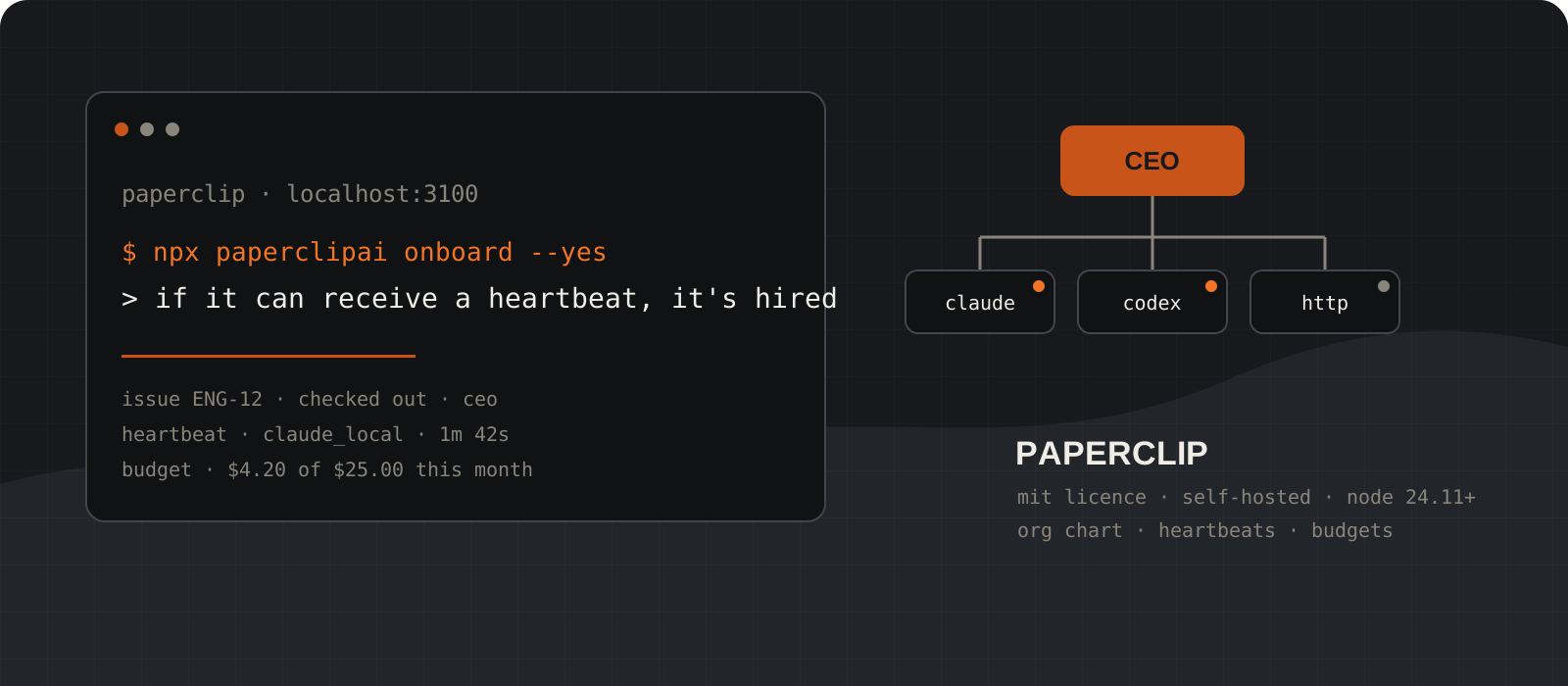
Paperclip is an open-source, MIT-licensed control plane for teams of AI agents. You install it on your own machine, it starts a Node.js server with an embedded PostgreSQL database and a React dashboard on port 3100, and you then hire agents into it: Claude Code, Codex, Cursor, OpenCode, a shell command, or anything that can answer an HTTP webhook. Paperclip does not write code or run a model itself. It owns the parts around the agent that people usually rebuild badly: tickets with an atomic checkout so two agents never grab the same task, scheduled heartbeats so agents wake up and work without a terminal open, per-agent monthly budgets that pause an agent when the money runs out, and an audit log of every action. The repository has just over 80,000 stars and the current release is v2026.831.1 from 2 September 2026. This guide gets you from nothing to a running company with one Claude Code agent, a bounded first task, and a budget, and it is honest about the one platform where that does not yet work natively.
System requirements
Node.js
24.11 or newer
The package declares engines.node >= 24.11.0 and the installer refuses older runtimes. Node 22, which many machines still run as LTS, is not enough. Check with node --version before anything else.
Operating system
macOS, Linux, or Windows via WSL2 or Docker
The official installer supports macOS, Linux, and WSL2. Native Windows is not a supported path today: several open issues from the 2026.720 release onward report every local Claude Code and Codex run failing because the runtime spawns a bash wrapper. Use WSL2 or the Docker image on Windows.
A coding agent CLI
Claude Code, Codex, or OpenCode installed and logged in
Paperclip launches the agent CLI you already have. For the Claude Code adapter the claude command must be on PATH with either a subscription login, ANTHROPIC_API_KEY, or CLAUDE_CODE_OAUTH_TOKEN available.
Package manager
npm and npx for the quick start, pnpm 9.15+ for source builds
The one-line quick start only needs npx. Cloning the repository and running pnpm dev needs pnpm 9.15 or later, which is pinned in the packageManager field.
Database
None to install
Paperclip creates an embedded PostgreSQL database under ~/.paperclip/instances on first run. For a production deployment you point DATABASE_URL at your own Postgres instead.
Cost
Free software, paid tokens
Paperclip is MIT-licensed and needs no account. Every heartbeat runs your agent CLI against your provider, so the bill is whatever Anthropic, OpenAI, or OpenRouter charge. Budgets in Paperclip cap that spend per agent per month.
Disk and ports
Port 3100, plus room under ~/.paperclip
The managed CLI, the embedded database, and agent workspaces all live under ~/.paperclip. The server binds to loopback on port 3100 by default. Budget a gigabyte or so of disk; that is our recommendation, not a vendor number, and it grows with workspaces and run logs.
Project status
Actively developed, date-versioned releases
Releases are cut several times a month and named by date, for example v2026.831.1. Expect the UI and CLI flags to move between releases, and pin a version with paperclipai install --version if you need stability.
Check Node 24.11+ and pick your platform
Paperclip refuses to start on Node 22. On Windows, open a WSL2 terminal now rather than PowerShell.
Run node --version first. If it prints anything below 24.11, upgrade before you touch the installer. The installer can bootstrap Node for you on macOS and Linux, but only when you download the script and run it locally, not from a pipe.
On Windows the supported route is WSL2. The install script checks for it explicitly, and the background service uses systemd inside WSL2. Native PowerShell can run the npx quick start, but as of this writing every local agent run fails on native Windows, which makes it a dashboard with no workers. Docker is the other Windows option and is covered in step 09.
node --version
npm --versionnvm install 24
nvm use 24
node --versionwsl --install -d Ubuntu
# reopen the terminal, then:
wslInstall and log in to the agent CLI you want to hire
Paperclip does not ship a model. Before you create an agent, the CLI it will drive has to work on its own.
Install Claude Code, Codex, or OpenCode with npm and run it once by hand so the login is stored. The Claude Code adapter accepts a subscription login, ANTHROPIC_API_KEY, or CLAUDE_CODE_OAUTH_TOKEN. The Codex adapter accepts a ChatGPT login or OPENAI_API_KEY. If the CLI cannot answer a prompt in your terminal, Paperclip cannot fix that.
Pick a working directory for the agent now. The adapter needs an absolute path, and the agent will read and write files there on every heartbeat. A fresh clone of the repository you want worked on is the safe choice.
npm install -g @anthropic-ai/claude-code
claude
# complete the login prompt, then exitnpm install -g @openai/codex
codex
# complete the login prompt, then exitclaude --print "Respond with hello."Start Paperclip with one command
The npx form runs onboarding, creates the embedded database, and opens the dashboard on http://localhost:3100.
Two paths exist. The npx path installs nothing permanently and is the right one for a first look. The managed installer downloads a script, verifies its checksum, puts a stable paperclipai shim in ~/.local/bin, and offers to run Paperclip as a background service. Both end at the same dashboard.
The registry flag is not decoration. If your ~/.npmrc points at a private registry such as GitHub Packages, npx resolves paperclipai there and fails with an E404. The README documents this exact failure and the registry flag as its fix.
Onboarding defaults to trusted local mode: loopback only, no login screen. That is correct for a laptop. Add --bind lan or --bind tailnet to switch to authenticated mode if other machines need to reach it.
npx --registry https://registry.npmjs.org paperclipai onboard --yescurl -fsSLO https://paperclip.ing/install.sh
curl -fsSLO https://paperclip.ing/install.sh.sha256
sha256sum -c install.sh.sha256
bash install.shnpx paperclipai runpaperclipai onboard --yes --bind tailnetTip
On macOS, shasum -a 256 -c install.sh.sha256 replaces the sha256sum line. Both commands verify the same file.
Or skip setup entirely with test-drive
One command creates an isolated instance with a CEO agent already configured, then opens the browser. Nothing touches your real config.
test-drive is the fastest way to see a heartbeat happen. It writes to a fresh temporary directory, prints that path, ensures one CEO agent exists using the harness you choose, starts the server in the foreground, and opens the dashboard. It never installs a service and never creates a task on its own, so you can watch each thing happen.
Pass the API key for the harness you want. Claude is the default. OpenCode routes through OpenRouter and needs a model id that starts with openrouter/. Reuse the same instance later with --data-dir.
ANTHROPIC_API_KEY=sk-ant-your-key npx paperclipai test-driveOPENAI_API_KEY=sk-your-key npx paperclipai test-drive --harness codexOPENROUTER_API_KEY=sk-or-your-key npx paperclipai test-drive \
--harness opencode \
--model openrouter/anthropic/claude-sonnet-4.5npx paperclipai test-drive --data-dir ~/paperclip-trialCreate a company and write the goal
Everything in Paperclip hangs off a company goal. Write one sentence that an agent could argue for or against.
In the dashboard, create a company and give it a goal. The README example is "Build the #1 AI note-taking app to $1M MRR". For a first run, something smaller and checkable is better: "Get the test suite of repo X green and keep it green." Every task an agent creates later carries the goal ancestry in its prompt, so a vague goal produces vague work.
One instance can hold many companies with full data isolation, so you do not need to get this right the first time. Delete the company and start over if the goal was wrong.
Hire a CEO agent on the Claude Code adapter
The CEO is the agent that turns your goal into tasks. Set its adapter, working directory, and model, then press Test Environment.
Create an agent, give it the CEO role, and choose the claude_local adapter. The only required field is cwd, the absolute working directory from step 02. Optional fields include model, a prompt template, environment variables with secret references, a per-run timeout, and maxTurnsPerRun, which defaults to 300.
Press Test Environment before you save. It confirms the claude command is reachable, checks the directory, reports which auth mode it detected, and sends a live "Respond with hello." probe using the same headless flags a real heartbeat uses. A green result here means the first heartbeat will not fail on plumbing.
One default deserves a pause. dangerouslySkipPermissions is true for this adapter, because a scheduled run has nobody to click Allow. Your agent will edit files and run commands in cwd without asking. Point it at a directory you can afford to reset.
{
  "cwd": "/home/you/work/my-repo",
  "model": "claude-opus-5",
  "maxTurnsPerRun": 100,
  "timeoutSec": 1800
}
Tip
Prefer Codex? The codex_local adapter has the same shape and reads OPENAI_API_KEY or your ChatGPT login from ~/.codex/auth.json.
Assign one bounded task and watch the heartbeat
Agents do not run continuously. They wake in heartbeats, check out a task, work, and report. Trigger one on purpose and read the log.
Create an issue with a finish line the agent cannot argue with, assign it to the CEO, and either wait for the assignment trigger or press Invoke. A heartbeat fires on a schedule, on assignment, on an @-mention in a comment, on a manual Invoke, or when an approval resolves. Each heartbeat checks identity, reviews assignments, atomically checks out a task, works, and updates status.
The issue moves backlog to todo to in_progress to in_review to done. Checkout is an atomic operation: if two agents try to claim the same issue, one receives a 409 and moves on. That single rule is most of what people mean when they say orchestration is hard.
Open the run from the issue page. You get structured logs, tool-call traces, the cost event for that heartbeat, and the session id the adapter will resume next time. The Claude Code adapter persists the session between heartbeats so the agent picks up its own context instead of starting cold.
Title: Make the failing unit test in src/date.test.ts pass

Done when: pnpm test exits 0 on the main branch,
the change is under 40 lines, and you have posted
a comment with the diff summary. Do not touch CI config.npx paperclipai agent heartbeat:invoke <agent-id>
npx paperclipai issue runs <issue-id-or-identifier>
npx paperclipai activity list --company-id <company-id>Set a monthly budget before you add a second agent
A budget is a hard stop, not a warning. When an agent reaches it, Paperclip pauses it and cancels queued work.
Budgets exist at company and agent level and are stored in cents per month. Cost is tracked per company, agent, project, goal, issue, provider, and model, with a warning threshold before the stop. The heartbeat queue checks budget before it invokes the adapter, so an over-budget agent never starts a run it cannot pay for.
Set a small number first, on the order of a few dollars, and let one week of heartbeats show you the real burn. A CEO that hires and delegates can multiply spend quickly, which is why hire approvals exist: turn them on and every new agent waits for you.
npx paperclipai cost summary --company-id <company-id>
npx paperclipai cost by-agent --company-id <company-id>Run it in Docker instead, including on Windows
The image bundles git, gh, ripgrep, Python, and the Claude, Codex, and OpenCode CLIs. It is the practical Windows path and the sane server path.
Clone the repository and use the quickstart compose file. It runs one container with the embedded database and persists everything under ./data/docker-paperclip. Two secrets are required at start: one for auth and one for signing tool actions. Pass ANTHROPIC_API_KEY or OPENAI_API_KEY into the container so the bundled CLIs can authenticate.
On Windows, run these from a WSL2 shell with Docker Desktop's WSL integration enabled, so that openssl and the bind mount path behave. If you change the host port or put it behind a domain, set PAPERCLIP_PUBLIC_URL to the address the browser will use.
git clone https://github.com/paperclipai/paperclip.git
cd paperclip
BETTER_AUTH_SECRET=$(openssl rand -hex 32) \
PAPERCLIP_TOOL_ACTION_SIGNING_SECRET=$(openssl rand -hex 32) \
ANTHROPIC_API_KEY=sk-ant-your-key \
docker compose -f docker/docker-compose.quickstart.yml up --builddocker build -t paperclip-local .
docker run --name paperclip -p 3100:3100 \
-e HOST=0.0.0.0 -e PAPERCLIP_HOME=/paperclip \
-e BETTER_AUTH_SECRET=$(openssl rand -hex 32) \
-e PAPERCLIP_TOOL_ACTION_SIGNING_SECRET=$(openssl rand -hex 32) \
-v "$(pwd)/data/docker-paperclip:/paperclip" \
paperclip-localKeep it running: service, update, rollback, doctor
The managed install gives you a background service and an atomic update with a database backup taken first.
The service is a systemd user unit on Linux and WSL2 and a LaunchAgent on macOS. It restarts after a crash and can start at login. Only one server process may own an instance: paperclipai run refuses to start while the service is supervising it.
Updates back up the database, verify the new CLI, flip the current symlink, and restart the service. Two previous payloads are kept, so a bad release is one command away from undone. Telemetry is on by default and anonymous; set PAPERCLIP_TELEMETRY_DISABLED=1 or DO_NOT_TRACK=1 if you would rather it were off.
paperclipai service install
paperclipai service status
paperclipai service logs -fpaperclipai update
paperclipai update --version 2026.831.1
paperclipai update --rollbackpaperclipai doctorWhat is Paperclip, and what is it not?
The README puts it in one line: if OpenClaw is an employee, Paperclip is the company. It is a task manager on the surface and an organization underneath: an org chart with reporting lines, goals that every issue traces back to, budgets, approval gates, and an audit log. Agents are employees with a title, a boss, a job description, and a monthly limit.
The project is explicit about what it does not do, and the list is worth reading before you install. It is not an agent framework, so it will not tell you how to build an agent. It is not a workflow builder, so there is no drag-and-drop pipeline canvas. It is not a prompt manager or a code review tool. And by its own account it is not a single-agent tool: with one agent you probably do not need it.
- Adapters: Claude Code, Codex, Cursor, OpenCode, Kimi Code, Pi, Hermes, OpenClaw gateway, an arbitrary process, and an HTTP webhook. Gemini CLI exists as an experimental package.
- Runtime targets: the local host, SSH hosts, or managed sandboxes on e2b, Cloudflare, Daytona, Modal, Novita, or your own Kubernetes.
- Extension points: an out-of-process plugin system, an MCP tool gateway with governed access, skills shared across the org, and company export and import with secrets scrubbed.
- Observability: opt-in OpenTelemetry traces and opt-in Sentry, both off until you set the relevant environment variable.
How do heartbeats and delegation work?
Nothing in Paperclip runs continuously by default. An agent wakes for a heartbeat, does a bounded amount of work, and goes back to sleep. Triggers are a schedule, a task assignment, an @-mention in a comment, a manual Invoke, or a resolved approval. The wakeup queue lives in the database and coalesces duplicates, so a burst of comments produces one run, not five.
Delegation flows down the org chart. You set a goal. The CEO drafts a strategy and submits it for your approval. Once approved, the CEO breaks the goal into issues, assigns them by role, and may ask to hire. Hire approvals are optional, and turning them on is the single most effective spend control after budgets. Every agent reports to exactly one manager, which is also the escalation path when an agent is blocked.
Routines add the scheduled layer: a cron, webhook, or API trigger creates a tracked issue and wakes the assigned agent. That is how a weekly report or a support inbox sweep becomes something you audit rather than remember to run.
Does Paperclip work offline, and what does it cost?
The server itself runs fully local: embedded PostgreSQL, local file storage, loopback binding, no account. Once the npm package is in your cache, npx paperclipai works with no network at all, and the CLI guide documents an air-gapped install from a tarball. What is not local is the model. The Claude Code and Codex adapters call Anthropic and OpenAI. The OpenCode adapter goes through OpenRouter. If you want fully offline inference you would need an OpenCode or process adapter pointed at a local model server, and that is your project to configure, not something Paperclip ships.
The software costs nothing and there is no hosted tier you have to buy. Token spend is the only bill, and it can be larger than a single Claude Code tab would produce, because an org of agents with heartbeats generates more runs than one person typing. That is exactly what the per-agent budget is for.
Paperclip vs twenty Claude Code terminals
| Claude Code tabs and scripts | Paperclip |
|---|---|
| Context lives in a terminal session and dies on reboot. | Issues persist, sessions resume per issue, and the goal ancestry is injected into every run. |
| Two agents can edit the same thing at once. | Atomic checkout: one owner per issue, the loser gets a 409. |
| You notice a runaway loop when the invoice arrives. | Budget checks run before each heartbeat. Over budget pauses the agent and cancels queued work. |
| Recurring jobs run when you remember to start them. | Routines fire on cron, webhook, or API and leave an auditable issue behind. |
| Zero setup, zero moving parts, easy to reason about. | A server, a database, adapters, and a UI to learn. Worth it at five agents, not at one. |
| Permission prompts keep you in the loop on every risky command. | Headless runs skip permission prompts by default. Governance moves to approvals, budgets, and sandboxes. |
This is the comparison the README makes, and it is the right one. Paperclip is not competing with Claude Code or Codex. It is competing with the pile of terminals, shell scripts, and Notion pages people use to coordinate them.
The trade-offs worth knowing
- Native Windows is not there yet. The installer targets macOS, Linux, and WSL2, and open issues 9986, 10012, and 10088 describe every local agent run failing on Windows since the 2026.720 release. WSL2 or Docker works. Plan on that rather than fighting it.
- Headless means headless. The Claude Code adapter sets dangerouslySkipPermissions to true so scheduled runs can proceed. Governance shifts from per-command prompts to approvals, budgets, execution policies, and sandboxed targets. Give agents a directory and credentials scoped to what they should touch.
- The surface area is large. Companies, goals, projects, issues, routines, approvals, plugins, skills, MCP governance, environments, and execution targets each have their own settings. The first afternoon is spent learning the model, not shipping.
- Releases move quickly and are date-versioned. Flags in this guide were checked against v2026.831.1 and the master documentation on 7 September 2026. Pin a version for anything you depend on.
- Telemetry is on by default. It is anonymous and documented, and the off switch is one environment variable, but you should decide rather than discover it.
- More runs means more spend. A CEO that plans, delegates, and hires can burn through tokens faster than a human driving one terminal. Set the budget before the second agent exists.
Our verdict
Install it if you already run three or more agents and have felt the pain the README describes: lost context after a reboot, two agents on one file, a surprise bill. Paperclip solves those with the right primitives, atomic checkout and pre-run budget checks in particular, and it does so on your own machine under an MIT licence. The test-drive command means you can see a real heartbeat in ten minutes without committing to anything.
Skip it if you have one agent and a terminal you are happy with. The project says this itself, and it is right. Skip it on native Windows until the spawn issues close, and use WSL2 or Docker in the meantime. And whatever you do, hire the CEO with a small budget and hire approvals on, then widen both once a week of heartbeats has shown you what it does.
Adopt it once you are coordinating three or more agents and want budgets and atomic task ownership on your own machine. With one agent, keep the terminal. On Windows, use WSL2 or Docker.
Frequently asked questions
What is Paperclip in one sentence?+
Paperclip is an open-source Node.js server and web dashboard that runs a team of AI agents like a company, with an org chart, goals, ticketed tasks, scheduled heartbeats, per-agent budgets, and an audit log, using agent CLIs you already have such as Claude Code and Codex.
Is Paperclip free?+
Yes. It is MIT-licensed, self-hosted, and needs no account. You pay only for the model tokens your agents use through Anthropic, OpenAI, OpenRouter, or whichever provider your adapter calls.
Does Paperclip run on Windows?+
Through WSL2 or Docker, yes. The official installer supports macOS, Linux, and WSL2. As of September 2026, open issues report that local agent runs fail on native Windows because the runtime spawns a bash wrapper, so a native PowerShell install gives you a dashboard without working agents.
Do I need to install PostgreSQL?+
No. Paperclip starts an embedded PostgreSQL under ~/.paperclip/instances on first run. For a production deployment you can point DATABASE_URL at your own Postgres instead.
Does Paperclip replace Claude Code or Codex?+
No. It launches them. Each agent has an adapter such as claude_local or codex_local that runs the CLI in a working directory on every heartbeat, resumes the previous session, injects skills and goal context, and records cost. You still need the CLI installed and logged in.
How do budgets stop runaway spend?+
Budgets are monthly limits in cents at company and agent level. The heartbeat queue checks budget before invoking the adapter. Reaching the limit pauses the agent and cancels its queued work, and a warning threshold fires before that.
Can I try it without installing anything?+
Yes. npx paperclipai test-drive creates an isolated temporary instance with a CEO agent already configured, starts the server in the foreground, and opens the dashboard. Pass ANTHROPIC_API_KEY for Claude Code or OPENAI_API_KEY with --harness codex.