DeepSeek Harness Plugins: What You Can Actually Swap, and What You Cannot
The runtime declares 69 services and marks only 29 of them swappable. Here is the map, with working patch files for the model route, a remote sandbox, compaction, Claude Code and Codex subagents, and an agent preset of your own.
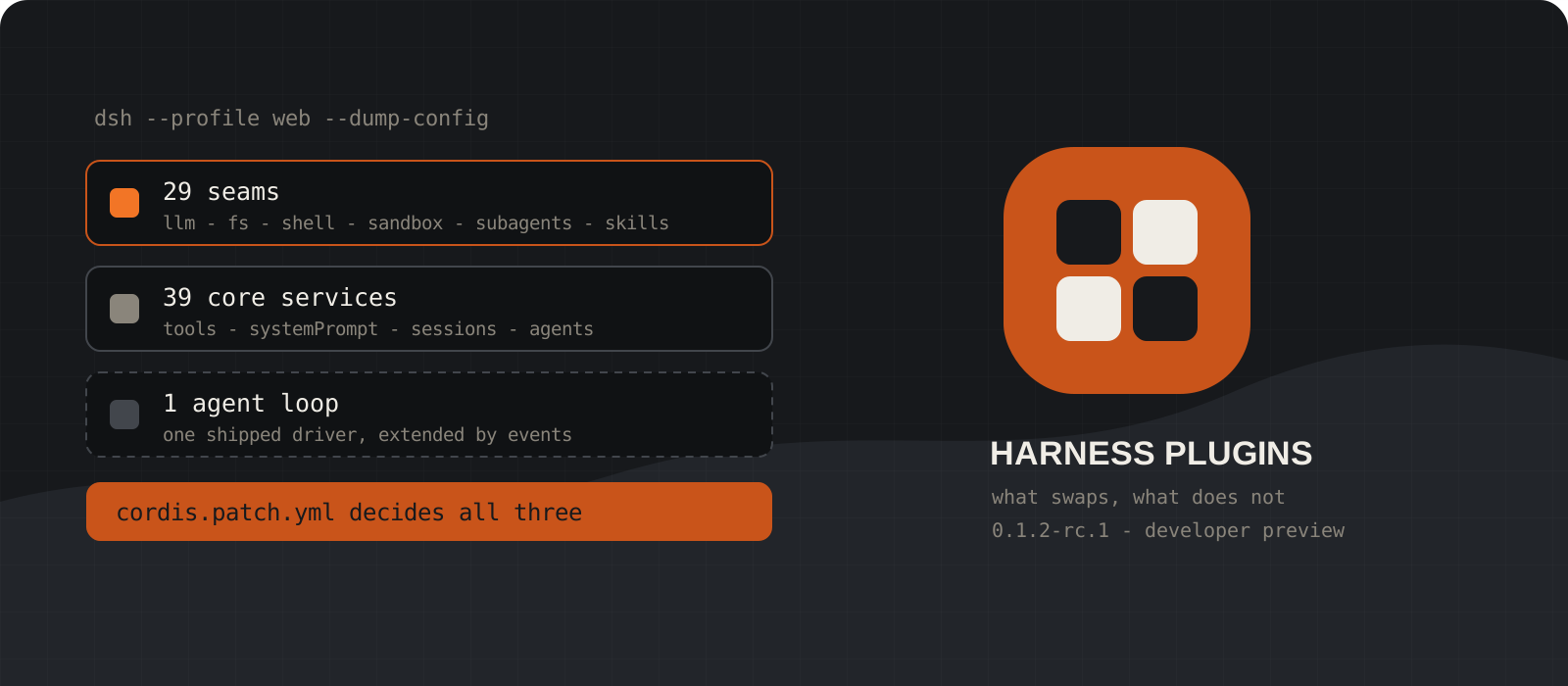
DeepSeek Harness is sold on the line that everything is a plugin. Its own generated documentation is more precise than that, and more useful. Of the 69 services the runtime declares, 29 are capability seams with a replaceable provider, 39 are core services you register into rather than replace, and one is the agent loop, which sits in a category by itself. Knowing which label a service carries is the difference between a five-line configuration change and a fork you maintain forever. This guide walks that map, then gives you working patch files for the swaps people actually want: a different model provider, a remote sandbox, a different compaction strategy, a Claude Code or Codex subagent backend, and a per-session agent preset of your own. Everything here was checked against 0.1.2-rc.1 on 4 September 2026. It is still a developer preview, so treat row ids and config keys as things a release can rename.
System requirements
A working dsh install
0.1.2-rc.1 or later
This guide starts after the first run. If dsh is not on your machine yet, our beginner's guide covers installation, the Node trap, and pointing it at a model. Check what you have with npx @deepseek-ai/dsh --version.
Node.js
^22.19.0, or 24 and above
The repository declares this range in engines, and it is stricter than it looks. Node 22.18 is a common LTS build and it does not satisfy the range.
pnpm
11.7 or later, on your PATH
The dsh plugin command forwards to pnpm with the profile directory as its working directory, so every pnpm verb works unchanged. Without pnpm you can still write patch files, but you cannot install a bundle.
Harness home
$DSH_HOME, defaulting to ~/.dsh
Profiles live at $DSH_HOME/profiles/<name>, each with its own cordis.patch.yml. The machine-wide overlay is $DSH_HOME/cordis.patch.yml. On Windows that path is %USERPROFILE%\.dsh.
A YAML-aware editor
Any editor with YAML support
Every change in this guide is a row in a patch file. An indentation mistake fails the boot with a reported error and a nonzero exit rather than starting a half-configured runtime, which is the behaviour you want.
Optional: an E2B account
Only for the remote sandbox step
Step 5 moves file and command execution into a hosted Linux sandbox and needs an E2B API key. Skip it if you are happy running the agent on your own machine.
Print the tree before you change anything
Two flags show every row your machine boots and name the file that supplied each one.
A running dsh is an ordered list of plugin rows composed at boot. Layers apply over an empty list in a fixed order: each bundle named in the profile manifest's dsh.profile.bundles, then the profile's own cordis.patch.yml, then $DSH_HOME/cordis.patch.yml, then each --patch overlay in the order it appears in argv.
The home-level file outranks the per-profile one. That ordering is deliberate, because the home file holds machine-local preferences that should apply to every profile you run.
--dump-default-config prints the bundle layers alone. --dump-config adds your patches on top. Neither boots the runtime, and both annotate each row with the file that supplied it and every overlay that changed it. Unmatched patch targets are reported on stderr, which is how you catch a typo in a row id before it costs you an hour.
One caveat when reading a dump: !!js expressions are printed unevaluated, and a dump never runs the app's command-line providers. What you see is the tree before --port or --host resolve.
npx @deepseek-ai/dsh --profile web --dump-default-confignpx @deepseek-ai/dsh --profile web --dump-confignpx @deepseek-ai/dsh --profile web --patch ./extra.yml --dump-confignpx @deepseek-ai/dsh --profile web --dump-config |
grep -B 3 -A 6 'id: compaction-basic'npx @deepseek-ai/dsh --profile web --dump-config |
Select-String -Pattern 'id: compaction-basic' -Context 3,6Tip
Read one full dump before you write a single patch row. The layering stops being abstract the moment you can see which file supplied the row you were about to guess at.
Learn the three row labels, because only one of them swaps
The generated catalog marks every service seam, core, or bundle, and the label tells you what a patch can do to it.
A seam is a service definition declaring an interface, a provider implementing it, and consumers using it. Replace the provider row and the consumers do not change. There are 29 of these, and they are where real substitution happens: ctx.llm, ctx.fs, ctx.shell, ctx.sandbox, ctx.subagents, ctx.compaction, ctx.skills and the rest.
A core service has one owner and no expectation of an alternative implementation. You extend it by registering into it. There are 39, and the one to understand first is ctx.tools. Tools really are plugins, so the popular version of this story is broadly right, but the registry that holds them, its policy pipeline and its execution guards are core. You add a tool. You do not replace the thing tools live in.
ctx.systemPrompt behaves the same way. Plugins contribute prompt sections and model-facing tool schemas for each step, and the assembler collecting them is not yours to swap. Same for ctx.sessions, ctx.agents, ctx.commands and ctx.tokenMeter.
Exactly one service carries the bundle label, and it is ctx.agentLoop. The catalog note beside it says this is the one concrete loop plugin. There is a section further down on what that does to the claim that the loop is customizable.
The catalog is generated from the Cordis declarations by scripts/gen-doc-graphs.ts with a completeness guard, so it cannot quietly fall behind the code. Open it before you plan a change, ahead of any blog post including this one.
Tip
If the service you want to change is marked core, stop hunting for a replacement row and go find the events it emits. That is where its extension point lives.
Swap the model route
The model adapter is a seam, and the shipped protocol-independent adapter covers three wire protocols.
Two adapters ship. llm-deepseek handles DeepSeek's own API and its wire extensions. llm-pi-ai is the protocol-independent adapter that covers everyone else, and it is the package doing the work whenever you point dsh at another vendor.
For a provider dsh already knows, open Settings, then Models, then Add provider. The list shows provider ids such as anthropic, openai, moonshotai for Kimi, and zai for GLM. Enter the key and save. The installed catalog supplies the endpoint, the protocol, and the model list.
For a company gateway, a self-hosted server, or anything absent from that catalog, choose Add a custom provider. You supply a lowercase provider id, a base URL, an API protocol, a credential, and at least one model. Three protocols are offered: openai-completions for OpenAI Chat Completions, openai-responses for the OpenAI Responses API, and anthropic-messages for the Anthropic Messages API. A provider speaks exactly one of them, so a gateway serving two needs two provider entries.
Choose the provider id carefully, because it is permanent. Requests, saved sessions, model defaults and credential references all use it. Renaming means adding a new provider and deleting the old one. Everything else stays editable.
The Models page exposes only what a route needs to exist. Reasoning effort levels, image input, request-compatibility switches, headers, timeouts and retry policy all live in $DSH_HOME/settings.yaml, which is the same document the page writes. Edit it directly and the adapters pick it up on the next request with no restart.
${EDITOR:-nano} ~/.dsh/settings.yamlnotepad $env:USERPROFILE\.dsh\settings.yaml# Provider ID: local-llama
# Base URL: http://127.0.0.1:8080/v1
# API protocol: openai-completions
# Credential: whatever your server expects, or a placeholder
# Models: at least one model id your server actually servesTip
A compatibility switch states a claim about your endpoint rather than testing it. Setting one your gateway does not need sends a different request and nothing more, and a switch left with an empty value is refused rather than ignored.
Turn a row off instead of forking it
A patch row does one of three things, and the shipped bundles lean hardest on the one people miss.
Target a row by id and set config to replace its configuration. Target it and set disabled: true to switch it off. Or open an insert block to add rows no bundle supplied. That is the whole grammar.
Replace means replace. A patch overwrites the targeted row's complete config value rather than deep-merging keys, so a row you patch must restate every key it owns. The web bundle's own patch file carries that warning in a comment at the top, and it is worth taking seriously.
Read that same file and you will find it disabling a long list of base rows: tool-bash, tool-pwsh, tool-fs, tool-fs-search, tool-str-replace-editor, tool-skill, plan-mode, compaction-basic, tool-subagent and more. Those capabilities are not missing from the web app. They moved down into agent presets, which compose per session rather than per process.
Copy that pattern in your own configuration. Disable at the host layer, mount at the preset layer, and you get one composition per agent instead of one composition for the whole process.
# 1. Replace a row's configuration. Restate every key you want kept.
- id: session-persistence-jsonl
  config:
    root: !!js dshHomePath('sessions')
    compression: none
    packChunks: false

# 2. Switch a row off without uninstalling its package.
- id: tool-web
  disabled: true

# 3. Add rows nothing else supplied.
- insert:
    - id: my-tool
      name: '/absolute/path/to/scratch-plugin/src/my-plugin.ts'
      config:
        greeting: 'Hi there'
Tip
A bare package name in an inserted row resolves through the profile directory's Node parent walk. A relative path resolves beside the patch file that declared it. For a plugin you are editing on disk, an absolute path removes the ambiguity.
Move the whole execution world into a remote sandbox
Three rows redirect the filesystem, the subprocess seam and the terminals, and no consumer changes.
This is the clearest demonstration of what a seam buys you. The filesystem and subprocess providers share one execution world, so pointing them at a remote sandbox takes the bash tool, the PTY shell and the language-server integration with them. None of those consumers is forked or even edited.
The E2B family is three packages. dsh-e2b owns one shared remote sandbox handle and its lifetime. dsh-fs-e2b and dsh-subprocess-e2b are the providers that fill ctx.fs and ctx.subprocess. No shipped composition enables the family, so this is entirely opt-in.
Three settings matter: an API key or the E2B_API_KEY environment variable, an absolute POSIX working directory that defaults to /home/user/workspace, and a lifetime in milliseconds that defaults to 300000. A bad key, a relative working directory or an invalid lifetime rejects startup before any remote work happens.
The sandbox is created when the family starts and deleted when the lifetime expires or the app shuts down. Whatever it held disappears with it. Five minutes is a short default for a real coding session, so raise timeoutMs deliberately rather than discovering the limit mid-task.
None of this reaches the model, and it adds no request cost. The agent sees one consistent remote world where what it writes with the file tools is what its commands can read.
- insert:
    - id: e2b
      name: '@deepseek-ai/dsh-e2b'
      config:
        apiKey: !!js process.env.E2B_API_KEY
        cwd: /home/user/workspace
        timeoutMs: 1800000

    - id: subprocess-e2b
      name: '@deepseek-ai/dsh-subprocess-e2b'

    - id: fs-e2b
      name: '@deepseek-ai/dsh-fs-e2b'
Tip
The local default is sandbox-local, which uses bwrap or Landlock on Linux, Seatbelt on macOS, and an ACL restricted-token backend on Windows that reports partial enforcement. If you need a hard boundary on Windows, a remote sandbox is the honest answer.
Change how the conversation gets compacted
Compaction is a seam with one shipped backend, and the pruner that runs before it is a separate row.
ctx.compaction is the seam. compaction-basic is the shipped backend, and it owns thresholds, retained-tail policy, overflow caps and failure handling. Swap the row and every one of those decisions becomes yours.
Automatic compaction runs at the agent/pre-step waterfall, before request derivation, under one of two triggers: pressure or context-overflow. Recovery from a failed request runs separately through agent/request-error after the failed step closes.
Before selecting a range to summarise, the backend calls the optional tool-result pruner, which rewrites oversized current tool results into replayable replacements, then remeasures through ctx.tokenMeter. Sometimes pruning alone advances the surface and no summary is written at all. Disabling tool-result-pruner is a one-line patch if you would rather keep raw results and pay for them.
There is no model-facing compact tool. The human /compact command is backend independent, so it follows whichever compaction service the leaf mounts, and it returns without writing when no useful range exists.
Writing your own backend means implementing compactIfNeeded, compactNow and compactRegion, forwarding the supplied abort signal to summarization, and creating the replacement user message through compactCheckpointSource so clients still recognise the checkpoint. That recognition predicate is deliberately backend independent, which is what makes a custom backend viable rather than theoretical.
# Keep full tool results and let summary compaction do all the work.
- id: tool-result-pruner
  disabled: true

# Hand compaction to your own backend.
- id: compaction-basic
  disabled: true

- insert:
    - id: compaction-mine
      name: '/absolute/path/to/my-compaction/src/index.ts'
Tip
ctx.tokenMeter is core, not a seam. Estimation and replay have exactly one owner, and only the strategy sitting on top of those measurements is replaceable.
Pick a subagent backend, including someone else's coding agent
Six providers ship, they coexist by name, and two of them are Claude Code and Codex.
ctx.subagents is unusual among the seams. Multiple providers coexist in one context, registered by name, following the LLM adapter registry pattern rather than the single-executor pattern that bash uses. Delegation is one optional capability, not part of the agent loop.
Six providers ship: spawn and fork run in process, and acp, codex, claude-code and dsh-sdk run out of process through ctx.subprocess. fork seeds the child with the parent's completed-turn prefix; spawn and acp do not. That flag describes conversation seeding only and says nothing about inherited tools, services or authority.
The base bundle mounts spawn and fork, then registers two tools: subagent on the spawn provider in continuable mode, and subagent_fork on fork in one-shot mode. Fork deliberately omits model selection so the child's provider and model match the parent, which keeps the inherited history eligible for cache reuse.
Codex and Claude Code are separate optional bundles. Install either or both with dsh plugin. On the next start each installed bundle registers only its dormant host provider, so a copied preset must separately enable the matching tool row before new agents can delegate to it.
Providers advertise their start-time features on a static descriptor: agentOptions, outputSchema, depthLimit, toolFilter and persona. A request needing a capability the chosen provider lacks is rejected with an UNSUPPORTED_CAPABILITY error rather than accepted and quietly ignored. The ACP, Codex and Claude Code backends reject agentOptions before they start their transports, so plan around that rather than against it.
npx @deepseek-ai/dsh plugin --profile web add @deepseek-ai/dsh-subagent-codex
npx @deepseek-ai/dsh plugin --profile web add @deepseek-ai/dsh-subagent-claude-codenpx @deepseek-ai/dsh plugin --profile web why @deepseek-ai/dsh-subagent-codex
npx @deepseek-ai/dsh plugin --profile web remove @deepseek-ai/dsh-subagent-codex- insert:
- id: tool-subagent-fork
name: '@deepseek-ai/dsh-tool-subagent'
config:
provider: fork
toolName: subagent_fork
backgroundMode: one-shotTip
Bundle membership is a startup boundary. Restart the profile after adding, removing or updating one. Ordinary edits to a profile or home cordis.patch.yml are picked up by hot reload instead.
Compose your own agent preset
This is the closest thing to building your own coding agent, and it is one YAML file per agent.
An agent preset is a directory holding a single agent.cordis.yml that names the plugins a session runs with: its tools, its prompt sections, its skills. Sessions naming the same preset share one installed composition while each session's state stays separate, so one process can run several differently composed agents at once. A subagent joins its parent's composition.
Four presets ship: minimal, standard, ptc and cordis. Read minimal first, because it is the most instructive file in the repository. It sets a fixed persona with complete: true so nothing else can add prompt text, suppresses runtime context snapshots, mounts one persistent shell plus str_replace_editor, and omits compaction entirely. That is an entire coding agent in about forty lines.
Presets come from two roots. The set shipped inside the package is prepended as a system root, and your own live under $DSH_HOME/.agent-presets. The shipped root wins duplicate ids unless you set includeShippedRoot to false, which is the escape hatch for a deployment supplying every preset itself.
Authoring is copy-only by design. You copy an existing preset's whole directory into the first user root, give it an id matching [a-z0-9][a-z0-9-]*, then edit the files. A copy never overwrites, and it grants nothing the roster did not already carry.
One rule catches everyone on their first preset. A service row inside a preset must sit inside a group carrying an isolate realm. Without one it publishes into the root realm where it is process-global, another preset publishing the same name collides, and dsh-agent-presets rejects the mount rather than letting one preset's instance serve every session.
A session can switch presets only while it has produced nothing. After the first message or tool call the composition is fixed for that session's life, because swapping tools mid-conversation would leave logged tool calls the new composition cannot make. A committed switch is recorded in the session log, so a resumed or forked session rebuilds under the composition it actually ran.
# $DSH_HOME/.agent-presets/my-agent/agent.cordis.yml
- id: persona
  name: '@deepseek-ai/dsh-persona'
  config:
    text: You are a helpful software engineer assistant.
    complete: true
    includeRuntimeContext: false

# A service row needs its own realm, or the mount is rejected.
- id: persistent-shell
  name: cordis:group
  group: true
  isolate:
    terminals: true
  config:
    - id: pty
      name: '@deepseek-ai/dsh-terminal'

    - id: terminal-bash
      name: '@deepseek-ai/dsh-terminal-bash'
      disabled: !!js process.platform === 'win32'
      config:
timeoutMs: 300000- id: agent-presets
config:
default: standard
roots:
- path: ~/company-presets
trust: systemTip
A preset is as privileged as the plugins it names. The package documentation states it plainly: a preset you author carries the same trust as shell access, so treat one you were sent the way you would treat a script someone asked you to run.
Can you actually replace the agent loop?
The short answer is that the row is replaceable, nobody has replaced it, and the architecture is built to make you not want to.
The generated catalog marks ctx.agentLoop as bundle rather than seam, and the note beside it says this is the one concrete loop plugin. Only two packages consume it, the base bundle and sdk-minimal. Every extension package depends on the agent's events and services rather than on the loop package itself.
That is a design decision, not an oversight. Waterfall events such as agent/pre-step and agent/request-error are the intended extension points, which is exactly why compaction, tool-result pruning, spill policy and the repeat-tool reminder all exist as separate rows instead of loop forks. Each one hooks a moment in the turn without owning the turn.
So the accurate version of the claim runs like this. The loop is a row in the same tree as everything else, and a patch can point it somewhere else. Doing so means writing a driver against an interface with one reference implementation, which is real work with no second example to copy. If what you want is different behaviour at a point in the turn, listen to the events. If what you want is a different control flow altogether, the workflow engine and the Ralph tool are where the shipped answer already lives.
The 29 seams, grouped
This is the list worth skimming before you plan anything, because a seam is where substitution costs a patch row and everything else costs more. The grouping is ours; the labels come from the generated catalog.
- Model and conversation: ctx.llm, ctx.compaction, ctx.sessionPersistence, ctx.sessionQuery, ctx.sessionTitle, ctx.sessionTelemetry, ctx.attachments, ctx.deepseekLlmApiExtensions.
- Execution: ctx.subprocess, ctx.shell, ctx.terminals, ctx.sandbox, ctx.fs, ctx.codeRuntime, ctx.jobs, ctx.lsp.
- Delegation: ctx.subagents and ctx.workflowEngine. The first takes multiple named providers at once; the second runs one engine per context.
- Knowledge and context: ctx.skills, ctx.web, ctx.fileReferences, ctx.spillStore.
- Host, identity and interaction: ctx.settings, ctx.credentials, ctx.authorization, ctx.storage, ctx.approval, ctx.userQuestions, ctx.directoryPicker.
- The 39 core services are the other side of the map, and the ones people most often assume are swappable are ctx.tools, ctx.systemPrompt, ctx.sessions, ctx.agents and ctx.tokenMeter.
Plugin, preset, profile or bundle: which layer do you want?
Four words get used interchangeably in write-ups about this project and they mean four different things. Picking the wrong one is the most common way a change lands in the wrong scope.
- A plugin is a TypeScript module exporting an apply function. It registers tools, services, listeners and effects through the context it is handed, and everything it registers unwinds when it unloads.
- A row is one plugin mounted in the tree with an id and a config. Patches target rows, not plugins, which is why row ids matter more than package names when you are writing a patch.
- An agent preset is a per-session composition: one agent.cordis.yml naming the tools, prompt sections and skills that sessions using it get. Reach for this when different agents in the same process should behave differently.
- A profile is the whole process composition, stored under $DSH_HOME/profiles/<name>, listing the bundles it stacks. Five auto-initialize from shipped templates: web, headless, sdk, sdk-minimal and acp. Reach for this when you want a different application surface.
- A bundle is the distribution format: a package whose manifest declares a dsh.bundle patch file, which joins the layer stack once installed. Reach for this when you want to share a composition with other people.
What DeepSeek Harness and Claude Code each let you change
| DeepSeek Harness | Claude Code |
|---|---|
| 29 capability seams with replaceable providers | A fixed runtime you extend at published extension points |
| Composition is layered YAML you can print before boot | Configuration is settings.json, CLAUDE.md and .claude/ directories |
| Model adapter is a plugin, three wire protocols, any gateway | Claude models through Anthropic, Bedrock or Vertex |
| Filesystem and subprocess redirect together to a remote sandbox | Execution runs locally, with sandboxing options per platform |
| Six subagent providers registered by name, Claude Code among them | Subagents defined in markdown with their own tools and model |
| Per-session composition through agent presets | Per-invocation behaviour through skills, hooks and MCP servers |
| No MCP server enabled by default | MCP is a first-class documented integration |
| Developer preview at 0.1.2-rc.1 | Generally available and supported |
Both tools are configurable, and they are configurable at different altitudes. The table is about where each one lets you intervene rather than which scores higher.
- These are not mutually exclusive. The Claude Code subagent provider is an installable bundle, so a dsh agent can hand a task to Claude Code as a child agent and read the result back.
- If your reason for reaching for an open runtime is running a model on your own hardware, dsh solves the harness half only. Point it at a local OpenAI-compatible server and the pair is local. The harness alone makes nothing local.
Where the customization story is thinner than it sounds
The seams are real and the documentation is unusually honest about them. These are the parts that bite anyway.
- 29 of 69 services are seams. That is a high proportion and it is not everything, so check the label before you plan a swap around it.
- A patch replaces a row's whole config rather than merging keys. Every patch you write is a copy of state you now maintain by hand, and an upstream change to a default will not reach you.
- One specific version of that bites hard. A row configured from a command-line flag reads it through a !!js expression, and a patch that replaces the whole config with literals removes that read. Your --port silently stops working, and the web bundle documents this in its own comments.
- Preset service rows need an isolate realm or the mount is rejected. The rule is correct and the error is loud, but it is unfamiliar enough to cost you the first attempt.
- Hot reload covers patch edits, not bundle membership. Adding, removing or updating a bundle needs a profile restart, and only a profile with patchReload set to live watches its patch files at all. Of the shipped profiles that is web; headless, sdk, sdk-minimal and acp load patches once at startup.
- No MCP server is enabled by default. The client ships as a dependency and enabling a server is a patch you write yourself, because each server command is trusted executable code outside the agent sandbox.
- It is 0.1.2-rc.1. Row ids, config keys and package names are all things a preview is allowed to rename, and this guide will need re-checking when it does.
Our verdict
Learn the seam labels first, write patches second, and do not standardise a team on this yet.
The thing worth copying here is not the plugin count. It is that DeepSeek generated the seam catalog from the code with a completeness guard, published which services are replaceable and which are not, and let the answer be 29 out of 69 rather than rounding it up to everything. Most projects that advertise extensibility cannot tell you where it stops. This one can, in a file that regenerates.
The swaps hold up under pressure too. Redirecting the filesystem and subprocess seams to a remote sandbox really does move the bash tool, the PTY and the language-server integration with them, with no consumer edited. That is the payoff a seam is supposed to deliver, and it is delivered.
Against that, the conceptual load is heavy. Rows, profiles, bundles, presets, realms, seams and waterfall events are all things you need before you can confidently change behaviour, and a preview version number sits under the whole stack. If you want a coding agent that works this afternoon, keep the one you have. If you are building a product on an agent runtime and the ability to replace a component without asking a vendor is worth real setup cost, spend an evening with the seam catalog. It is the most honest map of an agent runtime anyone has published.
The seam catalog is the reason to read this project: it tells you exactly where extensibility stops. Learn the labels before you write a patch, and keep it out of team-wide use until the preview label comes off.
Frequently asked questions
Is everything in DeepSeek Harness really a plugin?+
Everything is a plugin row, but not every row is replaceable. The generated catalog labels 29 of the 69 declared services as capability seams with a swappable provider, 39 as core services you register into rather than replace, and one, the agent loop, as a bundle with a single concrete implementation. Both halves of that are true at once: the composition is uniform, and substitution is bounded.
Can I replace the agent loop?+
In principle yes, in practice almost nobody should. ctx.agentLoop is a row like any other and a patch can point it elsewhere, but there is exactly one implementation and no second example to copy. The intended extension points are the waterfall events such as agent/pre-step and agent/request-error, which is why compaction, pruning and spill policy are separate rows rather than loop forks.
How do I use a model that DeepSeek Harness does not ship a provider for?+
Open Settings, then Models, then Add a custom provider. You supply a lowercase provider id, a base URL, one of three protocols (openai-completions, openai-responses or anthropic-messages), a credential, and at least one model id. The provider id is permanent because sessions and credential references use it, so choose it carefully. Everything past the basics goes in $DSH_HOME/settings.yaml, which the adapters re-read on the next request.
Can DeepSeek Harness use Claude Code or Codex as a subagent?+
Yes. Both are optional bundles installed with dsh plugin --profile <name> add. Once installed, each registers a dormant host provider on the next start, and a preset must separately enable the matching delegation tool before new agents can use it. Both backends reject agentOptions before starting their transports, so a request that needs per-child agent options has to go to an in-process provider instead.
What is the difference between an agent preset and a profile?+
A profile is the whole process composition and lives at $DSH_HOME/profiles/<name>. An agent preset is a per-session composition and lives either inside the presets package or under $DSH_HOME/.agent-presets. Change a profile when you want a different application surface. Change a preset when several agents in the same process should have different tools, prompts or skills.
Do I have to restart after editing a patch file?+
Not for ordinary patch edits in a profile whose patchReload is set to live, which the web profile is and which is also the default for a custom profile you create. Those edits reapply transactionally. Bundle membership is different: adding, removing or updating a bundle is a startup boundary and needs a restart. The headless, sdk, sdk-minimal and acp profiles load their patches once at startup.
Can I run the agent's file and command work somewhere other than my machine?+
Yes, and it is three rows. Mount dsh-e2b with an API key, a remote working directory and a lifetime, then add dsh-subprocess-e2b and dsh-fs-e2b. Because the filesystem and subprocess providers share one execution world, the bash tool, the PTY and the language-server integration all follow. The sandbox is deleted when its lifetime expires, so raise timeoutMs above the five-minute default before a real session.
How do I know which row supplied a setting I want to change?+
Run dsh --profile web --dump-config. It prints the composed tree without booting the runtime and annotates each row with the file that supplied it and every overlay that changed it. Unmatched patch targets are reported on stderr, which catches a mistyped row id. Use --dump-default-config when you want the shipped tree without your own overrides.
Is any of this safe to run against a work repository?+
Treat it the way you would treat any agent with shell access. New sessions in base-backed profiles start on the workspace-write permission preset, which confines bash and filesystem mutations to the workspace root and platform temporary directories, but reads and network access are not confined by that preset. A preset you author carries the same trust as shell access, so a preset someone sent you deserves the scrutiny you would give a script.