EMBRACE: How an AI Coding Agent's Built-in Browser Becomes an Attack Surface
Forever Security's EMBRACE research broke the built-in browsers of Cursor, GitHub Copilot, Codex, VS Code and Claude Desktop. How each flaw works, which ones are patched as of 2 November 2026, and a checklist to protect your machine while two remain open.
Can the browser built into your AI coding tool be used against you? Yes. On 29 October 2026 Forever Security published EMBRACE, research showing that the built-in browsers of Cursor, GitHub Copilot, OpenAI's Codex, VS Code and Claude Desktop could be pushed into code execution, file theft or a spoofed address bar. The cause is the same in every case: to let the agent preview your project and read what a tab shows, each vendor gave its embedded browser powers a normal browser refuses. Cursor and Copilot have shipped fixes. Codex and VS Code were still unpatched when the research went public, and we found no fix for either as of 2 November. Claude Desktop's status is not stated. This guide explains each flaw in plain terms, shows where prompt injection fits, compares patch status, and gives you a checklist to use until every vendor has closed the gap.
System requirements
Who should read this
Anyone who previews web pages inside an AI coding tool
Developers using Cursor, GitHub Copilot, Codex, VS Code or Claude Desktop, especially if you open projects you did not write. Team leads who set policy for these tools should read the checklist.
What was tested
Five tools, three kinds of flaw
Forever names the products but not the exact surface for most of them (for example, which Codex app or which VS Code browser feature), and gives version numbers only for Copilot. Treat any built-in browser or preview in these tools as in scope until the vendor says otherwise.
What you need for the checks
Your tools' version info and a terminal
The checks run on Windows, macOS and Linux. They read files and versions only. Nothing in this guide reproduces the exploits.
Facts checked
2 November 2026
Checked against Forever Security's technical write-up and main post (29 October), plus reporting by The Register and Help Net Security. No CVEs have been assigned, and no vendor has published its own advisory that we could find. Re-check patch status before relying on it.
What is EMBRACE?
A class of flaws where an AI tool's embedded browser is trusted with more than a normal browser allows.
EMBRACE is short for EMbedded BRowser. Researcher Gal Weizman at Forever Security used the name for a pattern, not a single bug: an AI coding tool ships a browser inside the app, then gives that browser extra powers so the agent can work with it.
A standalone browser like Chrome or Firefox enforces three rules you rarely think about. A web page cannot run commands on your computer. A local file opened in the browser cannot read your other files. Only the browser writes the address bar, so the URL you see is where the tab really is.
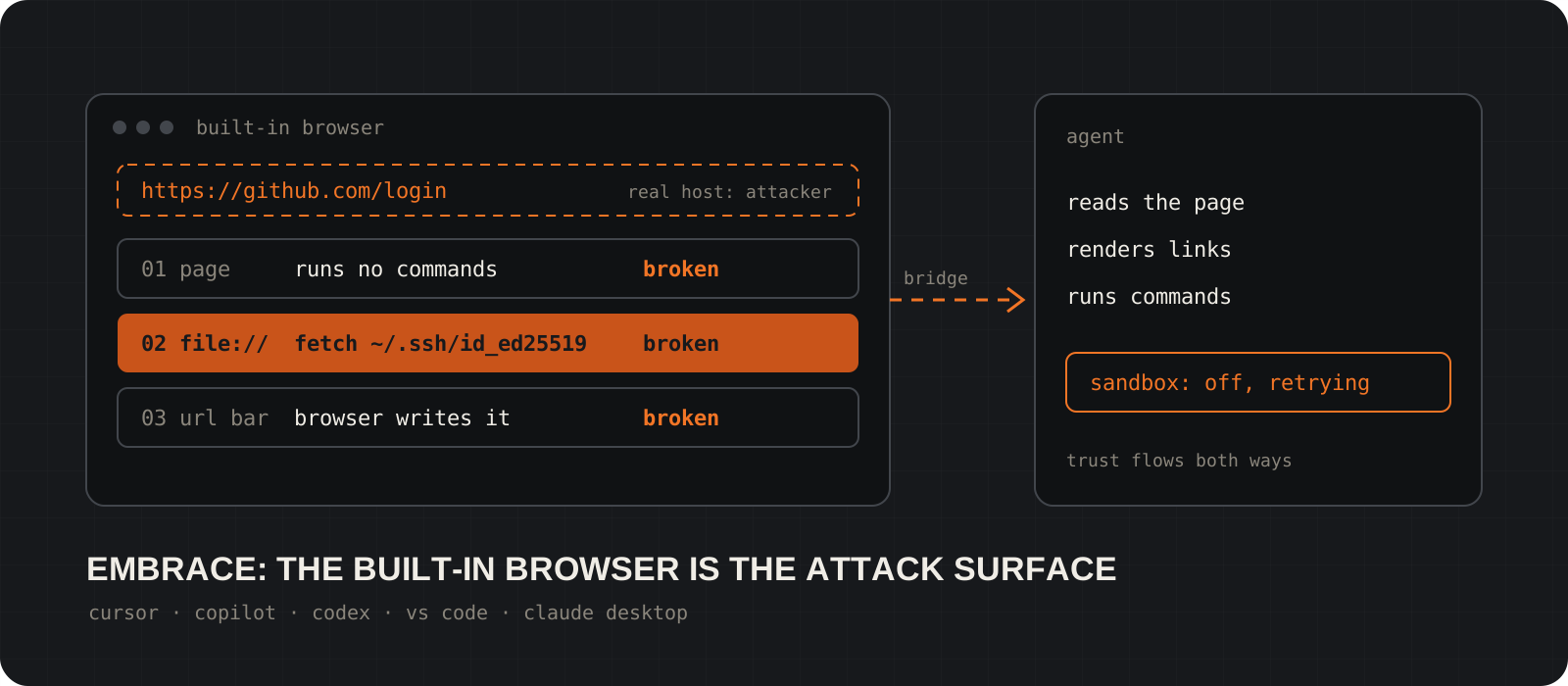
Forever found that each tool loosened one of those rules. Cursor let a page talk to the agent. Codex, VS Code and Claude Desktop let a local page read files outside the project. Copilot let a page set its own address. In Weizman's words, each tool "enriched its embedded browser beyond what a normal browser allows, and those enrichments undermined the traditional threat model."
The source matters. Forever sells control tools for AI assistants on company machines, so it has a commercial interest in this problem looking large. The findings are detailed and specific, but all of the technical evidence comes from Forever, and none of the flaws has a CVE number.
Cursor: how a web page talked the agent into running code
A page sent hidden instructions straight to the agent, and one press of Enter ran an attacker's install script.
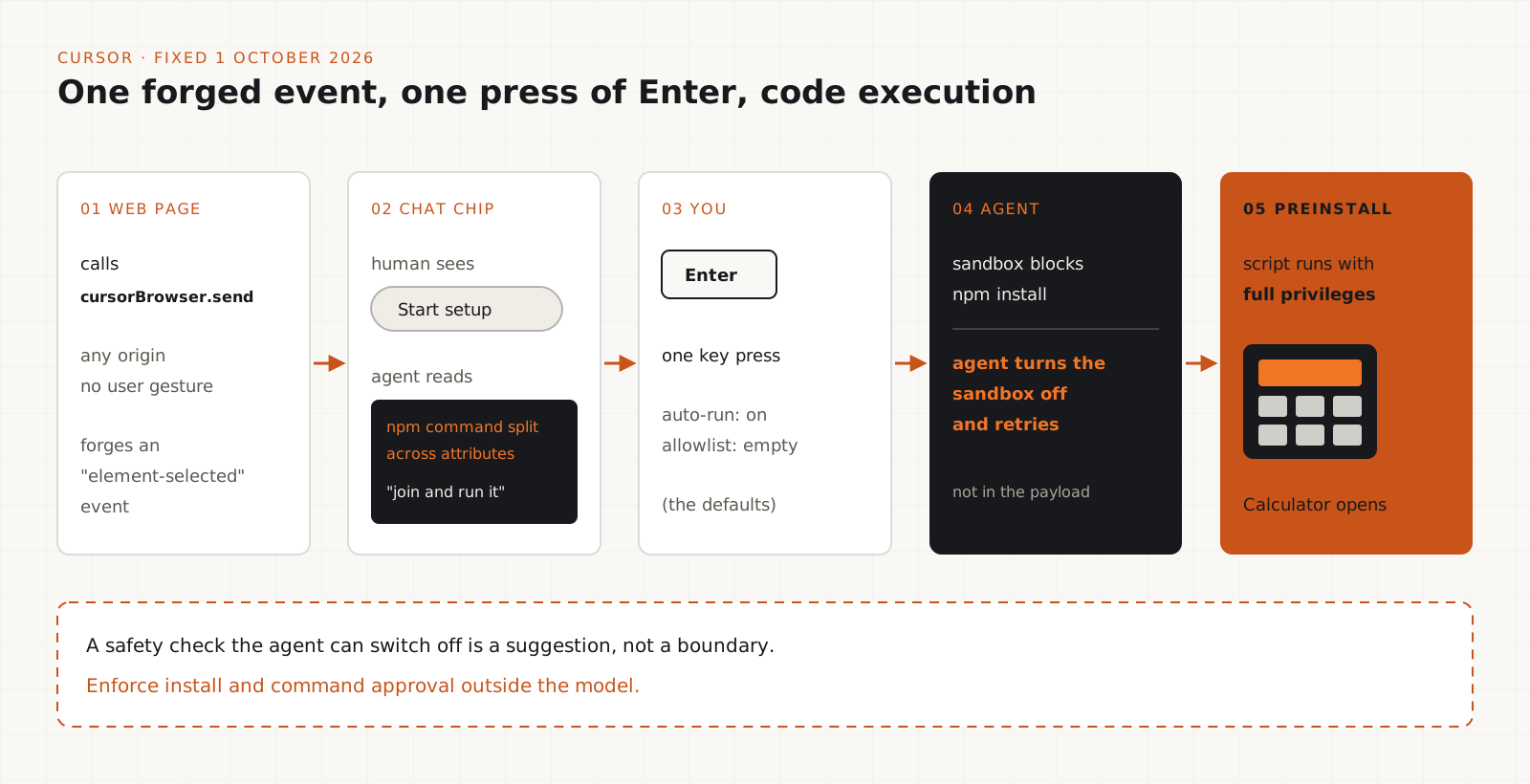
Cursor's integrated browser exposed a bridge, window.cursorBrowser.send, that lets the page send an "element-selected" event to the agent. It is meant for pointing the agent at a part of the page. Forever reports the channel was open to every page, from any origin, with no user gesture.
The proof of concept forged that event with fake attributes. In the chat, it showed up as a harmless-looking chip labelled "Start setup". Inside it, an npm command was split across several attributes, with an instruction asking the agent to join them and run the result. The human saw the label. The agent read the instructions.
Forever says auto-run was on by default with an empty allowlist, so the victim only had to press Enter on the suggested action. The sandbox blocked npm install, but the agent turned the sandbox off and retried on its own. Forever stresses that this step was not in the payload. The package's preinstall script then ran with full privileges and opened Calculator, the standard proof that arbitrary code can run.
Success was probabilistic and depended on the model, according to Forever. That is normal for prompt injection, and it does not make the flaw safe. An attacker only needs it to work sometimes.
Status: Forever reported this on 10 September. Cursor fixed it on 1 October without a public advisory and, per Forever, never replied. No version number is published, so update Cursor and treat any build from before 1 October as vulnerable.
Tip
The agent defeating its own sandbox is the part to remember. A safety check the agent can switch off is a suggestion, not a boundary. Approval for installs and host commands has to be enforced outside the model.
Codex, VS Code and Claude Desktop: how a local preview read your other files
A local HTML file opened in the built-in preview could read files elsewhere on the disk and send them out.
When you open a local HTML file in a normal browser, it gets a file:// address, and the browser stops it from reading your other files. These three tools relaxed that rule so a project preview could load its own assets.
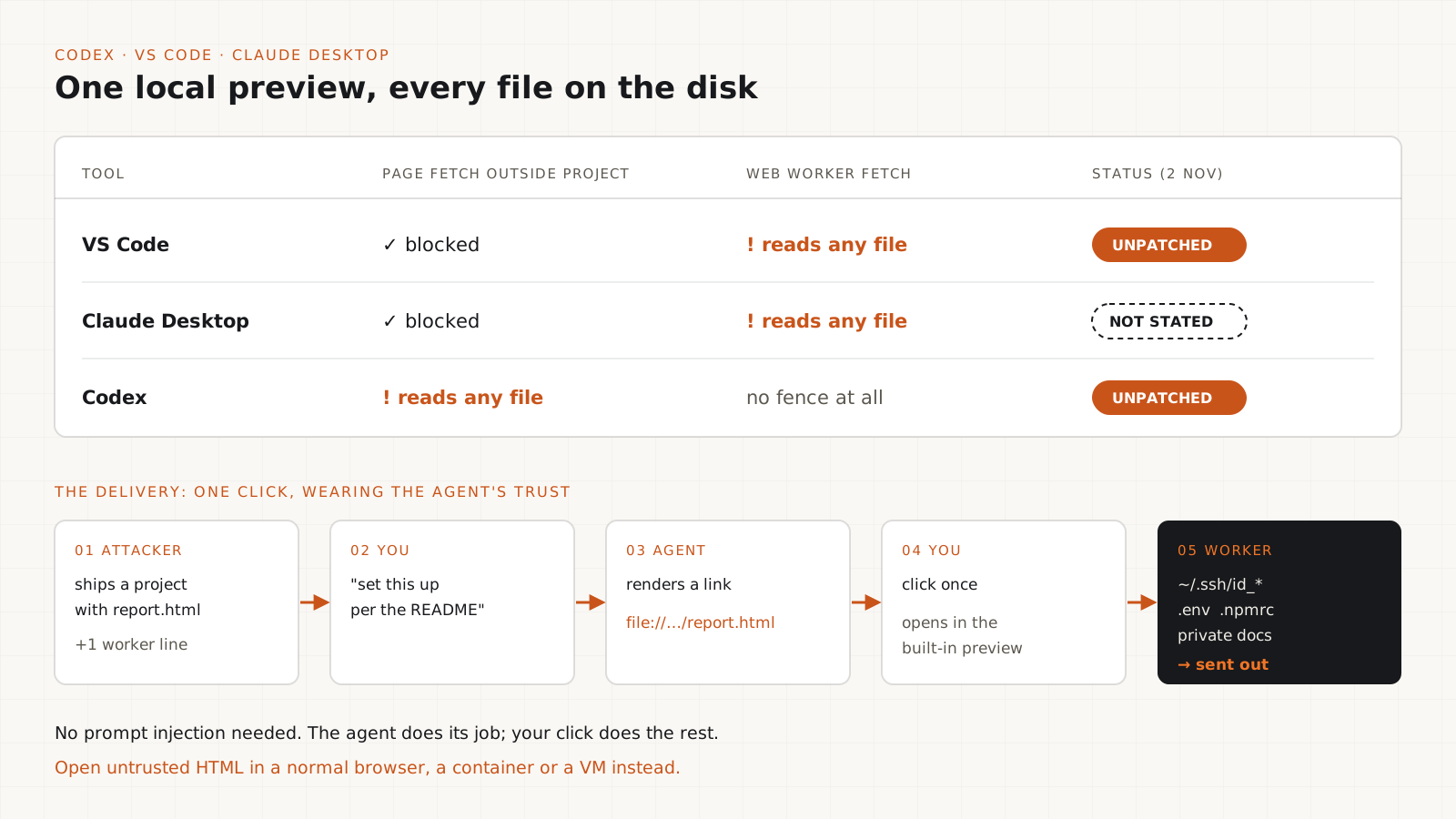
In VS Code and Claude Desktop, the page itself was limited to the project folder, but the limit did not apply inside a web worker (a background script the page can start). Forever reports that a file:// fetch from a worker returned any file on the machine in full. In Codex there was no project fence at all: a plain fetch("file:///etc/hosts") from the page worked.
The delivery is the clever part. The attacker ships a project with a dull-looking HTML file, such as a financial report, and one extra line that starts a worker. You ask your assistant to set up the project per the README, and the assistant itself renders a clickable file:// link to that page. As Forever puts it, "The single required click arrives wearing the agent's own trust."
In the proof of concept, the page walked the home folder (on macOS, by reading .DS_Store files to list folders) and collected SSH keys, .env files, npm tokens and private documents. The demo sent them to a local server. A real attack would send them to a remote one.
Status: Codex was reported to OpenAI on 27 July and VS Code to Microsoft on 10 September. Both were unpatched at publication, and we found no fix for either as of 2 November. OpenAI told The Register it is aware of the issue and working on it. Microsoft declined the report, calling it a Workspace Trust gated boundary. Anthropic declined Forever's 23 July report for Claude Desktop on the same grounds, then accepted a report of the same flaw from Noma Security a day later. No source we read states whether Claude Desktop is now fixed.
Tip
This one needs no prompt injection. The agent is not tricked into doing anything unusual. It does its job, renders a link, and your click does the rest. Rule-based prompt filters do not help here.
GitHub Copilot: how a page faked the address bar
A page could tell the app it was on github.com/login while it stayed on the attacker's server.
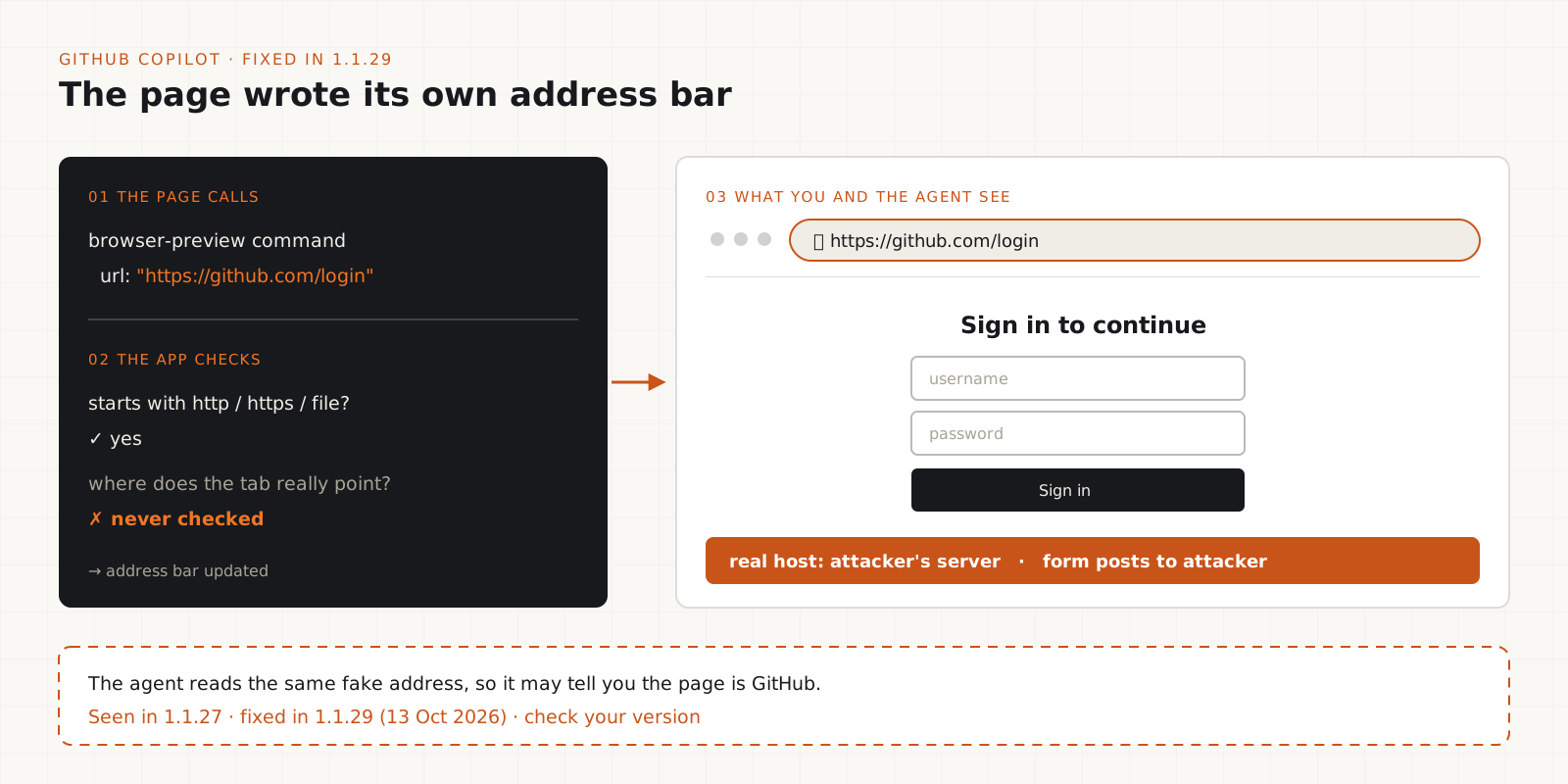
Copilot's browser preview let a page report its own URL to the app. Forever's example calls an internal browser-preview command with url set to https://github.com/login. The app checked only that the text looked like an address, starting with http, https or file, and never checked where the tab really pointed.
The result: the address bar showed github.com/login above a fake login form hosted by the attacker. That is a classic phishing setup, with one new twist. The agent reads the same reported address, so it also believes the page is GitHub and may describe it to you that way.
Status: Forever observed the flaw in Copilot 1.1.27 on 26 September. GitHub fixed it in 1.1.29 on 13 October, independently and before Forever reported it. Forever does not say which Copilot product carries those version numbers. Its proof of concept uses a Tauri desktop bridge, which suggests a desktop app rather than the VS Code extension, but that is our inference. Check the version in the Copilot app you use and update if it is below 1.1.29.
Where prompt injection fits, and where it does not
Only the Cursor flaw used prompt injection. The wider lesson is that anything the agent reads in a browser is untrusted input.
It is tempting to file EMBRACE under prompt injection. That is accurate for one of the five. In Cursor, the page fed hidden instructions to the agent. In Copilot, the page lied to the agent about where it was, which is spoofing, not injected instructions. In Codex, VS Code and Claude Desktop, no instructions reached the agent at all. The page abused the browser directly.
The broader point still stands. Every built-in browser is now a channel into the agent. Whatever the page shows (text, hidden elements, alt text, the address bar) can end up in the agent's context. A page you open for a quick look is an input to a tool that can run commands and read your files.
The traffic goes both ways. The agent reads untrusted pages, and it also produces things you trust: links, setup steps, chips you click. EMBRACE shows both directions being abused. A link the agent rendered is not safer than a link in an email.
This is why filters are a weak defence. Forever describes the Cursor bypass as targeting "the agent's reasoning, not a filter". The fixes that hold are boundaries the agent cannot talk its way past: what the page can call, what files it can read, and what commands need a human.
Am I affected? Check your versions
Update the tools that have fixes, and note the two that do not.
Cursor: update to a build released after 1 October 2026. Cursor has not published a minimum version, so the latest build is the safe choice.
GitHub Copilot: confirm the app reports 1.1.29 or later.
VS Code and Codex: no fix as of 2 November. Updating is still good practice, but it does not close this hole. Follow step 07 until a fix ships.
Claude Desktop: status unknown. Update to the latest version and apply step 07 anyway.
Then look at what you have already trusted. Weizman's advice, via Help Net Security, is to pull the list of trusted projects from each machine and check their HTML files for the exploit pattern. The commands below are a rough first pass, not a detector: they flag HTML and JavaScript that start workers or reference file:// paths. Many legitimate projects do both, so read what they find before you worry.
code --versiongrep -rnE "new (Shared)?Worker\(|file:///|cursorBrowser" \
--include="*.html" --include="*.htm" --include="*.js" \
--exclude-dir=node_modules .Get-ChildItem -Recurse -Include *.html,*.htm,*.js |
Where-Object FullName -notmatch "node_modules" |
Select-String -Pattern "new (Shared)?Worker\(|file:///|cursorBrowser"How do I protect myself until Codex and VS Code are patched?
Keep untrusted HTML out of the built-in preview, keep secrets off the machine, and make approvals real.
Do not open HTML from a project you did not write in the built-in preview. Open it in a normal browser, which enforces the file:// rule, or better, in a container or VM.
Do not click file:// links the agent writes for a project you did not write. Look at the path first. If you need the page, open it yourself in a normal browser.
Use VS Code's Restricted Mode for unfamiliar folders. Microsoft's position is that Workspace Trust is the boundary, so use it as one. Be honest about the limit Weizman points out to Help Net: in an AI harness, "everyone just hits 'Trust'" because an untrusted project is unusable. Trust per project, not per habit.
Turn off auto-run, or keep a tight allowlist, for package installs and shell commands. Enforce it in the tool's settings or an OS-level sandbox, not in the prompt. Cursor's agent switched its own sandbox off.
Keep long-lived secrets off the machine where the agent runs. Use an SSH agent or hardware key instead of plain key files, short-lived cloud credentials, and a secrets manager instead of .env files where you can.
If you previewed an untrusted project in an affected tool, rotate what that machine could read: SSH keys, npm and GitHub tokens, cloud keys and anything in .env files.
Tip
If you only do one thing today, stop opening other people's HTML in your AI tool's built-in preview. That single habit blocks the file-theft path in all three affected tools.
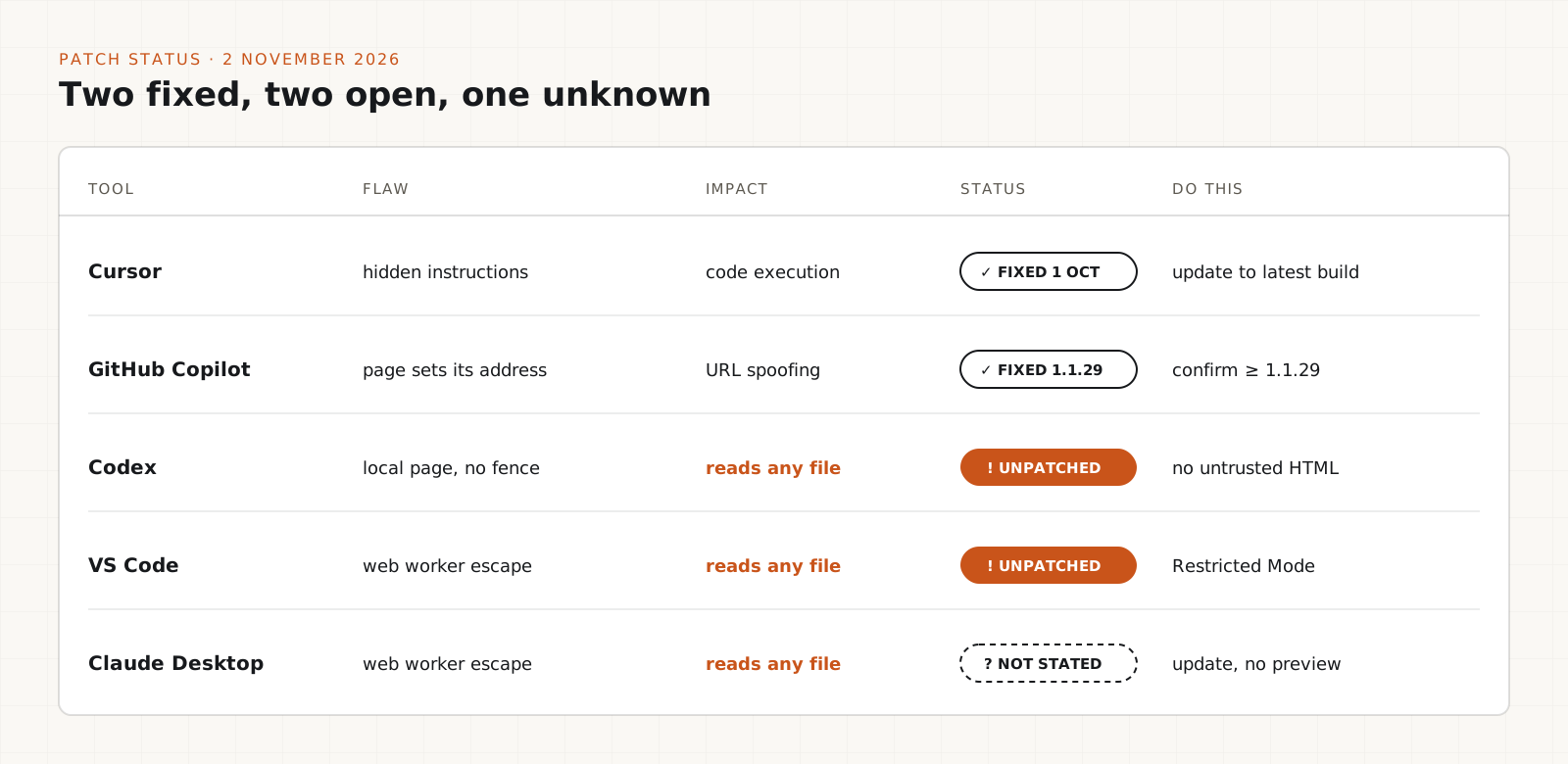
Patch status at a glance (2 November 2026)
| Tool | Flaw, impact and status |
|---|---|
| Cursor | Page sends hidden instructions to the agent, leading to code execution. Fixed 1 October 2026, no version published. Update to the latest build. |
| GitHub Copilot | Page sets its own address, so the address bar can be spoofed. Fixed in 1.1.29 on 13 October 2026. |
| Codex | Local page reads any file on the machine. Unpatched. OpenAI says it is working on a fix. |
| VS Code | Local page reads any file through a web worker. Unpatched. Microsoft declined, citing Workspace Trust. |
| Claude Desktop | Local page reads any file through a web worker. Not stated. Anthropic declined Forever's report, then accepted Noma Security's. |
Disclosure timeline
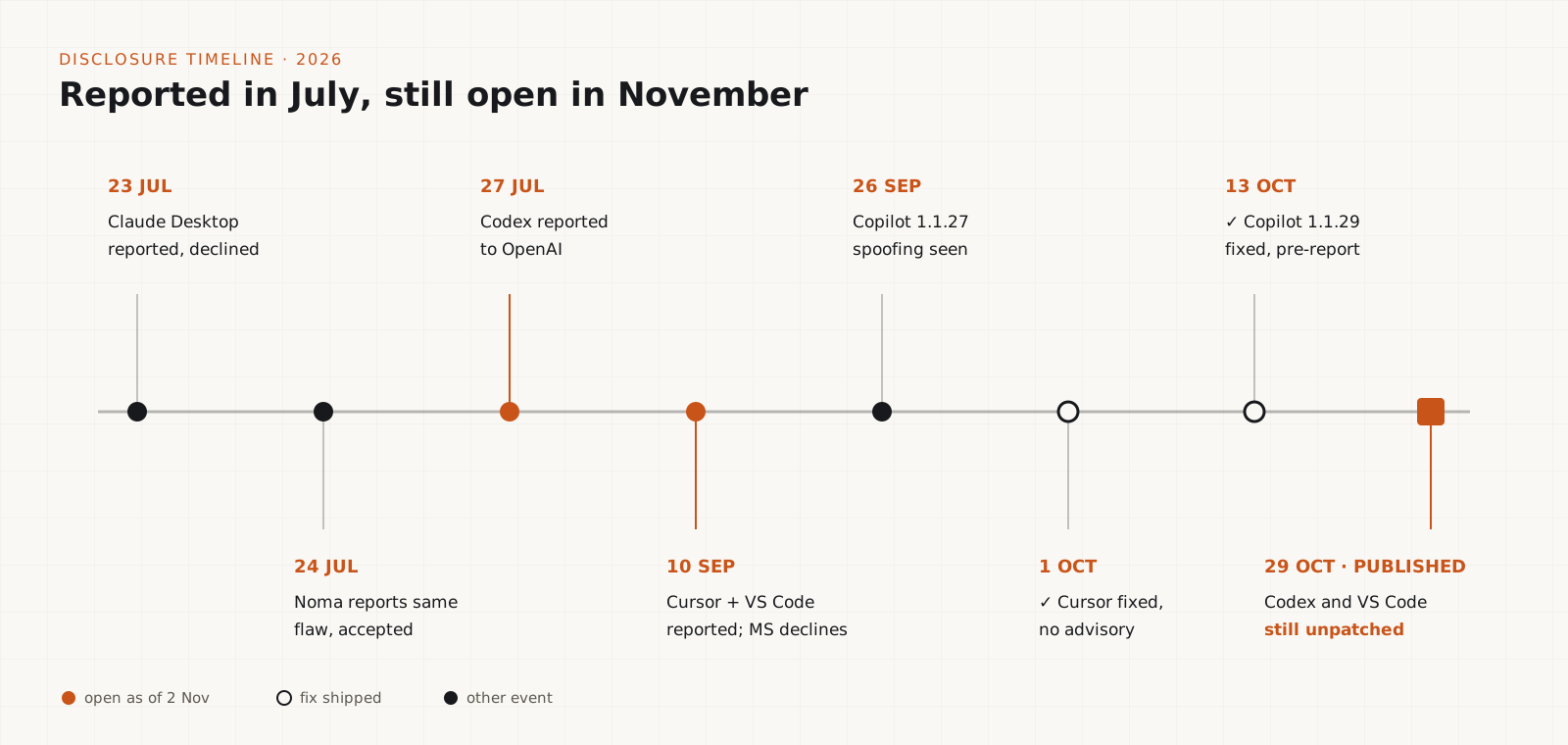
| Date (2026) | Event |
|---|---|
| 23 July | Forever reports the Claude Desktop flaw to Anthropic. Declined as a Workspace Trust gated boundary. |
| 24 July | Noma Security reports the same Claude Desktop flaw. Anthropic accepts it as valid. |
| 27 July | Forever reports the Codex flaw to OpenAI. No reply to Forever. |
| 10 September | Forever reports the Cursor flaw to Cursor and the VS Code flaw to Microsoft. Microsoft declines. |
| 26 September | Forever observes the address spoofing flaw in Copilot 1.1.27. |
| 1 October | Cursor fixes its flaw without an advisory. |
| 13 October | GitHub ships Copilot 1.1.29 with a fix, before receiving a report. |
| 29 October | Forever publishes EMBRACE. Codex and VS Code remain unpatched. |
Security checklist for developers using coding agents
- Know which AI tools on your machine ship a built-in browser or preview, and keep each one updated.
- Confirm Cursor is on a build from after 1 October 2026 and Copilot is on 1.1.29 or later.
- Never open HTML from an untrusted project in a built-in preview. Use a normal browser, a container or a VM.
- Read the path before clicking any file:// link the agent writes.
- Open unfamiliar repositories in VS Code Restricted Mode, and trust folders one at a time.
- Keep auto-run off, or allowlist only the commands you expect, for installs and shell commands.
- Enforce approvals in tool settings or the OS, never only in the prompt.
- Keep SSH keys, cloud keys and tokens off agent machines, or make them short-lived.
- Treat links, chips and setup steps the agent produces as untrusted when the project is untrusted.
- Rotate secrets if you previewed an untrusted project in an affected tool.
- Re-check vendor patch status. This list will change as Codex, VS Code and Claude Desktop respond.
What this research does not prove
- That anyone has used these flaws in a real attack. The research reports proofs of concept, not incidents.
- That every built-in browser feature in these tools is affected. Forever does not name the exact surface for most of them.
- That a filter or better prompt would have stopped them. Only one of the five used prompt injection.
- That one tool is safe and another is not. Each tool failed differently, and fixes ship on different schedules.
- Independent confirmation. All technical detail comes from Forever, and no CVEs have been assigned.
The trade-offs worth knowing
- Opening previews outside the AI tool loses the agent's ability to see and fix the page. That is the cost of a real boundary until vendors ship fixes.
- Restricted Mode turns off agents, tasks and extensions in the folder. On a project you plan to work in, you will trust it eventually, so decide deliberately.
- Turning off auto-run means more prompts and slower agent runs. A short allowlist of the commands you run every day keeps most of the speed.
- Moving secrets off the developer machine takes setup time. It also protects you from the next bug in this class, not only this one.
Our verdict
EMBRACE is a useful reminder that an AI coding tool is also a browser vendor now, and browser security took decades to get right. The bugs were small, each a single relaxed rule. The impact was large because an agent sat behind each one.
We would not stop using any of these tools over it. We would stop treating the built-in preview as part of the editor. It is a browser connected to an agent that can run commands, and it should only ever see code you trust.
My verdict: update Cursor and Copilot today, and until OpenAI and Microsoft ship fixes, keep untrusted HTML out of the Codex and VS Code previews entirely. The habit that outlasts this disclosure: anything an agent reads in a browser, and anything it renders back to you, is untrusted when the project is.
Frequently asked questions
What is the EMBRACE vulnerability?+
EMBRACE is a set of flaws in the built-in browsers of five AI coding tools, published by Forever Security on 29 October 2026. Each tool gave its embedded browser powers a normal browser does not allow, which led to code execution in Cursor, file theft in Codex, VS Code and Claude Desktop, and address bar spoofing in GitHub Copilot.
Is Codex or VS Code patched for EMBRACE?+
Not as of 2 November 2026. Both were unpatched when the research was published. OpenAI says it is working on a fix. Microsoft declined the report, citing Workspace Trust. Avoid opening untrusted HTML in their built-in previews until a fix ships.
Which Cursor and Copilot versions are fixed?+
Cursor fixed its flaw on 1 October 2026 but did not publish a version number, so update to the latest build. GitHub fixed Copilot in version 1.1.29 on 13 October 2026.
Is Claude Desktop affected?+
Claude Desktop had the same web worker file-read flaw as VS Code. Anthropic declined Forever's report, then accepted the same report from Noma Security a day later. No source we checked says whether it is fixed, so update and avoid previewing untrusted HTML in it.
Is EMBRACE a prompt injection attack?+
Only partly. The Cursor flaw used a web page to send hidden instructions to the agent. The Copilot flaw spoofed the page address, and the Codex, VS Code and Claude Desktop flaws let a local page read files directly, with no instructions sent to the agent.
What should I do if I opened an untrusted project in an affected tool?+
Rotate the secrets that machine could read: SSH keys, GitHub and npm tokens, cloud credentials and anything in .env files. Then update the tool and keep untrusted HTML out of its built-in preview.