Harness Engineering for AI Coding Agents: A Beginner's Guide
Learn what harness engineering is and build a practical repository setup that gives coding agents clear context, bounded tasks, persistent state, and executable proof of completion.
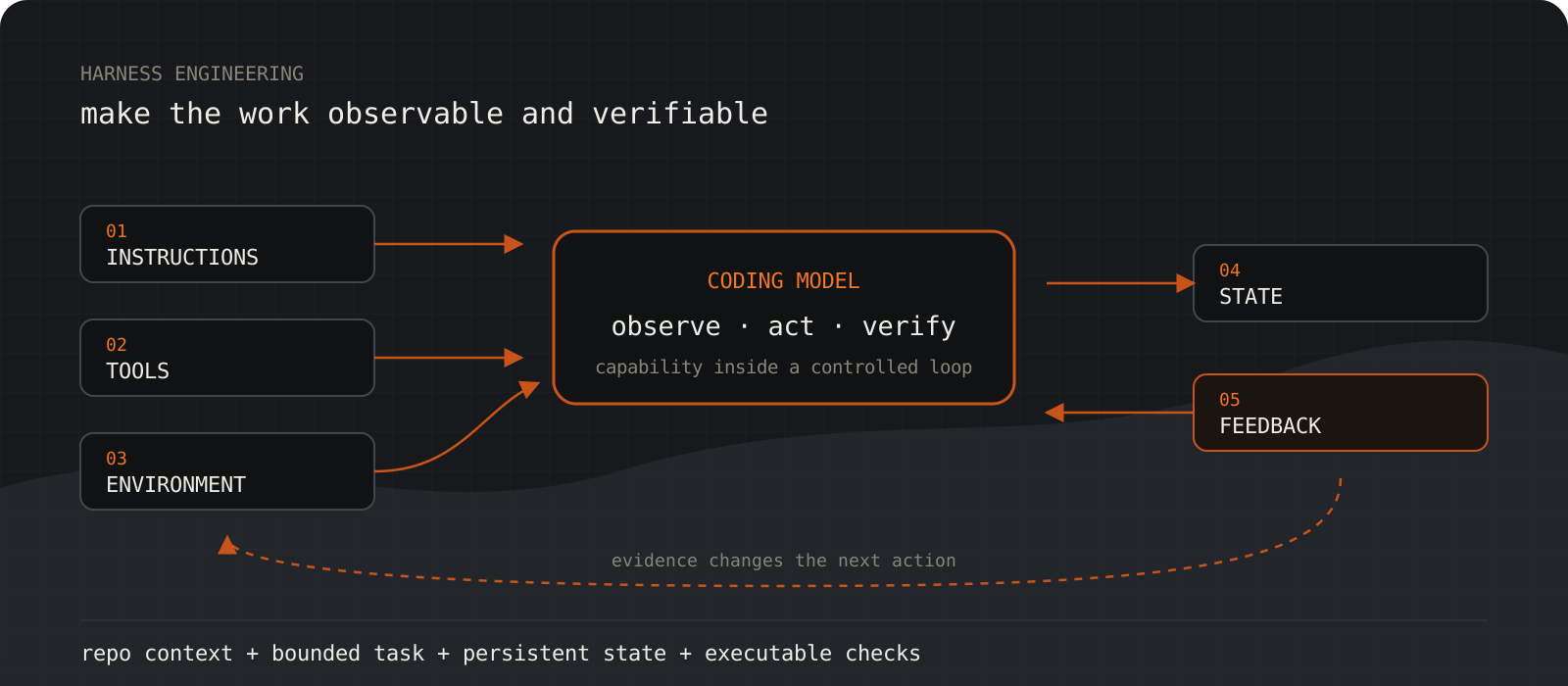
Harness engineering is the practice of designing everything around an AI coding model so it can do reliable work. That includes instructions, tools, a reproducible environment, persistent state, and feedback from real verification. The model is only one part of the system. A useful first harness can be a short AGENTS.md, a small docs folder, explicit acceptance criteria, and commands that prove the task works. You do not need a new framework or special hardware to begin.
System requirements
Repository
A version-controlled project
Git gives the agent a readable change history, a clean diff, and a safe way to inspect what changed between sessions.
Coding agent
File and command access
Use Codex, Claude Code, Cursor, or another agent that can inspect the repository and run your project's verification commands.
Project toolchain
Your normal local setup
No special hardware is required for the harness itself. You still need the runtime, package manager, services, and credentials that your application needs.
Verification
At least one executable check
Start with the checks your project already has, such as tests, lint, type checking, a build, or a manual browser flow. A harness without feedback cannot distinguish a plausible edit from a working result.
Cost and connectivity
Determined by the agent and model
Markdown files and scripts add no license fee. Hosted models still need network access and may bill for tokens. A fully local model and local toolchain can run offline, but cloud APIs and hosted agents cannot.
Audit the five parts of your current harness
Find the weakest part before adding more instructions.
The Learn Harness Engineering course groups a harness into five subsystems: instructions, tools, environment, state, and feedback. Instructions tell the agent how this repository works. Tools let it inspect and change the system. The environment makes those actions reproducible. State carries decisions across sessions. Feedback tells the agent whether the result is correct.
Score each subsystem from one to five. Then inspect recent failures. If an agent used the wrong package manager, the instruction or environment layer failed. If it claimed success while the payment button did nothing, the feedback layer failed. Fix the layer that caused the observed failure instead of changing models by default.
Instructions: __/5  Evidence:
Tools:        __/5  Evidence:
Environment:  __/5  Evidence:
State:        __/5  Evidence:
Feedback:     __/5  Evidence:

First failure to remove:
Harness layer responsible:
Smallest testable improvement:
Tip
Keep the model and task fixed when comparing a harness change. Otherwise you cannot tell which change helped.
Make the repository the system of record
Move the facts an agent needs into versioned files it can discover.
An agent cannot follow an architecture decision that exists only in a meeting, chat thread, or a senior engineer's memory. Put stable knowledge beside the code: product behavior, architecture, setup, security boundaries, deployment rules, and known failure modes.
Do not copy every document into one file. OpenAI reports that a short AGENTS.md works better as a map to deeper repository documentation. This progressive disclosure keeps the starting context small while making detailed guidance available when a task needs it.
New-Item -ItemType Directory -Force docs
New-Item -ItemType File -Force AGENTS.md, PROGRESS.mdmkdir -p docs
touch AGENTS.md PROGRESS.mdWrite AGENTS.md as a map, not a manual
Give the agent the rules and routes it needs at the start of every task.
A useful root instruction file explains the project's purpose, stack, important directories, standard commands, hard boundaries, and definition of done. Link to detailed documents instead of repeating them. Rules that protect data, security, billing, or architecture should be explicit and testable.
Keep advice local when it only applies to one part of a monorepo. A frontend package can have its own instruction file with browser-test guidance while the root file stays focused on repository-wide behavior.
# Project map

## Purpose
One paragraph describing the product and its users.

## Stack
List exact runtimes, frameworks, and package managers.

## Read before editing
- Architecture: docs/architecture.md
- Product behavior: docs/product.md
- Security rules: docs/security.md

## Commands
- Install: pnpm install --frozen-lockfile
- Lint: pnpm lint
- Test: pnpm test
- Build: pnpm build

## Boundaries
- Preserve the existing architecture and package manager.
- Do not edit generated files.
- Ask before changing authentication, billing, or schemas.

## Definition of done
- Acceptance criteria are demonstrated.
- Relevant checks pass.
- The diff contains no unrelated edits.
- PROGRESS.md records any remaining work.Turn each request into a bounded task
Specify what changes, what stays untouched, and what evidence counts.
Broad goals encourage an agent to start several related changes and finish none of them. Give it one vertical slice with an observable outcome. Include the allowed scope, non-goals, acceptance criteria, and commands or actions required to prove completion.
For work that spans sessions, store features as structured records. The scheduler, implementer, verifier, and next session should all read the same status and acceptance criteria. Change status only after the evidence exists.
{
  "id": "checkout-payment",
  "status": "pending",
  "outcome": "A signed-in user can complete a test payment",
  "scope": ["checkout UI", "payment adapter", "success state"],
  "nonGoals": ["refunds", "subscription billing"],
  "acceptance": [
    "Pay now opens the provider test flow",
    "A successful payment shows the order number",
    "A declined payment preserves the cart and shows an error"
  ],
  "evidence": []
}
Tip
If the feature cannot be demonstrated in one clear flow, split it again.
Replace confidence with executable verification
The agent is done only when independent evidence satisfies the acceptance criteria.
Static checks catch syntax, types, formatting, and many regressions. They do not prove that connected parts work together. Add the narrow checks first for fast feedback, then run the full pipeline that exercises the user-visible path.
A payment feature is a useful example. Rendering the checkout page proves very little. The verification must click Pay now, use the provider's test path, observe network and browser errors, and confirm both success and failure states. Record the exact command or manual procedure in the task so a later session can repeat it.
pnpm lint
pnpm test
pnpm exec tsc --noEmitpnpm build
pnpm exec playwright test tests/e2e/checkout.spec.tsTip
A failing check is useful feedback. Preserve its output, fix the cause, and rerun the same check before widening the scope.
Persist progress before the context disappears
Leave a clean handoff that a fresh session can trust.
Context compaction and chat history are not dependable project memory. Anthropic's long-running agent work uses repository artifacts and git history to bridge sessions. A small progress file should state what changed, why key decisions were made, which checks passed, what failed, and the next bounded action.
End each session in a state another engineer could resume. Remove debug artifacts, keep the build understandable, and distinguish verified work from incomplete work. Never mark a feature complete because files were created.
# Current objective
Complete the checkout payment test flow.

## Verified
- Checkout renders with a test cart.
- Lint and type checking pass.

## In progress
- Provider redirect opens, callback handling is incomplete.

## Decisions
- Keep provider code behind the existing payment adapter.

## Evidence
- pnpm lint: pass
- pnpm exec tsc --noEmit: pass
- checkout E2E: fail at callback assertion

## Next action
Implement the callback success state, then rerun the checkout E2E test.Expose runtime evidence to the agent
Make the application observable before increasing autonomy.
Agents correct themselves faster when they can inspect browser state, logs, network requests, traces, and test artifacts. Give them the smallest safe tool access that can observe the behavior under test. A screenshot alone is weaker than a browser trace plus console and network output because it shows the surface, not the cause.
Increase autonomy only after the loop has a bounded goal, a retry limit, a stop condition, and an escalation path. Start with one agent completing one task. Planner, reviewer, or graph-style workflows add coordination cost and should solve a measured bottleneck, not decorate an unreliable loop.
Goal: one acceptance criterion becomes verified
Observe: tests, browser, logs, and diff
Act: make the smallest relevant change
Verify: rerun the named checks
Stop: success, retry limit, unsafe action, or missing decision
Handoff: record evidence and the next action
What changes when the harness is working?
| Prompt-only workflow | Harnessed workflow |
|---|---|
| Project rules live in chat | Stable rules live in versioned repository files |
| The agent explores from scratch | A short map points to relevant context |
| Done means the code looks complete | Done means acceptance checks produced evidence |
| A new session reconstructs history | Progress and decisions survive in files and git |
| Retries repeat the same guess | Runtime feedback changes the next action |
The trade-offs worth knowing
- Maintenance: instruction files, fixtures, and verification scripts can become stale. Give them owners and update them when behavior changes.
- Cost: more test runs and longer agent loops consume compute and model tokens. Use fast checks early and reserve full-pipeline tests for meaningful checkpoints.
- Speed: strict gates may slow a small edit, but they reduce the cost of false completion and repeated discovery on larger work.
- Security: broader tools make agents more capable and increase risk. Use least privilege, isolated workspaces, test credentials, and explicit approval boundaries.
- Complexity: multi-agent planners and graphs can create more handoff problems than they solve. Add coordination only after one loop is measurable and dependable.
When should you skip harness engineering?
Skip the ceremony for a disposable experiment where you can inspect the entire result in minutes. Even then, keep the task bounded and run one relevant check. A larger harness earns its keep when work repeats, crosses sessions, touches production behavior, or needs evidence that another person can audit.
Our verdict
Start with a one-page AGENTS.md, a reproducible setup, a progress file, and one full-pipeline verification command. That small loop delivers most of the early value. Add feature schedulers, extra reviewers, and autonomous orchestration only when your failure log shows a specific need.
Treat harness engineering as product infrastructure for the agent. The best first investment is executable feedback, followed by concise repository context and clean handoffs. A smarter model may help, but it cannot recover rules it cannot see or prove a flow it never ran.
Frequently asked questions
What is harness engineering for AI coding agents?+
Harness engineering designs the instructions, tools, environment, state, and feedback around a coding model. Its purpose is to turn model capability into repeatable work that can be inspected and verified.
Is AGENTS.md the same as an agent harness?+
No. AGENTS.md is the entry point for the instruction subsystem. A complete harness also includes tool access, a reproducible environment, persistent task state, and verification feedback.
Does harness engineering work with Claude Code, Codex, and Cursor?+
Yes. The file names and integrations differ, but the core pattern is portable: repository-local guidance, bounded tasks, repeatable commands, persistent state, and evidence-based completion.
Can an AI coding agent harness work offline?+
The repository files and scripts work offline. The full workflow is offline only when the model, dependencies, and application services also run locally. Hosted models and cloud APIs still require a network connection.
How much does a coding agent harness cost?+
The basic files and scripts cost nothing beyond engineering time. Verification and autonomous loops can increase model-token and compute usage, so measure cost per verified task instead of cost per prompt.
What should I add first?+
Add the exact install, lint, test, type-check, and build commands to a short root instruction file. Then define one task with explicit acceptance criteria and require the agent to run the relevant checks before reporting completion.
Do I need multiple agents or a graph workflow?+
No. Begin with one bounded execution and verification loop. Add a separate reviewer or graph only when measured failures show that role separation or branching is worth the extra coordination.