Building a Production-Ready WhatsApp AI Agent (2026)
A practical architecture guide for building WhatsApp AI agents that support customers, qualify leads, and complete real business work.
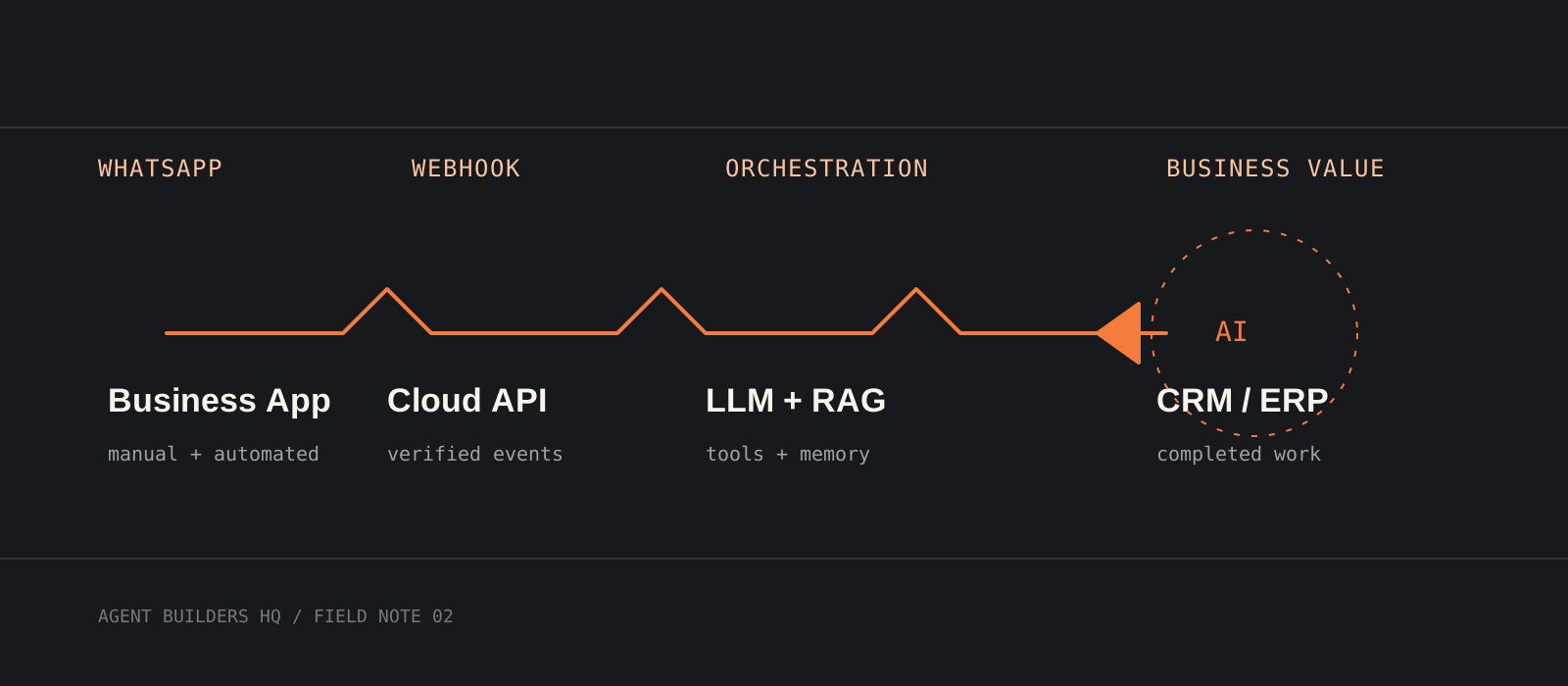
Yes, you can build a WhatsApp AI agent that does more than answer FAQs. The production pattern is a WhatsApp Business Platform connection feeding a verified webhook, an orchestration layer, an LLM, your knowledge base, and the business APIs that let the agent complete work.
System requirements
WhatsApp access
A Meta business account and WhatsApp Business Account
Use Meta Cloud API or a BSP. If the business already uses the WhatsApp Business App, confirm Coexistence eligibility for its onboarding path and region.
Webhook
A public HTTPS endpoint with a stable URL
Receive inbound messages and delivery events at a verified endpoint. Use a secure tunnel during local development.
Application stack
Node.js, FastAPI, n8n, LangGraph, or an equivalent backend
Your backend owns authentication, state, retries, tool execution, and business rules; the messaging API is transport.
Data systems
PostgreSQL plus Redis and a vector store when needed
Store customers, conversations, leads, and tickets durably. Add Qdrant, Pinecone, or pgvector for document retrieval.
Cost model
Budget for Meta, provider, model, and hosting costs
Pricing depends on message category and recipient market. BSP, LLM, database, hosting, and monitoring costs are separate.
Connectivity
Cloud-connected by design
Cloud API is not an offline channel. A local model can process tasks, but the end-to-end agent needs network access.
Map the system before choosing tools
Treat WhatsApp as the front door, not the agent itself.
An incoming message should move through WhatsApp Business, Meta Cloud API, your webhook, an orchestration workflow, an LLM, retrieval or business tools, and a WhatsApp response.
The LLM can interpret intent and choose an allowed action. Your backend validates permissions, calls CRM or ERP systems, and decides what may be written back.
Tip
Draw both the message path and failure path. Decide where duplicates, timeouts, and human escalations go before shipping.
Choose Cloud API, Coexistence, or a BSP
Pick the onboarding path that matches the business, not only the API price.
Direct Meta Cloud API fits SaaS and enterprise platforms that need full control over onboarding, data, monitoring, and operations.
WhatsApp Coexistence is the recommended default for many client projects: an eligible business can keep using the Business App on the same number while adding Cloud API automation, manual conversations, and team workflows. Confirm eligibility before promising it.
A BSP can shorten onboarding and add inbox, analytics, templates, or support. Compare its API surface, webhook behavior, pricing, data access, and exit path.
Register a webhook and send a staging message
Make message delivery observable before adding intelligence.
Expose a GET verification route and a POST event route. Verify the challenge token, validate the request signature, acknowledge quickly, and put longer work on a queue.
Keep the Graph API version in configuration. The examples use vXX.X as a placeholder; copy the currently supported version from Meta's documentation when testing.
Invoke-RestMethod -Method Get -Uri "http://localhost:3000/health"curl --fail http://localhost:3000/healthInvoke-RestMethod -Method Post -Uri "https://graph.facebook.com/vXX.X/$env:WA_PHONE_NUMBER_ID/messages" -Headers @{ Authorization = "Bearer $env:WA_ACCESS_TOKEN" } -ContentType "application/json" -Body '{"messaging_product":"whatsapp","to":"RECIPIENT_NUMBER","type":"text","text":{"body":"Staging message"}}'curl -X POST "https://graph.facebook.com/vXX.X/$WA_PHONE_NUMBER_ID/messages" -H "Authorization: Bearer $WA_ACCESS_TOKEN" -H "Content-Type: application/json" -d '{"messaging_product":"whatsapp","to":"RECIPIENT_NUMBER","type":"text","text":{"body":"Staging message"}}'Tip
Use a test number, recipient allowlist, and staging WABA. Never test an unreviewed workflow on a real customer list.
Build the orchestration layer
Use a stateful workflow instead of one giant prompt.
Classify the message, load customer context, retrieve knowledge, decide whether a tool is needed, execute it through a server-side permission check, and write a response or escalation event.
n8n is practical for integration-heavy workflows and quick delivery. LangGraph or a custom Node.js or FastAPI service fits typed state, branching, durable execution, and custom retry behavior.
Keep prompts concise and business logic in code. The model can select create_lead, book_appointment, track_order, or raise_ticket; it should not invent credentials or implementation details.
Ground answers with RAG
Retrieve only the documents that matter instead of stuffing the entire knowledge base into the prompt.
Index product documentation, FAQs, SOPs, policies, PDFs, and catalogs. At response time, retrieve relevant chunks and tell the model to say when evidence is insufficient.
Carry document identity and freshness metadata so you can audit answers and remove an outdated policy without rewriting every prompt.
Tip
Start with a curated document set and a test question bank. Inspect retrieval results before tuning the prompt.
Add memory, tools, and human handoff
Give the agent context and a safe way to finish work.
Store structured memory outside the model: customer profile, conversation history, lead stage, preferences, purchases, and active tickets. Use summaries or compact state rather than replaying every message forever.
Add function calls for leads, appointments, invoices, order tracking, inventory, refunds, and CRM updates. Validate every argument and authorize every action on the server.
When confidence is low, a customer asks for a person, or an action is sensitive, pause automation, notify a human, preserve context, and resume only when safe.
Test for failure, then deploy gradually
Reliability is part of the product experience.
Test duplicate and out-of-order events, expired tokens, API timeouts, malformed media, rate limits, model refusal, missing CRM records, and a human taking over mid-conversation.
Release to a small cohort. Watch delivery success, first-response latency, tool error rate, escalation rate, resolution rate, token spend, and human corrections.
Tip
Make every side effect idempotent. A retry must not create two leads, bookings, or refunds because a webhook was delivered twice.
Create a Meta Business Portfolio
Start the integration in the customer's own Meta account.
Create a Business Portfolio in Meta Business Manager with the business name, email, website, and business details.
If you are building for a client, ask the client to create the portfolio and invite your team. Do not share account credentials.
Verify the business before production
Verification is not required for the first development test, but it is a sensible production milestone.
Prepare business registration documents, the business website, a business email, and domain verification if Meta requests it.
Verification can help unlock higher messaging limits and additional platform features. Requirements and review times vary, so start before the launch date.
Create a Meta app and add WhatsApp
The developer app gives you the test assets needed to send your first message.
Create an application in the Meta for Developers portal and add the WhatsApp product. Meta will provide an App ID, App Secret, temporary access token, and test phone number for development.
Use the test number and sandbox flow while you build. Keep test credentials separate from production secrets.
Configure the WhatsApp account
Connect a business number and record the identifiers your backend will use.
Add and verify the business phone number, then create a long-lived System User access token for production rather than relying on the temporary development token.
Record the Phone Number ID and WhatsApp Business Account ID (WABA ID). Your backend uses these identifiers when sending messages and managing subscriptions.
Tip
Store tokens in a secret manager or environment variables. Never commit them to the repository or paste them into workflow prompts.
Subscribe to webhook events
Connect Meta's events to the backend you designed earlier.
Expose the public HTTPS endpoint, complete Meta's verification challenge, and subscribe to inbound messages, message status updates, and template status updates as needed.
Validate webhook signatures before processing requests, acknowledge quickly, and use retries or a queue for work that may take longer than the request timeout.
Connect the AI backend
Put your automation workflow between the webhook and the model.
Route events from the webhook into your backend, then into n8n, LangGraph, or custom logic. The workflow loads memory, retrieves knowledge, calls approved business APIs, and sends a WhatsApp response.
Keep the model, knowledge base, and business systems replaceable. Your backend remains responsible for permissions, validation, and side effects.
WhatsApp
      │
      ▼
Meta Webhook
      │
      ▼
Backend API
      │
      ▼
Automation workflow
(n8n / LangGraph / custom logic)
      │
      ▼
LLM
(OpenAI / Claude / Gemini)
      │
 ┌────┴─────────┐
 │              │
Knowledge base  Business APIs
 │              │
 └────┬─────────┘
      ▼
WhatsApp responseComplete the production handoff
Move from a successful test message to an operable production system.
Switch from the test phone number to the approved production number. Use long-lived System User access tokens, configure webhook retries, and create and approve the message templates your workflows need.
Enable logging and monitoring, secure API keys and secrets, add rate limiting and retry mechanisms, and test human handoff before enabling customer traffic.
Architecture at a glance
Customer
     │
     ▼
WhatsApp Business
     │
     ▼
Meta Cloud API
     │
     ▼
Webhook
     │
     ▼
Automation layer
(n8n / LangGraph / custom backend)
     │
     ▼
LLM
(OpenAI / Claude / Gemini)
     │
 ┌───┴────────────┐
 │                │
Knowledge base   Business APIs
(RAG)            (CRM / ERP / payments)
 │                │
 └──────┬─────────┘
        ▼
WhatsApp response
The API gets messages from A to B. The orchestration layer, model, knowledge base, business APIs, and human workflow determine whether the agent creates business value.
Direct integration versus a BSP
| Direct integration | BSP |
|---|---|
| Full API control | Faster onboarding |
| More engineering effort | Managed infrastructure |
| Maximum flexibility | Additional platform features |
Direct integration gives control over the product and data model. A BSP can remove onboarding and operational work. Choose whether your team wants to own the messaging platform or buy part of that responsibility.
Popular provider options
Providers such as Chakra HQ, AiSensy, Wati, Interakt, and Gallabox can simplify onboarding and add inbox, analytics, or team features. Compare API capabilities, webhooks, CRM integrations, pricing, analytics, collaboration, support, export options, and the exit path.
A practical technology stack
| Layer | Good starting choices |
|---|---|
| Messaging | Meta Cloud API |
| Automation | n8n / LangGraph |
| Backend | Node.js / FastAPI |
| AI models | OpenAI / Claude / Gemini |
| Database | PostgreSQL |
| Cache | Redis |
| Vector database | Qdrant / Pinecone / pgvector |
| Hosting | Azure / AWS / GCP |
| Monitoring | Langfuse / OpenTelemetry |
Production checklist
- Verify webhook signatures and authenticate outbound API calls.
- Implement retries with backoff and make workflows idempotent.
- Store conversation state and log permitted AI interactions.
- Secure API keys, secrets, customer data, and operator access.
- Add rate limiting, latency monitoring, token tracking, and cost alerts.
- Handle failures gracefully and provide human escalation.
Common use cases
Connect the conversational entry point to existing systems: customer support, lead qualification, appointment booking, order tracking, CRM updates, payment reminders, FAQ automation, internal assistants, sales follow-ups, and marketing campaigns.
Points to consider
- Templates, message categories, opt-in, quality signals, and market-specific pricing affect what you can send and what it costs.
- Coexistence is attractive, but availability and onboarding requirements can change; confirm them for each customer.
- Keep critical decisions and business logic outside the prompt. Use deterministic checks for refunds, prices, and private data.
- Monitor cost, latency, and failures continuously. A strong model cannot repair a broken webhook or duplicate side effect.
Using WhatsApp Coexistence
When onboarding through a Business Solution Provider such as Chakra HQ, AiSensy, Wati, Interakt, or Gallabox, much of the Meta Business Manager setup is handled through an Embedded Signup flow. You still need a Meta Business Portfolio, but the BSP can automate much of the onboarding while letting an eligible business continue using the WhatsApp Business App alongside API-based automation.
- Developer tip: unless you are building a WhatsApp platform or SaaS product, Coexistence through a BSP is usually the fastest path to production-ready client agents.
Our verdict
For most client projects, start with WhatsApp Coexistence when eligible, a small orchestration service, PostgreSQL-backed state, curated RAG, and a narrow set of server-side tools. That adds automation without forcing the team to abandon the Business App on day one.
Choose direct Cloud API for a reusable SaaS or enterprise platform that must own onboarding and operations. Choose a BSP when speed, inbox features, and managed infrastructure are worth the recurring cost and dependency. The goal is an agent that completes work safely, not a chatbot that merely sounds helpful.
Build a digital employee with reliable workflows, not a chatbot with a WhatsApp number.
Frequently asked questions
Can I use the WhatsApp Business App and an AI agent on the same number?+
WhatsApp Coexistence is designed for that setup, but eligibility and onboarding depend on the current Meta flow and provider or Tech Provider. Confirm availability before committing a customer.
Can a WhatsApp AI agent work offline or run entirely on my laptop?+
No. WhatsApp messaging requires a network-connected Business Platform integration and reachable webhook. A local model can process some tasks, but the end-to-end agent remains online.
How much does a WhatsApp AI agent cost?+
Plan for Meta per-message charges, any BSP or inbox fee, model usage, hosting, databases, monitoring, and engineering. Pricing varies by message category and recipient market.
Should I use Meta Cloud API directly or a BSP?+
Use direct integration for control when you can own onboarding and operations. Use a BSP when managed infrastructure and faster setup are worth the cost. Compare data access, webhooks, pricing, support, and exit path.
What should the agent do when it is unsure?+
Avoid inventing an answer or action, explain what can be verified, and offer a human handoff with conversation context preserved.