GitHub Copilot Is Retiring Three AI Models on November 16, 2026: Migration Guide for Developers
GitHub Copilot retires Claude Opus 4.8, Claude Opus 5, and GPT-5.6 Terra on November 16, 2026. Here are the suggested replacements, who keeps access, and a six-step checklist to migrate before the deadline.
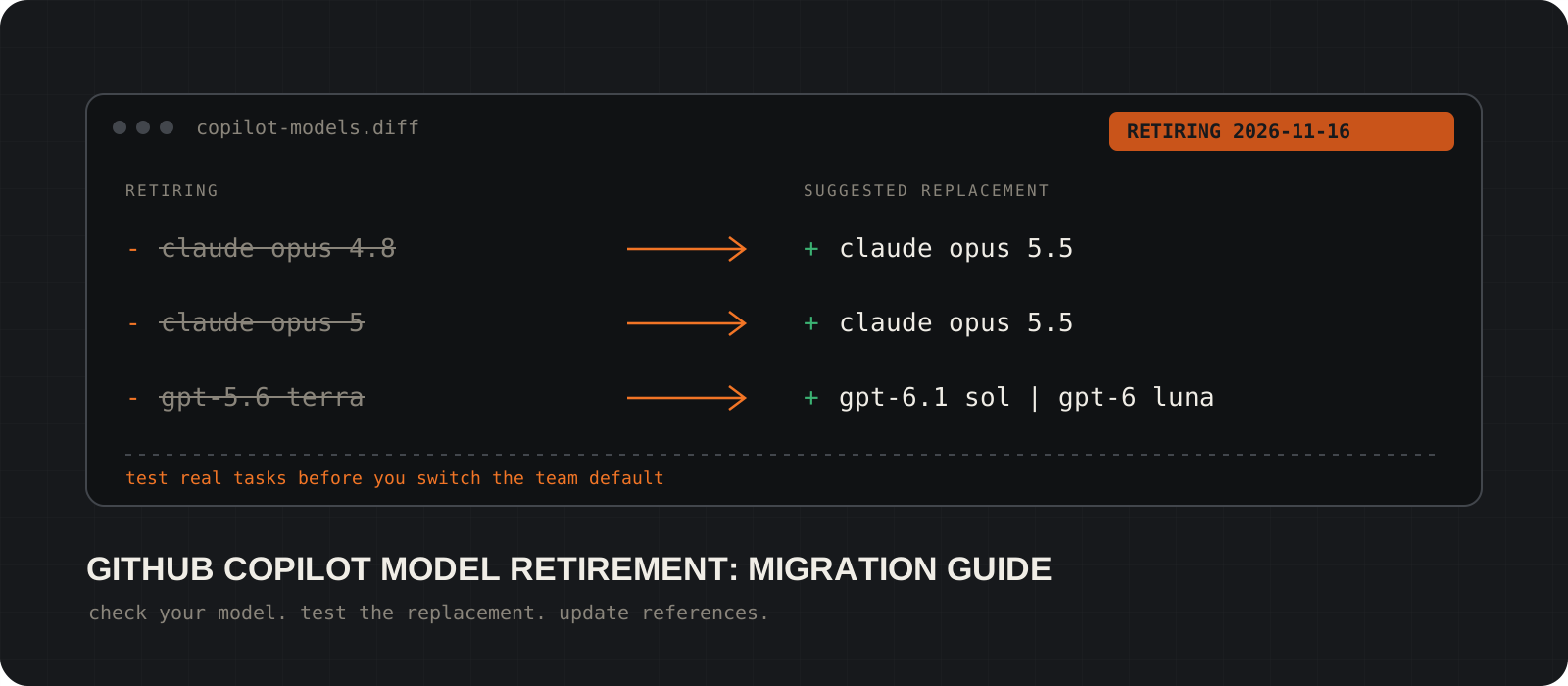
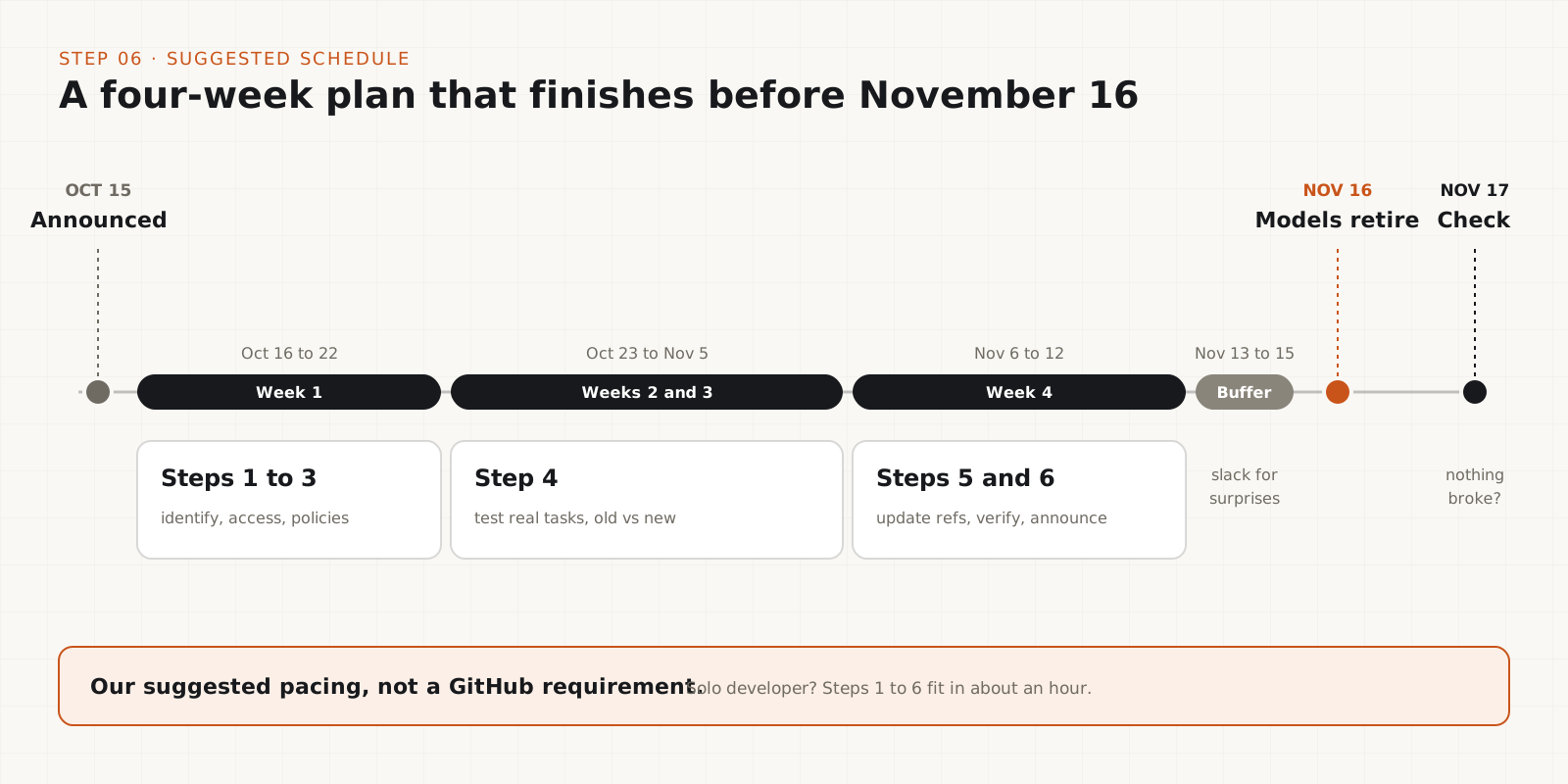
GitHub Copilot is retiring three AI models on November 16, 2026: Claude Opus 4.8, Claude Opus 5, and GPT-5.6 Terra. GitHub announced the change on October 15 and suggests Claude Opus 5.5 in place of both Claude models, and GPT-6.1 Sol or GPT-6 Luna in place of GPT-5.6 Terra. If you pick a model by hand for chat, agent mode, or refactoring, or your team's instructions and configs name one of these models, you have one month to test a replacement and update those references. If you only use Auto model selection, there is much less to do, though admins should still check their model policies.
System requirements
Retirement date
November 16, 2026
Applies across Copilot Chat, inline edits, ask and agent modes, and code completions. GitHub announced it on October 15, 2026.
Retiring models
Claude Opus 4.8, Claude Opus 5, GPT-5.6 Terra
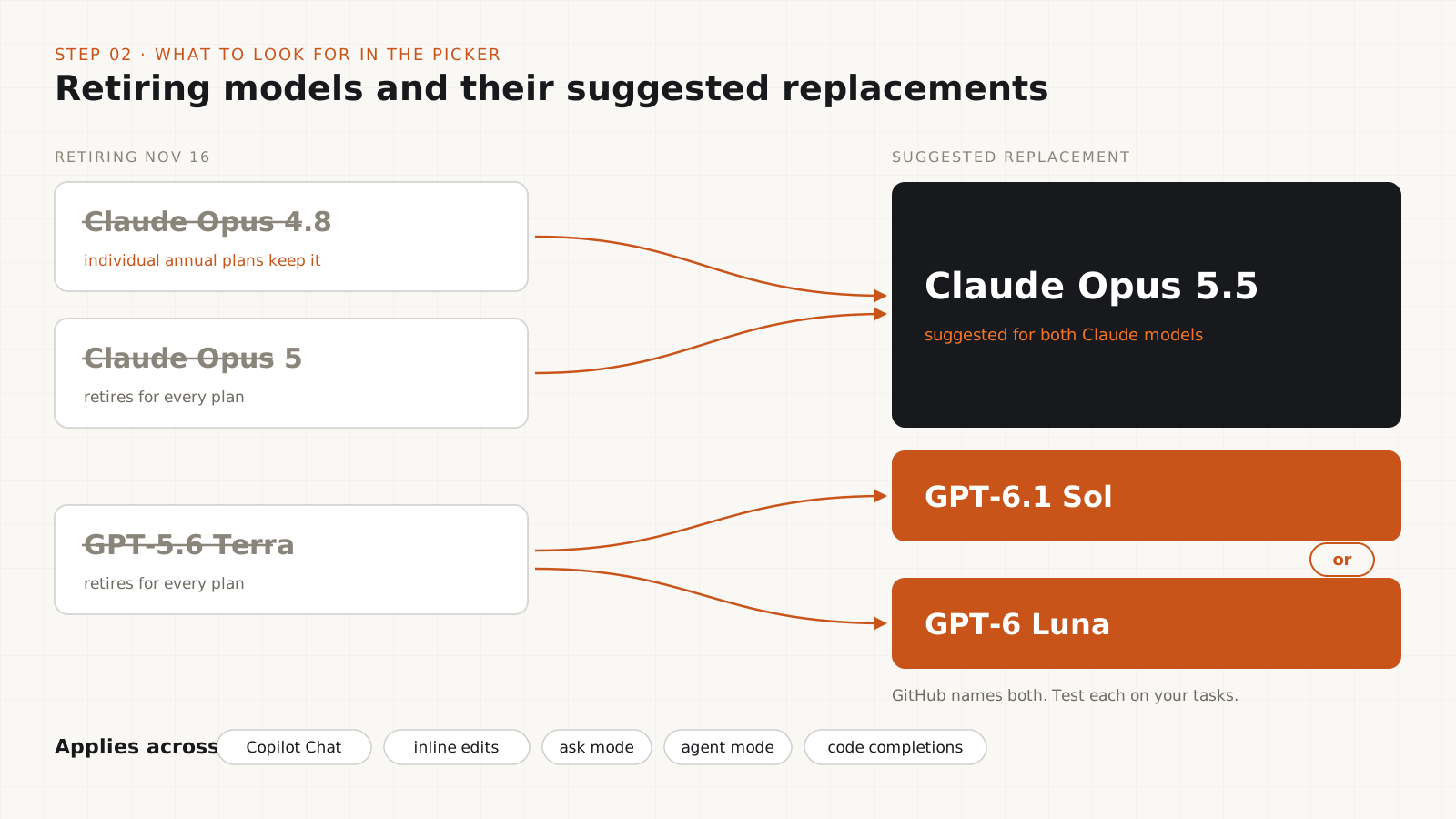
Suggested replacements: Claude Opus 5.5 for both Claude models. GPT-6.1 Sol or GPT-6 Luna for GPT-5.6 Terra.
The one exception
Individual annual plans keep Claude Opus 4.8
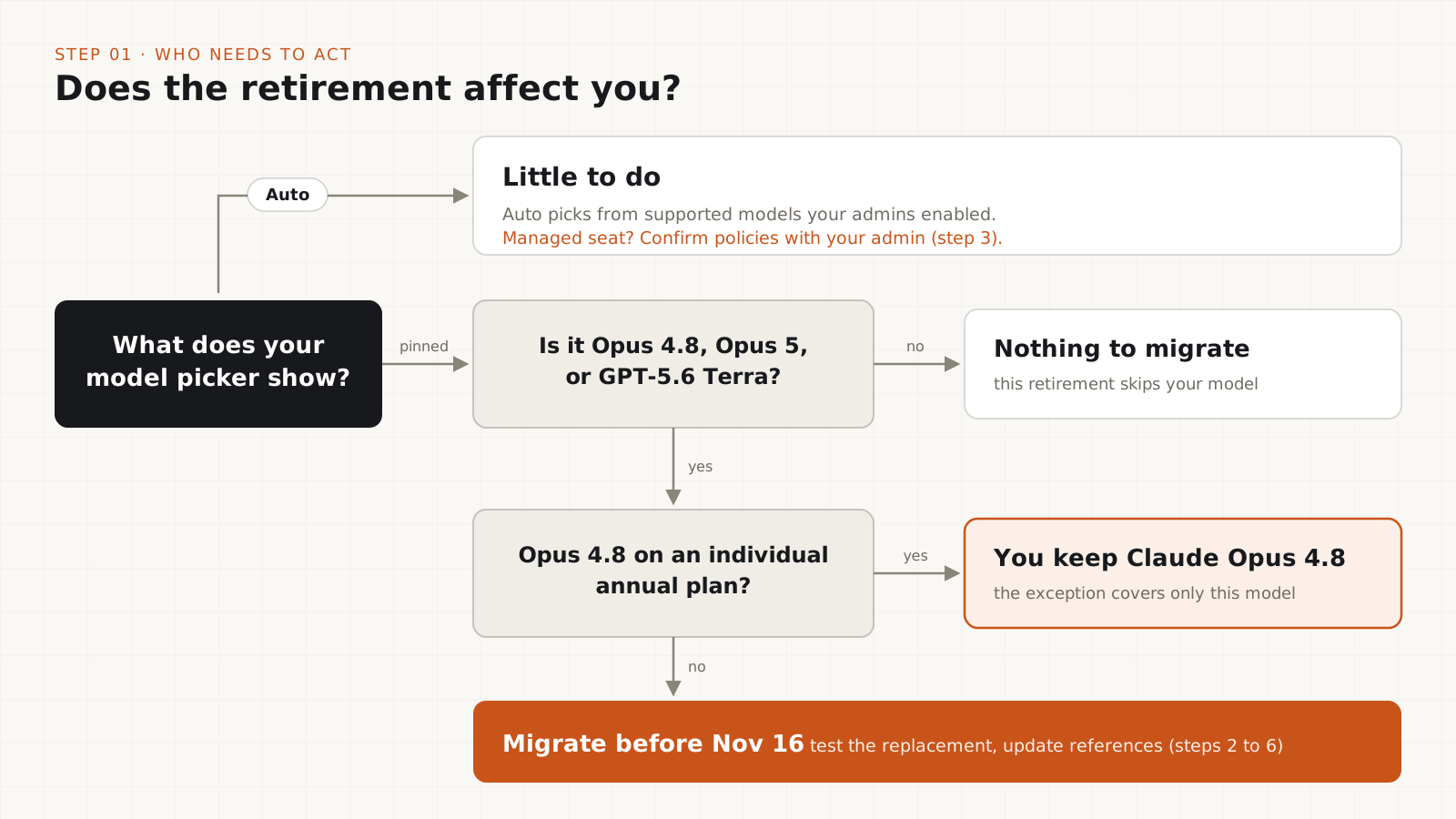
Only individual Copilot subscribers on annual plans keep Claude Opus 4.8. Every other customer group loses it on November 16, and the exception does not cover the other two models.
What to have ready
Your current model choices and 3 to 5 real tasks
Our recommendation, not a GitHub requirement. On a Business or Enterprise seat you will also need an administrator who can see Copilot model policies.
Which model are you using today?
Write down the model you select for chat, edits, and agent work, and what you use each one for.
Open the model picker in each Copilot client you use and note the model selected for chat, inline edits, and agent mode. Check your IDE, github.com, and Copilot CLI separately if you use more than one.
Next to each model, list the jobs you give it: debugging, multi-file refactoring, writing tests, or explaining unfamiliar code. That list becomes your test set in step 4.
If the picker shows Auto, Copilot already chooses a supported model for you. Most of this guide is optional for you, but step 3 still matters on a managed account.
Tip
GitHub notes that not every model is available in every IDE, on GitHub, in Copilot CLI, or in the Copilot app. The picker in one client can differ from another.
Is the replacement available on your plan and client?
Confirm you can select Claude Opus 5.5, GPT-6.1 Sol, or GPT-6 Luna where you work, while the old model still runs.
Model availability depends on three things: your Copilot plan, the client you use, and your organization's policies. A model listed in GitHub's documentation is not a promise that it appears in your picker.
Look for the suggested replacement now. If it is missing, you still have weeks to sort out access instead of discovering the gap on November 16.
On a Business or Enterprise seat, a missing model is usually a policy setting. Send your Copilot administrator the model name and the client you use.
Have your admins checked the model policies?
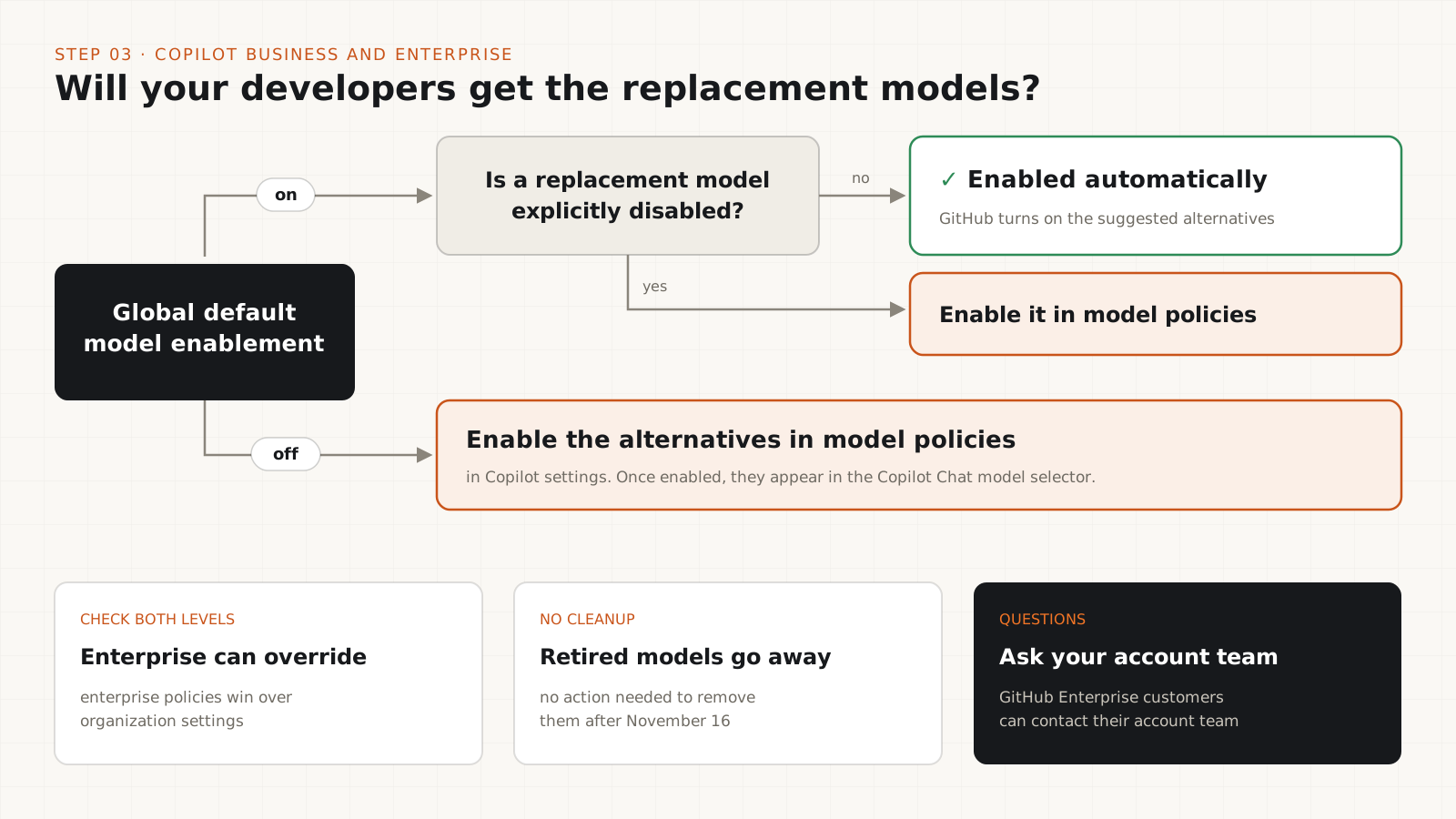
Business and Enterprise accounts get the replacements automatically, unless someone turned default enablement off.
GitHub says Copilot Business and Copilot Enterprise customers receive the suggested alternatives automatically under default model enablement. That holds unless an administrator turned off the global default or explicitly disabled one of those models.
If the global default is off, enable the alternatives through the model policies in Copilot settings. Once enabled, they appear in the Copilot Chat model selector.
Check both levels. Enterprise policies can override what an organization admin sets.
You do not need to remove the retiring models. GitHub says no action is needed for that after the deprecation date.
Tip
GitHub Enterprise customers with questions about the retirement can contact their GitHub account team, as the announcement suggests.
Does the replacement handle your real tasks?
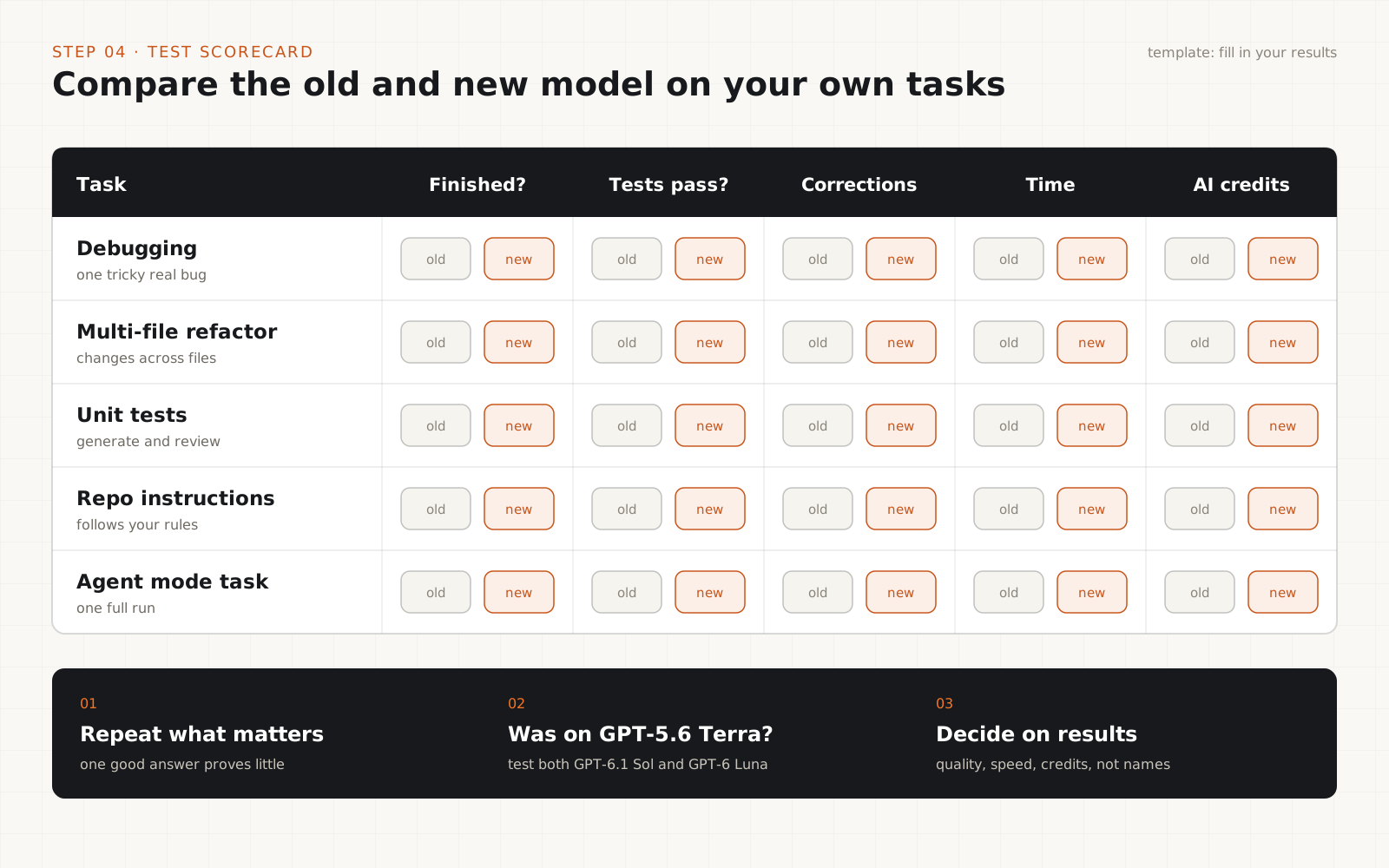
Run the same 3 to 5 tasks on the old model and the new one. Compare results, not model names.
Pick tasks from your step 1 list. A good set: one tricky debugging session, one refactor across several files, generating and reviewing unit tests, a task that depends on your repository's custom instructions, and one agent mode task if your team uses agent mode.
Run each task on the outgoing model while it still works, then on the replacement. Note whether the task finished, whether the tests passed, how much you had to correct, how long it took, and roughly how many AI credits it used.
On GPT-5.6 Terra, test both GPT-6.1 Sol and GPT-6 Luna if your plan and policies allow it. The newer-sounding name is not automatically the better fit for your work.
One good answer proves little. If a team-wide decision depends on a task, run it more than once.
Tip
Keep the test notes. They justify your team's new default today, and they make the next model retirement much faster.
Where are the old model names written down?
Search repository instructions, agent configs, prompts, scripts, and docs for the three retiring names.
Model names tend to hide in .github/copilot-instructions.md, custom agent and prompt files, editor or CLI settings, CI scripts, onboarding guides, and internal wikis.
Run one of the commands below from the root of a repository. They search for common spellings of Claude Opus 4.8, Claude Opus 5, and GPT-5.6 Terra, ignore Claude Opus 5.5 and the GPT-6 models, and skip .git and node_modules.
Review every match by hand. Update anything that selects or recommends a model. Leave changelogs, older posts, and dated examples as they are, or label them as historical.
grep -rniE --exclude-dir={.git,node_modules} \
"opus[ ._-]?4[._-]8|opus[ ._-]?5([^._0-9-]|[._-][^0-9]|[._-]?$)|gpt[ ._-]?5[._-]6" .Get-ChildItem -Recurse -File |
Where-Object { $_.FullName -notmatch '\\(\.git|node_modules)\\' } |
Select-String -Pattern 'opus[ ._-]?4[._-]8|opus[ ._-]?5([^._0-9-]|[._-][^0-9]|[._-]?$)|gpt[ ._-]?5[._-]6'Tip
If your team uses an internal alias or a different spelling for a model, add it to the pattern before you run it.
Is everything verified before November 16?
Confirm access, pass your acceptance checks, then tell the team which model replaces which.
Confirm the replacement can be selected by everyone who needs it, in every client they use.
Re-run your critical workflows on the replacement and check them against your acceptance tests.
Write down the approved replacement for each retiring model. A short message in your team channel with the test results is enough for most teams.
Set a reminder for November 17 to confirm nothing broke after the retirement.
Which GitHub Copilot models are being retired?
| Retiring model | Suggested replacement |
|---|---|
| Claude Opus 4.8 | Claude Opus 5.5 |
| Claude Opus 5 | Claude Opus 5.5 |
| GPT-5.6 Terra | GPT-6.1 Sol or GPT-6 Luna |
All three leave every Copilot experience on November 16, 2026: Copilot Chat, inline edits, ask and agent modes, and code completions. Individual subscribers on annual plans keep Claude Opus 4.8. No other group keeps any of the three.
Treat the suggested replacements as a starting point. Models differ in output quality, speed, tool use, and AI-credit cost, so the replacement can handle the same task differently.
What happens to pinned models and integrations?
GitHub has not said. The announcement asks you to update workflows and integrations to supported models before the deprecation date, but it does not describe how each client, pinned selection, or integration behaves once a retired model is gone.
So do not assume a pinned model quietly falls back to a replacement, and do not assume it fails either. Treat every explicit model reference as a migration item, test it in the client you use, and check GitHub's docs or support if the behavior matters to you.
Should you switch to Auto model selection?
Auto routes each request to an appropriate supported model based on task complexity and real-time availability, so a retirement like this one mostly passes you by. It still picks only from models your administrators have enabled, and it will not run your acceptance tests for you.
We would use Auto for everyday chat and completions, and keep an explicit, tested model for workflows where consistency matters, such as long agent mode runs and team automation.
Will the replacement models cost more?
Possibly. The announcement does not compare costs. Copilot bills usage in AI credits with model-specific token pricing, so the cost of a task depends on the model, input and output tokens, cached tokens, and how many model calls the task makes. Agent mode tasks often make several.
- Check current model pricing before you choose a team default.
- Record approximate credits next to quality and time in your step 4 tests.
- Check your plan's included usage and how additional usage is billed.
- Do not assume two models use the same credits for the same task.
Checklist for Copilot Business and Enterprise admins
- Default enablement: confirm the suggested alternatives are on, or enable them in model policies.
- Policy levels: check whether enterprise policies override organization settings.
- Clients: confirm the IDEs and other Copilot clients your developers use support the replacement.
- References: ask teams to search instructions, agent configs, prompts, and automation for the retiring names.
- Requirements: confirm the new model meets your internal quality, security, and cost bar.
- Communication: announce the approved replacements before November 16, not after.
Related: check what your coding agent can reach
Changing the model behind agent mode is a good moment to review what that agent is allowed to touch. Our guide to GitHub Copilot's local sandbox, linked in the sources below, shows how to test its filesystem, network, and credential limits yourself.
This migration is small if you start this week and annoying if you start on November 15. If you only use Auto, confirm your org policies and move on. If you pin models, block out an hour: list what you pin, run three to five real tasks on the replacement, and search your repositories for the old names. On GPT-5.6 Terra, test both Sol and Luna before you standardize. Write the decision down so the next retirement takes ten minutes.
Frequently asked questions
When is GitHub Copilot retiring Claude Opus 4.8, Claude Opus 5, and GPT-5.6 Terra?+
November 16, 2026, across Copilot Chat, inline edits, ask and agent modes, and code completions. GitHub announced the retirement on October 15, 2026.
What should I use instead of Claude Opus 5 or Claude Opus 4.8?+
GitHub suggests Claude Opus 5.5 for both. Test it on your own tasks before making it a team default.
What replaces GPT-5.6 Terra in Copilot?+
GitHub suggests GPT-6.1 Sol or GPT-6 Luna. It names both, so run your real tasks on each one your plan allows and compare correctness, speed, and AI-credit cost.
Can I keep using Claude Opus 4.8 after November 16?+
Only if you are an individual Copilot subscriber on an annual plan. Everyone else loses access on November 16.
Will my pinned model switch to the replacement automatically?+
GitHub's announcement does not say. Do not rely on an automatic switch. Update explicit model references before the deadline and test them in the client you use.
I use Auto. Do I need to do anything?+
Very little. Auto picks from supported models your admins have enabled. On a managed account, confirm with your admin that the replacements are enabled.
Do admins need to remove the retired models?+
No. GitHub says no action is needed to remove them after the deprecation date. Admins only need to make sure the alternatives are enabled.